@badliveware/pi-rich-output
Terminal-friendly structured timeline cards for Pi.
Package details
Install @badliveware/pi-rich-output from npm and Pi will load the resources declared by the package manifest.
$ pi install npm:@badliveware/pi-rich-output- Package
@badliveware/pi-rich-output- Version
0.1.1- Published
- May 2, 2026
- Downloads
- not available
- Author
- doz3r
- License
- MIT
- Types
- extension
- Size
- 189.2 KB
- Dependencies
- 0 dependencies · 2 peers
Pi manifest JSON
{
  "extensions": [
    "./index.ts"
  ]
}
Security note
Pi packages can execute code and influence agent behavior. Review the source before installing third-party packages.
README
Pi Rich Output
Rich Output adds terminal-friendly structured cards to the Pi timeline. It can show validation summaries, review findings, diagrams, charts, artifact links, progress, and small visual status blocks without turning the conversation into a wall of text.
This extension is working, but it is still WIP. I am publishing it while I evaluate whether rich timeline output is useful enough to keep and expand.
Why use it
Use Rich Output when a result is easier to understand as a compact card than as prose:
| Content | What readers get |
|---|---|
| Validation summaries | Commands, results, durations, and skipped checks in one compact entry |
| Review findings | Severity, location, evidence, impact, and suggested fixes |
| Benchmark notes | Tables, sparklines, and charts for comparisons or trends |
| Diagrams | Small flow diagrams or rendered Mermaid architecture/sequence diagrams |
| Artifact links | Visible file paths with terminal hyperlinks when supported |
| Status snapshots | Badges, progress bars, key/value rows, and callouts |
For simple answers, normal text is still better.
Install
From npm:
pi install @badliveware/pi-rich-output
From this repository workspace:
pi install ./agent/extensions/public/rich-output
Try it
Run the demo command in Pi:
/rich-output-demo
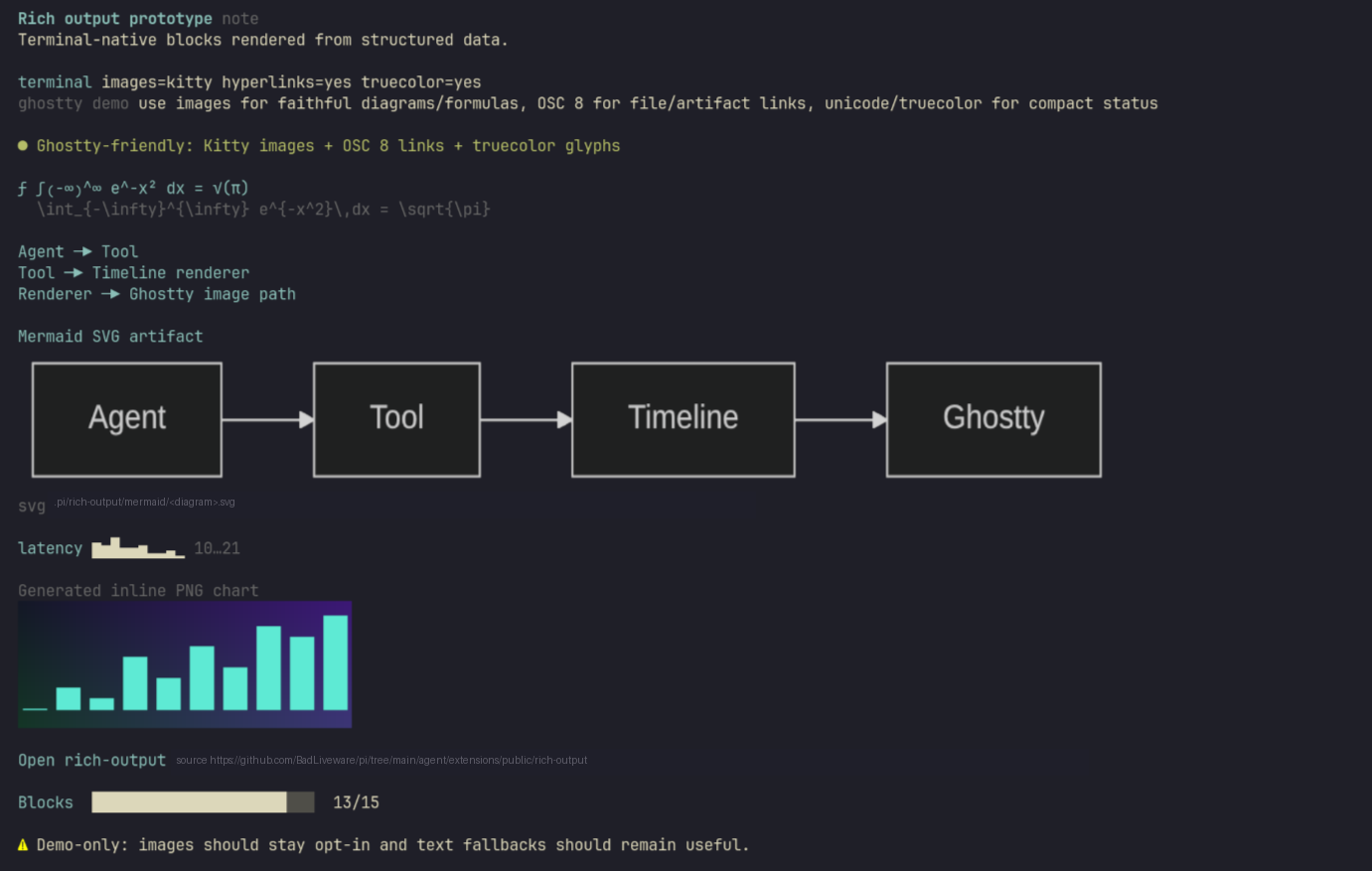
The demo shows the main rendering surfaces in one timeline entry: terminal capabilities, badges, a formula, a simple flow diagram, a Mermaid diagram, a sparkline, an inline image preview, an artifact link, progress, and a callout.
Tool and command
/rich-output-demo
Shows a sample rich timeline entry so you can see how the extension renders in your terminal.
rich_output_present
Structured Pi tool used to add a rich card to the timeline. It accepts a card kind, title, optional summary/markdown/payload, and optional blocks such as tables, links, diagrams, charts, images, badges, progress bars, and callouts.
Most users do not need to call the tool directly; the point is to give Pi agents a better display surface when structured output helps.
Terminal behavior
Rich Output is designed to degrade safely across terminals:
- Text first: visual blocks keep readable text fallbacks.
- Images when available: Kitty-compatible terminals can show inline PNG previews.
- Links when available: OSC 8 hyperlinks are used when supported; the file path or URL is still printed visibly.
- Safe failures: missing files, invalid image data, oversized artifacts, and failed renders show a short fallback message instead of breaking the timeline.
Optional render tools
Mermaid diagrams and Vega-Lite charts are rendered before they reach the timeline. If the optional renderer is installed, the card shows an inline preview when possible and prints artifact paths for external viewing.
| Feature | Optional tool | If missing |
|---|---|---|
| Mermaid diagrams | mmdc |
Shows source text or a short render error |
| Vega-Lite charts | vl-convert |
Shows source/spec fallback or a short render error |
Artifact directories:
- Mermaid:
.pi/rich-output/mermaid/ - Vega-Lite charts:
.pi/rich-output/charts/ - If the project directory cannot be written, temporary fallback directories under
/tmpare used.
Built-in limits
The renderer keeps entries bounded so large output does not freeze the UI.
| Limit | Value |
|---|---|
| Mermaid diagrams rendered per entry | 4 |
| Vega-Lite charts rendered per entry | 4 |
| Mermaid source before text fallback | 12,000 characters |
| Vega-Lite spec before text fallback | 80,000 characters |
| Artifact image read limit | 5 MB |
Development
From agent/extensions:
npm run typecheck
npm test