@baretread/pi-forge
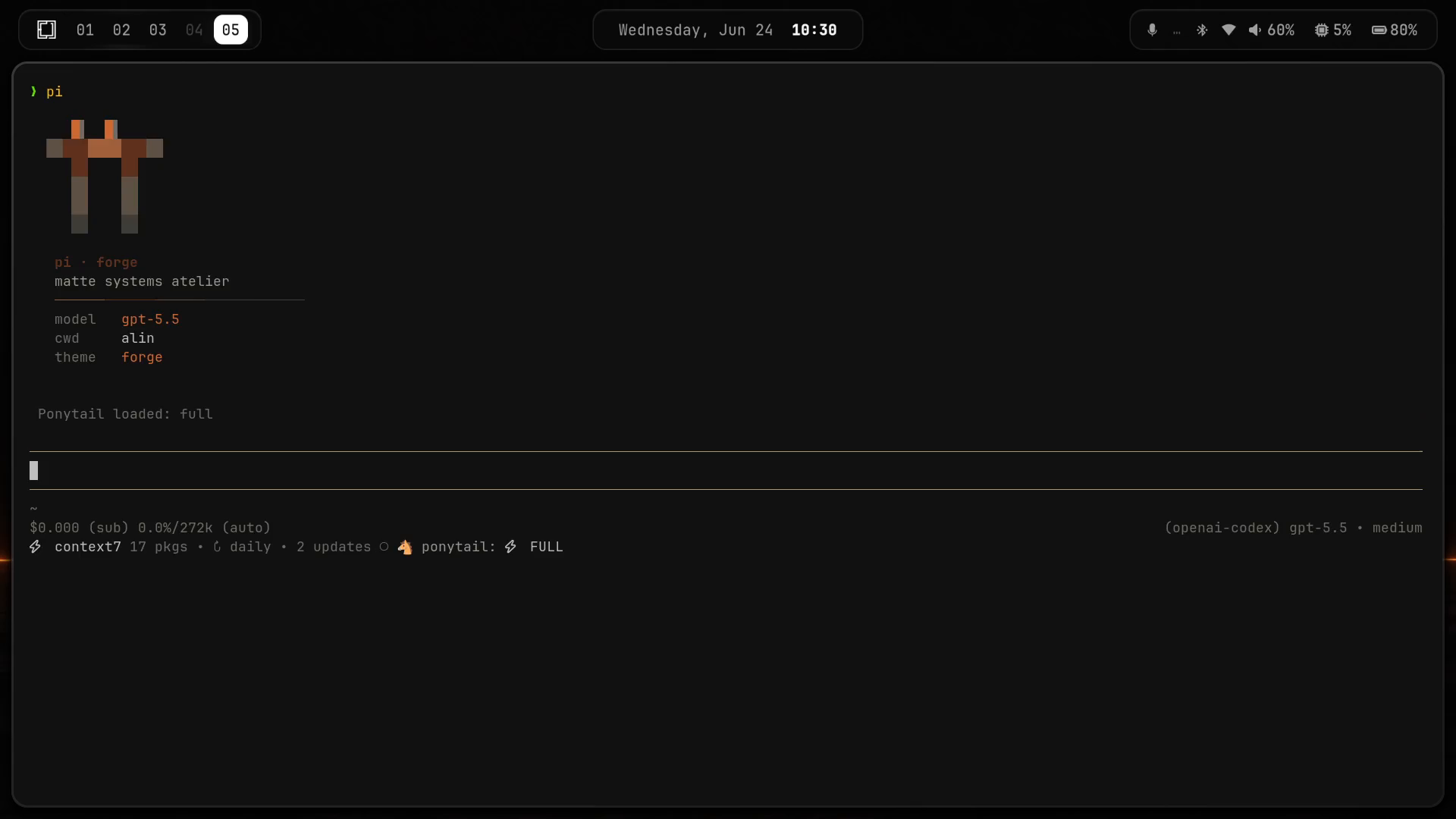
Matte graphite, molten copper Forge theme and visual atmosphere for Pi.
Package details
Install @baretread/pi-forge from npm and Pi will load the resources declared by the package manifest.
$ pi install npm:@baretread/pi-forge- Package
@baretread/pi-forge- Version
0.7.0- Published
- Aug 13, 2026
- Downloads
- 271/mo · 42/wk
- Author
- baretread
- License
- MIT
- Types
- extension, theme
- Size
- 1.2 MB
- Dependencies
- 0 dependencies · 2 peers
Pi manifest JSON
{
  "extensions": [
    "./extensions"
  ],
  "themes": [
    "./themes"
  ],
  "video": "https://unpkg.com/@baretread/pi-forge@0.7.0/assets/preview.mp4",
  "image": "https://unpkg.com/@baretread/pi-forge@0.7.0/assets/preview.png"
}
Security note
Pi packages can execute code and influence agent behavior. Review the source before installing third-party packages.
README
Pi Forge
Matte graphite, molten copper, and brushed-steel visual identity for Pi.
pi-forge is a visual package only. It adds the forge theme plus a Forge-gated atmosphere extension. It does not change prompts, tools, models, thinking level, autocomplete, or workflow.
What You Get
One temperature system — cold iron → graphite → copper → white-hot — drives every animated surface, with one rule: strike fast, cool slow.
forgetheme: graphite shell, copper heat, wheat text, cool steel contrast.- Ignition header: the π maker's-mark heats from cold graphite to a white-hot strike on session start, then settles into its resting gradient beneath the
heat · hammer · holdtagline (~1.2s, then the timer stops — zero idle cost). - Heat line: a stepped copper hairline under the wordmark, hot at the left and cooling to the right.
- Asymmetric working ember: 5 frames up to white-hot, 7 frames cooling through copper into steel, 2 cold rest beats (14 frames total).
- Forging vocabulary: the working message walks a real forging sequence one stage per turn —
kindling…→stoking the forge…→bringing to heat…→striking…→drawing out…→hammering…→shaping…→planishing…→honing…→burnishing…→quenching…. - Terminal title pulse: fixed
⚒anchor with an animating spark — strike → ember → cool — then a two-beat quench settle on agent end. - Collapsed thinking label:
tempering…. /forge-atmosphere [on|off]command (onre-runs the ignition).
Footer is untouched so packages such as pi-powerline-footer can keep owning it.
Install
From npm after publish:
pi install npm:@baretread/pi-forgeFrom GitHub:
pi install git:github.com/BareTread/pi-forgeFrom this package checkout:
pi install .From another checkout that contains this folder:
pi install ./path/to/pi-forgeTemporary test without installing:
pi -e .Enable
Select the theme in Pi:
/settings → Theme → forge
/reload
The atmosphere is dormant unless the resolved theme name is forge. That includes light/forge (auto dark) and --theme forge. /forge-atmosphere always exists; with a non-forge theme it reports on (dormant).
Commands
/forge-atmosphere        show current state
/forge-atmosphere on     apply Forge atmosphere
/forge-atmosphere off    restore default visual chrome
Safety Boundary
This package is visual-only:
- no prompt injection
- no custom tools
- no model changes
- no thinking-level changes
- no active-tool changes
- no footer replacement
- no package overrides
- no personal settings or paths
Package Notes
Pi packages load resources from package.json under the pi key. This package exposes:
{
  "pi": {
    "extensions": ["./extensions"],
    "themes": ["./themes"],
    "video": "https://unpkg.com/@baretread/pi-forge@0.7.0/assets/preview.mp4",
    "image": "https://unpkg.com/@baretread/pi-forge@0.7.0/assets/preview.png"
  }
}
The Pi package gallery discovers packages with the pi-package keyword. Video takes precedence over the static image fallback.
Troubleshooting
Washed-out or oversaturated colors over SSH. Pi's colors go through chalk 5, which quantizes to 256 colors when COLORTERM is unset — and SSH does not forward it. Fix on the remote shell:
export COLORTERM=truecolorUninstall
pi remove npm:@baretread/pi-forgeIf installed from GitHub/local path, remove that matching package source from Pi settings.