@bitcraft-apps/pi-web-tools
Shell-only web search and fetch tools for pi.dev. No API keys.
Package details
Install @bitcraft-apps/pi-web-tools from npm and Pi will load the resources declared by the package manifest.
$ pi install npm:@bitcraft-apps/pi-web-tools- Package
@bitcraft-apps/pi-web-tools- Version
1.6.0- Published
- Aug 4, 2026
- Downloads
- 828/mo · 702/wk
- Author
- sgraczyk
- License
- MIT
- Types
- extension
- Size
- 162.6 KB
- Dependencies
- 1 dependency · 3 peers
Pi manifest JSON
{
  "extensions": [
    "./index.ts"
  ],
  "video": "https://raw.githubusercontent.com/bitcraft-apps/pi-web-tools/main/.github/preview.mp4",
  "image": "https://raw.githubusercontent.com/bitcraft-apps/pi-web-tools/main/.github/preview.png"
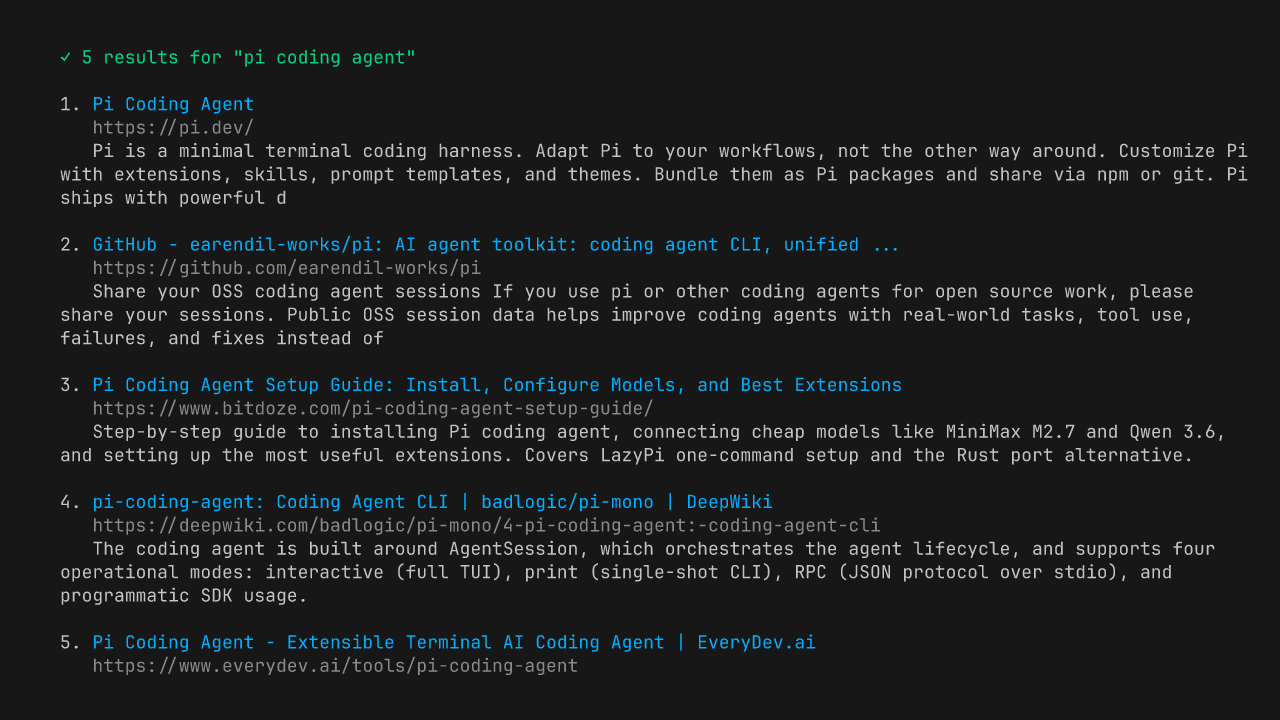
}
Security note
Pi packages can execute code and influence agent behavior. Review the source before installing third-party packages.
README
@bitcraft-apps/pi-web-tools
Shell-only web search and fetch tools for pi.dev. Zero API keys, zero accounts — just ddgr + pandoc/w3m running locally.
Tools
websearch
DuckDuckGo search via ddgr. Returns up to 25 results with title, URL, snippet.
webfetch
fetch + optional content-extraction pre-pass + HTML→markdown via pandoc (preferred) or w3m (fallback). Auto-handles Cloudflare challenges via UA hack. Blocks SSRF (localhost/RFC1918). Optional add-ons: a Reader-View extractor for chrome-heavy pages (docs/extraction.md) and pdftotext for PDFs (docs/pdf.md).
Install
# 1. System deps (one-time)
brew install ddgr pandoc        # macOS
# or: pip install ddgr; apt install pandoc w3m

# Optional add-ons (recommended):
#   pipx install trafilatura     # Reader-View extraction — see docs/extraction.md
#   brew install poppler         # PDF support — see docs/pdf.md

# 2. Extension (from npm)
pi install npm:@bitcraft-apps/pi-web-tools

# Or pin a specific version:
# pi install npm:@bitcraft-apps/pi-web-tools@<version>

# Or for local dev / hacking on the source:
pi install -e /path/to/pi-web-tools
After install, restart pi and the websearch and webfetch tools become available.
Usage examples
In a pi session:
> Find me docs for Bun's native Sqlite API
[agent uses websearch → gets bun.sh URL → uses webfetch → reads docs]
You don't call them directly — pi's agent calls them when it needs.
Limits and behavior
websearch: default 8 results, hard cap 25. DuckDuckGo rate-limits ~10 req/min/IP. If you hit it, wait or usewebfetchdirectly.region(optional): DuckDuckGo region code, e.g.pl-pl,us-en,de-de. Maps to ddgr's--reg. Default: ddgr's built-in (us-en).safesearch(optional):off|moderate|strict. Defaultmoderate.offpasses--unsafeto ddgr. ddgr does not distinguish moderate vs strict — both use its default safe-search behavior (see ddgr.1 manpage; only--unsafeis exposed).time(optional):d|w|m|y— restrict results to the past day/week/month/year. Maps to ddgr's--time. Default: no filter (all time). Use when the query is time-sensitive ("latest", "recent", "this week") — DuckDuckGo's default ranking otherwise surfaces years-old SEO content above recent results.
webfetch: default 50k chars output, hard cap 200k; 5 MB response cap; 30s timeout.webfetchsendsAccept: text/markdown,text/html;q=0.9,…first; sites that honor it (Cloudflare's "Markdown for Agents", GitHub docs, Anthropic docs, Stripe API docs, …) return pre-rendered markdown — typically 10–100× smaller.webfetchcannot fetch: images, video, audio, localhost, 127/8, 169.254/16; PDFs unless optionalpdftotextis installed (see docs/pdf.md).webfetchpagination: passoffset(default 0) to read past the 200k-char per-call cap; thread theYfrom the[TRUNCATED — returned chars [X, Y) of Z total. Re-call with offset=Y to read the next chunk.]footer back as the nextoffset. The range is half-open (Xinclusive,Yexclusive) so passingYresumes exactly where the previous chunk stopped, with no overlap or gap. Stop paginating once the section the agent needs is in hand.- On
429/503, honorsRetry-After(delta-seconds or HTTP-date) for one retry, capped at 10s. No backoff, no retry on other statuses. - Cross-host redirects are surfaced in-band via a
[REDIRECTED — input was https://INPUT_HOST, final URL is FINAL_URL]line prepended to the markdown; userinfo (user:pass@) is stripped. Same-host redirects produce no notice. - Honors the
charset=parameter onContent-Typefor response decoding (e.g.windows-1250,iso-8859-2,shift_jis,gb2312). Unknown labels fall back to UTF-8. - For HTML responses without a
Content-Typecharset, sniffs<meta charset="...">or<meta http-equiv="Content-Type" content="...; charset=...">declared in the first 1024 bytes (HTML comments are stripped first). - All operations are read-only and synchronous. The only state is one in-memory entry that holds the last document
webfetchfetched: a call withoffset> 0 for that same URL is served from it and makes no request, whileoffset0 always fetches. The entry is per process, holds one document, and is lost on exit. Nothing is written to disk. See ADR 0001.
What webfetch does not do
- No JavaScript execution. Pages that render client-side return empty markdown. Workarounds: try the same content via
old.reddit.com,*.jsonAPI endpoints, RSS/Atom feeds, or the site's documented REST API. - No per-host routing.
webfetchdoes not switch behavior based on hostname (noif hostname === "github.com"branches). If you want "useghfor GitHub URLs, fall back towebfetchotherwise," that belongs in a personal pi skill in~/.pi/agent/skills/, not in this package. SeeAGENTS.md“Bar for new tools” for the full rationale. - No headless browser. Out of scope per
AGENTS.md. Shell-only is the project's design constraint.
Troubleshooting
ddgr not installed→brew install ddgrorpip install ddgrNeed pandoc or w3m installed→brew install pandocDuckDuckGo timed out (likely rate-limited)→ wait 1–2 minSite requires JS, cannot fetch in shell-only mode→ site uses Cloudflare/JS-only; not solvable without headless browser, out of scope for this tool
Development
# one-time, if you don't have bun:
#   macOS:        brew install bun
#   Linux / WSL:  curl -fsSL https://bun.sh/install | bash
# (or see https://bun.sh for other options)
git clone https://github.com/bitcraft-apps/pi-web-tools
cd pi-web-tools
bun install
bun run typecheck           # type-check via tsgo (@typescript/native-preview); CI runs this before tests
bun run lint                # oxlint + type-aware oxlint-tsgolint; CI runs this before tests
bun run format              # apply oxfmt to src/, test/, index.ts, vitest.config.ts
bun run format:check        # CI runs this before lint; fails if anything is unformatted
bun run test                # unit tests, no network
bun run test:contract       # run the real external CLIs (pandoc, w3m, trafilatura, rdrview, pdftotext, ddgr);
                            #   skips any binary you do not have installed. PI_CONTRACT_STRICT=1 makes a
                            #   missing binary a failure, PI_CONTRACT_NETWORK=1 adds one live DuckDuckGo query
bun run probe:strict        # ask a real OpenAI/Codex provider which schema keywords it accepts and rewrite
                            #   test/strict-contract.json. Hand-run, not part of `bun run test`: needs
                            #   OPENAI_API_KEY and network. Run it when you change a tool schema.
                            #   STRICT_PROBE_ENDPOINT/_MODEL point it at a gateway (OpenRouter and
                            #   friends); it refuses to vouch for an endpoint that skips validation
bash scripts/metrics.sh     # passive health signals (npm + GitHub) and upstream pi drift; on-demand, no state
We use bun as the dev package manager. The committed lockfile is bun.lock; package-lock.json is gitignored.
End-user installs (
pi install npm:...) pull a published tarball from the npm registry. The tarball ships onlyindex.ts,src/,README.md,LICENSE, andCHANGELOG.md(no tests, nobun.lock, no CI configs) — seefilesinpackage.json.bun.lockis the dev lockfile only; transitive deps for end users are resolved bynpm installagainst the registry at install time. Peer deps are wildcard-pinned, no runtime deps drift in breaking ways.
Hot-reload during dev:
ln -s "$(pwd)" ~/.pi/agent/extensions/pi-web-tools
# in pi session: /reload
License
MIT