@caho1/pi-agent-swarm
Multi-model AI subagents for Codex and Pi with MCP, parallel execution, persistent sessions, and a local web panel
Package details
Install @caho1/pi-agent-swarm from npm and Pi will load the resources declared by the package manifest.
$ pi install npm:@caho1/pi-agent-swarm- Package
@caho1/pi-agent-swarm- Version
0.1.3- Published
- Oct 29, 2026
- Downloads
- 398/mo · 398/wk
- Author
- caho1
- License
- MIT
- Types
- extension, skill
- Size
- 528.9 KB
- Dependencies
- 6 dependencies · 1 peer
Pi manifest JSON
{
  "image": "https://raw.githubusercontent.com/Caho1/codex-pi-subagents/main/docs/panel-preview.jpg",
  "skills": [
    "./skills"
  ],
  "extensions": [
    "./extension.js"
  ]
}Security note
Pi packages can execute code and influence agent behavior. Review the source before installing third-party packages.
README
Pi Agent Swarm
Pi Agent Swarm adds multi-model AI subagents to Codex and Pi. Its local MCP server runs agents in parallel with Pi's configured models, stores their sessions, and provides a web panel. One npm package contains the Pi extension, Codex plugin, service, and panel.
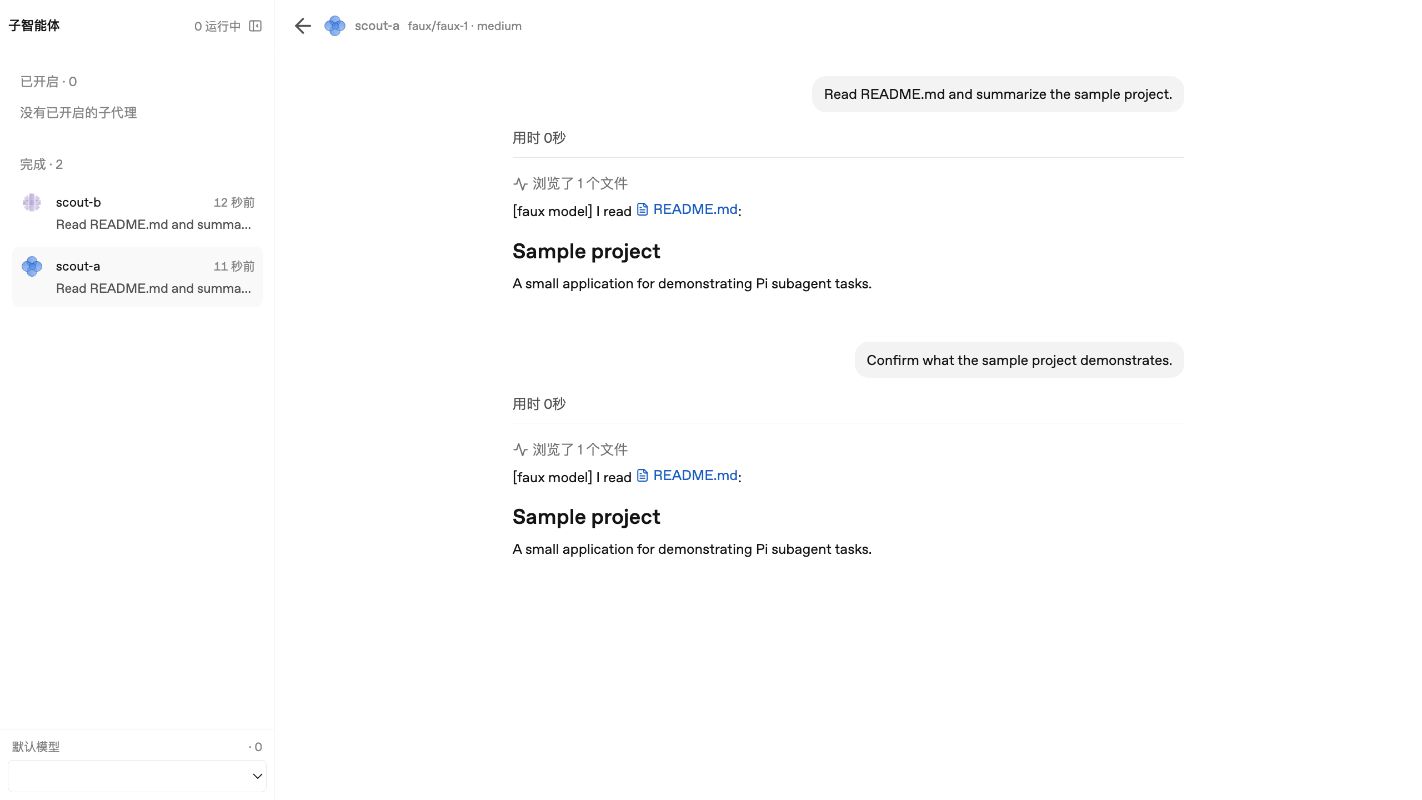
The screenshot uses the offline demo model and sample data.
Features
- Choose a model per agent. Use any model available through your Pi configuration, including configured custom providers. Set a working directory, thinking level, and tool preset for each agent.
- Delegate in Codex and Pi. Both clients use the same seven tools and the same local service. The package includes a Codex plugin and a Pi extension with a delegation skill.
- Run independent tasks concurrently. Start agents separately, then wait for all of them or for the first one to finish.
- Inspect work in the panel. View agent status, responses, and tool activity at http://127.0.0.1:7788. Stop a running agent or choose the default model for new agents. Use
pi_get_agentto inspect token usage and cost. - Continue an existing agent. Sessions and results are saved locally. A follow-up reopens the session with its previous context and reconnects its resources after the agent has finished.
- Use Pi tools. The
codingpreset uses Pi's configured extensions and MCP servers, subject to Pi's project trust settings. Theread-onlypreset providesread,grep,find, andlswithout loading extensions or MCP tools.
Requirements
- Node.js 22.19 or later.
- A Pi installation with at least one configured model and its credentials. See the Pi documentation.
- Codex, if you want to use the Codex plugin.
The package has been tested with Pi SDK 1.4 on macOS. Windows and the standalone Pi binary have not been verified. A global npm install can resolve a newer Pi SDK peer dependency.
Install
Pi
pi install npm:@caho1/pi-agent-swarmStart or reload Pi, then ask it to delegate a task. On the first tool call, the extension starts the local service if a compatible service is not already running. The service continues running after the Pi session ends. Installing the Pi extension does not install the Codex plugin.
Codex
Install the package and start the service:
npm install -g @caho1/pi-agent-swarm
pi-subagents-server
In another terminal, install the Codex plugin from the same package:
codex plugin marketplace add "$(npm root -g)/@caho1/pi-agent-swarm/codex-plugin"
codex plugin add pi-subagents@pi-subagents-local
Keep the service running while using the plugin. Restart Codex after changing its plugin configuration. The plugin connects to http://127.0.0.1:7788/mcp and includes a skill that guides delegation.
Codex may ask for approval when using the plugin's MCP tools. To approve these calls by default, add the following to ~/.codex/config.toml:
[plugins."pi-subagents@pi-subagents-local".mcp_servers.pi-subagents]
default_tools_approval_mode = "approve"
This changes approval behavior for this plugin's MCP tools. Leave it out if you prefer individual approvals.
Upgrade from @caho1/pi-agents
The Codex plugin name, MCP endpoint, and agent data directory (~/.codex-pi-subagents) stay the same. Stop the old service before upgrading and start pi-subagents-server again afterward.
If you installed the old package in Pi, replace its package entry:
pi remove npm:@caho1/pi-agents
pi install npm:@caho1/pi-agent-swarm
If you installed the Codex plugin from the old global npm package, replace the marketplace source and package:
codex plugin marketplace remove pi-subagents-local
npm uninstall -g @caho1/pi-agents
npm install -g @caho1/pi-agent-swarm
codex plugin marketplace add "$(npm root -g)/@caho1/pi-agent-swarm/codex-plugin"
codex plugin add pi-subagents@pi-subagents-local
Restart Codex after changing its plugin configuration. The old and new npm packages provide the same executable, so remove the old global package before installing the new one.
Configure models
Pi Agent Swarm uses Pi's provider and credential configuration. For example, Pi's DeepSeek provider reads DEEPSEEK_API_KEY from the service's environment:
export DEEPSEEK_API_KEY="your-api-key"
pi-subagents-server
Set the variable before starting the service or Pi. For other providers and custom endpoints, see Pi's provider and model configuration documentation. Use pi_list_models to see the model IDs available to the service.
Try a task
In Codex or Pi, ask for a review using separate agents:
Review this repository with two Pi subagents in parallel. Ask one to look
for correctness issues and the other to inspect test coverage. Give each a
self-contained task and use read-only tools. Wait for both and summarize
their findings.
You can also name an available provider/model in your request. For example, use magpie/auto/GLM-5.3-Flash if that model is configured and available in your Pi installation. Ask the parent agent to check pi_list_models when you are unsure of the model ID.
Open the panel URL returned by a tool call to follow progress. The panel shows all local agents; Codex and Pi tool calls are scoped to their respective conversation or session IDs.
Tools
| Tool | Purpose |
|---|---|
pi_list_models |
List models available through Pi. |
pi_spawn_agent |
Start an agent with a task and optional model, working directory, thinking level, name, and tool preset. |
pi_wait |
Wait for all specified agents or the first to finish. The default timeout is 120 seconds, with a maximum of 240 seconds. |
pi_get_agent |
Inspect an agent's status, latest answer, and recent log. |
pi_send_followup |
Continue an agent with its existing session context. A message sent while it is running is queued. |
pi_abort |
Stop a running agent. |
pi_list_agents |
List agents belonging to the current Codex conversation or Pi session. |
pi_wait returns the latest answer. Use pi_get_agent to inspect earlier log entries after follow-ups. An aborted or failed agent needs further inspection before treating its work as complete.
Configuration and data
The service listens on 127.0.0.1:7788 by default. It stores the agent index, session JSONL files, and the panel's default model under ~/.codex-pi-subagents.
Agent transcripts and native sessions
Each agent writes finalized messages, including tool calls and results, to <project_dir>/.pi-subagents/agent-transcripts/<agent-id>.jsonl. The transcript is independent of the native Pi session and is ignored by Git locally.
For direct MCP calls, project_dir defaults to the agent's cwd. The Pi extension uses the parent Pi session's working directory. Set project_dir explicitly when the transcript belongs to another project.
Choose native session storage with the optional pi_spawn_agent parameters:
- Omit
persist_sessionto keep the existing private session under the service data directory. - Set
persist_session: trueto use Pi's session directory. Setsession_diras well to choose a directory. - Set
persist_session: falseto keep the Pi session in memory. Follow-ups retain context while the service is running. After a service restart, the transcript remains readable but the agent cannot resume its previous native session.
session_dir requires persist_session: true. Existing agents keep their original native session files; their project transcripts are created when they are continued.
For a standalone service, use --port, --host, --data, --allow-host, --stdio, and --faux as needed. PI_SUBAGENTS_PORT and PI_SUBAGENTS_DATA also set the port and data directory. For example:
pi-subagents-server --port 7789 --data "$HOME/.codex-pi-subagents-demo"For Pi's automatically started service, set the environment variables before starting Pi. PI_SUBAGENTS_DATA affects a newly started service, not one already running. Use a separate data directory for each service running on a different port. The bundled Codex plugin uses port 7788; use a manual MCP configuration if your service uses another port.
For a different port, add an MCP server entry to ~/.codex/config.toml:
[mcp_servers.pi-subagents]
url = "http://127.0.0.1:7789/mcp"
tool_timeout_sec = 300
The manual MCP configuration does not install the delegation skill. Tell Codex to use the Pi tools in your prompt or in AGENTS.md.
If you use a custom host name, pass --allow-host example.local. Host and Origin checks restrict browser requests; they do not authenticate clients.
Security and current limits
- The service and panel have no authentication. Keep them on localhost and do not expose them to untrusted clients or the public internet. The panel can show agents from all local conversations.
- Conversation and session IDs scope MCP operations, but they are not an authentication mechanism.
- Pi subagents do not inherit the Codex sandbox. The default
codingpreset can modify files and run tools. Useread-onlyfor reviews that should not modify files. - Agents do not automatically receive the parent conversation. Include the goal, context, constraints, and expected output in each task.
- Pi fills in the current project directory when an agent's
cwdis omitted. Direct MCP calls default to the server's working directory, so specify an absolutecwdfor Codex tasks. - Concurrent agents share their selected working directory. This project does not currently create separate Git worktrees for them.
- Codex waits through
pi_wait; the service does not wake Codex automatically when an agent finishes. - Legacy agents without a conversation ID remain visible in the panel but are not exposed through conversation-scoped MCP tools.
Troubleshooting
- No models listed. Check the model and credentials in Pi, then call
pi_list_modelsagain. The offline demo models appear only when the service runs with--fauxand the call includesinclude_faux: true. - The Codex plugin cannot connect. Confirm
pi-subagents-serveris running on port 7788 and restart Codex after installing the plugin. - A Pi tool cannot start the service. Check whether the configured port is already occupied. The Pi extension reuses a compatible service and rejects an unrelated service on that port.
- An agent cannot find project extensions. Check Pi's project trust settings. The
read-onlypreset intentionally does not load extensions or MCP tools.
Frequently asked questions
Can Codex use Pi models as subagents?
Yes. Start the local MCP service and install the included Codex plugin. Each agent can use an available model from your Pi configuration.
Can agents use different models in parallel?
Yes. Set the model for each agent when you start it. The models must be available through your Pi configuration.
Can I use Pi Agent Swarm without Codex?
Yes. Install the package with pi install and use the extension directly in Pi. The first tool call starts the local service if needed.
Do agents run in the Codex sandbox?
No. Pi agents use Pi's tool permissions. Use read-only for tasks that must not modify files. Separate Git worktrees are not created automatically.
Develop from source
git clone https://github.com/Caho1/codex-pi-subagents.git
cd codex-pi-subagents
npm install
npm start
For an offline test, start the service with npm start -- --faux and run the smoke test against that service:
SMOKE_FAUX=1 npm run smoke -- /path/to/project
npm run check
npm test
The smoke test reads README.md in the selected working directory. See the release instructions for building and checking the npm package.
Repository map
| Path | Purpose |
|---|---|
src/main.ts |
HTTP service, MCP endpoint, panel, and events. |
src/manager.ts |
Pi sessions, agent state, follow-ups, and persistence. |
src/pi-runtime.ts |
Pi SDK session and extension setup. |
src/mcp.ts |
MCP tool definitions. |
src/panel.html |
Local web panel. |
src/codex-avatars.js, src/codex-icons.js |
Avatar and icon assets extracted from the local Codex bundle. |
src/faux.ts |
Offline demo provider. |
packages/pi/ |
npm package manifest, Pi extension, and skill. |
codex-plugin/ |
Codex plugin and local marketplace. |
scripts/ |
Package build and verification scripts. |
License
MIT.
The repository includes assets extracted from a local Codex bundle and OpenAI Sans fonts. Their redistribution terms have not been verified.