@chankov/agent-fleet
Multi-agent fleet orchestration for coding agents. Pi as the primary runtime, Herdr as the workspace control plane, coms as the peer data plane, and Hermes for remote control — plus skills, personas, harnesses, and a guided setup CLI.
Package details
Install @chankov/agent-fleet from npm and Pi will load the resources declared by the package manifest.
$ pi install npm:@chankov/agent-fleet- Package
@chankov/agent-fleet- Version
0.0.10- Published
- Aug 3, 2026
- Downloads
- 1,604/mo · 670/wk
- Author
- chankov
- License
- MIT
- Types
- extension, skill, prompt
- Size
- 22.1 MB
- Dependencies
- 5 dependencies · 0 peers
Pi manifest JSON
{
  "skills": [
    "./skills",
    "./vendor/agent-skills-upstream/skills",
    "./.pi/skills",
    "./node_modules/pi-ask-user/skills"
  ],
  "prompts": [
    "./.pi/prompts"
  ],
  "extensions": [
    "./.pi/harnesses/ask-user-remote/index.ts"
  ],
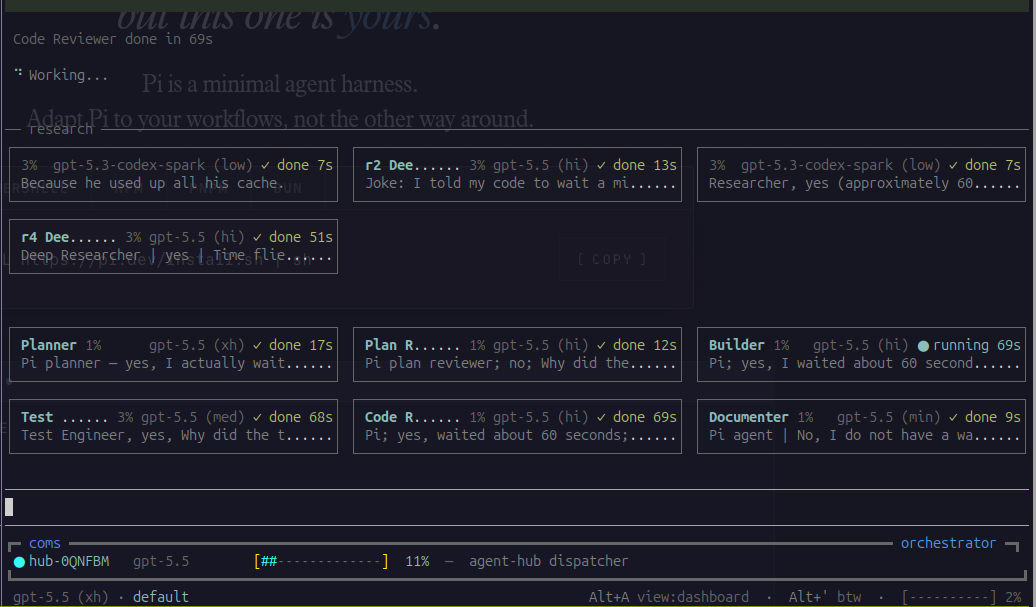
  "image": "https://raw.githubusercontent.com/chankov/agent-fleet/main/docs/assets/agent-hub-dashboard.png"
}
Security note
Pi packages can execute code and influence agent behavior. Review the source before installing third-party packages.
README
Agent Fleet





Operate a coding-agent fleet — not just one chat session.
Agent Fleet is a multi-agent orchestration system for AI coding agents, built pi-first: a thin dispatcher routes work to specialist agents under a Verification Contract, whole teams spawn as tiled workspaces you can snapshot and resume, agents message each other over a shared coms plane, a Hermes Desktop panel shows you the whole fleet at a glance — and a library of 29 production-grade lifecycle skills and 15 personas keeps every agent disciplined.
Three things make it unusual:
- You run it on the subscriptions you already pay for — Codex/ChatGPT, GitHub Copilot, Claude, Ollama — mixed inside one fleet, alongside models running locally on your own GPU. How ↓
- The dispatcher never drowns. Research output, subagent dumps and specialist chatter stay out of the orchestrator's context window — on disk, behind file paths. How ↓
- You can actually see it. Tiled panes in herdr, a live session panel in Hermes Desktop, and questions relayed to your phone when an agent needs a human. How ↓

The fleet at a glance
flowchart TD
    You(["<b>You</b><br/>terminal · desktop · phone"])

    subgraph Control["Control surfaces"]
        Herdr["<b>herdr</b><br/>tiled peer workspaces<br/>snapshot · resume"]
        Desktop["<b>Hermes Desktop plugin</b><br/>live session panel<br/>who is blocked · what it is doing"]
        Phone["<b>Hermes relay</b><br/>hub questions → Telegram<br/>answer from anywhere"]
    end

    Hub["<b>agent-hub</b> — thin dispatcher<br/>owns the Verification Contract on disk"]

    subgraph Team["Specialist team (.pi/agents/teams.yaml)"]
        Specialists["planner · plan-reviewer · builder<br/>test-engineer · code-reviewer · documenter"]
    end

    Research["<b>research helpers</b> — read-only<br/>findings go to disk, never to the dispatcher"]
    Coms["<b>coms</b> — peer data plane<br/>pi ⇄ pi ⇄ Claude Code panes"]

    You --> Control
    Control --> Hub
    Hub --> Specialists
    Specialists --> Research
    Hub <--> Coms
    Specialists <--> Coms
    Coms --> Desktop
| Layer | Job |
|---|---|
| agent-hub | Thin-context dispatcher on pi — drives specialists under a Verification Contract |
| herdr | Fleet control plane — tiled peer workspaces, presence, snapshot/resume |
| coms | Peer data plane — bidirectional messaging between agents (including Claude Code panes) |
| Hermes Desktop plugin | Live fleet panel in the Hermes desktop app — every session, its state, what it is doing, and who is waiting on you |
| Hermes relay | Remote human control — relay hub questions to your phone and answer them there |
| Codex conductor (experimental) | Android-initiated, approval-gated delegation to live coms peers through a user-systemd service |
| Skills + personas | Lifecycle discipline — how to spec, plan, build, verify, review, and ship |
Quick Start
pi (primary runtime)
pi install -l npm:@chankov/agent-fleet   # project-scoped package: skills, prompts, ask-user
# then, inside pi:
#   /af-setup-agent-fleet                 # guided install of harnesses, personas, extensions
# and once set up:
just fleet                    # guarded Pi + STT and core utilities
just fleet hub                # guarded multi-agent dispatcher
just fleet team docs          # hub + guarded peers in one tiled herdr workspace
Claude Code / OpenCode
npx @chankov/agent-fleet init
# then open your coding agent in this directory and run the command it prints:
#   Claude Code: /setup-agent-fleet
#   OpenCode:    /af-setup-agent-fleet
The CLI detects your coding agent and prints the correct setup command. It runs the full guided install — analysing the workspace, showing grouped menus, and confirming everything before writing a single file.
The guided flow is a front-end over the CLI — the CLI itself does every write, so a complete install needs no coding agent and no model:
npx @chankov/agent-fleet install --agent pi --profile recommended --yes
npx @chankov/agent-fleet verify
| CLI command | What it does |
|---|---|
npx @chankov/agent-fleet init |
Materialize the package + hand off to the runtime's setup command |
npx @chankov/agent-fleet install |
Install a profile (minimal, recommended, full, pi-fleet-core, hermes-plugins, codex-bridge) or explicit --items |
npx @chankov/agent-fleet upgrade |
Refresh what is installed, three-way merged against your local edits |
npx @chankov/agent-fleet uninstall |
Remove recorded artifacts (--items / --all), bound by the ownership rule |
npx @chankov/agent-fleet verify |
Read-only report: manifest × install record × disk |
npx @chankov/agent-fleet doctor |
Find and repair breakage (--fix); advisory findings listed |
npx @chankov/agent-fleet update |
Surface the version delta + hand off to the runtime's setup command for the per-artifact diff |
npx @chankov/agent-fleet transform-persona |
Generate per-agent subagent files from the canonical personas |
Every verb takes --dry-run, --json, and --yes, and exits 0 ok / 1 error /
2 findings / 3 conflicts — scriptable in CI. Full reference: docs/npm-install.md.
Claude Code plugin marketplace — best UX inside Claude Code:
/plugin marketplace add chankov/agent-fleet
/plugin install agent-fleet@nc-agent-fleet
SSH errors? The marketplace clones via SSH; use the HTTPS URL instead:
/plugin marketplace add https://github.com/chankov/agent-fleet.git
Git clone — best for skill authors and contributors:
git clone https://github.com/chankov/agent-fleet.git && cd agent-fleet
claude --plugin-dir .    # in Claude Code
# then run /setup-agent-fleet in your target workspace
Artifacts install as copies; refresh them after a git pull with npx agent-fleet upgrade, which
does a real three-way merge and keeps your local edits. Symlink installs exist only inside an
agent-fleet checkout, where editing an artifact is meant to edit the source.
OpenCode — agent-driven skill execution via AGENTS.md + the skill tool, plus optional af-* slash commands (/af-spec … /af-ship, /af-orchestrate, /af-compound). See docs/opencode-setup.md.
pi details — the package bundles pi-ask-user (interactive ask_user + skill); lifecycle commands load from .pi/prompts/, always-on utility extensions from .pi/extensions/ (mcp-bridge, chrome-devtools-mcp, compact-and-continue, pi-voice-stt push-to-talk dictation), and the selectable harnesses live under .pi/harnesses/ (loaded via the justfile). See docs/pi-setup.md and the pi extension catalog.
Versioned with semver — CHANGELOG.md · docs/npm-install.md.
Bring your own subscriptions — and your own GPUs
There is no Agent Fleet API key. Every agent in the fleet declares which model it wants, and pi resolves that against whatever providers you are already signed in to. A single fleet routinely mixes several at once — that is the normal configuration, not an edge case.
| Where the tokens come from | Looks like | Who uses it in a fleet |
|---|---|---|
| ChatGPT / Codex subscription | openai-codex/gpt-5.6-terra, …-sol, …-luna, …-codex-spark |
Default for most shipped personas |
| GitHub Copilot subscription | github-copilot/claude-sonnet-4.6, github-copilot/claude-haiku-4.5 |
Common override for builder / reviewers |
| Claude subscription | a real Claude Code pane, bridged in as a first-class coms peer | plan-reviewer and code-reviewer — cross-model review |
| Ollama — cloud or local | ollama/glm-5.2:cloud, ollama/minimax-m3:cloud, or a model on your own box |
Overflow capacity and cost control |
| Anything else pi can address | local MLX / llama.cpp / LM Studio weights, e.g. a 4-bit Qwen3.6-35B-A3B orchestrator |
Cheap always-on roles: dispatcher, recon, docs |
Two consequences worth spelling out:
- Cross-model review is the point, not a party trick. A
builderon one lab's model and acode-revieweron another's catches what a single model rationalizes past.plan-reviewerandcode-reviewership ready to run as Claude Code peers for exactly this. - Cost lives on a ladder, not a switch. Each persona declares a default plus a switch list over a three-tier policy — deep reasoning / workhorse / fast recon — swappable at runtime per persona (
/af-agent-model) or fleet-wide (/af-models <profile>). Recon sweeps run on the cheap tier or on your own hardware; only synthesis and verdicts spend the expensive one.
/af-models fast                                   # move the whole team down a tier
/af-agent-model builder github-copilot/claude-sonnet-4.6
/af-agent-models-substitute openai-codex/gpt-5.6-sol ollama/glm-5.2:cloud   # swap one model everywhere
Per-project defaults live in .ai/agent-fleet-overrides.md — see docs/agent-fleet-setup.md.
Watch the fleet from your desktop — the Hermes plugin
Once a fleet is more than two agents, "is anything waiting on me?" stops being answerable by looking at panes. agent-fleet-herdr is an in-repo Hermes Desktop plugin that answers it: a live panel of every Agent Fleet session, grouped by project, sorted so that the agent blocked on a human is at the top.

What the panel gives you
- Every session, not every pane. The list is built from the coms registry, so an agent that left its herdr pane still shows up — as
detached, which is a different fact from "gone". - A toast when something needs you.
needs_answer(an agent blocked on a human for more than 20s),vanished(a session that died mid-work),stale,finished— pushed over a WebSocket, with a poll underneath that never switches off. Optional Telegram fan-out for alerts that must survive a closed window. - What an agent is doing right now. Select a row and the modal reads that agent's own transcript —
bash git rev-list…,dispatch_agent builder,update_assertion— projected through a per-tool allowlist, never forwarded wholesale. - The subagents underneath it. A hub whose own transcript is idle while three specialists work is exactly the case a naive status panel renders as "nothing happening". Each live child carries a tail of its stdout and a Cancel button.
- One action, and honest disabled states.
Focus panebrings the workspace hosting that agent to the front. An action that cannot work right now stays visible with its reason beside it.

How it connects to Agent Fleet
The plugin reads what the fleet already writes. It adds no daemon to your agents and holds no write door into them.
flowchart LR
    subgraph Fleet["Your running fleet"]
        Agents["pi + Claude Code peers"]
        Registry[("~/.pi/coms/projects/*<br/><b>coms registry</b><br/>who exists")]
        Transcripts[("~/.pi/agent/sessions<br/>~/.claude/projects<br/><b>transcripts</b><br/>what it is doing")]
        HerdrD["<b>herdr</b><br/>what state it is in"]
        Agents --> Registry
        Agents --> Transcripts
        Agents --> HerdrD
    end

    subgraph Hermes["Hermes"]
        API["<b>backend</b> — FastAPI<br/>plugins/agent-fleet-herdr/dashboard<br/>join · watch · project"]
        Pane["<b>Desktop pane</b> — ESM<br/>desktop-plugins/agent-fleet-herdr"]
        API -->|"REST + WS"| Pane
    end

    Registry --> API
    Transcripts --> API
    HerdrD --> API
    Pane -->|"POST focus"| HerdrD
- The coms registry is the filter and the source of truth for who exists. A herdr pane with no registry entry is not an Agent Fleet session and is not shown.
- herdr says what state each one is in, joined by the
(project, name)pair a pane advertises — not by cwd, which a pi pane and a Claude Code pane in the same repo would collide on. - The agent's own transcript says what it is doing. That file is written whether or not anybody is watching, which is why the activity tail also works for a
detachedsession no pane hosts. - Reads only, except two doors.
focusand subagentcancel— both re-derived server-side from a fresh snapshot, so a renderer cannot name a target it was not given.
Install it
Prerequisites: Hermes v0.19.0+ (the hermes CLI on PATH, plus the Desktop app), this repo checked out, and a fleet that has run at least once (so ~/.pi/coms/projects/ exists). herdr is optional — without it every row reads unknown instead of a live state.
scripts/install-hermes-plugin.sh agent-fleet-herdr
That one command backs up config.yaml, symlinks both halves into the profile (plugins/ for the FastAPI backend, desktop-plugins/ for the pane), runs hermes plugins enable, and verifies the result — then prints the restart steps instead of performing them, because restarting a live gateway is your call:
# 1. restart the Hermes Desktop app  ← the pane talks to the gateway Desktop spawns for itself
# 2. hermes gateway restart          ← only if the web dashboard / TUI needs the routes too
Then start a fleet and open the Agent Fleet tab:
just fleet team default # monitored hub + peers; nothing extra to configure
scripts/install-hermes-plugin.sh agent-fleet-herdr --profile dev   # a non-default profile
scripts/install-hermes-plugin.sh agent-fleet-herdr --copy          # no symlinks
scripts/install-hermes-plugin.sh agent-fleet-herdr --dry-run       # print, change nothing
scripts/install-hermes-plugin.sh agent-fleet-herdr --uninstall
Working install: ~/.hermes/logs/gui.log contains Mounted plugin API routes: /api/plugins/agent-fleet-herdr/ at Desktop start, and /capabilities reports both sources. An empty panel with no error means the enable gate 404'd — that is documented, along with every other failure mode that looks identical from the outside, in the runbook.
Deep dive: docs/hermes-desktop-plugins.md — the plugin contract, the four rules that cost the most to learn, the full API, and the deliberate limits.
And on your phone
Separately from the panel, the Hermes relay pipes an agent's ask_user question — choices intact, not flattened into a message — to Telegram, and races your phone's answer against a local one. Whichever arrives first wins; the fleet keeps working meanwhile.
See docs/coms-hermes-bridge.md and the screenshots.
The optional Codex Remote-Control conductor is verified on Linux with Codex CLI 0.144.x. Hermes remains the inbound ask_user route; Codex is outbound-only and delegates one confirmed task at a time to peers already visible in the same coms project.
cd /path/to/agent-fleet
just fleet conductor codex setup docs --project af  # once per configured context
just fleet conductor codex pair                     # interactive; never capture the code
just fleet conductor codex start
just fleet team docs --project af                   # hub + peers Codex can reach
In ChatGPT Android, open the paired Remote Control host and use the managed external workspace at $HOME/.local/state/agent-fleet/codex-conductor/workspace. Do not start a local codex process for the Android flow, and do not also launch just fleet conductor codex docs when just fleet team docs already owns the same peers.
Lifecycle, approval flow, examples, recovery, and security boundaries: Codex Remote-Control conductor runbook.
agent-hub: a thin-context dispatcher for pi
agent-hub turns a single pi session into a dispatcher that drives a live team of specialist subagents — planner, builder, reviewer, test-engineer, documenter — with read-only research helpers fanning out beneath them, peer-to-peer coms messaging embedded, and a damage-control-continue guardrail on every tool call.

What makes it different is what it doesn't put in front of the dispatcher LLM. Multi-agent setups usually drown the orchestrator: every subagent's output, every research dump flows back into one context window until it compacts and forgets. agent-hub is built the other way around:
- Research never enters the dispatcher context. Specialists end their turn with
NEEDS_RESEARCH:lines; the hub fans out read-only helpers, writes findings to disk, and resumes the specialist with file paths. The dispatcher sees a one-line notice — never the raw findings. Each local-disk research tool call has a parent-side 120-second watchdog (configurable asrecon-search-timeout-sin.ai/agent-fleet-overrides.md), not a whole-agent deadline. - The Verification Contract lives on disk. A ledger of checkable acceptance assertions, built from the request before any builder runs, rendered as one status line (
Assertions: 2✓ 1○ 1✗ · open: A4). A stated requirement is never silently dropped, and the contract survives compaction. - Specialists run
--no-extensions. Tools and credentials stay scoped to the subagent that needs them instead of leaking up into the dispatcher.

just fleet hub                # guarded dispatcher + research + coms + orchestrator persona
just fleet hub --solo         # same, without the coms layer

# fleet recipes (need a running herdr server — https://herdr.dev)
just fleet team full --no-hub # guarded addressable peers in a tiled workspace
just fleet team docs          # hub + guarded peers in ONE workspace
just fleet down docs          # snapshot + close cleanly
just fleet resume docs        # rebuild the grid; pi peers continue their conversations
Deep dive: agent-hub harness README (the full dispatch loop, coms layer, configuration) · fleet hierarchy · pi extension catalog · Claude Code coms bridge · Hermes bridge.
The lifecycle: commands and skills
  DEFINE          PLAN           BUILD          VERIFY         REVIEW          SHIP
 ┌──────┐      ┌──────┐      ┌──────┐      ┌──────┐      ┌──────┐      ┌──────┐
 │ Idea │ ───▶ │ Spec │ ───▶ │ Code │ ───▶ │ Test │ ───▶ │  QA  │ ───▶ │  Go  │
 │Refine│      │  PRD │      │ Impl │      │Debug │      │ Gate │      │ Live │
 └──────┘      └──────┘      └──────┘      └──────┘      └──────┘      └──────┘
  spec           plan           build         test          review        ship
10 slash commands map to the development lifecycle; each activates the right skills automatically. Claude Code uses the unprefixed form; Pi and OpenCode use /af-*.
| What you're doing | Claude Code | Pi / OpenCode | Key principle |
|---|---|---|---|
| Define what to build | /spec |
/af-spec |
Spec before code |
| Plan how to build it | /plan |
/af-plan |
Small, atomic tasks |
| Build incrementally | /build |
/af-build |
One slice at a time (auto runs the whole plan in one approved pass) |
| Prove it works | /test |
/af-test |
Tests are proof |
| Review before merge | /review |
/af-review |
Improve code health |
| Audit web performance | /webperf |
/af-webperf (OpenCode) |
Measure before you optimize |
| Simplify the code | /code-simplify |
/af-code-simplify |
Clarity over cleverness |
| Ship to production | /ship |
/af-ship |
Faster is safer |
| Orchestrate a team | /orchestrate |
/af-orchestrate (OpenCode; Pi uses agent-hub) |
Main session drives a config-defined roster |
| Capture session lessons | /compound |
/af-compound |
Every session improves the next |
Under the hood are 29 skills — each a structured workflow with steps, verification gates, and anti-rationalization tables (never vague advice). Skills also activate automatically from what you're doing: designing an API triggers api-and-interface-design, building UI triggers frontend-ui-engineering.
- Define: interview-me · idea-refine · spec-driven-development
- Plan: planning-and-task-breakdown
- Build: incremental-implementation · test-driven-development · context-engineering · source-driven-development · doubt-driven-development · frontend-ui-engineering · api-and-interface-design
- Verify: browser-testing-with-devtools · debugging-and-error-recovery
- Review: code-review-and-quality · code-simplification · security-and-hardening · performance-optimization
- Ship: git-workflow-and-versioning · ci-cd-and-automation · deprecation-and-migration · documentation-and-adrs · observability-and-instrumentation · shipping-and-launch
- Orchestrate: orchestration-verification · peer-coms
- Learn: compound-learning · Onboard: guided-workspace-setup · Meta: using-agent-skills · designing-agents
Full catalog with descriptions and triggers: docs/skills-catalog.md. Format spec: docs/skill-anatomy.md.
Agent personas
15 pre-configured specialist personas live in agents/ — reusable subagent definitions your coding agent delegates work to: planner, plan-reviewer, builder, code-reviewer, test-engineer, security-auditor, web-performance-auditor, documenter, architect, releaser, researcher, deep-researcher, plus the pi-only bowser, web-debugger, and orchestrator.
Each persona is one Markdown file; the canonical format is pi-flavored and the runtime's Agent Fleet setup command transforms it per target agent on install (Claude Code subagents, OpenCode mode: subagent, pi as-is). Personas are the who, skills are the how — each carries a conditional hook to its primary skill, and they compose into teams under the hub or via /orchestrate.
Full roster, skill hooks, install matrix, and team composition: docs/agents.md.
Why Agent Fleet?
One coding agent is an assistant; a fleet is a team you operate. Agent Fleet exists for the moment a single session stops being enough — when you want a dispatcher driving specialists under a Verification Contract, whole peer teams you can snapshot and resume, Claude Code panes that answer pi agents mid-task, a desktop panel that tells you which agent is stuck, and a phone-reachable human in the loop.
Discipline is the other half. AI coding agents default to the shortest path — skipping specs, tests, and security reviews. The skill library gives every agent in the fleet the same discipline senior engineers bring to production code, baking in practices from Software Engineering at Google and Google's engineering practices guide: Hyrum's Law in API design, the test pyramid and Beyonce Rule in testing, change sizing in review, Chesterton's Fence in simplification, trunk-based development in git workflow.
How it compares: wondering how this stacks up against Superpowers or Matt Pocock's skills? See docs/comparison.md — an honest, side-by-side look, including a controlled head-to-head experiment.
Documentation
| Doc | Covers |
|---|---|
| docs/ARCHITECTURE.md | Runtime layers, fleet hierarchy, module map, external dependencies |
| docs/getting-started.md | First session walkthrough |
| docs/skills-catalog.md | All 29 skills with descriptions and triggers |
| docs/agents.md | All 15 personas: roster, skill hooks, install matrix, teams |
| docs/pi-setup.md · docs/pi-extensions.md | pi install paths, harnesses, and utility extensions |
| docs/opencode-setup.md | OpenCode setup and af-* commands |
| docs/agent-fleet-setup.md | Per-project overrides (.ai/agent-fleet-overrides.md) — spec/plan paths, dev server, branch policy, per-persona models, dispatcher language, rules/docs targets |
| docs/hermes-desktop-plugins.md | The Hermes Desktop plugin: install, contract, API, failure modes, limits |
| docs/claude-code-coms-bridge.md · docs/coms-hermes-bridge.md · docs/codex-remote-conductor.md | Claude Code as a coms peer · phone relay · experimental Codex remote-control operator runbook |
| docs/npm-install.md | CLI reference, versioning, update flow |
| references/ | 9 checklists skills pull in: testing, security, performance, accessibility, observability, orchestration + fleet-coordination + prompting patterns |
Credits & origins
Agent Fleet started as a customized fork of Addy Osmani's agent-skills library, with pi session-harness patterns from IndyDevDan's pi-vs-claude-code (MIT) growing alongside it. As orchestration became the center of gravity, it split into a standalone project — with the upstream relationship kept honest: Addy's library is vendored pristine at a pinned SHA under vendor/agent-skills-upstream/ (policy), and the ported harnesses credit their origin in docs/pi-extensions.md. Split record: docs/MIGRATION-agent-fleet.md.
| Person | Handle | What we draw from |
|---|---|---|
| IndyDevDan | @disler | Pi session harness patterns — foundation for agent-hub, coms, damage-control |
| Addy Osmani | @addyosmani | Production-grade lifecycle skills — the vendored upstream skill library |
Thank you both for the inspiration and for shipping work others can build on.
Contributing
Skills should be specific (actionable steps), verifiable (clear exit criteria with evidence), battle-tested (based on real workflows), and minimal (only what's needed to guide the agent). See docs/skill-anatomy.md and CONTRIBUTING.md.
License
MIT - use these skills in your projects, teams, and tools.