@code-fixer-23/pi-prompt-guard
Pi package scaffold for pi-prompt-guard
Package details
Install @code-fixer-23/pi-prompt-guard from npm and Pi will load the resources declared by the package manifest.
$ pi install npm:@code-fixer-23/pi-prompt-guard- Package
@code-fixer-23/pi-prompt-guard- Version
1.0.7- Published
- Jun 19, 2026
- Downloads
- 1,101/mo · 597/wk
- Author
- codebreaker10
- License
- MIT
- Types
- extension
- Size
- 2.7 MB
- Dependencies
- 1 dependency · 2 peers
Pi manifest JSON
{
  "extensions": [
    "extensions",
    "extensions/!*.test.ts"
  ],
  "image": "https://raw.githubusercontent.com/louiss0/pi-packages/main/pi-prompt-guard/assets/small-pi-prompt-guard.png"
}
Security note
Pi packages can execute code and influence agent behavior. Review the source before installing third-party packages.
README
pi-prompt-guard
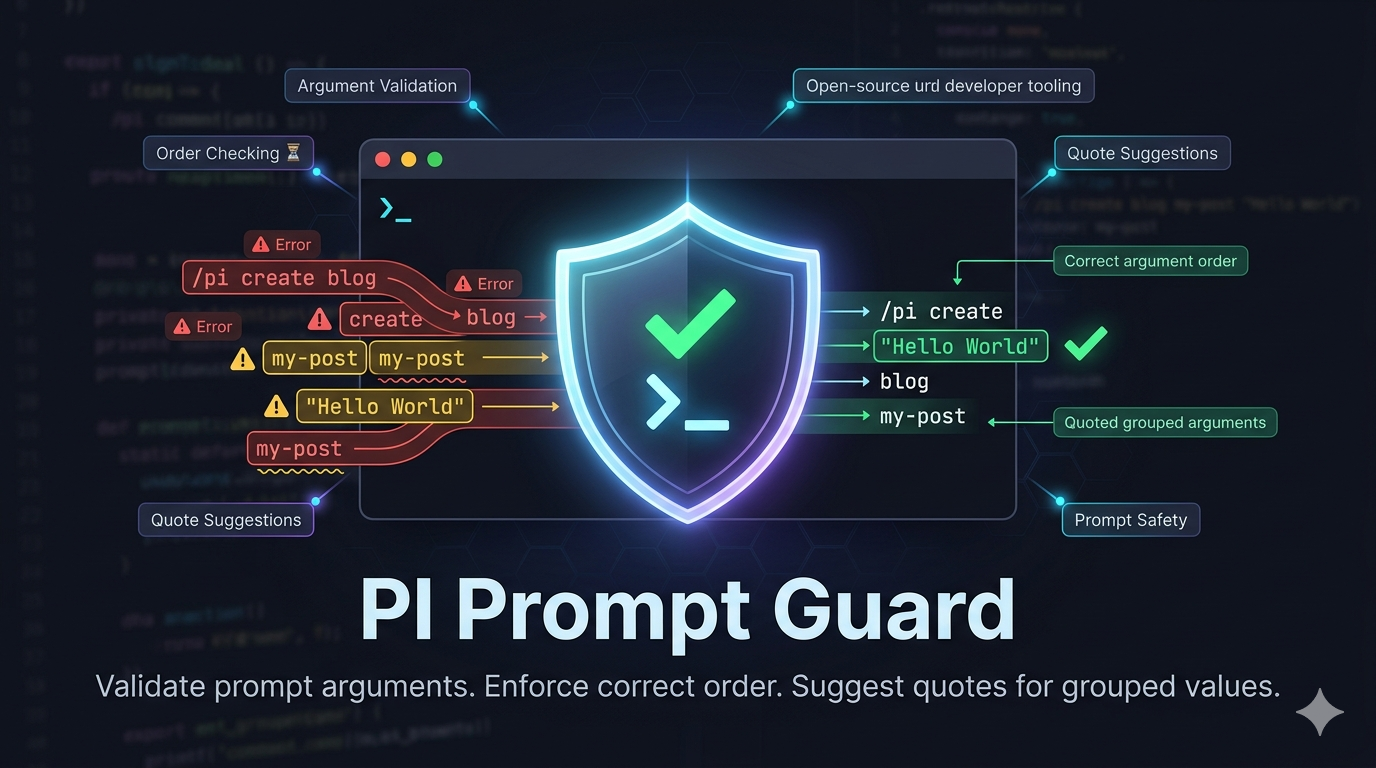




pi-prompt-guard adds a validation layer in front of PI prompt execution. It intercepts slash-command prompt usage, resolves matching prompt files through PI's command registry, parses the prompt definition with its own internal prompt parser, and blocks invalid input before the agent starts. This helps catch malformed prompt templates, missing required arguments, mismatched positional placeholders, and quoting mistakes early, so prompt-driven workflows fail fast with actionable feedback instead of producing confusing agent behavior later in the turn.
This package is meant to run as a PI extension and depends on the PI extension runtime.
pi-prompt-guard
This package contains a single extension in extensions/index.ts. Its job is to guard prompt execution at input time, before PI expands the selected prompt into agent input.
Features
Prompt command validation
When a user types a slash command, the extension checks PI's available commands with getCommands() and narrows the result to prompt-backed commands. If the slash command does not resolve to a prompt, the extension stops the request and notifies the user immediately instead of letting an invalid prompt reference continue through the session.
Once a prompt command is found, the extension reads the prompt file from sourceInfo.path and validates it in the same order the parser expects:
parseTemplateextracts the prompt body andargument-hintfrontmatter.parseArgumentHintvalidates the declared argument contract.parsePlaceholdersvalidates the placeholder usage inside the prompt body.
If any stage fails, the extension returns { action: "handled" } and reports the parsing error through ctx.ui.notify(..., "error") so the user gets feedback immediately.
Argument hints, placeholders, and runtime input
The core contract in this package is the relationship between a prompt's argument-hint and the placeholders used in the prompt body.
argument-hint defines the command surface the user is expected to type. For example:
---
argument-hint: <project> [version]
---
This declares two positions:
- position
1is required and namedproject - position
2is optional and namedversion
Placeholders then decide how those declared positions are consumed inside the prompt body:
$1uses the first declared argument$2uses the second declared argument{@:2}uses a slice starting at argument2{@:2:4}uses a bounded slice across declared positions$ARGUMENTSrefers to the declared argument set as a group$@behaves like a rest-style passthrough for trailing input
That means argument-hint is not just documentation. In pi-prompt-guard, it is treated as the prompt's public input contract, and placeholders are validated against that contract before the prompt is allowed to run.
At runtime, the extension validates two things together:
- the prompt definition itself — whether the placeholders make sense for the declared
argument-hint - the user's invocation — whether the values typed after the slash command satisfy that declared contract
For fixed positional prompts, this catches mismatches such as a prompt declaring only <project> but using $2 in the body. It also blocks user input that omits required arguments or sends more positional arguments than the prompt supports.
Argument handling and quoting guidance
The extension validates both the prompt definition and the arguments the user typed for that prompt.
It checks for:
- missing required arguments declared in
argument-hint - too many positional arguments when a prompt only supports fixed positions
- placeholder references such as
$2or finite slices that exceed the arguments declared by the prompt - invalid uses of
$ARGUMENTSwhen no arguments are declared - malformed quoted input such as unterminated
'...'or"..."
It also tokenizes prompt input with quote awareness, so users can pass multi-word values like:
/release "my project" 1.0.0
When input appears to be split incorrectly, the extension advises users to wrap space-containing arguments in single or double quotes. This makes prompt usage more predictable for prompts that rely on positional values.
Fixed arguments vs. $ARGUMENTS vs. $@
The extension distinguishes between three prompt styles and validates them differently:
- Fixed positional prompts use placeholders like
$1,$2, or finite slices. These prompts must stay consistent with the declaredargument-hint. If the highest referenced placeholder position is greater than the number of declared arguments, the prompt is rejected before execution. $ARGUMENTSprompts are treated as argument-aware prompts that can consume the declared argument set more flexibly, but they still require the prompt to declare arguments explicitly. A prompt that uses$ARGUMENTSwithout any declared arguments is rejected.$@prompts are treated as rest-style prompts that intentionally accept trailing input beyond a fixed argument count. They are not validated as strict positional contracts in the same way fixed placeholders are.
This separation helps prompt authors choose whether a prompt should behave like a strict command interface or a more open-ended passthrough.
Session workflow and UI lifecycle
The extension coordinates prompt guarding as part of the PI session lifecycle rather than as isolated callbacks. When a session starts, session_start initializes the widget controller and marks the extension as ready. As soon as the user submits input, the input handler switches the widget into a guarding state and performs prompt lookup, parsing, and argument validation before PI continues with prompt expansion.
If validation succeeds, PI can continue into its normal prompt expansion and agent startup flow. Right before the agent begins its work, before_agent_start updates the widget to reflect that guarding has finished and the request is moving into execution. After the turn completes, turn_end restores the ready state so the next prompt invocation starts from a known baseline.
This event chain keeps the UI synchronized with the validation workflow: the user sees when prompt guarding starts, when execution is about to begin, and when the extension is ready for the next command.
Extension load signaling
After registration, the extension emits pi-prompt-guard:loaded. This allows other extensions or package-level integrations to detect that prompt guarding is available and coordinate around it if needed.
Development
Useful Nx targets for this package:
pnpm nx lint pi-prompt-guard
pnpm nx typecheck pi-prompt-guard
pnpm nx test pi-prompt-guard
pnpm nx check pi-prompt-guard
The extension keeps prompt parsing local so the published package does not depend on a private workspace parser package.