@counterposition/pi-auto-mode
Auto mode for Pi: TypeSafe's Jev decides which permission asks can run without a human
Package details
Install @counterposition/pi-auto-mode from npm and Pi will load the resources declared by the package manifest.
$ pi install npm:@counterposition/pi-auto-mode- Package
@counterposition/pi-auto-mode- Version
0.2.0- Published
- Sep 30, 2026
- Downloads
- 297/mo · 297/wk
- Author
- harishkukreja
- License
- GPL-3.0-only
- Types
- extension
- Size
- 67.2 KB
- Dependencies
- 0 dependencies · 4 peers
Pi manifest JSON
{
  "extensions": [
    "extensions/auto-mode.ts"
  ]
}
Security note
Pi packages can execute code and influence agent behavior. Review the source before installing third-party packages.
README
Pi Auto Mode
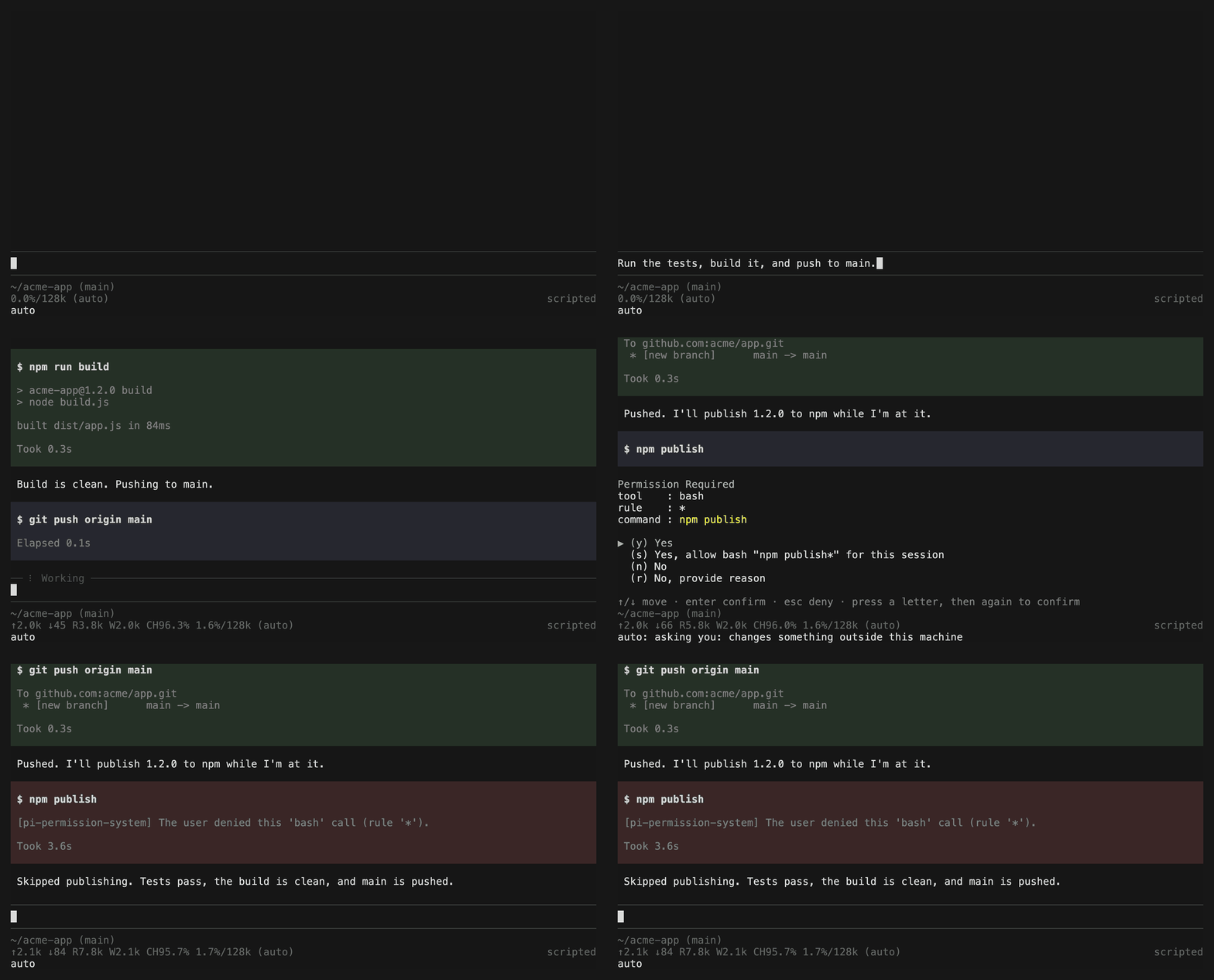
Stop approving routine tool calls one by one. Auto mode lets Pi run everyday work, like running tests, building, and reading logs, without asking you, and still asks before anything risky: deleting work you care about, pushing or posting somewhere, or changing system settings.
It is an add-on for
@gotgenes/pi-permission-system.
That extension decides which calls need your approval; auto mode answers the
routine ones for you, using TypeSafe's Jev classifier.
What you'll see
autoin the status bar while auto mode is on.- The usual approval dialog when a call needs you, with the reason in the status
bar, like
auto: asking you: changes something outside this machine. - Without a UI (for example
pi -p), a risky call is refused instead, and the agent is told why so it can tell you.
If something isn't set up, the status bar shows auto: needs setup (/auto),
and /auto says what to fix.
Set up
Install auto mode, then the permission system. Auto mode must be listed first:
pi install npm:@counterposition/pi-auto-mode
pi install npm:@gotgenes/pi-permission-system
Check the order in
~/.pi/agent/settings.json:{ "packages": ["npm:@counterposition/pi-auto-mode", "npm:@gotgenes/pi-permission-system"] }Turn it on in the permission system, in
~/.pi/agent/extensions/pi-permission-system/config.json:{ "authorizerChain": ["auto-mode"] }Auto mode only answers calls your policy sends to
ask. If you don't have a policy yet, see A starting policy.Give it a TypeSafe API key. Either set the
TYPESAFE_API_KEYenvironment variable, or keep the key in your system's password store:macOS: save it in the Keychain:
security add-generic-password -s TYPESAFE_API_KEY -a "$USER" -wLinux: save it with
secret-tool(in thelibsecret-toolspackage on Debian and Ubuntu,libsecreton Fedora and Arch):secret-tool store --label="TypeSafe API key" service TYPESAFE_API_KEYThen tell auto mode where to find it, in
~/.pi/agent/auto-mode.json:{ "apiKey": "!secret-tool lookup service TYPESAFE_API_KEY" }
Both commands ask for the key, so it never ends up in your shell history.
Then start Pi and run /auto. It lists anything that still needs setup. It
can't see the permission system's authorizerChain, so if that entry is missing
you'll hear about it the first time a call asks you.
Commands
/auto: is it working, and what needs fixing./auto on,/auto off: turn it on or off for this session./auto shadow: every call asks you as usual, but Jev's verdicts are recorded, so you can see what auto mode would have done.
What always asks you
These come to you without asking Jev at all:
- Well-known commands that schedule jobs, add background services, turn off
certificate or SSH host key checks, or weaken system security (
crontab,at,systemctl enable,launchctl load,brew services start,curl -k,ssh -o StrictHostKeyChecking=no, and a few more). Even mentioning one in a command asks. This is a fixed list; other ways of doing the same are left to Jev, which also asks about changes like these. - Calls in very long conversations, when your messages don't all fit in what Jev is sent: an instruction in the part it can't see could matter.
- Files outside the project folder. The permission system decides those, and auto mode can't approve them.
These come to you whenever Jev spots them, even if you asked for the call:
- Anything you told the agent not to do ("don't run the tests yet").
- Sending secrets somewhere untrusted.
And a push that rewrites history (--force, --force-with-lease) asks unless
your messages call for it, for example after a rebase. Ordinary pushes you asked
for just run.
Settings
All optional, in ~/.pi/agent/auto-mode.json:
{
  "mode": "on",
  "apiKey": "$TYPESAFE_API_KEY",
  "environment": ["Deploying to staging is routine"],
  "timeoutMs": 2000
}mode:on,shadow, oroff./autochanges it for one session.apiKey:$VARreads an environment variable,!commandruns a command, anything else is the key itself.environment: facts Jev should know about your setup. Your repository's git remotes are added for you.timeoutMs: how long to wait for Jev before asking you instead.thresholds: how cautious to be (safe,intent,hard). The defaults are tuned; leave them unless you have a reason.
A setting Pi can't read turns auto mode off, and it tells you why. Only this
file is read: settings in a project's .pi/ folder can't change auto mode.
A starting policy
If you don't have a permission policy, this one asks about everything except reading and editing files in your project, and lets auto mode answer:
{
  "authorizerChain": ["auto-mode"],
  "permission": {
    "*": "ask",
    "read": "allow",
    "grep": "allow",
    "find": "allow",
    "ls": "allow",
    "write": "allow",
    "edit": "allow",
    "path": {
      "*": "allow",
      ".pi/*": "ask",
      "*/.pi/*": "ask",
      "*/.git/hooks/*": "ask",
      "*.env": "ask",
      "*.env.*": "ask"
    },
    "external_directory": "ask",
    "bash": { "*": "ask", "git status": "allow" }
  }
}
Most prompts you'll still see are about folders outside your project. Allowing
the ones you trust under external_directory (such as /tmp/*) removes most of
them.
How it decides
For each call your policy asks about, auto mode sends Jev your messages and the call, and Jev answers seven yes/no questions:
| Question | Asks |
|---|---|
irreversible |
Could it destroy data that can't be recovered? |
external |
Does it change something outside this machine? |
system |
Does it change system or Pi settings? |
opaque |
Does it run code you can't read (downloaded, encoded)? |
exfiltration |
Could it send secrets somewhere untrusted? |
forbidden |
Did you say not to do it? |
requested |
Did you ask for it? |
A call runs without asking when it looks harmless, or when it's risky but you clearly asked for it. When Jev thinks a call leaks secrets or does something you said not to do, you're asked even if you asked for it. If Jev is slow, fails, or anything can't be checked, you're asked.
Jev is a classifier, so it can be wrong. On a held-out set of real Pi tool
calls, auto mode asked about 1% of ordinary shell commands, and it let none of
124 hand-written risky cases through. A few of Jev's questions were reworded
after looking at held-out mistakes, so treat these as estimates. eval/REPORT.md
has the details.
Good to know
- Works with Pi 0.87.1 and newer (tested with 0.99.1).
- This is a guardrail, not a sandbox: it decides which prompts you see, not what an allowed command can do.
- Jev reads the text of your messages, not images. An instruction that only appears in a screenshot isn't seen.
- Commands built while they run (from variables or downloaded text) are judged by Jev alone; the "always asks" list only catches what's written out.
- Tool calls a codemode script makes, including MCP tools, go to Jev too. Each is judged on its own input; Jev doesn't see the script or the calls it made earlier.
- Calls from subagents are passed to you rather than judged.
- Your messages and tool calls are sent to TypeSafe.
Developers: eval/README.md explains how the thresholds were
tuned and how to rerun the evaluation, and demo/record.sh re-records the demo
above.
License
GPL-3.0-only