@curio-data/pi-intelli-search
Intelligent web research for Pi: search, extract, collate, and cache grounded web context in one tool call.
Package details
Install @curio-data/pi-intelli-search from npm and Pi will load the resources declared by the package manifest.
$ pi install npm:@curio-data/pi-intelli-search- Package
@curio-data/pi-intelli-search- Version
0.15.0- Published
- Oct 7, 2026
- Downloads
- 820/mo · 200/wk
- Author
- miah0x41
- License
- Apache-2.0
- Types
- extension, skill
- Size
- 747.8 KB
- Dependencies
- 3 dependencies · 4 peers
Pi manifest JSON
{
  "image": "https://raw.githubusercontent.com/Curio-Data/pi-intelli-search/main/docs/images/06.png",
  "skills": [
    "./skills"
  ],
  "extensions": [
    "./src/index.ts"
  ]
}
Security note
Pi packages can execute code and influence agent behavior. Review the source before installing third-party packages.
README
pi-intelli-search




Intelligent web research for coding agents: search, extract, collate, and cache grounded web context in one tool call.
Features:
- 🔍 Search: a search-grounded model, Perplexity Sonar via OpenRouter by default. One application programming interface (API) key, no $50 minimum. Chat models with tool support also work through the web search server tool; see native search settings or Model Context Protocol (MCP) tuning.
- 🔗 Harvest: provider-supplied citation links recovered from the response, alongside links in the answer. Recognised
url_citationannotations are merged with text links before pages are selected; recovery is best-effort, not a complete record of sources consulted. - 🌐 Fetch: Dual-fetch each page (Hypertext Markup Language (HTML) → Defuddle versus Markdown endpoint), compare quality, pick the cleaner version.
- 📄 Extract: Per-page large language model (LLM) extraction guided by a focused prompt. Compresses ≈50K to ≈3-5K chars of query-relevant content.
- 🔗 Collate: Cross-source deduplication, inconsistency detection, and synthesis into a focused ≈5K-character summary.
- 💾 Cache: Persistent
.search/cache with automatic cache suggest. Related previous searches surfaced on each query. - 🎯 Configurable: Select models independently for search, extract and collate. The native extension uses registered, authenticated
Pimodels (capability and context limits apply); the MCP server uses explicitly selected OpenRouter models. - 💰 Cost: see the default research-run estimate.
@curio-data/pi-intelli-search registers four research tools natively in Pi, using its settings, authentication and model registry. Install the extension to get started.
For other coding agents, the sibling @curio-data/mcp-intelli-search package serves the same engine and cache format through the Model Context Protocol (MCP). See MCP installation.
The shared pipeline searches via a search-grounded model (Perplexity Sonar, the native default) and merges prose links with harvested citations before selecting pages. It fetches pages through a dual-fetch comparison (Defuddle versus Markdown endpoint), then extracts query-relevant content per page with a dedicated large language model (LLM) guided by a focused prompt. Collation deduplicates findings, flags inconsistencies, and synthesises a concise summary. Reports, extractions and fetched content are cached for offline reuse in .search/ by default. Cache suggest surfaces related previous searches on each query.
Two Packages, One Engine
Choose the installation route for the host:
| Route | Host | What to Install |
|---|---|---|
Native Pi Extension |
Pi |
@curio-data/pi-intelli-search |
| Direct MCP Registration | Any MCP-compatible host | @curio-data/mcp-intelli-search |
| Host Plugin | Claude Code or Codex | Repository marketplace launching the pinned MCP package |
The install branches: Pi Native Extension and MCP Server, with host instructions for Claude Code, Codex and any Generic MCP Host.
The native extension uses Pi settings and authentication. The MCP server requires explicit configuration, a per-folder workspace and an environment-supplied inference key; it does not read Pi settings or credentials.
Contents
- Two Packages, One Engine
- Install
- Tools
- Usage Examples
- Launch Blog Post
- What It Adds Over Other Extensions
- Configuration Recipes
- Model Configuration
- Pipeline
- Cost
- Settings
- Cache Structure
- Compatibility
- Documentation
- Downloads
- Provenance
- Sponsor
- Licence
- Use of Large Language Models
Install
Pi Native Extension
Prerequisites
Install Pi and obtain an OpenRouter account. One key covers search, extraction and collation with the default models. Other providers are supported for extraction and collation; see Model Configuration.
- Sign In With Open Authorization (OAuth) (Recommended): run
/login openrouterinPi. OnPi0.82.0 and later this performs OpenRouter OAuth Proof Key for Code Exchange (PKCE) sign-in and stores a user-controlled key automatically. No manual key paste is required. - Or add a key manually: create one at openrouter.ai/keys, then edit
~/.pi/agent/auth.json:
{
  "openrouter": {
    "type": "api_key",
    "key": "sk-or-v1-..."
  }
}
Install the Extension
From npm (recommended):
pi install npm:@curio-data/pi-intelli-searchFrom GitHub:
pi install git:github.com/Curio-Data/pi-intelli-searchLocal development:
pi install /path/to/pi-intelli-searchOn first load, Pi shows Added models: followed by any missing models: on a fresh install these are perplexity/sonar, perplexity/sonar-pro, and perplexity/sonar-pro-search. An upgrade lists only models not already registered. A missing OpenRouter key produces a warning notification.
Verify Installation
Start Pi and type /model. Confirm that perplexity/sonar, perplexity/sonar-pro, and perplexity/sonar-pro-search appear in the model list. If they are missing after a manual edit, reopen /model: since Pi 0.82.0 the picker reloads models.json on open. Restart Pi only if they are still absent. Registration does not select a pipeline model; searchModel in settings does that.
Customise (Optional)
No configuration is needed to get started. The defaults use OpenRouter for all stages. To limit research to six pages, add this block to ~/.pi/agent/settings.json or, for a trusted project, <project>/.pi/settings.json:
{
  "pi-intelli-search": {
    "defaultUrls": 6,
    "maxUrls": 6
  }
}
See Model Configuration for model selection, Configuration Recipes for complete examples, and Settings for defaults and the full reference.
Tools
Both packages expose these four operations. The names below are native Pi tool names and MCP server tool names; MCP hosts add their own callable-name prefixes. Use the names exposed by the host.
| Tool | Description |
|---|---|
intelli_search |
Search the web and return a concise answer with a source list (top defaultUrls). |
intelli_extract |
Extract query-relevant content from a web page, preserving code and technical detail verbatim. |
intelli_collate |
Deduplicate and synthesise multiple extractions into a summary. Writes cache. |
intelli_research |
Search, fetch, extract, collate, cache. The primary research tool. One call. |
Usage Examples
These examples describe tool calls for the agent, not shell commands. MCP hosts add their own tool-name prefixes.
Quick Search
intelli_search(query="TypeScript 5.8 release date")Deep Research
Always provide a focusPrompt. The extraction LLM works best with specific guidance.
intelli_research(
  query="Svelte 5 runes tutorial examples",
  focusPrompt="Extract the core rune concepts ($state, $derived, $effect), their syntax, and how they replace the old reactive declarations. Include migration patterns from Svelte 4."
)
Targeted Research With Domain Guidance
intelli_research(
  query="Cloudflare Workers KV write timeout limits",
  focusPrompt="Extract KV write limits, timeout thresholds, storage limits, and any workarounds for bulk writes. Focus on hard numbers and error messages.",
  maxUrls=3,
  domains=["developers.cloudflare.com"]
)
domains guides source selection, it is not a security boundary: the query gains a site: expression, and with the web search tool enabled the same domains are also combined with searchWebSearch.allowedDomains and sent as an engine filter. The lists are combined, not intersected, and returned uniform resource locators (URLs) are not checked against a local hostname allowlist before fetching. Engine support for allow and exclude lists differs; see native searchWebSearch keys or MCP tuning.
Comparing Options
intelli_research(
  query="Tailwind CSS vs Vanilla Extract comparison 2026",
  focusPrompt="Extract pros/cons, bundle size benchmarks, DX tradeoffs, and migration costs. Note which claims come from official sources vs blog opinions."
)
Launch Blog Post
Read the launch post, pi-intelli-search: LLM-Native Web Research for the Pi Coding Agent, for the design story behind the pipeline: why the pipeline extracts query-relevant content before collation, how collation keeps the agent context clean, and the launch-era estimate of ≈$0.05 per session. The Cost section holds the current default estimate.
What It Adds Over Other Extensions
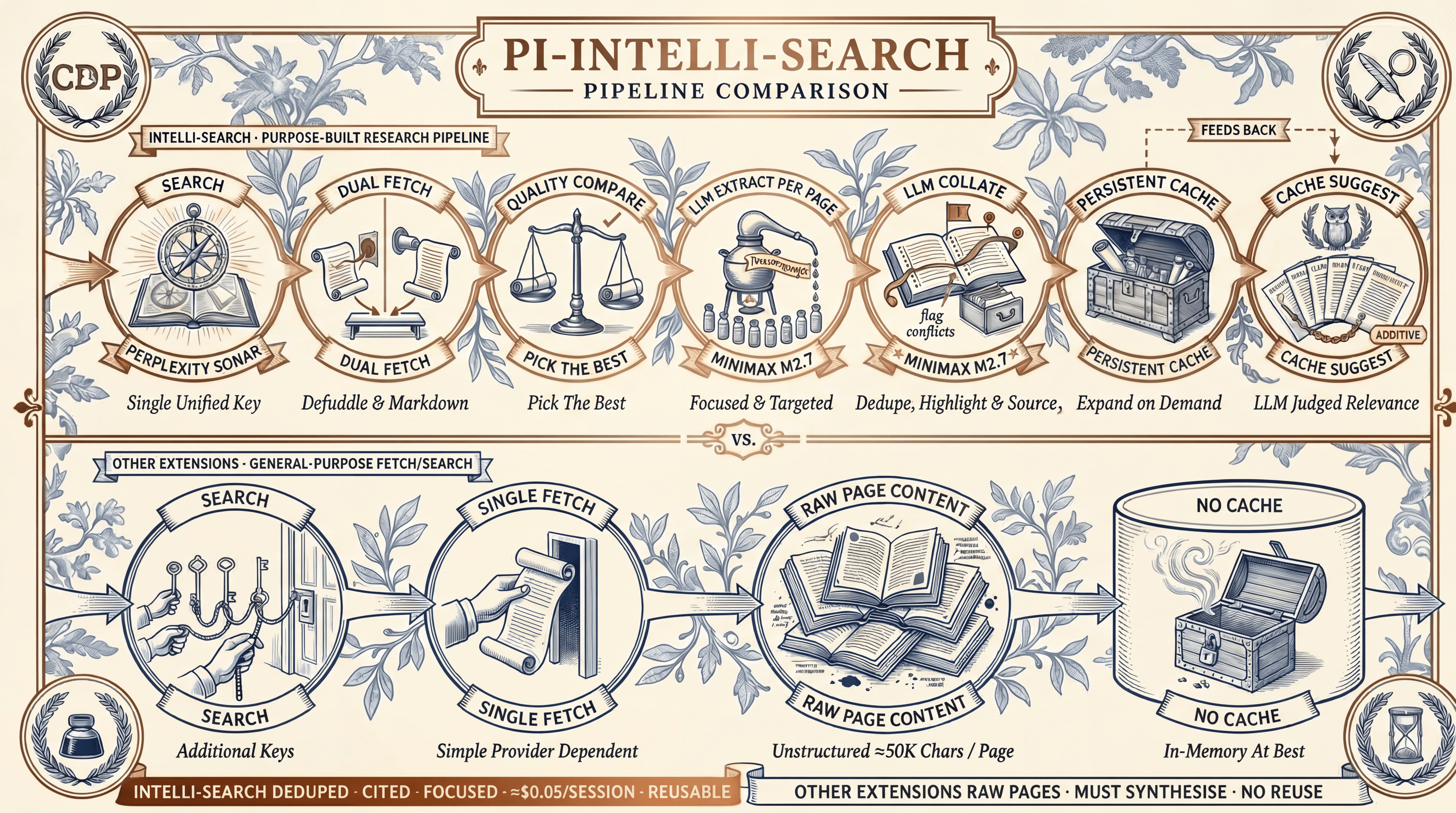
The comparison illustration shows the default configuration and cost at its creation; search is configurable (see Model Configuration).
Four capabilities distinguish intelli-search within the seven-extension May 2026 comparison:
- Dual-fetch quality comparison. Every page is fetched twice in parallel (Defuddle versus Markdown endpoint), scored, and the better version wins. Server-rendered Markdown is not guaranteed to be cleaner than HTML; the comparison catches this automatically.
- Per-page LLM extraction guided by
focusPrompt. Each page is compressed to ≈3-5K chars of query-relevant content before entering the agent's context. Extraction quality scales with the chosen model. - LLM collation with deduplication. A collation model synthesises across sources, flags conflicting claims, and preserves source attribution. The agent does not spend reasoning tokens on mechanical synthesis.
- Persistent cache with cache suggest. Full pages and extractions are kept in
.search/and indexed. An LLM judge surfaces related previous searches after each live query. Manually reusing a cached report can avoid a subsequent research call; cache suggest does not skip the current search.
The collation prompt targets a concise ≈5K-character summary; actual length depends on the selected model and output budget. The full page content stays in the cache, accessible via native Pi tools like read or grep for deeper inspection. Among the seven extensions in the May 2026 comparison, only intelli-search combines per-page extraction and a persistent structured cache.
For the detailed feature-by-feature comparison against six other Pi search extensions, see docs/COMPARISON.md.
Configuration Recipes
These recipes configure the native Pi extension. For MCP configuration, select models under models and tuning under tuning in the standalone configuration file; do not copy the native settings wrapper.
Each recipe is a complete ~/.pi/agent/settings.json. Copy it whole, or merge the pi-intelli-search block into an existing file. Project-level overrides go in <project>/.pi/settings.json (applies only after Pi approves the project; the global file always applies).
Two loader rules to keep in mind:
- A configured object replaces its default wholesale. The
searchWebSearchblock and the model blocks have no per-key merge: supply every required key. - Nested
pi-intelli-searchkeys always win over the deprecated flatintelli*keys.
| Purpose | Recipe |
|---|---|
| Works immediately, nothing to write | Zero Configuration |
| A chat model plus the web search server tool | Web Search Tool + Nano |
| Sonar Pro Search via a model swap | Sonar Pro Search |
| The pre-0.13 page count | Pin Eight Pages |
| Cheaper extraction and collation | Economy Extract and Collate |
| Better final summaries | Stronger Collation |
| A free-tier or shared OpenRouter key | Free-Tier Resilience |
| A different search model for one repo only | Per-Project Override |
Every recipe is exercised end-to-end in its own isolated environment by test/e2e/10_config_recipes.sh; recipes 2 and 3 by 08_websearch_tool.sh and 09_sonar_pro_search.sh.
Recipe 1: Zero Configuration
Write nothing. The defaults provide Sonar search with citation harvesting, MiniMax M3 extraction and collation, up to 10 pages per research run, and the .search/ cache. Every other recipe below changes exactly one concern from this baseline.
Recipe 2: Web Search Tool + Nano
An OpenRouter chat model with server-tool support can use live search through openrouter:web_search; search does not require a search-native model family. The September 2026 probe estimate for this pairing is ≈$0.008 per search, not a lowest-cost ranking. In that configuration, reasoning: "minimal" leaves more of the completion budget available for answer text; unconstrained reasoning can consume it.
{
  "pi-intelli-search": {
    "searchModel": {
      "provider": "openrouter",
      "model": "openai/gpt-5-nano"
    },
    "searchWebSearch": {
      "enabled": true,
      "engine": "exa",
      "maxResults": 8,
      "reasoning": "minimal"
    },
    "extractModel": {
      "provider": "openrouter",
      "model": "minimax/minimax-m3"
    },
    "collateModel": {
      "provider": "openrouter",
      "model": "minimax/minimax-m3"
    }
  }
}
Recipe 3: Sonar Pro Search
Agentic multi-step search on the Perplexity stack, reached through a settings-only model swap. The recorded estimate is ≈$0.05 per search ($18 per 1,000 requests plus tokens); it is not a comparative quality measurement. searchWebSearch is disabled explicitly so this recipe also applies after previously enabling the tool.
{
  "pi-intelli-search": {
    "searchModel": {
      "provider": "openrouter",
      "model": "perplexity/sonar-pro-search"
    },
    "searchWebSearch": {
      "enabled": false
    },
    "extractModel": {
      "provider": "openrouter",
      "model": "minimax/minimax-m3"
    },
    "collateModel": {
      "provider": "openrouter",
      "model": "minimax/minimax-m3"
    }
  }
}
Recipe 4: Pin Eight Pages
v0.13.0 raised defaultUrls to 10 and maxUrls to 20 because citation harvesting fills the URL list. To retain the earlier page-count settings, pin both values. This recipe previously recorded ≈$0.004 per extracted page without specifying an input/output budget. That unscoped figure is historical, not the default M3 estimate in Cost.
{
  "pi-intelli-search": {
    "defaultUrls": 8,
    "maxUrls": 16
  }
}
Recipe 5: Economy Extract and Collate
A full 10-page research run makes 10 extraction calls and one collation call, so token rates dominate cost. Swap both stages to a cheaper OpenRouter model; search is untouched. Select a registered, authenticated model with sufficient text-processing capability and context for these stages.
{
  "pi-intelli-search": {
    "extractModel": {
      "provider": "openrouter",
      "model": "google/gemini-3.7-flash"
    },
    "collateModel": {
      "provider": "openrouter",
      "model": "google/gemini-3.7-flash"
    }
  }
}
Convert extractMaxChars to an estimated input-token budget (150K chars is ≈37K tokens), then add prompt tokens and reserve extractionMaxTokens for output. Lower the character limit if that total exceeds the model's token window.
Recipe 6: Stronger Collation
Keep extraction cheap and spend on the final synthesis, where cross-source reasoning and contradiction-flagging live. Only collateModel changes.
{
  "pi-intelli-search": {
    "collateModel": {
      "provider": "openrouter",
      "model": "openai/gpt-5-mini"
    }
  }
}
Recipe 7: Free-Tier Resilience
For an observed account limit of approximately 0.33 requests per second, the default fan-out of up to 4 concurrent extractions can exceed the limit. Space the calls, lengthen the retries, and shrink the page count. This recipe is a response to observed limits, not a provider-wide quota claim about free-tier keys.
{
  "pi-intelli-search": {
    "defaultUrls": 5,
    "minRequestIntervalMs": 3000,
    "extractionConcurrency": 2,
    "llmRetryAttempts": 4,
    "llmTimeoutMs": 120000
  }
}
Choose pacing, concurrency and retry settings from observed account and provider rate limits, whether the key is paid, free-tier or shared. Leave the throttle off when the account handles the default fan-out without rate-limit failures.
Recipe 8: Per-Project Override
A trusted project can override individual keys for one repository only. Put the override in <project>/.pi/settings.json; everything not listed keeps its global value.
{
  "pi-intelli-search": {
    "searchModel": {
      "provider": "openrouter",
      "model": "perplexity/sonar-pro-search"
    },
    "cacheDir": ".search-client-x"
  }
}
Use this to give a client project a dedicated cache directory and a stronger search model while every other project stays on the global defaults.
Model Configuration
Both packages select models independently for search, extract and collate. The configuration below is for the native Pi extension; the MCP server requires explicit OpenRouter selections for all three roles in its configuration file, with no implicit model defaults.
Native defaults are chosen for cost-efficiency. Registered, authenticated models from built-in providers, OpenRouter or other extensions can replace them, subject to role suitability and context limits. Search needs grounding or supported web-search tools; registry access alone does not establish that capability.
| Stage | Default | Config Key |
|---|---|---|
| Search | openrouter/perplexity/sonar |
searchModel |
| Extract | openrouter/minimax/minimax-m3 |
extractModel |
| Collate | openrouter/minimax/minimax-m3 |
collateModel |
OpenRouter Routing for Sonar
Perplexity Sonar is a search-grounded model, but it is not in Pi's built-in model list. Rather than requiring a separate Perplexity API account (which requires a $50 minimum credit top-up), the extension routes Sonar through OpenRouter. OpenRouter is a unified pay-as-you-go API with a lower minimum spend. One API key provides access to Sonar and other catalogue models, subject to account permissions. On first load, the extension patches ~/.pi/agent/models.json to add Sonar under the openrouter provider so Pi can discover it. This approach has several benefits:
- Avoids the Perplexity API $50 minimum. Routing through
OpenRouterconsolidates spend on a single account already used across the open-source coding-agent ecosystem, includingPi. No separate Perplexity subscription is required. - One account, many models. The same OpenRouter key covers Sonar and other accessible models selected for extraction or collation.
- Non-Destructive Registration: The patch merges new models by ID. It never replaces existing OpenRouter models.
- Idempotence: It is safe across extension reloads and updates.
The same single-key argument covers the alternative search configurations: the web search server tool and perplexity/sonar-pro-search both route through the same OpenRouter account.
Source Harvesting from Citations
Search-grounded models can return machine-readable url_citation annotations identifying cited sources. The recovered set can exceed the prose links (recorded Sonar probe: 20 annotations against 3 prose links), but it does not establish every source consulted. Pi's chat-completions adapter reassembles only text, thinking, and tool-call blocks, so those annotations never reach extension code on their own. The pipeline reads a tee of the raw response body, parses the citations out, and merges them with the text-scraped links before pages are selected for fetching.
Collection is attempted on every search call regardless of model and needs no configuration. Native calls await background citation reads for up to two seconds; collection failure leaves the text-link path intact without failing the search. Text links come first; annotation-only links follow; exact URL duplicates are removed. intelli_research applies its URL limit after merging, so not every discovered source is fetched. Harvesting is best-effort: a model that emits no annotations, or annotations the parser does not recognise, leaves the text-link path intact. intelli_search caps its rendered source list at defaultUrls (top 10 by default). The count is recorded in meta.json as stages.search.annotationsHarvested.
OpenRouter Web Search Server Tool
The search stage normally relies on a search-native model (default: Sonar). The searchWebSearch setting decouples it: OpenRouter's openrouter:web_search server tool gives the configured chat model access to live web search, so the pipeline is not tied to any search-native model family. The tool is beta upstream; the model decides whether and how many times to search, and search charges depend on the engine, the number of server-side searches, and token usage. maxResults limits results per search and maxUrls limits pages fetched; neither caps total search spend.
searchWebSearch requires searchModel.provider to be openrouter. The tool ID is OpenRouter-specific; on any other provider the setting is ignored without warning.
A probe-validated pairing (2026-09): openai/gpt-5-nano with engine exa and reasoning: "minimal", at ≈$0.008 per search with 5-17 cited sources:
{
  "pi-intelli-search": {
    "searchModel": {
      "provider": "openrouter",
      "model": "openai/gpt-5-nano"
    },
    "searchWebSearch": {
      "enabled": true,
      "engine": "exa",
      "maxResults": 8,
      "reasoning": "minimal"
    }
  }
}
searchWebSearch Keys
A supplied object replaces the entire default object; there is no per-key merge. A trusted project's object also replaces the global one. Omitting reasoning gives low, not minimal; omitting maxResults sends no result-count override and OpenRouter applies its own default (5).
| Key | Values | Notes |
|---|---|---|
enabled |
true, false |
Off by default. Requires searchModel.provider to be openrouter. |
engine |
auto, native, exa, parallel, perplexity, firecrawl |
auto (and unrecognised values) are omitted from the payload, leaving OpenRouter's default. |
maxResults |
1-25 (1-20 on perplexity) |
Rounded and clamped by the extension. Per engine search, not per research run. |
searchContextSize |
low (≈5K chars), medium (≈15K), high (≈30K) |
Engine-specific budgets; some engines ignore it. |
allowedDomains |
array of domains | Combined (not intersected) with the per-call domains tool parameter. Cannot be combined with excludedDomains except on exa. |
excludedDomains |
array of domains | As above. |
reasoning |
minimal, low, medium, high |
Falls back to low when omitted. Use minimal explicitly with GPT-5 family models to limit reasoning expenditure under the recorded tool configuration. |
The extension exposes a subset of the server tool's parameters. Upstream mode, max_uses, max_total_results, max_characters, and user_location are not settable through this block. The firecrawl engine additionally requires a separate Firecrawl account configured with OpenRouter (bring your own key, or BYOK); the other engines bill through OpenRouter credits.
Choosing an Alternative Search Configuration
The default search model is perplexity/sonar (≈$0.007 per search). Two configurable alternatives use the same OpenRouter account:
| Option | Model | Setting | Cost per Search |
|---|---|---|---|
| Server tool | openai/gpt-5-nano + engine: "exa" |
searchWebSearch.enabled: true |
≈$0.008 |
| Model swap | perplexity/sonar-pro-search |
searchModel only |
≈$0.05 |
| Current default | perplexity/sonar |
none | ≈$0.007 |
The model swap is settings-only:
{
  "pi-intelli-search": {
    "searchModel": {
      "provider": "openrouter",
      "model": "perplexity/sonar-pro-search"
    },
    "searchWebSearch": {
      "enabled": false
    }
  }
}
perplexity/sonar-pro-search bills $18 per 1,000 requests on top of $3/$15 per 1M tokens (model card). It buys agentic multi-step search; it is not the cheap option. Explicitly disabling searchWebSearch in the example makes it safe to apply after previously enabling the server tool: changing searchModel alone does not clear that separate setting.
Swapping the Extract and Collate Model
MiniMax M3 (via OpenRouter) is the native default. In baseline runs 1A, 2A, 1B, 2B and 3C, its collations stated their ranking methodology, caveated low-evidence claims and flagged compatibility warnings. M3's recorded ≈1M-token window provides input headroom at the default character limit. M3 and M2.7 had equal per-token pricing in that benchmark, while M3 wrote ≈2× the extraction characters. The recorded default-switch estimate projected doubled extract-stage output-token cost, not whole-session cost; the character measurements alone do not establish a token ratio (see Decision Recorded). Selecting minimax/minimax-m2.7 requests leaner extractions, but values matching an upgrading version's historical default remain eligible for model migration; the migration is match-based, not intent-based, so an explicit selection equal to a previous default is still migrated (see Decision Recorded). Other registered, authenticated text models can also be selected, subject to capability and context limits. Override in ~/.pi/agent/settings.json or .pi/settings.json:
Option A: Use a Pi Built-In Provider (auth via /login):
{
  "pi-intelli-search": {
    "extractModel": {
      "provider": "openai",
      "model": "gpt-4o-mini"
    },
    "collateModel": {
      "provider": "openai",
      "model": "gpt-4o-mini"
    }
  }
}
Option B: Use Another OpenRouter Model (same key, no extra setup):
{
  "pi-intelli-search": {
    "extractModel": {
      "provider": "openrouter",
      "model": "google/gemini-2.0-flash-001"
    },
    "collateModel": {
      "provider": "openrouter",
      "model": "google/gemini-2.0-flash-001"
    }
  }
}
Option C: Use a Model Provided by Another Extension (for example, Z.Ai or local models):
{
  "pi-intelli-search": {
    "extractModel": {
      "provider": "zai",
      "model": "glm-5.1"
    },
    "collateModel": {
      "provider": "zai",
      "model": "glm-5.1"
    }
  }
}
The model must be registered in Pi's model registry, have authentication configured and support the required text operation within its context and output limits. Run /login to set up built-in providers, or follow the extension's own setup for extension-provided models.
Model Selection Guidance
For extraction and collation, the ideal model has:
- Low Cost per Token: Up to 10 extractions, 1 collation and 1 cache suggestion per default research run, before retries.
- Good Instruction Following: Must adhere to extraction prompts precisely.
- Sufficient Context: Cleaned pages can be ≈50K chars (truncated to
extractMaxChars).
Models known to work well for extraction and collation: MiniMax M3 (default, ≈1M context, via OpenRouter), MiniMax M2.7 (leaner extractions in the recorded benchmark, via OpenRouter), Qwen 3.5-Flash (≈1M context, ≈$0.26/M output), DeepSeek V4 Flash (≈1M context, ≈$0.28/M output), Gemini 2.0 Flash Lite (≈1M context, ≈$0.30/M output), GPT-4.1 Nano (≈1M context, ≈$0.40/M output).
Required API Keys
With default settings, one key is required in ~/.pi/agent/auth.json:
{
  "openrouter": {
    "type": "api_key",
    "key": "sk-or-v1-..."
  }
}
A single OpenRouter key is the minimum required. It covers the default search model (Sonar) plus MiniMax M3 for extraction and collation with the default models. The extract and collate stages can use other registered, authenticated text models with suitable capabilities and context limits. Override extractModel or collateModel in settings to switch providers.
Run /login openrouter in Pi to authorise via OAuth (Pi 0.82.0 and later), or edit the file directly with a key from openrouter.ai/keys.
Pipeline
The illustration shows the native pipeline with the model configuration at its creation, including MiniMax M2.7 and Pi authentication; it does not show the current defaults or standalone authentication. All model assignments are configurable through native model settings or MCP configuration; alternative search configurations use the same five-stage pipeline.
The search stage merges text links with harvested citation annotations before selecting pages (see Source Harvesting from Citations). Each page is dual-fetched (HTML via Defuddle versus Markdown endpoint) and scored for quality. Per-page extraction (guided by focusPrompt) compresses ≈50K chars to ≈3-5K of query-relevant content before collation, keeping the total context manageable (≈30-50K for 10 pages).
Completed runs and the degraded exits recorded in outcome (no-links, fetch-failed, extraction-failed) attempt to write a local-only meta.json telemetry sidecar into the cache directory (see Cache Structure). Set "disableTelemetry": true in the native pi-intelli-search namespace or the MCP tuning object to suppress it.
See docs/ARCHITECTURE.md for detailed design decisions.
Cost
The estimate below uses the native default models and tuning, also selected in the minimal MCP configuration example. It is a planning estimate based on the recorded September 2026 price basis, not a live tariff check. Both packages incur inference charges on the configured provider account; MCP does not use host subscriptions or credentials.
Per research run with the default 10 pages: ≈$0.09
| Step | Calls | Cost |
|---|---|---|
| Search (Sonar) | 1 | ≈$0.007 |
| Fetch (Defuddle + Markdown) | 10 (≤4 concurrent) pairs | $0.00 |
| Extract (M3 via OpenRouter) | 10 (≤4 concurrent) | ≈$0.07 |
| Collate (M3 via OpenRouter) | 1 | ≈$0.01 |
| Cache Suggest (M3 via OpenRouter) | 1 | ≈$0.0002 |
Since v0.13.0 the search stage adds recovered provider citation URLs to prose links, increasing the candidate source set; maxUrls still caps page selection. The ≈$0.09 figure is the planning estimate for a full 10-page research run with the v0.14.0 default models (M3 and M2.7 had equal per-token prices in the recorded benchmark; M3 wrote ≈2× the extraction characters, with the cost estimate separately projecting greater token usage); lower defaultUrls to hold earlier spend. Changing the search model or engine also changes the search step's cost; configure it through native model settings or MCP configuration. The extract and collate rows scale with the selected models.
Settings
This section describes native Pi settings. The MCP server reads only its explicitly selected file; its accepted keys, ranges and policy differences are documented in Configuration and Tuning.
No configuration is required. To override defaults, use ~/.pi/agent/settings.json or, for a trusted project, <project>/.pi/settings.json under the pi-intelli-search namespace. Pi ignores project-local settings until the project is approved; the global file always applies.
Explicit tuning values are preserved on upgrade. Explicit model selections remain eligible for match-based migration when their provider and model match the upgrading version's historical default. Migration changes effective settings in memory, not the file (see migrateDefaults() in src/settings.ts).
The example below shows the default models and common tuning settings. The Settings Reference lists every accepted namespace key:
{
  "pi-intelli-search": {
    // Model assignments (see Model Configuration above)
    "searchModel": {
      "provider": "openrouter",
      "model": "perplexity/sonar"
    },
    "searchWebSearch": {
      "enabled": false,
      "engine": "auto",
      "maxResults": 8,
      "reasoning": "minimal"
    },
    "extractModel": {
      "provider": "openrouter",
      "model": "minimax/minimax-m3"
    },
    "collateModel": {
      "provider": "openrouter",
      "model": "minimax/minimax-m3"
    },

    // Pipeline tuning
    "defaultUrls": 10,
    "maxUrls": 20,
    "cacheDir": ".search",
    "extractMaxChars": 150000,
    "extractionConcurrency": 4,
    "extractionMaxTokens": 3000,
    "collationMaxTokens": 4000,

    // Fetch behaviour
    "fetchTimeoutMs": 20000,
    "fetchConcurrency": 4,
    "browserFingerprint": "chrome_145"
  }
}
Settings Reference
| Setting | Stage | Default | What It Does |
|---|---|---|---|
searchModel |
1. Search | openrouter/perplexity/sonar |
Model for the initial web search. Swap to a stronger model for deeper search results, or to a cheaper one to reduce the ≈$0.007 search cost. See Model Configuration. |
searchWebSearch |
1. Search | see reference | Attach OpenRouter's openrouter:web_search server tool to the search-stage call so a plain OpenRouter chat model gains access to live search. Off by default; requires searchModel.provider to be openrouter. Full key reference in OpenRouter Web Search Server Tool. |
extractModel |
3. Extract | openrouter/minimax/minimax-m3 |
Model for per-page content extraction. Runs up to 10 times per default research run so low cost per token matters. Estimate tokens from extractMaxChars, add system and user prompt tokens, and reserve extractionMaxTokens for output. Compare that total with the model's token window and lower the character limit if needed. See Model Configuration. |
collateModel |
4. Collate | openrouter/minimax/minimax-m3 |
Model for cross-source synthesis and deduplication. Sees all extractions at once so it needs enough context and instruction-following to flag contradictions. A model with ≥128K context handles 8 full extractions comfortably. See Model Configuration. |
defaultUrls |
1 → 2 | 10 |
Fallback when the agent does not pass maxUrls per call; also caps intelli_search's rendered source list. Lower values reduce cost and latency but give less thorough results. The agent's skill guide recommends 3 (targeted), 10 (broad), or 16 (exhaustive). Raised from 8 in v0.13.0: citation harvesting fills the URL list, so the pipeline can use more sources than prose links alone provided. |
maxUrls |
1 → 2 | 20 |
Hard cap on URLs fetched. Lower caps mean faster responses and lower cost; higher caps allow more thorough research. Each extra successfully extracted page adds ≈$0.007 under the M3 output-volume estimate in Cost. Requests above the cap are silently clamped. Raised from 16 in v0.13.0. |
cacheDir |
4, 5 | .search |
Directory where research runs are cached. Change this to keep project-specific research separate. Example: ".my-research-cache". |
extractMaxChars |
3. Extract | 150000 |
Maximum characters of page content fed to the extract LLM per page. Each 50K chars consumes ≈12K input tokens as a planning approximation; the model's tokenizer determines the actual count. Add prompt tokens and reserved output (extractionMaxTokens) before comparing with the token window. Lower this limit if that budget does not fit; raise it only with sufficient headroom. |
extractionConcurrency |
3. Extract | 4 |
Number of per-page extractions sent to the extract model simultaneously. Bounded so a wide result set does not fire many concurrent LLM calls and trigger rate limiting. Raise it (6-8) on generous rate limits for faster extraction; lower it (1-2) on tight limits. |
extractionMaxTokens |
3. Extract | 3000 |
Maximum output tokens for each per-page extraction. Higher values preserve more detail at higher cost. Lower this when using a model with a small context window so the output does not crowd out the input. The extract prompt targets 3,000-5,000 characters; 3,000 tokens covers this comfortably. |
collationMaxTokens |
4. Collate | 4000 |
Maximum output tokens for the final synthesis. Lower values force tighter deduplication. Lower this when using a collation model with a small context window (the output must fit alongside all extraction inputs). This bounds synthesis output, not the source and cache appendices added afterwards. |
fetchTimeoutMs |
2. Fetch | 20000 |
Per-page fetch timeout in milliseconds. Increase for sites known to be slow. Fetches run in parallel so this does not multiply by page count. |
fetchConcurrency |
2. Fetch | 4 |
Number of pages fetched simultaneously. Higher values (6-8) complete the fetch stage faster but may trigger rate limiting. Lower values (2) are gentler on target servers. |
browserFingerprint |
2. Fetch | chrome_145 |
Transport Layer Security (TLS) fingerprint used by wreq-js to impersonate a browser. Determines which Hypertext Transfer Protocol (HTTP) client signature the site sees. Available profiles include chrome_*, firefox_*, safari_*, edge_*, and opera_* across many versions. Change this if a site blocks the default fingerprint. |
llmTimeoutMs |
Research LLM | 90000 |
Hard per-call timeout in milliseconds for each model request inside intelli_research. Bounds a stalled provider connection (common under rate limiting) so it becomes a retryable timeout instead of hanging on the software development kit (SDK)'s long default. Raise it for slow reasoning models on large inputs; lower it to fail faster. |
llmRetryAttempts |
Research LLM | 3 |
Total attempts per LLM call including the first. Transient failures (HTTP 429, 5xx, timeouts) are retried with full-jitter exponential backoff that honours any Retry-After hint. Set to 1 to disable retry. |
retryBaseDelayMs |
Research LLM | 1500 |
Base delay for retry backoff. Attempt N waits a random duration up to min(retryMaxDelayMs, retryBaseDelayMs * 2^(N-1)). |
retryMaxDelayMs |
Research LLM | 20000 |
Upper bound on any single retry backoff, and the clamp applied to a Retry-After hint so a large hint cannot stall the pipeline. |
searchRetryAttempts |
1. Search | 2 |
Total attempts for the search stage when it returns a valid response with zero usable links (a degraded result), including the first. Independent of llmRetryAttempts, which covers transport errors. |
minRequestIntervalMs |
3. Extract | 0 |
Minimum gap in milliseconds between concurrent extract LLM calls. 0 disables the throttle. For an observed account limit of approximately 0.33 requests per second, use approximately 3000. Adjust to observed limits rather than payment status. |
disableLlmsFullDiscovery |
Supplementary Fetch | false |
Set true to skip automatic llms-full.txt probes and downloads. This does not disable page fetching or extraction. See Automatic llms-full.txt Discovery. |
disableTelemetry |
All | false |
When false, completed runs and the degraded exits recorded in outcome (no-links, fetch-failed, extraction-failed) attempt to write a local meta.json sidecar into the configured cache. It contains the full query and per-stage outcomes, which can include confidential information. The sidecar adds no network transmission or credential fields; ordinary research still sends requests to configured services. Set true to suppress it. |
httpProxy is a separate top-level Pi setting, not a pi-intelli-search namespace key; page fetching honours it too. Its default is unset.
The model retry and timeout settings apply inside intelli_research. The native standalone intelli_search, intelli_extract and intelli_collate tools retain one model attempt and no application-level timeout; they still accept cancellation. Provider connection limits are separate from the research pipeline's streaming-body timeout.
Automatic llms-full.txt Discovery
Sites that follow the llms-full.txt convention publish a single Markdown file containing their complete documentation. During the fetch stage, every domain in the search results is probed at https://domain/llms-full.txt. If the file exists (HTTP 200), it is downloaded raw to sources/llms-full-*.md for offline search with grep or read.
These probes are supplementary: failures do not invalidate completed research. Each runs under a bounded timeout and honours cancellation. The pipeline awaits download completion and cleanup before returning, so this work can add latency; pressing Esc cancels it with the rest of the pipeline. Set disableLlmsFullDiscovery: true to skip the probes entirely.
A small built-in list handles sites with non-standard paths:
| Site | Path Pattern |
|---|---|
| Cloudflare Docs | /product/llms-full.txt |
| Next.js | /docs/llms-full.txt |
| Vite | /llms-full.txt (root) |
No configuration is needed. The probe and download are automatic.
Cache Structure
Both packages write this format. The native extension resolves the cache against the active Pi workspace; MCP resolves it against INTELLI_SEARCH_WORKSPACE or --workspace and keeps it beneath that workspace. See the MCP filesystem boundaries.
.search/
├── 2026-04-19-d1-worker-api-3f7a2c/
│   ├── report.md               # Collated summary + source index
│   ├── query.txt               # Original search query
│   ├── meta.json               # Local-only telemetry sidecar (v0.11.0+)
│   ├── extractions/            # Per-page LLM extractions (≈3-5K each)
│   │   ├── 01-developers-cloudflare-com.md
│   │   └── 02-developers-cloudflare-com.md
│   └── sources/                # Full page content
│       ├── 01-developers-cloudflare-com.md
│       ├── 02-developers-cloudflare-com.md
│       └── llms-full-developers-cloudflare-com.md
└── .index.json                 # Index of all cached searches
Each research run writes a cache entry named <date>-<slug>-<hash>. The <hash> is six hexadecimal characters from a Secure Hash Algorithm 1 (SHA-1) hash of the full query. It distinguishes queries sharing a readable stem and reduces collision risk; it does not guarantee unique names. Concurrent writers use short cache locks, and index updates are atomic. Cache readers do not take those locks: a multi-file refresh is not a whole-directory atomic snapshot.
Refresh behaviour:
- A completed same-day refresh attempts to archive the previous report, extractions, numbered sources and telemetry sidecar to a numbered sibling folder (
<slug>.1, then.2and so on) before writing the new set. - Archive failure is logged and the completed run can replace canonical files in place; interrupted rotation can leave a partial archive.
- Supplementary
llms-full-*documentation downloads stay with the live folder and are not archived. - A degraded repeat preserves the earlier successful report, extractions, sources and index entry untouched and records only the failed attempt in
meta.json. - The numbered siblings are a same-day safety net, not a versioned archive: copy a report elsewhere if it must be retained long-term.
Local Telemetry (meta.json): Unless disabled, completed runs and the degraded exits recorded in outcome attempt a best-effort sidecar write. Cancellation and thrown failures do not all produce a sidecar. It records the full research query and per-stage outcomes: pages fetched and failed, fetch-variant winners (Defuddle versus Markdown), search retries, cache-suggest hits and latency. stages.search.annotationsHarvested counts recovered url_citation entries and can be 0 when none are recovered. Historical records or an unreached stage can omit it. It is not a subset of linksReturned: harvested citations are merged with prose links before the maxUrls clamp, so a run can harvest twenty and report ten links. The sidecar adds no network transmission or credential/account-identifier fields, but the query and metadata can contain personal or confidential information. Ordinary research requests still go to configured external services. The bundled scripts/analyze-sessions.sh can aggregate these sidecars to report per-stage success rates.
To suppress the sidecar in the native extension, set disableTelemetry: true inside the pi-intelli-search namespace in Settings.
Compatibility
Pi Extension Compatibility
Pi>= 0.81.1: Core functionality, trusted project settings, the configurableCONFIG_DIR_NAME, provider-basedpi-aicalls, and sequential cache-writing tools. OnPi>= 0.86, LLM calls dispatch through thectx.modelRegistry.streamSimple()facade so system prompts reach the model;Pi0.81.1 through 0.85.x use the direct provider path. Compatibility audited and verified throughPi1.0.0 (2026-10-02); thefetch/onPayloadrequest hooks used by citation harvesting and the web search tool are verified against pi-ai 1.0.0.- User interface (UI) notifications and status indicators are guarded with
ctx.hasUI, so the tools behave cleanly in non-interactive modes (pi -p,--mode json, remote procedure call (RPC)). - Page fetching honours the global
httpProxysetting. The LLM stages already route throughPi's managed HTTP clients, which applyhttpProxyautomatically. - Retry and timeout are owned by the shared model policy, invoked by native
callLlm(), independently ofPi'sretry.provider.maxRetries. Native calls force SDKmaxRetries: 0. Configured backoff and application timeout apply insideintelli_research; the three standalone tools retain their one-attempt, no-application-timeout behaviour.
Documentation
- Comparison: How
intelli-searchcompares to otherPisearch extensions and to host-native web search. - Changelog: Release history.
- Architecture: Detailed design decisions and pipeline internals.
- Compatibility: Tested host versions and artefacts for the native extension, MCP server and plugins.
- Components: Third-party dependencies and licence attribution.
- Native skill guide: Agent-facing usage instructions for
Pi. - Contributor guide: Coding conventions and project structure.
Downloads
Weekly npm downloads for both packages, stacked by package and refreshed every Monday by a scheduled GitHub Action. The native extension is the lower segment of each bar and the MCP server is the upper segment. The chart is rendered with rough.js from daily caches in data/downloads.json and data/downloads-mcp.json (see scripts/plot-downloads.mts); the caches are append-only with a short trailing re-fetch window so npm's revisions of recent days are picked up. Only complete Monday-to-Sunday weeks are drawn, so a package's segment appears from the first refresh after its first complete week.
Provenance
Git history was rewritten in v0.9.0 to normalise commit author and committer metadata on the path to a stable v1 release. The gitHead commit identifiers recorded in npm Supply-chain Levels for Software Artifacts (SLSA) provenance attestations for versions 0.3.1 through 0.8.0 reference pre-rewrite commits that no longer resolve in this repository. Published tarballs and their tree-level contents are unchanged; only commit metadata was altered. From v0.9.0 onwards, attestations track the rewritten history. See the Changelog entry for v0.9.0 for the full account.
Sponsor
Curio Data Pro Ltd sponsors this project. Curio Data Pro is a data consultancy serving Rail, Naval Design, Aviation, and Offshore Energy, combining 20+ years of Chartered Engineer experience with Data Science and DevOps capabilities.
Licence
Copyright 2026 Ashraf Miah, Curio Data Pro Ltd.
Licensed under the Apache License, Version 2.0.
Use of Large Language Models
Large Language Models were used extensively during the development of this project:
Piagent (primary development environment).- GLM 5.1/5.2/5.3: Primary model family for code generation and architecture, across successive releases.
- Kimi K3: Code generation, review, and vision-dependent verification.
- MiniMax M3: Adversarial review and analysis.
- Qwen 3.8 Max: Review and deep research.
- DeepSeek V4 Pro: Research and data analysis.
- Qwen 3.6 Plus: Secondary model for review and documentation.
- Claude Opus 5.0/5.5: Primary model for MCP variant.