@curio-data/pi-intelli-search
Intelligent web research for Pi: search, extract, collate, and cache grounded web context in one tool call.
Package details
Install @curio-data/pi-intelli-search from npm and Pi will load the resources declared by the package manifest.
$ pi install npm:@curio-data/pi-intelli-search- Package
@curio-data/pi-intelli-search- Version
0.8.0- Published
- May 17, 2026
- Downloads
- 1,145/mo · 359/wk
- Author
- miah0x41
- License
- Apache-2.0
- Types
- extension, skill
- Size
- 310.5 KB
- Dependencies
- 3 dependencies · 3 peers
Pi manifest JSON
{
  "extensions": [
    "./src/index.ts"
  ],
  "skills": [
    "./skills"
  ],
  "image": "https://raw.githubusercontent.com/Curio-Data/pi-intelli-search/main/docs/images/06.png"
}
Security note
Pi packages can execute code and influence agent behavior. Review the source before installing third-party packages.
README
pi-intelli-search




Intelligent web research for Pi: search, extract, collate, and cache grounded web context in one tool call.
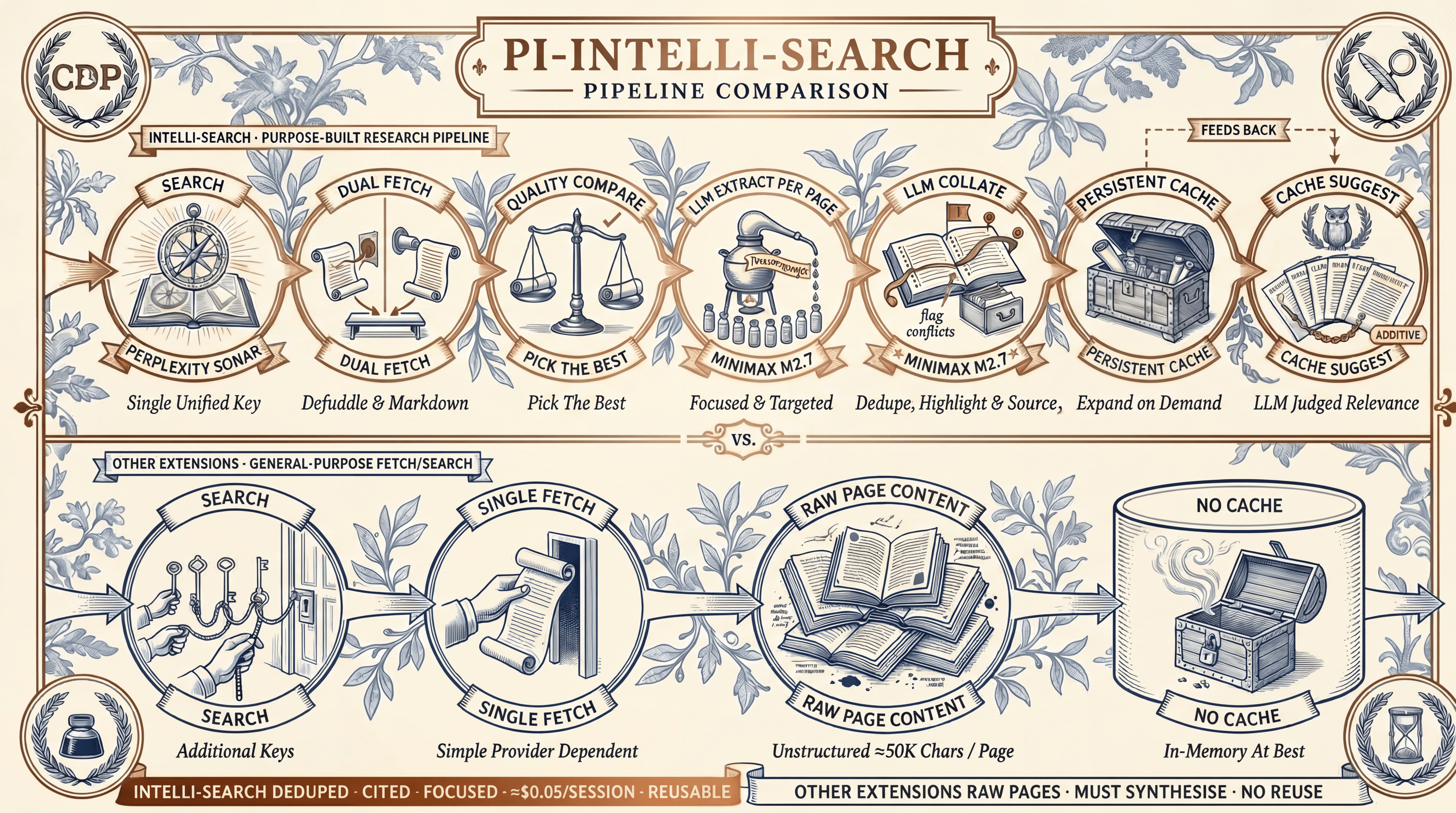
A Pi extension for deep web research. It searches via Perplexity Sonar, fetches pages through a dual-fetch comparison (Defuddle versus Markdown endpoint), extracts query-relevant content per page with a dedicated LLM guided by a focused prompt, then collates findings: deduplicating, flagging inconsistencies, and synthesising a concise summary. Everything is cached in .search/ for offline reuse. Cache suggest surfaces related previous searches on each query.
Features:
- 🔍 Search: Perplexity Sonar via OpenRouter. One API key, no $50 minimum.
- 🌐 Fetch: Dual-fetch each page (HTML → Defuddle versus Markdown endpoint), compare quality, pick the cleaner version.
- 📄 Extract: Per-page LLM extraction guided by a focused prompt. Compresses ≈50K to ≈3-5K chars of query-relevant content.
- 🔗 Collate: Cross-source deduplication, inconsistency detection, and synthesis into a focused ≈5K summary.
- 💾 Cache: Persistent
.search/cache with automatic cache suggest. Related previous searches surfaced on each query. - 🎯 Configurable: Swap any pipeline stage (search, extract, collate) to any model
Pisupports. - 💰 Low cost: Approximately $0.05 per research session with default settings.
What It Adds Over Other Extensions
Four capabilities together separate intelli-search from every other extension in the Pi ecosystem:
- Dual-fetch quality comparison. Every page is fetched twice in parallel (Defuddle versus Markdown endpoint), scored, and the better version wins. Server-rendered Markdown is not guaranteed to be cleaner than HTML; the comparison catches this automatically.
- Per-page LLM extraction guided by
focusPrompt. Each page is compressed to ≈3-5K chars of query-relevant content before entering the agent's context. Extraction quality scales with the chosen model. - LLM collation with deduplication. A collation model synthesises across sources, flags conflicting claims, and preserves source attribution. The agent does not spend reasoning tokens on mechanical synthesis.
- Persistent cache with cache suggest. Full pages and extractions are kept in
.search/and indexed. An LLM judge surfaces related previous searches on each query, so follow-up research is faster and cheaper.
The agent receives a concise ≈5K summary by default. The full page content stays in the cache, accessible via native Pi tools like read or grep for deeper inspection. No other Pi search extension offers both.
For the detailed feature-by-feature comparison against six other Pi search extensions, see docs/COMPARISON.md.
Install
Prerequisites
You need at minimum an OpenRouter API key for Perplexity Sonar search. The same key also covers extraction and collation with the default models. For the extract and collate stages, any model or provider Pi supports can be used. See Model Configuration for how to swap them.
- Get a key at openrouter.ai/keys
- Add it to
Piby running/logininPiand selecting theopenrouterprovider, or edit~/.pi/agent/auth.json:
{
  "openrouter": {
    "type": "api_key",
    "key": "sk-or-v1-..."
  }
}
Install the Extension
From npm (recommended):
pi install npm:@curio-data/pi-intelli-search
From GitHub:
pi install git:github.com/Curio-Data/pi-intelli-search
Local development:
pi install /path/to/pi-intelli-search
On first load, Pi will show: Added models: perplexity/sonar, perplexity/sonar-pro. If your OpenRouter key is missing, you will see a warning notification.
Verify Installation
Start Pi and type /model. You should see perplexity/sonar and perplexity/sonar-pro in the model list. If not, restart Pi.
Customise (Optional)
No configuration is needed to get started. The defaults use OpenRouter for all stages. If you want to change models, add a pi-intelli-search block to ~/.pi/agent/settings.json or .pi/settings.json:
Defaults (what you get without any config):
{
  "pi-intelli-search": {
    "searchModel": {
      "provider": "openrouter",
      "model": "perplexity/sonar"
    },
    "extractModel": {
      "provider": "openrouter",
      "model": "minimax/minimax-m2.7"
    },
    "collateModel": {
      "provider": "openrouter",
      "model": "minimax/minimax-m2.7"
    },

    "defaultUrls": 8,
    "maxUrls": 16,
    "cacheDir": ".search",
    "extractMaxChars": 150000,
    "extractionMaxTokens": 3000,
    "collationMaxTokens": 4000,
    "fetchTimeoutMs": 20000,
    "fetchConcurrency": 4,
    "browserFingerprint": "chrome_145"
  }
}
Customised example (different provider, tuned pipeline):
{
  "pi-intelli-search": {
    "searchModel": {
      "provider": "openrouter",
      "model": "perplexity/sonar"
    },
    "extractModel": {
      "provider": "openai",
      "model": "gpt-4o-mini"
    },
    "collateModel": {
      "provider": "openai",
      "model": "gpt-4o-mini"
    },

    "defaultUrls": 6,
    "maxUrls": 6,
    "cacheDir": ".my-research-cache",
    "extractMaxChars": 80000,
    "extractionMaxTokens": 8000,
    "collationMaxTokens": 16000,
    "fetchTimeoutMs": 30000,
    "fetchConcurrency": 2,
    "browserFingerprint": "chrome_145"
  }
}
See Model Configuration for all options and Settings for the full reference.
Tools
| Tool | Description |
|---|---|
intelli_search |
Search the web and return a concise answer with source URLs. |
intelli_extract |
Extract query-relevant content from a web page, preserving code and technical detail verbatim. |
intelli_collate |
Deduplicate and synthesise multiple extractions into a summary. Writes cache. |
intelli_research |
Search, fetch, extract, collate, cache. The primary research tool. One call. |
Quick Start
Quick Search
intelli_search(query="TypeScript 5.8 release date")
Deep Research
Always provide a focusPrompt. The extraction LLM works best with specific guidance.
intelli_research(
  query="Svelte 5 runes tutorial examples",
  focusPrompt="Extract the core rune concepts ($state, $derived, $effect), their syntax, and how they replace the old reactive declarations. Include migration patterns from Svelte 4."
)
Targeted Research With Domain Restriction
intelli_research(
  query="Cloudflare Workers KV write timeout limits",
  focusPrompt="Extract KV write limits, timeout thresholds, storage limits, and any workarounds for bulk writes. Focus on hard numbers and error messages.",
  maxUrls=3,
  domains=["developers.cloudflare.com"]
)
Comparing Options
intelli_research(
  query="Tailwind CSS vs Vanilla Extract comparison 2026",
  focusPrompt="Extract pros/cons, bundle size benchmarks, DX tradeoffs, and migration costs. Note which claims come from official sources vs blog opinions."
)
Model Configuration
All three pipeline stages use independently configurable models. Defaults are chosen for cost-efficiency, but any model Pi can access works. This includes built-in providers, OpenRouter models, or models from other extensions.
| Stage | Default | Config key |
|---|---|---|
| Search | openrouter/perplexity/sonar |
searchModel |
| Extract | openrouter/minimax/minimax-m2.7 |
extractModel |
| Collate | openrouter/minimax/minimax-m2.7 |
collateModel |
Why OpenRouter for Sonar?
Perplexity Sonar is an excellent search-grounded model, but it is not in Pi's built-in model list. Rather than requiring a separate Perplexity API account (which requires a $50 minimum credit top-up), the extension routes Sonar through OpenRouter. OpenRouter is a unified pay-as-you-go API with a lower minimum spend. One API key gives you Sonar alongside thousands of other models. On first load, the extension patches ~/.pi/agent/models.json to add Sonar under the openrouter provider so Pi can discover it. This approach has several benefits:
- Avoids the Perplexity API $50 minimum. Routing through
OpenRouterconsolidates spend on a single account already used across the open-source coding-agent ecosystem, includingPi. No separate Perplexity subscription is required. - One account, many models. The same OpenRouter key covers Sonar and any other models you might want for extract or collate.
- Is non-destructive. The patch merges new models by ID. It never replaces existing OpenRouter models.
- Is idempotent. It is safe across extension reloads and updates.
Swapping the Extract and Collate Model
MiniMax M2.7 (via OpenRouter) is the default because it is cheap and effective for extraction and collation. However, you can use any model Pi supports. Override in ~/.pi/agent/settings.json or .pi/settings.json:
Option A: Use a Pi Built-In Provider (auth via /login):
{
  "pi-intelli-search": {
    "extractModel": {
      "provider": "openai",
      "model": "gpt-4o-mini"
    },
    "collateModel": {
      "provider": "openai",
      "model": "gpt-4o-mini"
    }
  }
}
Option B: Use Another OpenRouter Model (same key, no extra setup):
{
  "pi-intelli-search": {
    "extractModel": {
      "provider": "openrouter",
      "model": "google/gemini-2.0-flash-001"
    },
    "collateModel": {
      "provider": "openrouter",
      "model": "google/gemini-2.0-flash-001"
    }
  }
}
Option C: Use a Model Provided by Another Extension (for example, Z.Ai or local models):
{
  "pi-intelli-search": {
    "extractModel": {
      "provider": "zai",
      "model": "glm-5.1"
    },
    "collateModel": {
      "provider": "zai",
      "model": "glm-5.1"
    }
  }
}
The only requirement is that the model is registered in Pi's model registry and has auth configured. Run /login to set up built-in providers, or follow the extension's own setup for extension-provided models.
Model Selection Guidance
For extraction and collation, the ideal model has:
- Low cost per token: 8 extractions, 1 collation, and 1 cache suggest per default session.
- Good instruction following: Must adhere to extraction prompts precisely.
- Sufficient context: Cleaned pages can be ≈50K chars (truncated to
extractMaxChars).
Models known to work well for extraction and collation: MiniMax M2.7 (default, via OpenRouter), Qwen 3.5-Flash (≈1M context, ≈$0.26/M output), DeepSeek V4 Flash (≈1M context, ≈$0.28/M output), Gemini 2.0 Flash Lite (≈1M context, ≈$0.30/M output), GPT-4.1 Nano (≈1M context, ≈$0.40/M output).
Required API Keys
With default settings, you need one key in ~/.pi/agent/auth.json:
{
  "openrouter": {
    "type": "api_key",
    "key": "sk-or-v1-..."
  }
}
A single OpenRouter key is the minimum required. It covers Sonar for search plus MiniMax M2.7 for extraction and collation with the default models. The extract and collate stages can use any model Pi supports. Override extractModel or collateModel in settings to switch providers.
Run /login in Pi to set up keys interactively, or edit the file directly.
Pipeline
All model assignments are configurable. See Model Configuration.
Each page is dual-fetched (HTML via Defuddle versus Markdown endpoint) and scored for quality. Per-page extraction (guided by focusPrompt) compresses ≈50K chars to ≈3-5K of query-relevant content before collation, keeping the total context manageable (≈24-40K for 8 pages).
See docs/ARCHITECTURE.md for detailed design decisions.
Cost
Per research session with the default 8 pages: ≈$0.05
| Step | Calls | Cost |
|---|---|---|
| Search (Sonar) | 1 | ≈$0.02 |
| Fetch (Defuddle + Markdown) | 8 parallel pairs | $0.00 |
| Extract (M2.7 via OpenRouter) | 8 parallel | ≈$0.03 |
| Collate (M2.7 via OpenRouter) | 1 | ≈$0.005 |
| Cache suggest (M2.7 via OpenRouter) | 1 | ≈$0.0002 |
Costs scale with your chosen extract or collate model. MiniMax M2.7 (via OpenRouter) is the default specifically for its low relative cost.
Settings
Override defaults in ~/.pi/agent/settings.json or .pi/settings.json under the pi-intelli-search namespace:
{
  "pi-intelli-search": {
    // Model assignments (see Model Configuration above)
    "searchModel": {
      "provider": "openrouter",
      "model": "perplexity/sonar"
    },
    "extractModel": {
      "provider": "openrouter",
      "model": "minimax/minimax-m2.7"
    },
    "collateModel": {
      "provider": "openrouter",
      "model": "minimax/minimax-m2.7"
    },

    // Pipeline tuning
    "defaultUrls": 8,
    "maxUrls": 16,
    "cacheDir": ".search",
    "extractMaxChars": 150000,
    "extractionMaxTokens": 3000,
    "collationMaxTokens": 4000,

    // Fetch behavior
    "fetchTimeoutMs": 20000,
    "fetchConcurrency": 4,
    "browserFingerprint": "chrome_145"
  }
}
Settings Reference
| Setting | Stage | Default | What It Does |
|---|---|---|---|
searchModel |
1. Search | openrouter/perplexity/sonar |
Model for the initial web search. Swap to a stronger model for deeper search results, or to a cheaper one to reduce the ≈$0.02 search cost. See Model Configuration. |
extractModel |
3. Extract | openrouter/minimax/minimax-m2.7 |
Model for per-page content extraction. Runs 8 times per session so low cost per token matters. Ensure the model's context window exceeds extractMaxChars plus the system prompt. For a model with a smaller window (e.g. 256K), lower extractMaxChars to match. See Model Configuration. |
collateModel |
4. Collate | openrouter/minimax/minimax-m2.7 |
Model for cross-source synthesis and deduplication. Sees all extractions at once so it needs enough context and instruction-following to flag contradictions. A model with ≥128K context handles 8 full extractions comfortably. See Model Configuration. |
defaultUrls |
1 → 2 | 8 |
Fallback when the agent does not pass maxUrls per call. Lower values reduce cost and latency but give less thorough results. The agent's skill guide recommends 3 (targeted), 8 (broad), or 12 (exhaustive). |
maxUrls |
1 → 2 | 16 |
Hard cap on URLs fetched. Lower caps mean faster responses and lower cost; higher caps allow more thorough research. Each extra URL adds roughly $0.004 in extract cost with the default model. Requests above the cap are silently clamped. |
cacheDir |
4, 5 | .search |
Directory where research sessions are cached. Change this to keep project-specific research separate. Example: ".my-research-cache". |
extractMaxChars |
3. Extract | 150000 |
Maximum characters of raw page content fed to the extract LLM per page. Lower this when using an extract model with a small context window (e.g. 256K) to prevent context overflow. Raise it if pages are truncated and your model has ample headroom. Each 50K chars consumes roughly 12K input tokens. |
extractionMaxTokens |
3. Extract | 3000 |
Maximum output tokens for each per-page extraction. Higher values preserve more detail at higher cost. Lower this when using a model with a small context window so the output does not crowd out the input. The extract prompt targets 3,000-5,000 characters; 3,000 tokens covers this comfortably. |
collationMaxTokens |
4. Collate | 4000 |
Maximum output tokens for the final synthesis. Lower values force tighter deduplication. Lower this when using a collation model with a small context window (the output must fit alongside all extraction inputs). The summary you see in the agent context is bounded by this setting. |
fetchTimeoutMs |
2. Fetch | 20000 |
Per-page fetch timeout in milliseconds. Increase if you research sites known to be slow. Fetches run in parallel so this does not multiply by page count. |
fetchConcurrency |
2. Fetch | 4 |
Number of pages fetched simultaneously. Higher values (6-8) complete the fetch stage faster but may trigger rate limiting. Lower values (2) are gentler on target servers. |
browserFingerprint |
2. Fetch | chrome_145 |
TLS fingerprint used by wreq-js to impersonate a browser. Determines which HTTP client signature site sees. Available profiles include chrome_*, firefox_*, safari_*, edge_*, and opera_* across many versions. Change this if a site blocks the default fingerprint. |
Automatic llms-full.txt Discovery
Sites that follow the llms-full.txt convention publish a single Markdown file containing their complete documentation. During the fetch stage, every domain in the search results is probed at https://domain/llms-full.txt. If the file exists (HTTP 200), it is downloaded raw to sources/llms-full-*.md for offline search with grep or read.
A small built-in list handles sites with non-standard paths:
| Site | Path Pattern |
|---|---|
| Cloudflare Docs | /product/llms-full.txt |
| Next.js | /docs/llms-full.txt |
| Vite | /llms-full.txt (root) |
No configuration is needed. The probe and download are automatic.
Cache Structure
.search/
├── 2026-04-19-d1-worker-api/
│   ├── report.md               # Collated summary + source index
│   ├── query.txt               # Original search query
│   ├── extractions/            # Per-page LLM extractions (≈3-5K each)
│   │   ├── 01-developers-cloudflare-com.md
│   │   └── 02-developers-cloudflare-com.md
│   └── sources/                # Full page content
│       ├── 01-developers-cloudflare-com.md
│       ├── 02-developers-cloudflare-com.md
│       └── llms-full-developers-cloudflare-com.md
└── .index.json                 # Index of all cached searches
Compatibility
Pi>= 0.74.0: Core functionality (TypeBox 1.x, tools, model registration, settings, working indicator,after_provider_responsemonitoring).- Gracefully degrades on older versions. Optional features are skipped.
Development
npm install
npm run build        # TypeScript -> dist/
npm test             # Unit tests
npm run test:smoke   # Smoke test

# Test in pi
pi -e ./dist/index.js

# Install as package
pi install /path/to/pi-intelli-search
Documentation
- Comparison: How
intelli-searchcompares to otherPisearch extensions. - Changelog: Release history.
- Architecture: Detailed design decisions and pipeline internals.
- Components: Third-party dependencies and license attribution.
- Skill guide: Agent-facing usage instructions.
- Contributor guide: Coding conventions and project structure.
Sponsor
Curio Data Pro Ltd sponsors this project. Curio Data Pro is a data consultancy serving Rail, Naval Design, Aviation, and Offshore Energy, combining 20+ years of Chartered Engineer experience with Data Science and DevOps capabilities.
License
Copyright 2026 Ashraf Miah, Curio Data Pro Ltd.
Licensed under the Apache License, Version 2.0.
Use of Large Language Models
Large Language Models were used extensively during the development of this project:
Piagent (primary development environment).- GLM 5.1: Primary model for code generation and architecture.
- DeepSeek V4 Pro: Research and data analysis.
- Qwen 3.6 Plus: Secondary model for review and documentation.