@curio-data/pi-intelli-search
Intelligent web research for Pi: search, extract, collate, and cache grounded web context in one tool call.
Package details
Install @curio-data/pi-intelli-search from npm and Pi will load the resources declared by the package manifest.
$ pi install npm:@curio-data/pi-intelli-search- Package
@curio-data/pi-intelli-search- Version
0.3.2- Published
- May 4, 2026
- Downloads
- not available
- Author
- miah0x41
- License
- Apache-2.0
- Types
- extension, skill
- Size
- 238.1 KB
- Dependencies
- 3 dependencies · 3 peers
Pi manifest JSON
{
  "extensions": [
    "./src/index.ts"
  ],
  "skills": [
    "./skills"
  ],
  "image": "https://raw.githubusercontent.com/Curio-Data/pi-intelli-search/main/docs/images/02.png"
}
Security note
Pi packages can execute code and influence agent behavior. Review the source before installing third-party packages.
README
pi-intelli-search





Intelligent web research for Pi: search, extract, collate, and cache grounded web context in one tool call.
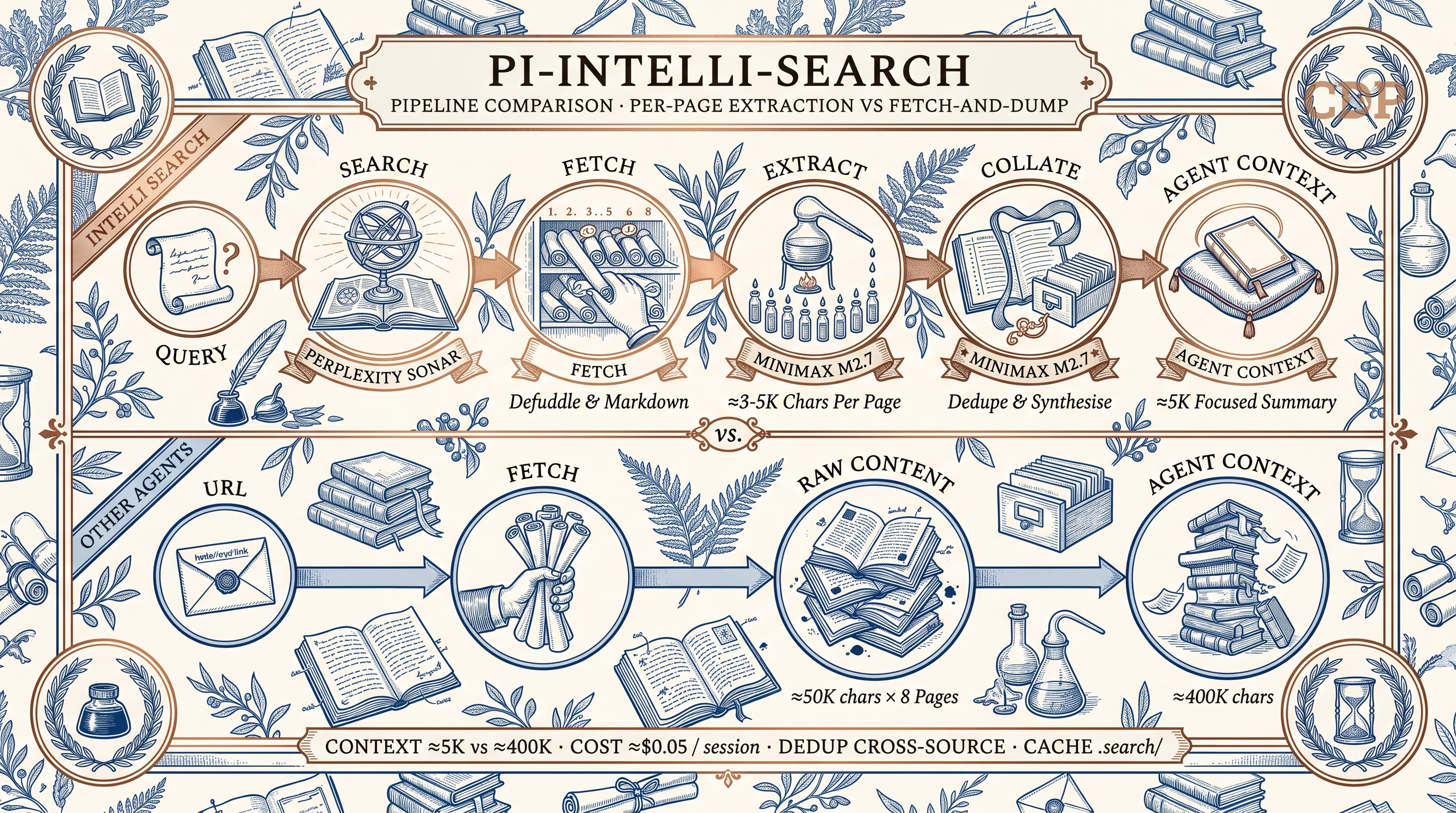
A Pi extension that adds a 5-stage research pipeline — search → fetch → extract → collate → cache suggest — designed for technical task completion. Per-page LLM extraction compresses raw pages to query-relevant content, then deduplicates across sources into a concise summary with a persistent .search/ cache.
Features:
- 🔍 Search — Perplexity Sonar via OpenRouter (one API key, no $50 minimum)
- 📄 Extract — Per-page LLM extraction compresses ~50K → ~3-5K chars
- 🔗 Collate — Cross-source deduplication into a focused ~5K summary
- 💾 Cache — Persistent
.search/cache for offline reuse and follow-up - 🎯 Configurable — Swap any pipeline stage to any model pi supports
- 💰 Low cost — ~$0.05 per 8-page research session with defaults
Why intelli-search?
Most coding agents handle web research with a simple two-step pattern: fetch URL → dump raw content into context. Claude Code's WebFetch tool, revealed in its open-sourced CLI, follows exactly this approach — it fetches a page, converts HTML to markdown (via the Jina Reader API), and hands the full result to the model.
The problem: a cleaned documentation page is still ~50K characters. For 8 sources, that's ~400K chars dumped into the agent's context window. The model must simultaneously hold your task, the codebase, and a wall of raw web content. Signal-to-noise drops fast.
intelli-search takes a different approach — extract before you collate.
Each page is compressed by a dedicated extraction model before entering the agent's context. A collation model then deduplicates across extractions. The agent receives a focused ~5K summary instead of 400K of raw HTML.
| Fetch-and-dump | intelli-search pipeline | |
|---|---|---|
| Context cost | ~400K chars raw | ~5K chars focused |
| Noise | Nav, ads, sidebars included | Stripped by extraction |
| Deduplication | None — overlapping sources waste tokens | Cross-source dedup via collation |
| Cost per session | N/A (no search) | ~$0.05 |
| Offline reuse | No | Cached in .search/ |
Install
From npm (recommended):
pi install npm:@curio-data/pi-intelli-search
From GitHub:
pi install git:github.com/Curio-Data/pi-intelli-search
Local development:
pi install /path/to/pi-intelli-search
On first load, the extension adds Perplexity Sonar models to ~/.pi/agent/models.json under the openrouter provider. This patch approach lets pi discover Sonar through OpenRouter — no separate Perplexity API account needed.
Tools
| Tool | Description |
|---|---|
intelli_search |
Search via Perplexity Sonar. Returns summary + source URLs. |
intelli_extract |
Per-page LLM extraction. Reduces ~50K chars → ~3-5K of relevant content. |
intelli_collate |
Deduplicate and synthesise extractions into a summary + cache. |
intelli_research |
Full pipeline: search → fetch → extract → collate → cache. One call. |
Quick Start
Quick search
intelli_search(query="TypeScript 5.8 release date")
Deep research
Always provide a focusPrompt — the extraction LLM works best with specific guidance.
intelli_research(
  query="Svelte 5 runes tutorial examples",
  focusPrompt="Extract the core rune concepts ($state, $derived, $effect), their syntax, and migration patterns."
)
Targeted research with domain restriction
intelli_research(
  query="Cloudflare Workers KV write timeout limits",
  focusPrompt="Extract KV write limits, timeout thresholds, and workarounds. Focus on hard numbers.",
  maxUrls=3,
  domains=["developers.cloudflare.com"]
)
Comparing options
intelli_research(
  query="Tailwind CSS vs Vanilla Extract comparison 2026",
  focusPrompt="Extract pros/cons, bundle size benchmarks, DX tradeoffs, and migration costs."
)
Model Configuration
All three pipeline stages use independently configurable models. Defaults are chosen for cost-efficiency, but any model pi can access works — built-in providers, OpenRouter models, or models from other extensions.
| Stage | Default | Config key |
|---|---|---|
| Search | openrouter/perplexity/sonar |
intelliSearchModel |
| Extract | minimax/MiniMax-M2.7 |
intelliExtractModel |
| Collate | minimax/MiniMax-M2.7 |
intelliCollateModel |
Why OpenRouter for Sonar?
Perplexity Sonar is an excellent search-grounded model, but it's not in pi's built-in model list. Rather than requiring a separate Perplexity API account (which requires a $50 minimum credit top-up), the extension routes Sonar through OpenRouter — a unified pay-as-you-go API with no minimum spend. One API key gives you Sonar alongside thousands of other models. On first load, the extension patches ~/.pi/agent/models.json to add Sonar under the openrouter provider so pi can discover it. This approach:
- Avoids the Perplexity API $50 minimum — OpenRouter has pay-as-you-go with no minimum spend
- One account, many models — the same OpenRouter key covers Sonar and any other models you might want for extract/collate
- Is non-destructive — the patch merges new models by ID; it never replaces existing OpenRouter models
- Is idempotent — safe across extension reloads and updates
Swapping the extract/collate model
MiniMax M2.7 is the default because it's cheap and effective for extraction/collation, but you can use any model pi supports. Override in ~/.pi/agent/settings.json or .pi/settings.json:
Option A — Use a pi built-in provider (auth via /login):
{
  "intelliExtractModel": { "provider": "openai", "model": "gpt-4o-mini" },
  "intelliCollateModel": { "provider": "openai", "model": "gpt-4o-mini" }
}
Option B — Use another OpenRouter model (same key, no extra setup):
{
  "intelliExtractModel": { "provider": "openrouter", "model": "google/gemini-2.0-flash-001" },
  "intelliCollateModel": { "provider": "openrouter", "model": "google/gemini-2.0-flash-001" }
}
Option C — Use a model provided by another extension (e.g. Z.Ai, local models):
{
  "intelliExtractModel": { "provider": "zai", "model": "glm-5.1" },
  "intelliCollateModel": { "provider": "zai", "model": "glm-5.1" }
}
The only requirement is that the model is registered in pi's model registry and has auth configured. Run /login to set up built-in providers, or follow the extension's own setup for extension-provided models.
Model selection guidance
For extraction and collation, the ideal model has:
- Low cost per token — 8 pages × extraction + 1 collation per session
- Good instruction following — must adhere to extraction prompts precisely
- Sufficient context — cleaned pages can be ~50K chars (truncated to
extractMaxChars)
Models known to work well: MiniMax M2.7 (default), GPT-4o-mini, Gemini 2.0 Flash, DeepSeek V3, Claude 3.5 Haiku.
Required API Keys
With default settings, you need two keys in ~/.pi/agent/auth.json:
{
  "openrouter": { "type": "api_key", "key": "sk-or-v1-..." },
  "minimax": { "type": "api_key", "key": "sk-api-..." }
}
- OpenRouter — used by
intelli_search(Perplexity Sonar) and available as an extract/collate alternative - MiniMax — used by
intelli_extractandintelli_collate(MiniMax M2.7). Only needed if you keep the defaults — overrideintelliExtractModel/intelliCollateModelto use a different provider.
Run /login in pi to set up keys interactively, or edit the file directly.
Pipeline
intelli_research(query)
  ├── Stage 1: Search  → Perplexity Sonar (via OpenRouter, pi native auth)
  ├── Stage 2: Fetch   → wreq-js + Defuddle, compared against raw markdown
  ├── Stage 3: Extract → configurable model, default: MiniMax M2.7 (parallel)
  ├── Stage 4: Collate → configurable model, default: MiniMax M2.7 (dedup + cache)
  └── Stage 5: Cache suggest → LLM judge finds related previous searches (additive)
All model assignments are configurable — see Model Configuration.
Each page is dual-fetched (HTML → Defuddle vs markdown endpoint) and scored for quality. Per-page extraction compresses ~50K chars to ~3-5K of query-relevant content before collation, keeping the total context manageable (~32K for 8 pages).
For sites with llms-full.txt (Cloudflare, Next.js, Vite), the raw file is downloaded to the cache for offline grep — no LLM processing needed.
See docs/ARCHITECTURE.md for detailed design decisions.
Cost
Per 8-page research session with default models: ~$0.05
| Step | Calls | Cost |
|---|---|---|
| Search (Sonar) | 1 | ~$0.02 |
| Fetch (Defuddle + markdown) | 8 parallel pairs | $0.00 |
| Extract (M2.7) | 8 parallel | ~$0.03 |
| Collate (M2.7) | 1 | ~$0.005 |
Costs scale with your chosen extract/collate model — MiniMax M2.7 is the default specifically for its low cost.
Settings
Override defaults in ~/.pi/agent/settings.json or .pi/settings.json:
{
  // Model assignments — see "Model Configuration" section for swap guidance
  "intelliSearchModel": {
    "provider": "openrouter",
    "model": "perplexity/sonar",
  },
  "intelliExtractModel": { "provider": "minimax", "model": "MiniMax-M2.7" },
  "intelliCollateModel": { "provider": "minimax", "model": "MiniMax-M2.7" },

  // Pipeline tuning
  "intelliMaxUrls": 8,
  "intelliCacheDir": ".search",
  "intelliExtractMaxChars": 150000,
  "intelliExtractionMaxTokens": 3000,
  "intelliCollationMaxTokens": 4000,
  "intelliFetchTimeoutMs": 20000,
  "intelliFetchConcurrency": 4,
  "intelliBrowserFingerprint": "chrome_145",
  "intelliLlmsFullSites": {},
}
Cache Structure
.search/
├── 2026-04-19-d1-worker-api/
│   ├── report.md               # Collated summary + source index
│   ├── query.txt               # Original search query
│   ├── extractions/            # Per-page LLM extractions (~3-5K each)
│   │   ├── 01-developers-cloudflare-com.md
│   │   └── 02-developers-cloudflare-com.md
│   └── sources/                # Full page content
│       ├── 01-developers-cloudflare-com.md
│       ├── 02-developers-cloudflare-com.md
│       └── llms-full-developers-cloudflare-com.md
└── .index.json                 # Index of all cached searches
Compatibility
- pi ≥ 0.69.0 — core functionality (TypeBox 1.x, tools, model registration, settings, working indicator,
after_provider_responsemonitoring) - Gracefully degrades on older versions (optional features are skipped)
Development
npm install
npm run build        # TypeScript → dist/
npm test             # Unit tests (104 tests)
npm run test:smoke   # Smoke test

# Test in pi
pi -e ./dist/index.js

# Install as package
pi install /path/to/pi-intelli-search
Documentation
- Changelog — release history
- Architecture — detailed design decisions and pipeline internals
- Components — third-party dependencies and license attribution
- Skill guide — agent-facing usage instructions
- Contributor guide — coding conventions and project structure
Sponsor

This project recognises the support and resources provided by Curio Data Pro Ltd, a data consultancy serving engineering sectors including Rail, Naval Design, Aviation, and Offshore Energy. Curio Data Pro combines 20+ years of Chartered Engineer experience across Aerospace, Defence, Rail, and Offshore Energy with data science and DevOps capabilities.
License
Copyright 2026 Ashraf Miah, Curio Data Pro Ltd.
Licensed under the Apache License, Version 2.0.
Use of Text Generators
Text Generators (e.g. Large Language Models (LLMs) or so-called "Artificial Intelligence" tools) have been used extensively in the development of this project.
- Pi agent (primary development environment)
- GLM 5.1 — primary model for code generation and architecture
- Qwen 3.6 Plus — secondary model for review and documentation