@d3ara1n/pi-access-denied
Sandbox write/edit/bash to the project dir — prompt / deny / allow modes, configurable deny-with-redirect rules, per-session allow-deny memory
Package details
Install @d3ara1n/pi-access-denied from npm and Pi will load the resources declared by the package manifest.
$ pi install npm:@d3ara1n/pi-access-denied- Package
@d3ara1n/pi-access-denied- Version
1.2.0- Published
- Aug 5, 2026
- Downloads
- 527/mo · 32/wk
- Author
- d3ara1n
- License
- MIT
- Types
- extension
- Size
- 705.9 KB
- Dependencies
- 1 dependency · 1 peer
Pi manifest JSON
{
  "extensions": [
    "./src/index.ts"
  ],
  "image": "https://raw.githubusercontent.com/d3ara1n/pi-extensions/main/packages/pi-access-denied/preview.png"
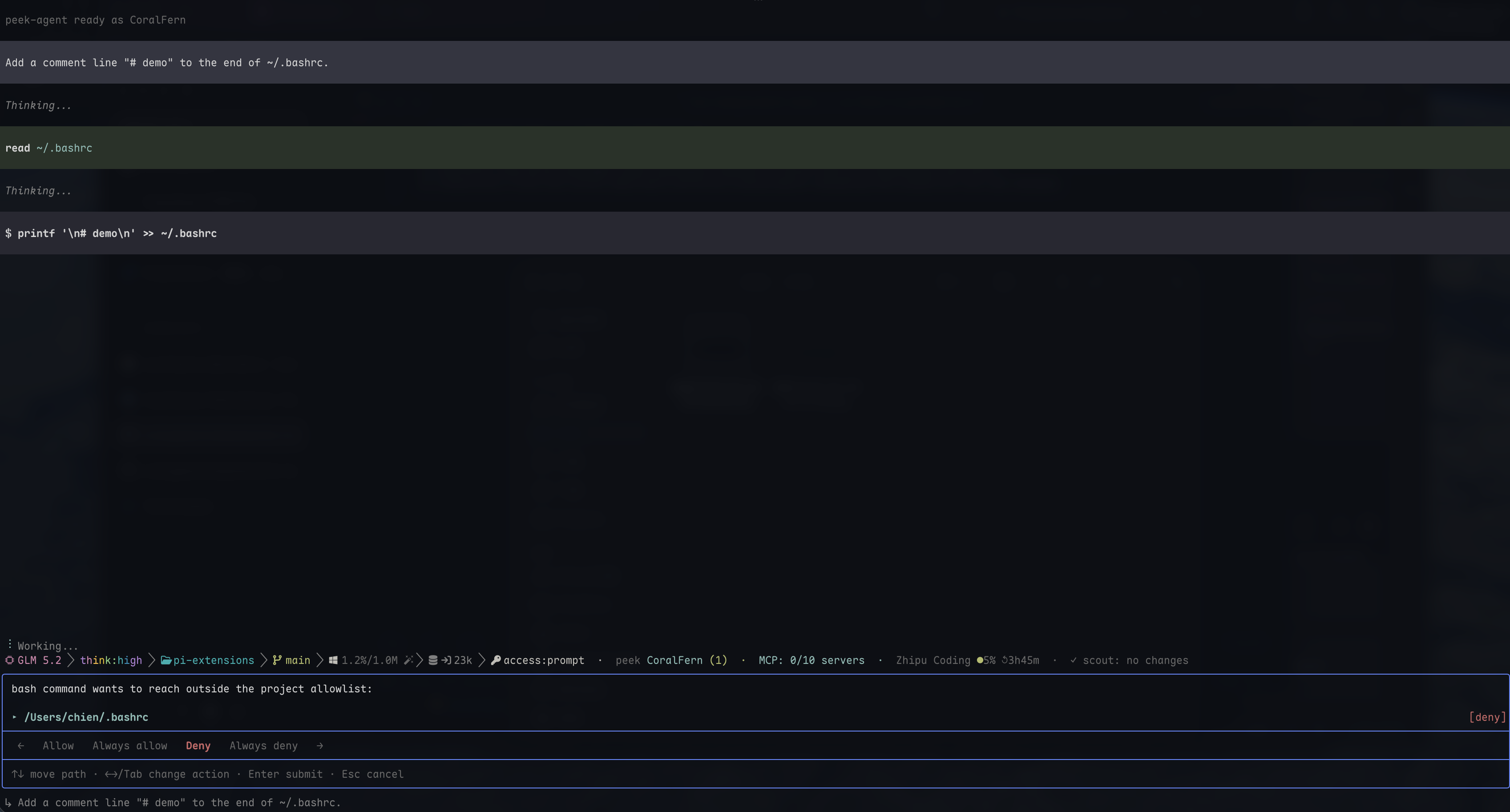
}
Security note
Pi packages can execute code and influence agent behavior. Review the source before installing third-party packages.
README
pi-access-denied
Behavior guard for write / edit / bash path choices. It nudges an agent back toward the project when it tries broad disk searches, reaches for stale sensitive-data locations, or writes persistent data outside the working directory.
Why
LLMs sometimes choose unnecessarily broad or misplaced paths: find / instead of searching the project, an application data directory remembered from training data, or a home-directory output path when the result belongs in the repository. This extension catches common forms of those calls and either asks you, redirects the agent with a reason, or blocks the call according to your selected mode.
It is a behavior-correction layer, not a security sandbox. Bash commands are parsed structurally (not flat-tokenized) so that quoted text and nested commands are handled correctly; matching remains deliberately best-effort and biased toward low noise — missing an unusual path expression is preferable to interrupting ordinary commands with false positives. Use OS/container isolation when access must be enforced against deliberate or comprehensive evasion.
Pi's built-in "trusted projects" controls whether project-local config, resources, and extensions may load. This extension instead influences agent tool behavior after loading; it does not reuse or replace pi's trust model.
Three modes
| Mode | Behavior |
|---|---|
prompt |
Ask the user on each out-of-bounds access (default) |
deny |
Block every out-of-bounds access without asking |
allow |
Passthrough (effectively disable the gate) |
Authorization panel (prompt mode only):
When a recognized tool call contains a path outside the configured roots, a bottom-anchored panel lists each matched path on its own row, defaulting to Allow. A single horizontal action bar reflects the focused path's current choice:
- Allow (default) — allow this one call; shows no marker on its row
- Always allow — remember the path and everything beneath it, don't ask again this session; marks the row
[always-allow](green) - Deny — block this one call; marks the row
[deny](red) - Always deny — block that path and everything beneath it for the rest of this session; marks the row
[always-deny](red)
Each path keeps its own choice, so a multi-path bash call can allow some paths while denying others in a single pass. Submitting with any deny present pops a single global reason input (leave empty for a default reason); Esc there returns to the path list rather than committing a no-reason deny.
Keys: ↑/↓ move path focus · ←/→ change the focused path's action (no wrap) · Tab cycles the action (wraps) · Enter submit · Esc cancel the whole authorization (or, in the reason input, go back to the path list).
"Always" memory uses prefix coverage (not exact paths): authorizing /a/b also covers /a/b/c, /a/b/c/d, … so you never get re-prompted for a path whose ancestor you already decided on. When you remember a broader path, any narrower entries it now subsumes are dropped, keeping the list minimal and the status view free of "parent listed next to its own child" oddity. Memory is session-only — restarting pi, /reload, /new, /resume all clear it.
Dependencies
None.
Installation
pi install npm:@d3ara1n/pi-access-denied
Or add to ~/.pi/agent/settings.json:
{
  "extensions": [
    "/absolute/path/to/pi-extensions/packages/pi-access-denied"
  ]
}
Then /reload (or restart pi).
Configuration
Under the accessDenied key in settings.json (global ~/.pi/agent/settings.json or per-project .pi/settings.json). A present project accessDenied block replaces the global block; fields omitted from the selected block use their defaults:
{
  "accessDenied": {
    "mode": "prompt",
    "allowedPaths": [
      "~/Documents/notes",
      "/var/log/myapp"
    ],
    "deniedPaths": [
      { "paths": ["~/.config/X/data"], "reason": "X data moved to ~/MyData/X; use the new location" },
      { "paths": ["/old/cache"] }
    ],
    "tools": ["write", "edit", "bash"]
  }
}
Rule resolution: longest-prefix-match
All rules — built-in safe paths, allowedPaths, deniedPaths, and runtime session decisions — are resolved by a single algorithm: the most specific (deepest) rule covering a target wins, regardless of which layer it came from.
allow /aaa/bbb deny /aaa/bbb/ccc deny /aaa
| Target | Winner | Result |
|---|---|---|
/aaa/bbb/ddd |
allow /aaa/bbb (depth 2) |
✅ allow |
/aaa/bbb/ccc/ddd |
deny /aaa/bbb/ccc (depth 3) |
❌ deny |
/aaa/ccc |
deny /aaa (depth 1) |
❌ deny |
A same-depth allow/deny conflict (same path in both lists) resolves to deny — the safe default. Session decisions are equal peers: a runtime "always-allow /a/b/c" overrides a config "deny /a/b" for that subtree, exactly as two config rules would.
deniedPaths — redirect recurring agent behavior
The primary use case is redirecting an agent away from a stale or unwanted path. An agent may reach for a data directory it remembers from training data; if that path is wrong, it can escalate into a broad disk search. Listing the old path in deniedPaths with the preferred location as the reason corrects the behavior immediately:
{
  "deniedPaths": [
    { "paths": ["~/.config/some-app"], "reason": "moved to ~/MyData/some-app; use the new location" }
  ]
}
The agent touches ~/.config/some-app, gets blocked, and the reason (surfaced as a "user note") tells it exactly where to look instead — no more disk-wide scavenger hunts.
The reason is delivered to the agent wrapped as a "user note" (Blocked by access-denied (user note: "...")) and is identical whether the deny came from config or a runtime panel decision — the agent only ever sees "the user declined this", never which layer produced it.
Built-in safe paths (never prompt)
The guard is intended to correct persistent or overly broad filesystem behavior, not to interfere with ordinary task-scoped scratch work. OS-reclaimed temporary locations are therefore allowed by default:
- Pseudo-devices:
/dev/null,/dev/stdin,/dev/stdout,/dev/stderr,/dev/zero,/dev/urandom,/dev/random,/dev/fd/(the process's own file descriptors). On Windows, the native device namesNUL/CON/AUX/PRN/COM1-9/LPT1-9are also recognized (matched by basename, soC:\proj\NUL, bareNUL, andNUL.txtall work). - Scratch dirs:
/tmp(system shared, auto-cleaned) andos.tmpdir()(per-user temp; on Linux these are the same place). macOS/tmp->/private/tmpsymlink is handled. On Git Bash for Windows,/tmpmaps to%TEMP%— see Cross-platform behavior.
Deliberately not allowed: /dev/tty (can capture keyboard input), /dev/disk* (block devices), and anything that persists — home dir, /etc, /var, /usr, etc.
Use allowedPaths to add your own always-safe roots (e.g. a log dir you always read).
Commands
/access-denied prompt        # switch to prompt mode
/access-denied deny          # switch to deny mode
/access-denied allow         # switch to allow mode
/access-denied:status        # show status (mode, allow/deny rules, session memory)
/access-denied:reset         # clear session always-allow / always-deny memory
Path resolution
In-bounds = current project cwd + configured allowedPaths + built-in safe paths. A target path is resolved + normalized and run through the PathManager (longest-prefix-match across all rule layers — see Rule resolution). A matching allow rule passes it; a matching deny rule blocks it; an uncovered path triggers authorization.
write/edit: takes thepathargument directly — exact.bash: the command string is parsed into a structural AST (unbash) and walked recursively; only clearly escaping tokens are judged:- absolute paths starting with
/ ~/$HOMEprefixes..parent climbs (../x,a/..,a/../b)
Relative paths under
cwd(e.g.src/foo.ts,cat README.md) are left alone by default.- absolute paths starting with
Quoted strings are data, not paths. A quoted run (single/double/ANSI-C) is an argument's value — e.g. a multi-line git commit -m "…" message — so its inner text is never mined for path tokens. This is what keeps the gate quiet instead of flagging every /… inside a commit message and training you to hit "always allow". Command and process substitutions still execute inside quotes ("$(rm /x)"), so they are recursed into regardless of quoting context. Heredoc bodies are stdin data and not scanned; an unquoted heredoc's $(…) substitutions do execute and are caught.
Backslash escapes are resolved by the parser. /a/Agent\ Workspace/b is one token whose dequoted value is /a/Agent Workspace/b. This covers \ , \;, \(, \|, \\, etc.
Note: read-only commands that traverse outside cwd (like find /, ls /etc) are also gated — bash access outside the project is blocked regardless of read/write, by design.
Cross-platform behavior
pi runs commands through Git Bash on Windows, so bash command strings arrive in MSYS style (/dev/null, /tmp, /c/Users/...). Node's path module does not understand MSYS path conventions — path.win32.normalize("/dev/null") yields \dev\null, which would otherwise fail to match the Unix-style safe-path constants. The gate handles MSYS paths itself instead of relying on Node:
Safe-path constants work on both platforms.
/dev/null,/dev/std*,/dev/fd/, and/tmpare matched after normalizing separators to/, so the\dev\nullproduced by Windows path resolution is recognized as the same safe path as the POSIX/dev/null.MSYS drive notation.
/c/Users/meis resolved toC:\Users\mebefore allowlist checks (case-insensitive, as MSYS is). So a command writing under cwd in MSYS style (/c/proj/src/...) is correctly seen as in-bounds rather than mis-resolved toC:\c\proj\..../tmpon Git Bash for Windows maps to%TEMP%(the OS-reclaimed per-user temp) by default, matching the Unix/tmpsemantics, and is treated as safe. (If you reconfigured/etc/fstabto mount/tmpat a permanent location, that location is still treated as safe — extremely rare configuration, and the blast radius is limited to/tmpwrites.)
Cannot be resolved statically (treated as out-of-bounds, conservatively): MSYS paths whose real Windows target depends on the install location or mount table — /usr/..., /etc/..., the MSYS root /. If your workflow needs these, add them to allowedPaths with their real Windows paths.
Limitations (bash heuristic)
A bash command is an arbitrary shell string, so perfect static path analysis is impossible. The structural parse recurses into command substitutions $(…), process substitutions <(…), subshells, pipelines, and every control-flow body (if/for/while/case/…), but these blind spots remain:
- Unexpanded
$VAR(other than$HOME/${HOME}) can't be analyzed statically and is skipped (allowed). e.g.cat $SECRET_FILE. - Quoted real paths are treated as data.
cat '/etc/passwd'passes through even thoughcat /etc/passwd(bare) is blocked — a quoted run is an argument value, and static analysis cannot know whether a given program opens it as a file. The bare-path check covers the common case. - An assignment like
X=/etc/passwdis data, not file access, and is skipped (nestedX=$(…)still recurses).
This is intentional best-effort matching, not an absolute sandbox. The goal is to correct common agent behavior with little noise, not to understand every possible shell expansion. For enforced isolation, use a container or remote execution boundary.
Non-interactive mode
The authorization panel uses pi's TUI-only ctx.ui.custom() API. In print, JSON, and RPC modes, prompt mode cannot open that panel and blocks matched out-of-project calls with TUI authorization unavailable. Set mode to allow when running non-interactively and this behavior guard is not wanted.
Design notes
- Session state is stored on
globalThis(per the monorepo convention, avoiding module-identity issues from pi's absolute-path loading); reset to the configured default onsession_start. - One decision engine. All access checks flow through a single
PathManager(longest-prefix-match) rather than a chain of scattered predicates. Rule layers (builtin / config / session) are equal peers at decision time; layering is only used to group the/access-denied statusoutput. - Deny reasons speak with the user's voice. Whether a deny came from config
deniedPathsor a runtime panel decision, the agent receives the sameBlocked by access-denied (user note: "...")form — it never learns which layer blocked it. - Session memory is never persisted — by design; restarting forgets, preventing authorization drift into hidden risk. Config rules (
allowedPaths/deniedPaths) reload from settings on each session. - Interception uses pi's
tool_callevent, returning{ block: true, reason }; the deny reason is passed back to the LLM as the block reason.