@d3ara1n/pi-peek-agent
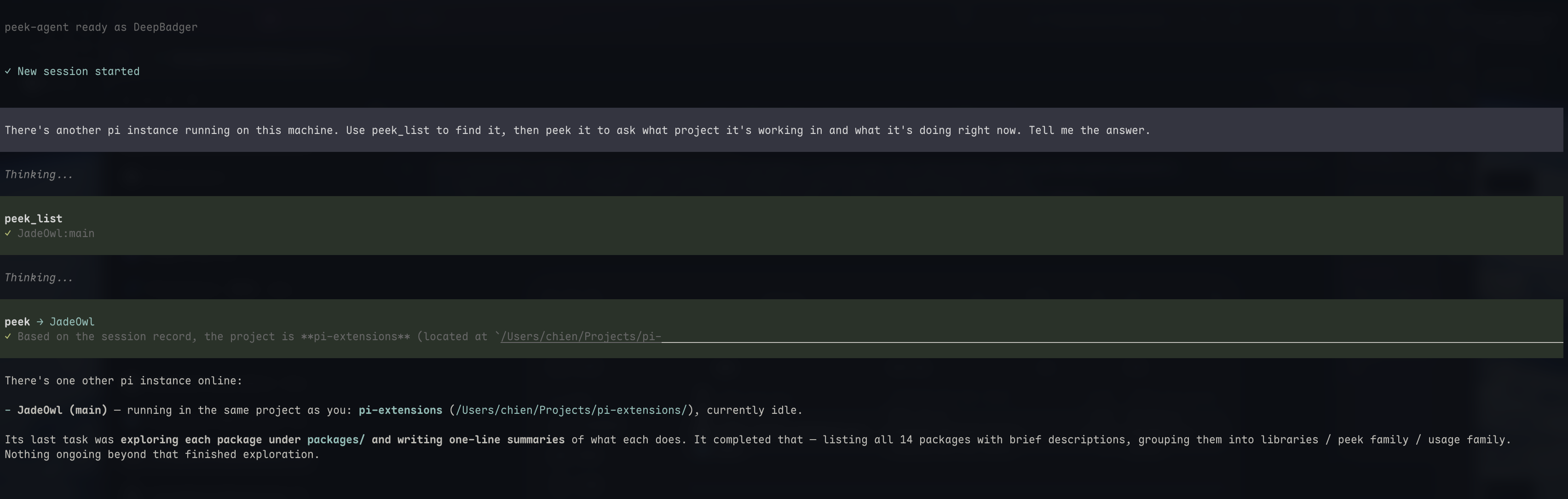
Cross-instance peek for pi — built on @d3ara1n/pi-mesh. Registers an 'ask' handler that answers remote peeks via @d3ara1n/pi-peek's read-after-burn consult, plus the `peek` LLM tool. Discovery, transport, and identity live in pi-mesh.
Package details
Install @d3ara1n/pi-peek-agent from npm and Pi will load the resources declared by the package manifest.
$ pi install npm:@d3ara1n/pi-peek-agent- Package
@d3ara1n/pi-peek-agent- Version
0.5.0- Published
- Jul 30, 2026
- Downloads
- 786/mo · 194/wk
- Author
- d3ara1n
- License
- MIT
- Types
- extension
- Size
- 416.8 KB
- Dependencies
- 2 dependencies · 3 peers
Pi manifest JSON
{
  "extensions": [
    "./src/index.ts"
  ],
  "image": "https://raw.githubusercontent.com/d3ara1n/pi-extensions/main/packages/pi-peek-agent/preview.png"
}
Security note
Pi packages can execute code and influence agent behavior. Review the source before installing third-party packages.
README
@d3ara1n/pi-peek-agent
Cross-instance peek for pi — ask another pi instance a question without disturbing its main conversation. Built on @d3ara1n/pi-mesh for discovery and transport.
Adds the peek tool. Discovery, identity, and the socket mesh live in pi-mesh — load pi-mesh alongside this package.
How it works
- Read-after-burn: the peeked instance's main agent is never touched. The answer comes from its side
utilitymodel via the sharedpi-peekconsult core. - On the mesh: this package registers an
"ask"handler on the pi-mesh transport; a remotepeekcall routes there and is answered locally. Identity, discovery, and peer listing are pi-mesh's job — usemesh_listto see who's online.
Tool
peek
Ask another instance a question without disturbing its main conversation.
| Parameter | Required | Description |
|---|---|---|
question |
yes | The question to ask. |
at |
no | Target instance name (e.g. "Fox"). Omit to auto-pick the other same-project instance. |
sessionId |
no | Pin a specific instance by sessionId (use when names collide). |
Peer discovery moved to pi-mesh — use
mesh_list(provided bypi-mesh) to see who's online.
Installation
pi install npm:@d3ara1n/pi-model-roles
pi install npm:@d3ara1n/pi-peek
pi install npm:@d3ara1n/pi-mesh
pi install npm:@d3ara1n/pi-peek-agent
Or add to ~/.pi/agent/settings.json:
{
  "extensions": [
    "/absolute/path/to/pi-extensions/packages/pi-model-roles",
    "/absolute/path/to/pi-extensions/packages/pi-peek",
    "/absolute/path/to/pi-extensions/packages/pi-mesh",
    "/absolute/path/to/pi-extensions/packages/pi-peek-agent"
  ]
}
Dependencies
@d3ara1n/pi-mesh— peer discovery + transport@d3ara1n/pi-peek— consult core (serialize + investigate)
Configuration
Optional, in ~/.pi/agent/settings.json under peek:
{
  "peek": {
    "askTimeoutMs": 120000,
    "role": "utility"
  }
}
askTimeoutMs must be a positive finite number. Discovery/registry/heartbeat config moved to pi-mesh's mesh block.
Naming
Names are managed by pi-mesh — see the pi-mesh README. Each instance gets a stable name derived from its session id; override at startup with PI_MESH_NAME, or rename at runtime with /mesh:rename.
License
MIT