@d3ara1n/pi-peek-user
Local /peek overlay for pi — investigate your own session without disturbing the main agent (read-after-burn)
Package details
Install @d3ara1n/pi-peek-user from npm and Pi will load the resources declared by the package manifest.
$ pi install npm:@d3ara1n/pi-peek-user- Package
@d3ara1n/pi-peek-user- Version
1.0.0- Published
- Sep 21, 2026
- Downloads
- 426/mo · 17/wk
- Author
- d3ara1n
- License
- MIT
- Types
- extension
- Size
- 1,019.9 KB
- Dependencies
- 2 dependencies · 3 peers
Pi manifest JSON
{
  "image": "https://raw.githubusercontent.com/d3ara1n/pi-extensions/main/packages/pi-peek-user/preview.png",
  "extensions": [
    "./src/index.ts"
  ]
}
Security note
Pi packages can execute code and influence agent behavior. Review the source before installing third-party packages.
README
@d3ara1n/pi-peek-user



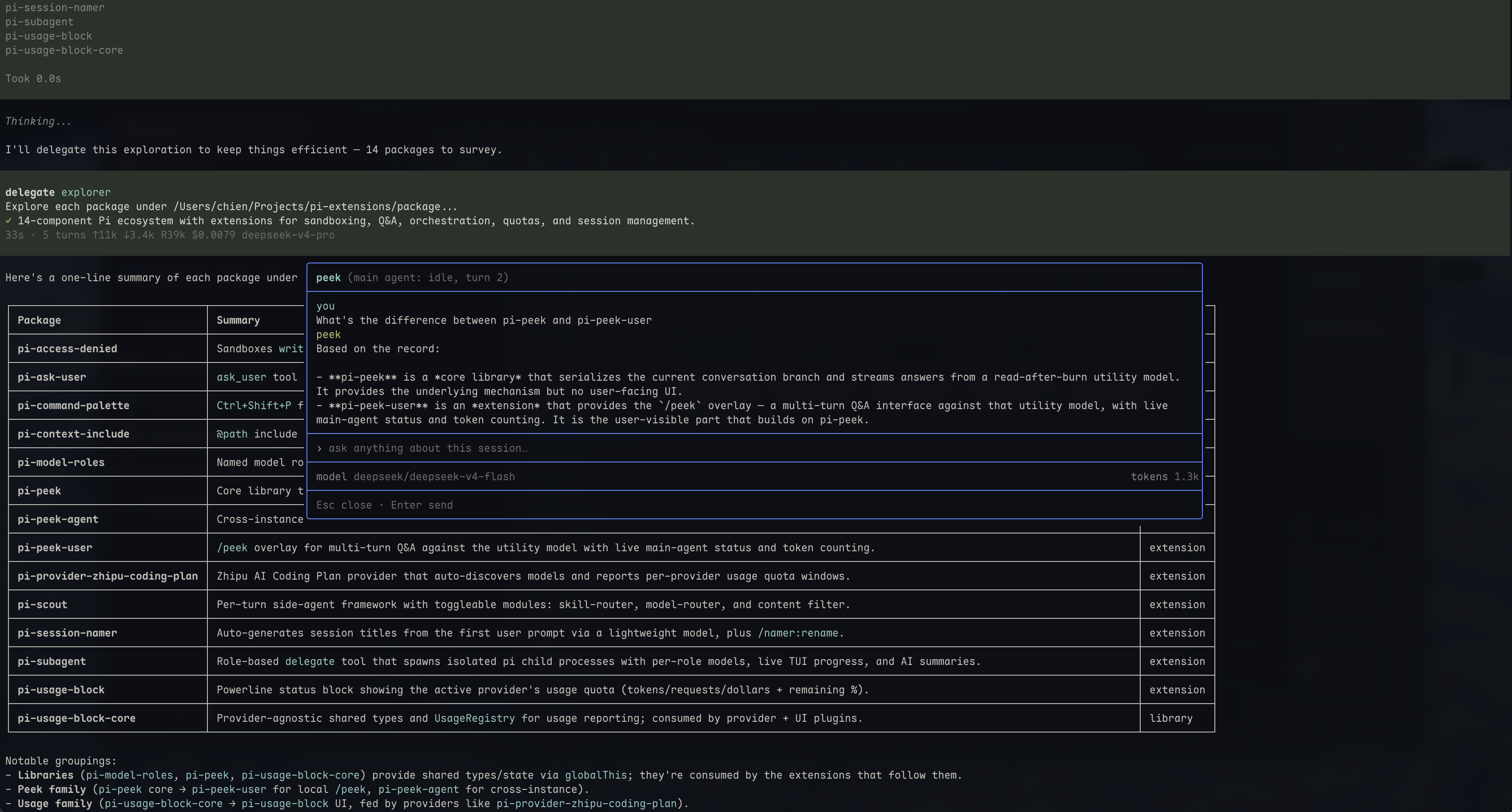
/peek overlay for pi — investigate your own session without disturbing the main agent.
Opens a centered overlay backed by a large-context utility model. Each question triggers one streaming investigation over the complete session text. The main agent keeps running, completely unaware.
╭──────────────────────────────────────────────────╮
│ peek (main agent: idle, turn 3)                  │
├──────────────────────────────────────────────────┤
│ you                                              │
│ how is the debounce implemented?                 │
│ peek                                             │
│ debounce uses requestAnimationFrame, cancelled   │
│ in the useEffect cleanup…                        │
├──────────────────────────────────────────────────┤
│ ▮                                                │
├──────────────────────────────────────────────────┤
│ model deepseek/deepseek-v4-flash   tokens 1.2k   │
├──────────────────────────────────────────────────┤
│ Esc · ↑↓ scroll · PageUp/Dn jump · Enter         │
╰──────────────────────────────────────────────────╯
Features
- Streaming Markdown — the report appears token-by-token with pi's native Markdown rendering and syntax highlighting
- Auto-height — the message region grows with content up to ~80% of the terminal, then scrolls (↑/↓, auto-follows the tail while streaming)
- Message navigation — prominent turn dividers and PageUp/PageDown jumps across the full local history (Fn+↑/Fn+↓ on MacBook)
- Multi-turn — follow-ups reuse one complete snapshot and the previous questions/reports; no internal retrieval loop
- Live status — header shows the main agent's current activity; the status line shows the utility model and cumulative tokens
- Limit notices — upstream output/context limits are shown separately from report text, without automatic truncation, compression, or retries
- Read-after-burn — closing aborts the investigation and discards its local reference and history; the main session is never touched
- Command palette entry — "Peek: Inspect This Session" runs directly from the palette, mid-draft
Installation
pi install npm:@d3ara1n/pi-model-roles
pi install npm:@d3ara1n/pi-peek
pi install npm:@d3ara1n/pi-peek-user
Or add to ~/.pi/agent/settings.json:
{
  "extensions": [
    "/absolute/path/to/pi-extensions/packages/pi-model-roles",
    "/absolute/path/to/pi-extensions/packages/pi-peek",
    "/absolute/path/to/pi-extensions/packages/pi-peek-user"
  ]
}
Dependencies
@d3ara1n/pi-peek— investigation core (tracker hooks + investigate backend)@d3ara1n/pi-command-palette-core— native command-palette registry (pure npm library, installed automatically; entries appear whenpi-command-paletteis installed)
Usage
/peek
Or pick Peek: Inspect This Session in the command palette (Ctrl+Shift+P, via pi-command-palette) — it opens the same overlay directly, without needing an empty editor.
Type what you want to find out, press Enter. The report streams in. Ask follow-ups, use PageUp/PageDown to jump between your questions (Fn+↑/Fn+↓ on MacBook), or press Esc to close.
The snapshot is captured on the first question and stays fixed during follow-ups, even while the main agent continues working. Close and reopen for a fresh snapshot.
Use /peek:thinking instead of /peek to explicitly include readable thinking saved in the source session. Normal /peek and the command-palette entry exclude it. Missing/redacted thinking cannot be recovered.
See pi-peek for evidence coverage, large-context model requirements, upstream limits, and configuration. Local read-after-burn does not imply zero retention by the model provider.
The overlay requires TUI mode; non-TUI hosts receive a warning when notification UI is available.
License
MIT