@dangnghia1997/pi-claude-tui
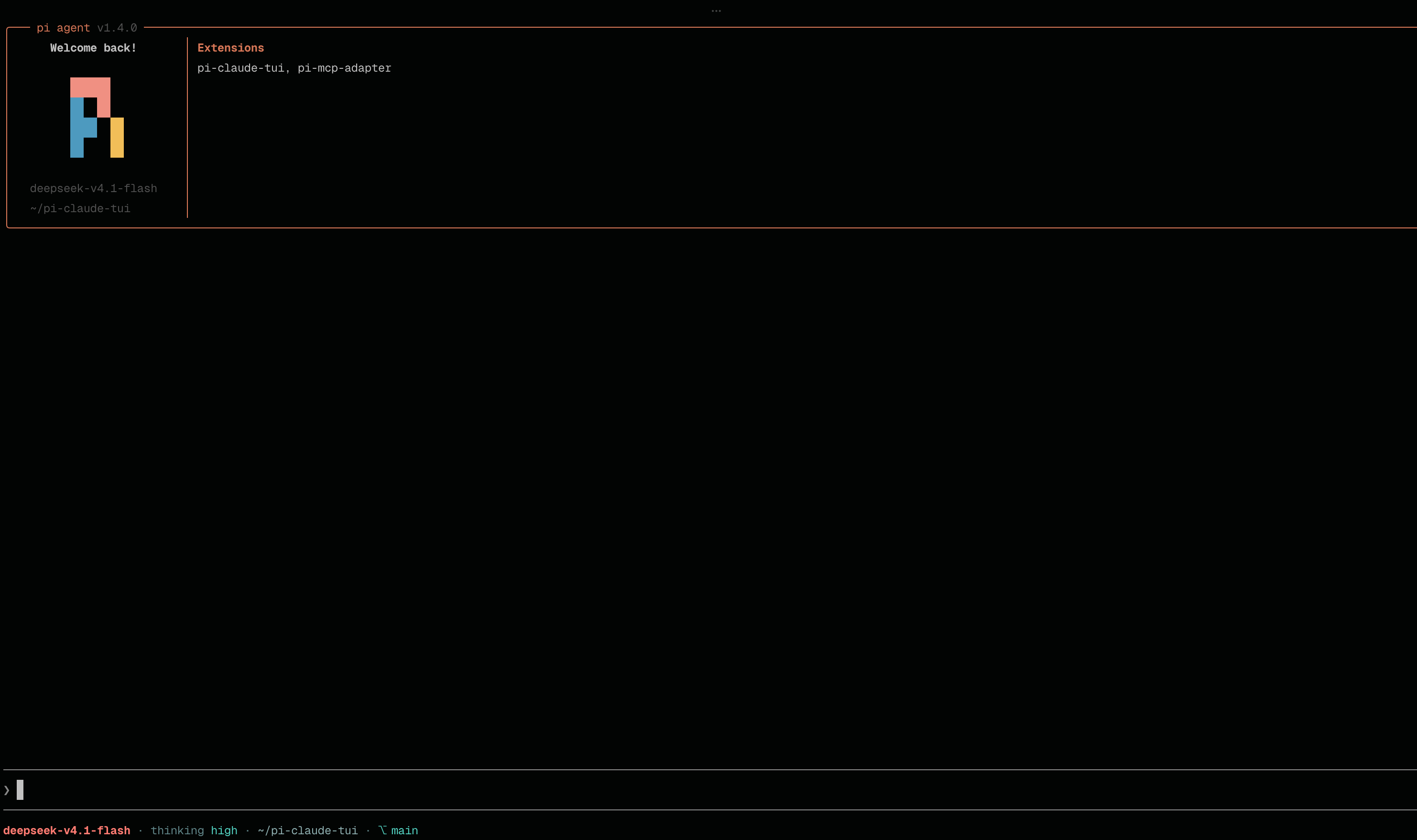
Claude Code visual identity for pi: 2 Claude Code themes, welcome banner, status line with context meter, CC spinner, turn footer, and CC-style tool rendering
Package details
Install @dangnghia1997/pi-claude-tui from npm and Pi will load the resources declared by the package manifest.
$ pi install npm:@dangnghia1997/pi-claude-tui- Package
@dangnghia1997/pi-claude-tui- Version
0.1.5- Published
- Oct 25, 2026
- Downloads
- 446/mo · 446/wk
- Author
- dangnghia1997
- License
- MIT
- Types
- extension, theme
- Size
- 416.2 KB
- Dependencies
- 2 dependencies · 2 peers
Pi manifest JSON
{
  "image": "https://unpkg.com/@dangnghia1997/pi-claude-tui/docs/logo.png",
  "themes": [
    "./themes"
  ],
  "extensions": [
    "./extensions/index.ts"
  ]
}
Security note
Pi packages can execute code and influence agent behavior. Review the source before installing third-party packages.
README
pi-claude-tui
Claude Code's visual identity for pi: two CC themes and CC-style chrome — welcome banner, status line, spinner, turn footer, thinking, prompt pointer, and tool rendering. Everything is drawn through pi's public extension API; no host files are modified.



Install
pi install npm:@dangnghia1997/pi-claude-tuiTry it for a single run without changing your settings:
pi -e npm:@dangnghia1997/pi-claude-tuiPin this release with @0.1.2: pi install npm:@dangnghia1997/pi-claude-tui@0.1.2.
Manage it with pi list, pi update --extensions, and pi remove npm:@dangnghia1997/pi-claude-tui. All pi packages are listed in the pi package gallery.
From a checkout
Local packages load in place and keep their own dependency tree:
cd ~/pi-claude-tui
bun install
pi install .
Run bun install again after pulling changes.
Quick start
- Start pi. The CC banner replaces pi's startup header, the status line gains a context meter, and replies end with
✻ Worked for 12s. - Hide pi's own startup header so the banner is not preceded by it — see Recommended settings.
- Pick a theme with
/cc-theme, or through/settings. - Check what is on with
/cc-tools,/cc-context, and/cc-spinner.
Recommended settings
This package draws its own welcome banner, so hide pi's built-in startup header. In ~/.pi/agent/settings.json:
{ "quietStartup": true }Thinking is rendered through pi's expanded path. Leave hideThinkingBlock at its default (false); when it is true, pi renders its own label row and CC-style collapsed thinking leaves a blank line.
Features
Themes
claude-code-dark— matched to CC's dark paletteclaude-code-light— matched to CC's light palette
Both ship as truecolor hex values; pi downconverts them on 256-color terminals. Switch with /cc-theme, or through /settings.
UI
| Surface | Behavior |
|---|---|
| Welcome banner | CC's bordered box: pi mark, model, cwd, resumed session id/name when resuming, and the Extensions and Skills pi actually loaded (resolved through pi's package resolver). |
| Status line | Model with thinking level (reasoning models), cwd, git branch, context meter, session cost and totals. Coral/teal palette; cwd, then branch, then the thinking badge are shed on narrow terminals so the meter survives; ctx ? after compaction when pi cannot vouch for the estimate. |
| Spinner | CC verb rotation with glimmer, elapsed time, output tokens, and a live thinking byline. Rebuilt from the active theme each tick. |
| Turn footer | ✻ Worked for 12s once per request (sub-second requests are skipped), persisted across reload and resume. |
| Thinking | Collapsed by default with no transcript row, like CC; alt+t expands. Its traces are the spinner byline and the collapsed tool-group summary. |
| Prompt editor | CC's ❯ pointer in the editor gutter, recolored with bash mode. |
| Tool rendering | CC-style call rows, grouped consecutive read-only calls with ⎿ continuations, ctrl+o previews, and syntax-highlighted diffs (shiki). |
Commands and shortcuts
| Input | Description |
|---|---|
/cc-theme |
Pick one of the two CC themes; the choice persists across projects. |
/cc-tools |
Show tool-rendering status. Subcommands: group on|off|toggle, detail on|off|toggle. |
/cc-context |
Show the context meter. Subcommands: bar|text|off|toggle, width 4-40. |
/cc-spinner |
Print the spinner configuration. |
alt+t |
Toggle CC-style thinking visibility. |
detail is this package's equivalent of CC verbose: previews run to pi's full tool-output cap instead of a few rows, and the status line shows a detail segment. It has no keyboard shortcut, matching CC, so it cannot be toggled by accident.
Configuration
The package persists its toggles in ~/.pi/settings.json:
| Key | Default | Description |
|---|---|---|
groupToolCalls |
true |
Group consecutive read-only tool calls. |
ccToolsExtraDetail |
false |
Extra detail (CC verbose). |
ccTheme |
— | Last /cc-theme pick, restored if pi falls back to a built-in theme at startup. |
ccContextBar |
"bar" |
Context meter mode: bar, text, off. |
ccContextBarWidth |
10 |
Meter width in cells, 4–40. |
pi's own settings — theme, quietStartup, hideThinkingBlock — live in ~/.pi/agent/settings.json. The /cc-theme picker writes both so the theme survives startup and the extension can restore it if package resolution runs late.
Requirements
- pi 1.4.x or newer (
@earendil-works/pi-coding-agent,@earendil-works/pi-tui) - Node.js 22.19+
- A truecolor terminal is recommended; 256-color terminals are downconverted automatically.
- The visual surfaces target pi's interactive TUI; print, JSON, and RPC modes have no banner, footer, or spinner.
Runtime dependencies (diff, @shikijs/cli) are installed by pi for npm packages. Local checkouts install them with bun install.
How it works
Everything is built on pi's public extension API. No host files are modified.
host-patches.ts wraps two public pi exports at runtime — AssistantMessageComponent.render and InteractiveMode.showStatus — to remove stray blank rows and the Tool output: expanded|collapsed notice. The wrappers are Symbol-guarded, idempotent, and no-op if a future pi changes those method shapes.
The package only renders UI: it reads local settings and session state and makes no network requests. Like any pi package, its extensions run with your permissions; review the source before installing packages from others.
Development
bun install          # runtime + dev dependencies
bun run typecheck    # tsc --noEmit, strict
bun run lint         # Biome lint + format + import order (read-only)
bun run lint:fix     # apply Biome's safe fixes
bun run format       # formatting only
Layout:
| Path | Contents |
|---|---|
extensions/index.ts |
Entry point; imports the chrome and tool modules. |
extensions/*.ts |
Banner, spinner, status line, turn footer, thinking, palette, prompt pointer. |
extensions/tools/ |
Tool renderers, grouping, collapse classification, diff renderer. |
themes/*.json |
The two CC themes. |
The pi manifest in package.json pins the entry (extensions/index.ts) and themes, so helper modules beside the entry are imported but never discovered as separate extensions.
Releasing
Publishing happens on your machine, not in CI: npm requires a 2FA one-time password to publish and rejects tokens for unattended publishing (HTTP 401 / EOTP), so no CI job can publish this package. The release workflow holds no npm credentials.
npm version patch          # bumps package.json, commits, creates tag v0.1.2
npm publish                # runs prepublishOnly: typecheck + lint
git push --follow-tags     # triggers the Release workflow
.github/workflows/release.yml then mirrors the tag into a GitHub Release: it verifies the tag matches package.json, runs typecheck and lint, reports whether that version is live on npm, and creates the Release with generated notes. It is idempotent, so any existing tag can be re-released:
gh workflow run release.yml -f tag=v0.1.2Note: a package on the public npm registry never shows up in GitHub's repo sidebar "Packages" box — that box only lists GitHub Packages (npm.pkg.github.com, ghcr.io). The Releases section is the place to look.
Migrating from the unscoped name
The package was first published unscoped. pi-claude-tui is deprecated in favour of @dangnghia1997/pi-claude-tui; existing pi install npm:pi-claude-tui entries keep resolving but are frozen at their pinned version. Switch with:
pi remove npm:pi-claude-tui
pi install npm:@dangnghia1997/pi-claude-tui
Maintainer side, once per name:
npm publish                              # @dangnghia1997/pi-claude-tui, access public via publishConfig
npm deprecate pi-claude-tui "renamed to @dangnghia1997/pi-claude-tui"
License
MIT. Copyright (c) 2026 Alex Dang.