@dbaida/pi-interactive-code-review
Interactive browser-based code review extension for Pi agent workflows.
Package details
Install @dbaida/pi-interactive-code-review from npm and Pi will load the resources declared by the package manifest.
$ pi install npm:@dbaida/pi-interactive-code-review- Package
@dbaida/pi-interactive-code-review- Version
1.0.4- Published
- Jun 19, 2026
- Downloads
- not available
- Author
- dmytro.baida
- License
- MIT
- Types
- extension
- Size
- 1.4 MB
- Dependencies
- 8 dependencies · 2 peers
Pi manifest JSON
{
  "extensions": [
    "./src/index.ts"
  ]
}
Security note
Pi packages can execute code and influence agent behavior. Review the source before installing third-party packages.
README
@dbaida/pi-interactive-code-review
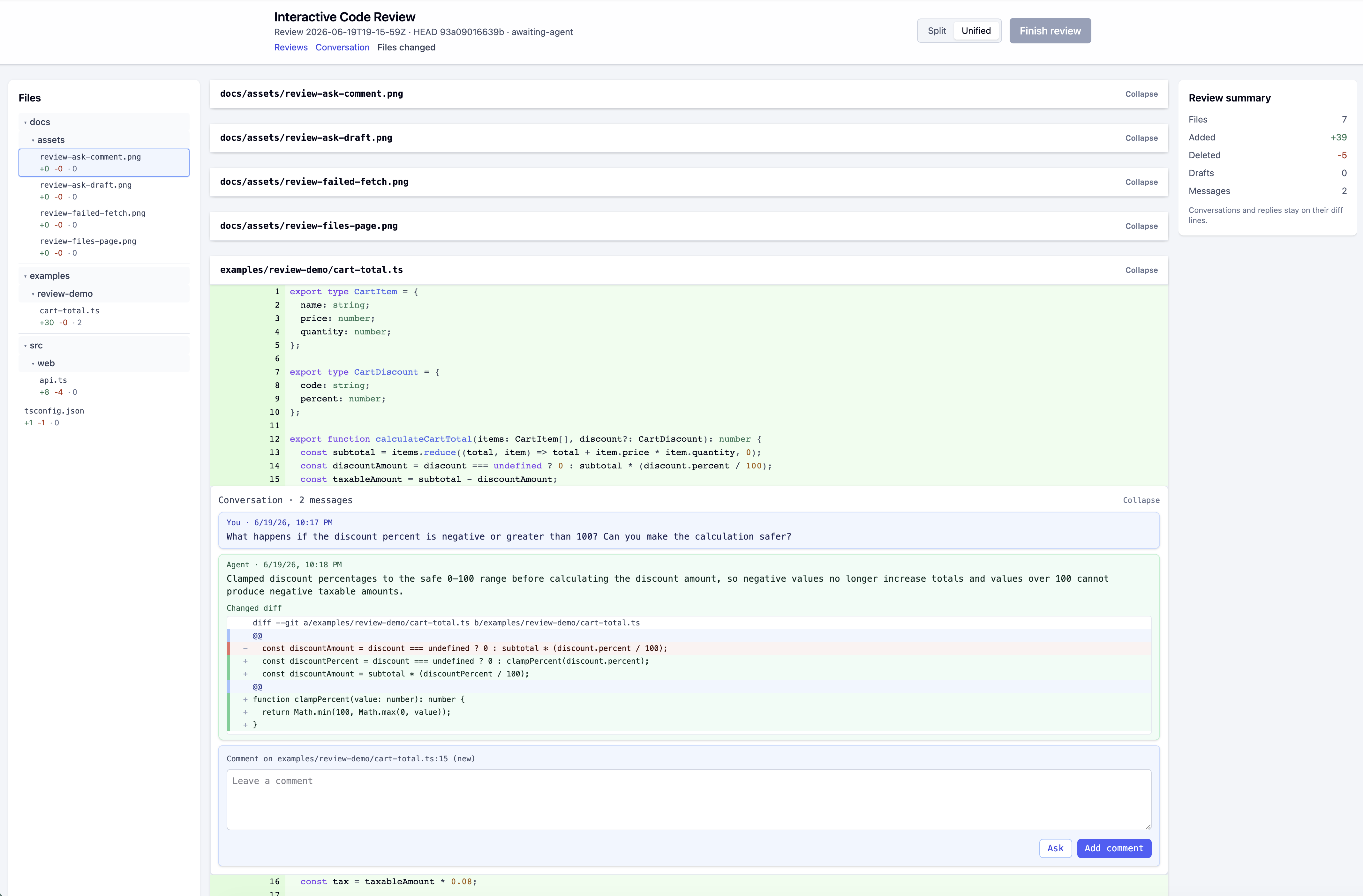
Pi extension for reviewing code produced by an AI coding agent before you accept it. It opens a local browser UI where you can inspect diffs, leave comments, ask the agent follow-up questions, track responses, and approve the review when satisfied.
This package is designed for local AI-agent review workflows. It is not a replacement for hosted pull requests; it gives you a lightweight review loop while working inside Pi.
When to use it
Use this extension when you want to:
- review code generated by a Pi agent before accepting it;
- leave line comments and whole-review comments in a browser UI;
- ask the agent to clarify or fix one comment immediately;
- submit a batch of review comments back to the agent;
- keep local review history for approved and abandoned reviews.
It may be unnecessary if you only want to inspect a small diff once in the terminal, or if your team already requires all review activity to happen in a hosted pull request system.
Requirements
- Pi coding agent.
- A project inside a git repository.
Diffs are generated against git HEAD. Untracked files are shown as added files.
Install
Install from npm:
pi install npm:@dbaida/pi-interactive-code-review
Or test from a local checkout:
pi -e ./path/to/pi-interactive-review
Quick start
Open a git project in Pi.
Let the agent make code changes.
Start a review:
/code-reviewPi opens, or prints, a local browser URL for the review.
Review files on the Files changed page.
Add line comments or a general comment.
Use Ask for one immediate question/fix, or Finish review to submit all draft comments as one batch.
After the agent responds, review the updated diff.
Approve when satisfied.
Use
/reviewsin the browser to inspect review history.
Browser UI
The browser UI has three main areas:
/reviews— list of all persisted review records for the current project./review/<id>/conversation— review-level timeline with comments, agent responses, and lifecycle events./review/<id>/files— file tree and diff view for reviewing changed files.
Only the active review is interactable. Approved and abandoned reviews are readonly history.
Commands
/code-review [--all|--staged|--unstaged|--touched]
/code-review settings
File scopes:
--all— default; reviews staged, unstaged, and untracked files.--staged— reviews only staged changes.--unstaged— reviews unstaged tracked changes plus untracked files.--touched— reviews files edited by the agent during the last request.
Use --touched when you want to focus on the last agent turn. If it shows no changes, use /code-review --all; touched files are tracked only for the recent agent activity in the current session.
Ask vs Submit Review
| Action | Use when | Result |
|---|---|---|
| Ask | You want an immediate answer or fix for one comment | Sends that comment to the agent right away. |
| Add comment / Finish review | You want to collect multiple comments first | Sends all drafts as one review batch. |
| Approve | You are satisfied with the changes | Marks the review approved and readonly. |
Settings
Run:
/code-review settings
Settings are stored project-locally in .review/config.json.
autoAskReview: whentrue, Pi starts a review automatically after agent changes; whenfalse, Pi asks first.autoOpenBrowser: whentrue, the browser opens as soon as review starts; whenfalse, Pi shows the URL and asks before opening.diffView: browser diff layout, either split or unified.
Review lifecycle
A review can be:
awaiting-review— ready for you to inspect in the browser.awaiting-agent— comments were submitted and the agent is expected to respond.approved— finished and readonly.abandoned— old unfinished review kept as readonly history.
Starting a new review may abandon an old pending review if it already has discussion history. Empty pending reviews may be deleted during cleanup.
Data storage and privacy
The extension runs a local browser server bound to localhost while Pi is active.
Project-local review data is stored under .review/:
.review/config.json— settings..review/reviews/*.json— review records.
You decide whether .review/ should be committed, ignored, backed up, or deleted for your project.
Troubleshooting
| Symptom | Likely cause | Suggested fix |
|---|---|---|
| “Interactive code review requires a git repository.” | Pi is not running inside a git work tree. | Open Pi inside a git repository. |
| “No git changes found to review.” | No changes exist for the selected scope. | Use /code-review --all, or make/stage changes first. |
| Browser did not open. | autoOpenBrowser=false or OS browser opening failed. |
Copy the URL printed by Pi into your browser. |
/code-review --touched is empty. |
No agent-touched files were tracked for the last request. | Use /code-review --all or /code-review --unstaged. |
| Approved or abandoned review cannot be edited. | This is expected readonly history behavior. | Open the active review or start a new one. |
| Old browser tab stopped updating. | The local review server stopped or belongs to an old Pi session. | Run /code-review again to restart/reopen the review server. |
| Local extension changes are not visible. | Pi is still using an old installed package/build. | Rebuild/reinstall the package or restart Pi. |
Development
yarn install
yarn validate
Build only the browser UI:
yarn build:web
dist-web/ is generated and ignored by git. npm pack / npm publish run prepack, which builds the browser assets before packaging.