@delthin/pi-ask
Turn Pi conversations into local Markdown knowledge cards and an offline graph.
Package details
Install @delthin/pi-ask from npm and Pi will load the resources declared by the package manifest.
$ pi install npm:@delthin/pi-ask- Package
@delthin/pi-ask- Version
0.2.1- Published
- Oct 23, 2026
- Downloads
- 227/mo · 227/wk
- Author
- delthin
- License
- unknown
- Types
- extension
- Size
- 189.3 KB
- Dependencies
- 0 dependencies · 1 peer
Pi manifest JSON
{
  "image": "https://raw.githubusercontent.com/Delthin/pi-ask/main/demo/preview.png",
  "extensions": [
    "./src/extension.ts"
  ]
}Security note
Pi packages can execute code and influence agent behavior. Review the source before installing third-party packages.
README
pi-ask
English · 简体中文
pi-ask turns Pi discussions into local Markdown knowledge cards. Start a discussion with /ask, ask follow-up questions, then run /ask end. The extension separates the discussion into knowledge points, adds to existing cards when the topic matches, and organizes the cards into a tree with up to three levels. An offline HTML page lets you browse the tree, follow connections between topics, and read the cards.
Preview
Open the interactive demo · Download the offline demo
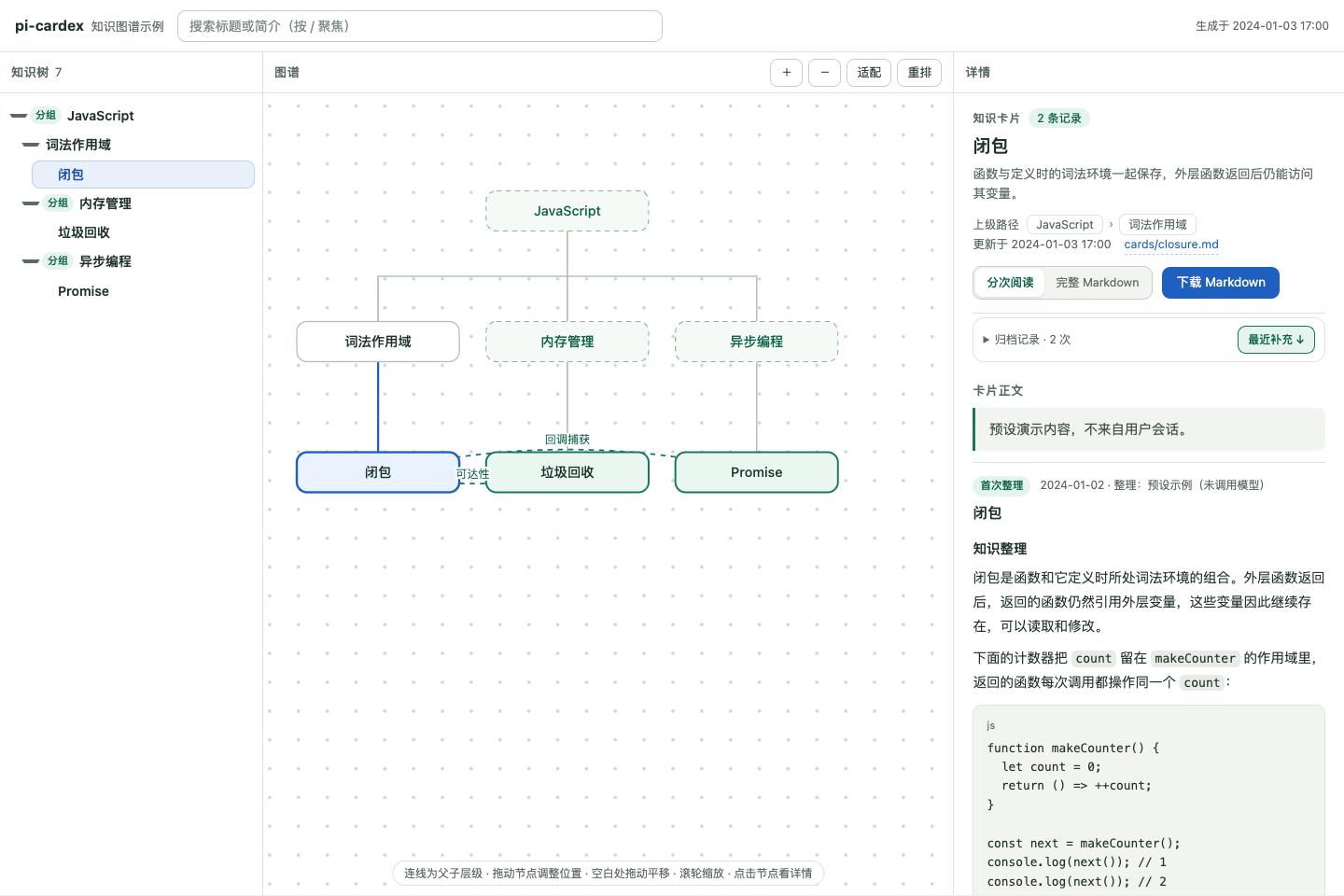
The demo uses preset JavaScript notes in a Chinese-language interface. Select “闭包” (closures) to see the path through lexical scope, its connections to garbage collection and Promise callbacks, and an explanation with code and source Q&A. The left pane supports folding and search; the graph supports dragging and zooming; the right pane displays the selected card. The demo runs entirely in the browser.
Install and create your first cards
Use Node.js 22.6 or later and a Pi host that provides modelRegistry.streamSimple(). The extension was implemented against the APIs in @earendil-works/pi-coding-agent 1.2.0.
pi install npm:@delthin/pi-askRestart Pi or run /reload in an existing session. Choose your archive directory and start a discussion:
/ask dir ~/journal/ask
/ask What is a JavaScript closure? Explain lexical scope first, then show an example. Write the cards in English.
After Pi replies, continue the conversation normally, or use /ask for follow-ups:
How does this relate to garbage collection? Do Promise callbacks also use closures?When you finish, archive the discussion and get the graph's file address:
/ask end
/ask graph
Open the reported index.html address in your browser. A discussion can create several cards and extend existing ones in the same archive operation; the result depends on the topics actually covered. Each card contains the explanation, relevant examples and Q&A, plus links to the full discussion.
The browser supports navigation through parents, children, and related topics, as well as Markdown reading and downloads. Dragged node positions are stored in the browser. Archiving maintains the knowledge tree and its connections; the page provides browsing and layout controls.
You can also install the tagged GitHub version with pi install git:github.com/Delthin/pi-ask@v0.2.1, or use pi install /absolute/path/to/pi-ask for local development.
Commands
| Command | Action |
|---|---|
/ask question |
Start recording a discussion, or ask a follow-up in the active one. |
/ask end |
Split the discussion into knowledge points, create or extend cards, and update the tree, connections, and HTML. |
/ask cancel |
End recording and keep the chat history. |
/ask model |
Choose a default organizer from the models available in Pi. |
/ask model current |
Pin the current chat model as the organizer. |
/ask model follow |
Follow the chat model and reuse the conversation context for organization. |
/ask model provider/model-id |
Select an organizer already configured in Pi. |
/ask dir /absolute/path |
Set the archive directory; ~/ is also supported. |
/ask status |
Show recording status, the archive directory, organizer, and configuration path. |
/ask graph |
Rebuild the offline graph and display its file address. |
/ask help |
Show command help. |
/ask -- question |
Ask a question beginning with a command word such as end or model. |
Archiving waits for the current response to finish. Wait for an /ask operation to complete before submitting another message. Text submitted while it is processing is returned to the editor for you to resend.
Models and configuration
Chat replies use Pi's current model. The organizer uses Pi's existing model configuration and authentication; select it with /ask model. The initial default is follow, which uses the chat model and appends the organizing instructions to the current conversation context.
Configuration is saved when you first change a model or directory. The default file is ~/.pi/agent/pi-ask.json; a custom Pi agent directory changes its location. /ask status shows the actual path. You can also edit the file directly:
{
  "version": 1,
  "directory": "~/journal/ask",
  "model": null,
  "timeoutMs": 120000
}
Set model to { "provider": "your-provider", "id": "your-model-id" } to pin an organizer. timeoutMs applies to each model request and accepts values from 1000 to 600000 milliseconds.
The archive directory is fixed independently of Pi's working directory. Each discussion keeps the directory it started with. Changing /ask dir during a discussion sets the default for the next one; existing files stay in their original location.
Conversation reuse and caching
In follow mode, the organizer reuses the most recent request's messages, system instructions, and tool definitions, includes the final answer, then adds the organizing instructions at the end. The appended prompt identifies the current discussion by message position, so it does not repeat the Q&A text. After a reload, the extension reconstructs the context from the session's effective message history. If compaction or other changes have removed part of the discussion, it reports the fallback and organizes a snapshot of the original Q&A instead.
Keeping the request prefix can help reuse the provider's input cache. Cache hits still depend on the provider, cache lifetime, and request changes made by other extensions. Without a cache hit, sending the full conversation costs more input tokens than sending only the current discussion. A pinned organizer, including /ask model current, uses a separate context containing the current discussion.
Files and organization
By default, pi-ask writes to ~/journal/ask/:
~/journal/ask/
├── index.json          # Titles, summaries, hierarchy, card paths, sources, and connections
├── index.html          # Offline tree and graph with all card contents embedded
├── cards/
│   └── <node-id>.md    # Explanation, background, relevant Q&A, and source links
└── discussions/
    └── <record-id>.md  # The full original Q&A for one discussion
At the start, the extension searches existing titles and summaries for a matching topic. At the end, the organizer extracts the knowledge points from the discussion. A separate request uses their titles and summaries together with the existing index to decide which cards to extend, where new nodes belong, and which topics are related. The extension appends new sections to matching cards and updates their summaries. It saves the full discussion once and copies the relevant Q&A into each card with source links.
Each node has one parent and can sit at the first, second, or third level. A knowledge card can have children. Group nodes provide a title and summary for a branch; they can become cards when a discussion covers their topic. Parent links express the main hierarchy, while semantic connections express other relationships. Extending a card preserves its parent.
Version 1 indexes are read as root-level knowledge nodes, retaining their IDs and card contents. The next archive operation writes the newer index format.
Card content and language
The card-writing prompt guides the organizer to explain the topic with the background, mechanisms, and examples needed for study. It preserves relevant qualifications and uncertainty. You can edit this prompt; the next organization request reads the updated file. The program saves the original Q&A separately from the model's explanation.
Cards default to Chinese. Explicitly request another output language during the discussion to change it, as in the English example above. The browsing interface and command messages are currently in Chinese.
Recording covers the current session branch from /ask to /ask end. Cards retain answer model names and visible Q&A text. Partial answers remain available with an interrupted, error, or length-limit label. Images are represented by an attachment notice; tool results and model thinking are excluded from the cards. A background summary can preserve context needed to understand the topic. With a pinned organizer, include any necessary earlier background in the current discussion.
Reopening the same session resumes an unfinished recording. Compaction does not change the original Q&A available for archiving, and each branch archives its own messages. Repeating the same archive request is deduplicated.
Data sent to models and local privacy
Retrieval, merge decisions, hierarchy assignment, and connection updates use isolated requests. Historical input to those requests is limited to id, title, summary, kind, and parentId. The extension reads existing card bodies locally to append content and generate HTML; it does not attach those bodies to index-maintenance requests.
The organizing request uses either the current conversation or the current discussion, according to the model setting. Follow mode can therefore include earlier background and tool results already present in the chat. That context is sent to the selected model service, but it is not all copied into cards. The organizer accepts model output without executing requested tool calls.
Cards, indexes, and HTML are local plaintext files. The HTML embeds every card: sharing it shares all card contents. Full discussion files are stored separately under discussions/, and their links depend on preserving the archive's folder structure. The page uses local resources, renders card HTML as text, and does not load remote images. External links open when clicked.
Recovery and backups
If a model times out, is unavailable, or returns invalid output, the recording remains available. Adjust the organizer if needed and retry /ask end.
Before writing archive files, the extension freezes the discussion's Q&A snapshot. A retry detects cards already saved even if the session's completion marker was not written. While an archive is pending, use /ask end to retry or /ask cancel to end recording before asking more questions. Canceling retains any cards already saved.
One .pi-ask-transaction.json journal covers all cards, the full discussion, and the index in an archive operation. It is removed when the operation finishes. After a process interruption, the next library access recovers the pending transaction. Power-loss durability depends on the operating system and filesystem; directory synchronization is skipped on Windows. Back up the entire archive directory, including a transaction file if one is present.
A .pi-ask.lock file prevents concurrent writers. Retry later if another Pi process is writing. If a process exited abnormally and left a lock, the error reports its path: confirm that no process is still writing to that library, then remove the stale lock and retry. Missing or damaged indexes and cards require restoration from backup.
Development and publishing
Install development dependencies with npm install --legacy-peer-deps. Before running checks, install or link the same @earendil-works/pi-coding-agent package used by your host; Pi supplies it at runtime.
npm run typecheck
npm test
Tests use temporary directories and mocked models. They make no real model requests and do not access a personal knowledge library.
The demo/ directory contains preset data, its generator, and the preview screenshot. Run npm run demo after changing the demo data, then open demo/site/index.html. The generator writes only the listed demo files. Committing the generated output updates the online demo through GitHub Pages.
The npm package is published as @delthin/pi-ask. It includes src/, web/, and both READMEs. Demo files and development tests stay in the repository. The pi-package keyword makes the package discoverable by the Pi package directory; the manifest also provides the extension entry and preview image. See the Pi package documentation for discovery and installation details.
For a new release, update the version in package.json and package-lock.json, run the relevant checks, and publish from the repository root using an npm account authorized for @delthin:
npm login
npm whoami
npm publish --dry-run
npm publish --access public
npm may require browser verification or two-factor authentication. Published versions cannot be overwritten. Allow time for the Pi directory to refresh after publication.