@devmaksi/pi-env
Profiles for the Pi coding agent: create, edit and launch isolated agent environments (settings, extensions, skills, MCP) from a terminal TUI
Package details
Install @devmaksi/pi-env from npm and Pi will load the resources declared by the package manifest.
$ pi install npm:@devmaksi/pi-env- Package
@devmaksi/pi-env- Version
0.2.4- Published
- Oct 25, 2026
- Downloads
- 1,019/mo · 650/wk
- Author
- devmaksi
- License
- MIT
- Types
- skill
- Size
- 1.5 MB
- Dependencies
- 0 dependencies · 0 peers
Pi manifest JSON
{
  "image": "https://github.com/devmaksi/pi-env/raw/refs/heads/master/docs/screenshot.png",
  "skills": [
    "./pi/skills"
  ]
}
Security note
Pi packages can execute code and influence agent behavior. Review the source before installing third-party packages.
README
pi-env




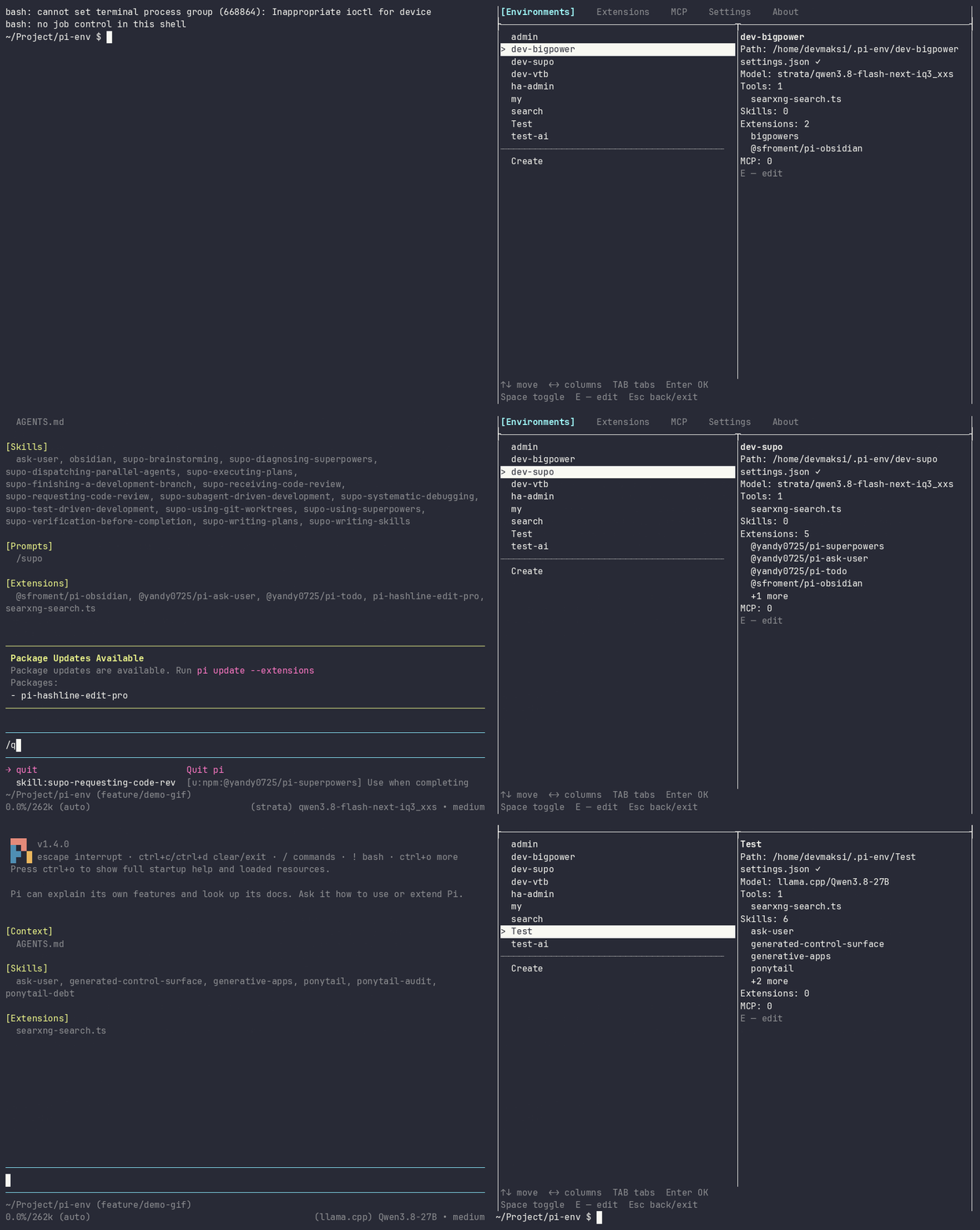
Profiles for the pi agent: a separate configuration per project and model, created and launched from one TUI.
pi reads its configuration from the directory pointed to by
PI_CODING_AGENT_DIR: settings.json, extensions/, skills/, agents/,
themes/, mcp.json. Different models, skills and MCP servers per task mean
different directories. pi-env makes them manageable: a list of environments,
a creation form, launch on Enter, extension and MCP updates in place — without
leaving the terminal.
Quick start
Requirements: Node.js ≥ 22.19 and the pi CLI installed
(npm install -g @earendil-works/pi-coding-agent).
(the Node floor matches pi itself: pi 1.3/1.4 requires Node.js 22.19 or newer)
npm install -g @devmaksi/pi-env                  # or one-off: npx @devmaksi/pi-env
pi-env                                           # TUI, environments root — ~/.pi-env
pi-env myenv --mode json "Review this repository"  # run pi in the environment (args passed as-is)
Why not just PI_CODING_AGENT_DIR
- You still have to remember the variable, export it, and keep paths in your
head —
pi-envturns that into a list of names and Enter to launch. - A new environment is not a
mkdir: it needs tools, skills, packages, the model catalog andauth.jsoncopied over. The creation form does it for you. - Extensions and MCP servers live in separate files per environment;
pi-envshows available updates and editsmcp.jsonfor you. - Launch remains a plain
pirun: the child process getsPI_CODING_AGENT_DIR=<environment>, arguments pass through untouched — so it is scriptable,--mode jsonincluded.
Not to be confused with @earendil-works/pi-env
This is an independent project, not affiliated with earendil-works. The official
@earendil-works/pi-env is about remote execution (ssh, remote, durable
agents) and has nothing to do with managing local configurations. Similar name,
different purpose.
Features
- list of environments (root directory
~/.pi-env, overridable via the--root <path>flag or thePI_ENV_ROOTenvironment variable); - tabs: Environments | Extensions | MCP | Settings | About;
- environment creation via a form: name, model, tools, extension packages,
skills (catalog is taken from the main
piagent), MCP servers; - launching an environment: a child
piprocess withPI_CODING_AGENT_DIR=<environment path>, back to the TUI on exit; - environment editing: change model, tools, packages, skills, MCP, rename, delete with confirmation;
- deleting an environment moves it to the trash (
<root>/.trash/): the “Trash (N)” entry in the environment list restores it with Enter, delete forever is there too, with confirmation; - extension management: update checks («↑ latest» markers), updating
one/all packages (
pi update), removal (pi remove); - installing extensions from the
https://pi.dev/packagescatalog: globally (the “Extensions” tab) and into a specific environment (“Install” button in the form); - MCP: a tab with the server list, form-based addition (
pi mcp add) — closed-choice values ("Type", "Exposure") cycle with left/right arrows right on the row — removal, and live status (pi mcp list --json); - environment details: info panel of the selected one (model, tools, skills, extension packages, MCP);
- application settings: “Colored output”, “Recheck updates”
(
npm outdatedon every visit to the “Extensions” tab); stored in<root>/.pi-env.jsonand survive restarts. - update indication for pi-env itself: when the npm registry has a newer
version, a sixth “Update” tab appears with the version number, the update
command for your install method (Enter copies it to the clipboard) and the
changelog of the releases you skipped. The application never updates or
restarts itself; the check is one background request per launch and is
switched off by
PI_ENV_NO_UPDATE_CHECK=1(and is never made when pi-env runs from a source checkout).
Controls (main keys)
| Key | Action |
|---|---|
| ↑/↓ | move through the list |
| ←/→ | column focus (wide mode, “Environments” tab) |
| TAB | switch tabs (a sixth “Update” tab joins when it is available) |
| Enter | confirm (launch environment, action on the selected item) |
| Space | mark in creation lists / toggle in settings (color, recheck) |
| E | edit the selected environment |
| R | reload: live MCP status, changelog on the “Update” tab |
| Enter on a command row | copy the update command to the clipboard (“Update” tab) |
| X | remove the selected extension (with confirmation) |
| printable characters / Backspace | entering a name (creation form) |
| ESC | back from a sub-screen / exit |
| Ctrl+C | emergency exit |
Installation
npm install -g @devmaksi/pi-env # or one-off: npx @devmaksi/pi-envAll installation methods (including Node.js setup), removal, and notes (TTY, Windows) — in docs/installation.md.
Documentation
- Installation — Node.js, pi-env install/remove
- Development — stack, quick start, project structure, conventions
- CHANGELOG.md — release history
- AGENTS.md — environments model, current status, roadmap
For the pi agent
The package ships a pi-env skill: install it as a Pi package
(pi install npm:@devmaksi/pi-env) and the agent can create environments,
launch them, and explain what lives in settings.json. Manual reference is in
SKILL.md.