@dianel/pi-workspace-history
Real workspace undo/redo for Pi
Package details
Install @dianel/pi-workspace-history from npm and Pi will load the resources declared by the package manifest.
$ pi install npm:@dianel/pi-workspace-history- Package
@dianel/pi-workspace-history- Version
1.0.2- Published
- Sep 1, 2026
- Downloads
- 450/mo · 37/wk
- Author
- dianel
- License
- MIT
- Types
- extension
- Size
- 984 KB
- Dependencies
- 1 dependency · 1 peer
Pi manifest JSON
{
  "extensions": [
    "./.pi/extensions/workspace-history.ts"
  ]
}
Security note
Pi packages can execute code and influence agent behavior. Review the source before installing third-party packages.
README
Pi Workspace History
Based on wcldyx/pi-workspace-history.
Real workspace undo/redo for Pi. Tracks file snapshots around each agent turn so you can time-travel your workspace state.
Install
pi install npm:@dianel/pi-workspace-history
Commands
| Command | Description |
|---|---|
/undo |
Restore workspace to before the last agent turn |
/redo |
Re-apply the last undone turn |
/checkpoint [label] |
Save a manual snapshot |
/rewind [entry-id] |
Browse history interactively or jump to a specific entry |
How It Works
- A lightweight shadow git repo stores file snapshots committed around each turn.
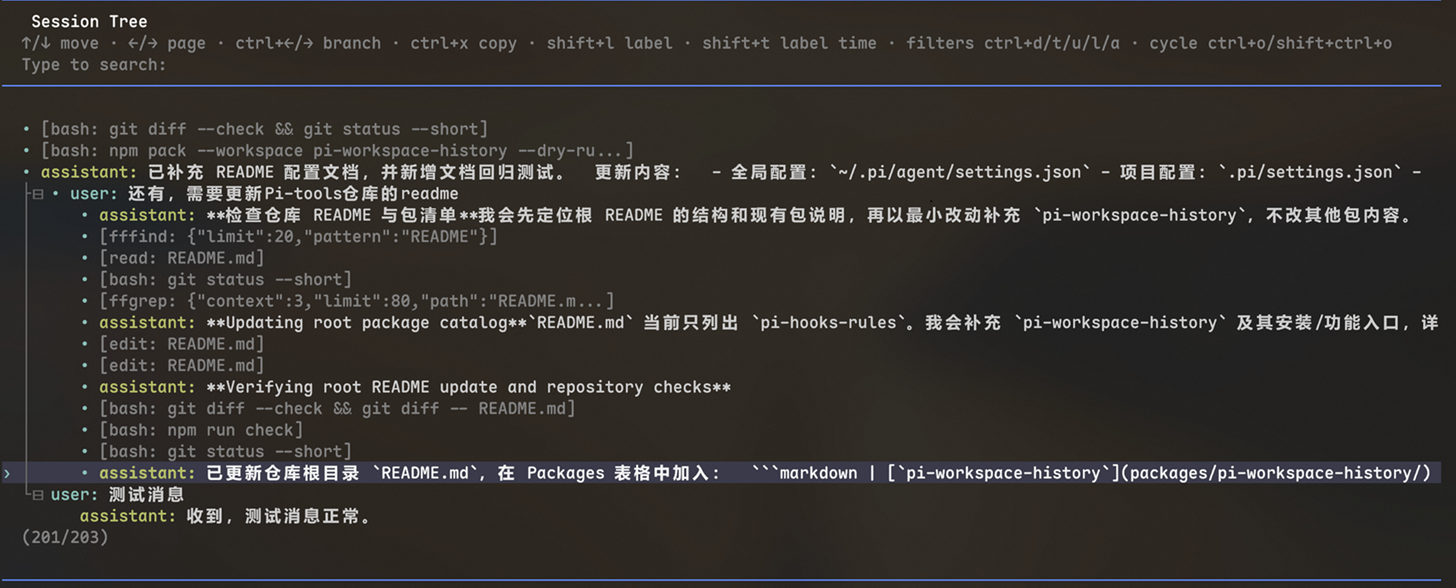
before_agent_start/turn_startsnapshots the workspace before changes.turn_endcommits the state after./undoresets to the previous snapshot;/redore-applies the undone turn./checkpointcreates a named manual snapshot for bookmarks./rewindopens a filterable history picker (↑↓ navigate, ⌃D/T/U/L/A cycle filters, ⌃X copy, ⇧L label, ⇧T time, ⌃←/→ branch).
Shortcuts (in /rewind picker)
| Key | Action |
|---|---|
| ↑ / ↓ or j / k | Move selection |
| ← / → | Page up / down |
| Ctrl+← / Ctrl+→ | Branch |
| Ctrl+X | Copy selected entry text |
| Shift+L | Toggle label |
| Shift+T | Toggle time |
| Ctrl+D / T / U / L / A | Cycle filter mode |
| Enter | Confirm selection |
| Esc | Cancel |
Preview
The /rewind picker:
Configuration
Configure the plugin through Pi settings. Project settings override global settings.
- Global:
~/.pi/agent/settings.json - Project:
.pi/settings.json
Example:
{
  "workspaceHistory": {
    "storageDir": "D:\\pi-history",
    "maxSessionsPerWorkspace": 3,
    "maxWorkspaces": 10,
    "enabled": "auto",
    "allowHomeDirectory": false,
    "requireProjectMarker": true,
    "maxScanFiles": 20000,
    "maxScanDirs": 3000,
    "maxScanMs": 5000,
    "gitTimeoutMs": 60000
  }
}
| Setting | Default | Description |
|---|---|---|
workspaceHistory.storageDir |
~/.pi/agent/state/workspace-history |
External storage root for shadow history |
workspaceHistory.maxSessionsPerWorkspace |
3 |
Keep only the most recently used sessions per workspace |
workspaceHistory.maxWorkspaces |
10 |
Keep only the most recently used workspaces globally |
workspaceHistory.enabled |
"auto" |
"auto" disables the plugin outside project-like directories; true forces it on; false disables it completely |
workspaceHistory.allowHomeDirectory |
false |
Allow the plugin to run in the user home directory |
workspaceHistory.requireProjectMarker |
true |
Require a project marker such as .git or package.json |
workspaceHistory.maxScanFiles |
20000 |
Maximum number of files scanned when checking ignored/protected paths |
workspaceHistory.maxScanDirs |
3000 |
Maximum number of directories scanned when checking ignored/protected paths |
workspaceHistory.maxScanMs |
5000 |
Maximum time spent scanning ignored/protected paths, in milliseconds |
workspaceHistory.gitTimeoutMs |
60000 |
Timeout for internal Git operations, in milliseconds |
Installation and Usage
Install from npm after publishing:
pi install npm:@dianel/pi-workspace-history
Or install from a local checkout:
pi install /path/to/workspace-history
After installing into an already-running Pi session, run /reload. Then test with:
/rewind
/undo
/redo
/checkpoint test
Local Development
The repository is configured for direct local extension loading:
.pi/extensions/workspace-history.ts
.pi/settings.json
Start Pi in the repository directory, or run /reload after changing the extension.
Testing
Run the complete check suite:
npm run check
Or run individual checks:
npm test
npm run typecheck
npm pack --workspace @dianel/pi-workspace-history --dry-run
Recent Changes
- History is stored outside the workspace by default.
- Added
workspaceHistory.storageDir. - Added retention limits for sessions and workspaces.
- Reduced runtime overhead with cached settings/paths and throttled cleanup.
Storage Layout
The plugin stores history outside the workspace by default:
~/.pi/agent/state/workspace-history/
  workspaces/
    <workspaceHash>/
      meta.json
      sessions/
        <sessionId>/
          repo.git/
          redo.json
          turn-snapshots.json
          meta.json
  logs/
    timemachine.log
Notes:
- History is isolated from the user's project
.githistory. - Old workspace-local
.pi/workspace-history/state is not migrated automatically. - Cleanup is LRU-style based on recent use.
- In
automode, the plugin disables itself in broad directories such as the user home folder to avoid expensive scans and startup stalls.
License
MIT