@diegopetrucci/pi-minimal-footer
A minimal custom footer for pi.
Package details
Install @diegopetrucci/pi-minimal-footer from npm and Pi will load the resources declared by the package manifest.
$ pi install npm:@diegopetrucci/pi-minimal-footer- Package
@diegopetrucci/pi-minimal-footer- Version
0.1.5- Published
- May 1, 2026
- Downloads
- 223/mo · 9/wk
- Author
- diegopetrucci
- License
- MIT
- Types
- extension
- Size
- 19 KB
- Dependencies
- 0 dependencies · 2 peers
Pi manifest JSON
{
  "extensions": [
    "index.ts"
  ],
  "image": "https://raw.githubusercontent.com/diegopetrucci/pi-extensions/main/assets/minimal-footer-preview.png"
}Security note
Pi packages can execute code and influence agent behavior. Review the source before installing third-party packages.
README
minimal-footer
A minimal custom footer for pi.
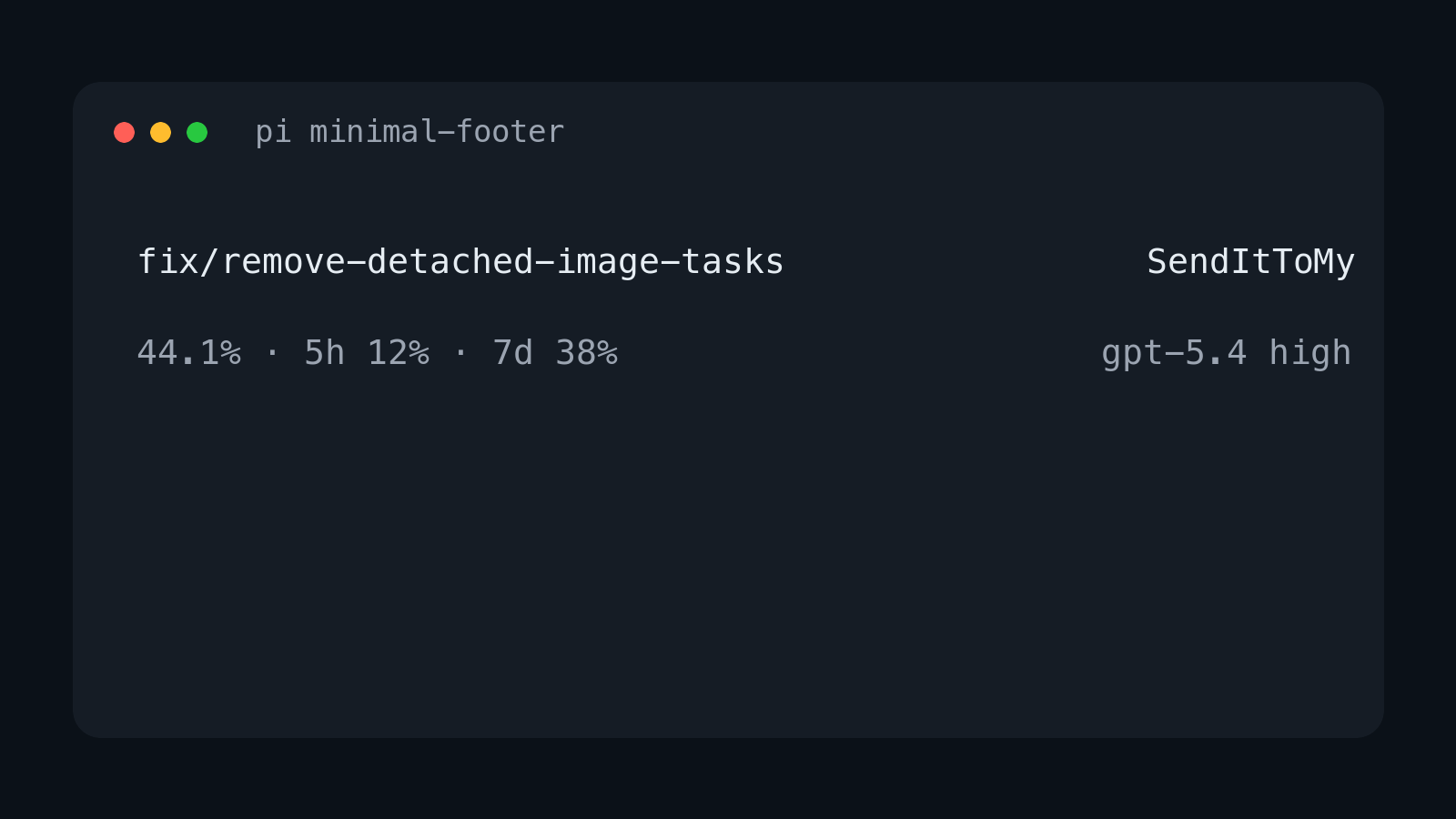
It replaces pi's built-in footer with a cleaner two-line layout that focuses on the information I care about most:
- current git branch
- current repo name
- current context percentage
- red
DUMB ZONEindicator when context usage is above 200k tokens - current model and thinking level
- OpenAI Codex 5-hour and 7-day usage when available
Layout
On wide terminals it renders two lines:
<git-branch>                                         <repo-name>
<context-%>                                     <model> <thinking>
Example:
fix/remove-detached-image-tasks                     SendItToMy
44.1%                                              gpt-5.4 high
When context usage is above 200k tokens, the bottom-left line includes a red warning:
44.1% · DUMB ZONE
When using openai-codex, the bottom-left line also includes subscription usage:
44.1% · 5h 12% · 7d 38%
On narrow terminals it falls back to one item per line.
Install
Standalone npm package
pi install npm:@diegopetrucci/pi-minimal-footer
Collection package
pi install npm:@diegopetrucci/pi-extensions
GitHub package
pi install git:github.com/diegopetrucci/pi-extensions
Then reload pi:
/reload
Configuration
Config files are merged, with project config overriding global config:
~/.pi/agent/extensions/minimal-footer.json<project>/.pi/minimal-footer.json
A ready-to-copy sample file is included at minimal-footer.example.json.
Example:
{
  "context": {
    "showPercent": true,
    "dumbZone": {
      "enabled": true,
      "thresholdTokens": 200000,
      "label": "DUMB ZONE",
      "color": "error"
    }
  },
  "codexUsage": {
    "enabled": true,
    "cacheTtlMs": 300000,
    "requestTimeoutMs": 10000,
    "windows": {
      "primary": {
        "enabled": true,
        "label": "5h"
      },
      "secondary": {
        "enabled": true,
        "label": "7d"
      }
    }
  }
}
Disable DUMB ZONE:
{
  "context": {
    "dumbZone": {
      "enabled": false
    }
  }
}
Disable OpenAI Codex session-limit usage entirely:
{
  "codexUsage": {
    "enabled": false
  }
}
Disable one session-limit window:
{
  "codexUsage": {
    "windows": {
      "secondary": {
        "enabled": false
      }
    }
  }
}
Config fields
context.showPercent: show the context percentagecontext.dumbZone.enabled: showDUMB ZONEwhen context tokens exceed the thresholdcontext.dumbZone.thresholdTokens: token threshold forDUMB ZONEcontext.dumbZone.label: warning textcontext.dumbZone.color: theme color for the warning (error,warning,accent,text, ordim)codexUsage.enabled: show OpenAI Codex session-limit usage when usingopenai-codexcodexUsage.cacheTtlMs: in-memory usage cache durationcodexUsage.requestTimeoutMs: usage request timeoutcodexUsage.windows.primary.enabled: show the primary usage windowcodexUsage.windows.primary.label: label for the primary usage windowcodexUsage.windows.secondary.enabled: show the secondary usage windowcodexUsage.windows.secondary.label: label for the secondary usage window
What it shows
- Top left: current git branch
- Top right: current repo directory name
- Bottom left: current context usage percentage, plus red
DUMB ZONEabove 200k context tokens - Bottom left on
openai-codex: current context usage percentage plus 5-hour and 7-day Codex usage - Bottom right: model id and thinking level
Publishing notes
This extension also lives inside the broader pi-extensions collection, but it is set up to be publishable as its own npm package too.
Notes
- Replaces pi's built-in footer entirely.
- Uses pi footer data for git branch updates.
- Shows only context percentage, not context window size.
- Shows
DUMB ZONEonly while context usage is above 200k tokens. - Shows the model id rather than a provider-specific display label.
- For
openai-codex, reads pi's stored OAuth login and fetches usage from ChatGPT's backend usage endpoint. - Usage is cached briefly in memory and refreshed after turns.