@each1024/pi-mini-mode
A compact Pi footer with live usage metrics, theme-aware settings previews, and configurable progress bars.
Package details
Install @each1024/pi-mini-mode from npm and Pi will load the resources declared by the package manifest.
$ pi install npm:@each1024/pi-mini-mode- Package
@each1024/pi-mini-mode- Version
2.0.15- Published
- Oct 18, 2026
- Downloads
- 4,619/mo · 915/wk
- Author
- each1024
- License
- MIT
- Types
- extension, theme
- Size
- 361.6 KB
- Dependencies
- 1 dependency · 2 peers
Pi manifest JSON
{
  "video": "https://raw.githubusercontent.com/eachann1024/pi-mini-mode/main/assets/pi-mini-mode-demo.mp4",
  "themes": [
    "./themes/cc-dark.json",
    "./themes/cc-light.json"
  ],
  "extensions": [
    "./extensions/footer-status.ts"
  ]
}Security note
Pi packages can execute code and influence agent behavior. Review the source before installing third-party packages.
README
中文 · Install · Features · Reference
Pi Mini Mode
Less noise. More focus.
An everyday refinement for Pi, not just a footer. Preview images at the cursor, fold long messages and process details, inspect subagent work, and keep your session’s essential signals in view.
Demo video
https://github.com/user-attachments/assets/1ad90757-ecea-4901-afd8-f33a68176ae2
Numbers in the footer shots come from a scripted demo session; prices are estimates, not provider bills.
Install
pi install npm:@each1024/pi-mini-modeIn an open Pi session, run Pi's built-in /reload command. On first use, choose Apply recommended setup for a bundled theme and fullscreen mode, then restart Pi for fullscreen to take effect. Configure this extension any time with /pi-mini-mode-settings. Project settings and CLI flags may override global settings.
Pi ≥ 0.84.0. Input enhancements and minimal output are on by default. Minimal mode uses a private Pi 0.85.x layout adapter—see compatibility before enabling it.
Update an existing npm installation
pi update npm:@each1024/pi-mini-modeThen run /reload in Pi and reopen /pi-mini-mode-settings (or restart Pi). The HTML settings page ships with the extension; no separate npm command or development server is needed. Publishing does not update users' installed copies or already-open browser tabs automatically. Pinned versions must first be replaced with pi install npm:@each1024/pi-mini-mode@latest; local development installs continue to use local files.
pi update updates Pi itself by default, not its plugins. Use pi update --extensions for all plugins, or pi update --all for both. /reload reloads files already on disk; it does not download updates.
Older 1.3.x installations: this package's version was previously reset to 0.9.x / 1.0.x. Pi treats the installed 1.3.x as newer than npm latest, skipping both updates and update notifications. Version 2.0.0 restores a version higher than the historical stable maximum 1.3.15, so normal plugin updates can resume. If an installation is still stuck, explicitly reinstall the current latest with pi install npm:@each1024/pi-mini-mode@latest, then /reload and reopen settings. First check pi list to confirm Pi loads the npm source, not a local path or another copy. Use the @latest tag rather than an exact version; an install without a tag may retain the saved dependency range.
pi install git:github.com/eachann1024/pi-mini-modeFeatures
01 / Input, refined
Images where you write. Images appear as inline cards above the editor by default; you can switch to cursor popups in settings. Press Esc to dismiss a popup.
Less path clutter. Same image. Image paths become underlined [image1] labels in the editor and messages, preserving the original path when submitted. Left-click opens the original image or another linked file in its default app. In fullscreen, right-click reveals the file selected in its folder.
Skills where you type. Enter / at the start or after whitespace to find a skill and insert /skill:name at the cursor. Inline skills expand on submission; URLs and paths keep their normal behavior.
Paste images with Ctrl+V (Alt+V on Windows/WSL). Disabling input enhancements preserves Pi’s native clipboard behavior.
02 / Process, quieter
Enable Minimal output in /pi-mini-mode-settings.
- Long prompts, folded. In fullscreen minimal mode, long user messages show the first four rendered rows. Click the fold control to reveal the rest. Complete fenced code blocks stay intact.
- Subagents, in plain sight. Click a subagent row to expand its available activity and message/final output. In minimal mode, this extension uses
Ctrl+Sto expand or collapse completed subagent summaries; Pi's focused selectors keep their own keys. A dispatch receipt or returned tool call is not a completed background task. - A process tree, not a wall of output. Thinking, tools and skill reads share one chronological tree. The latest summaries stay visible, including the latest thinking;
Ctrl+Oexpands or collapses the full process. New questions start collapsed. - Tool details on demand. Expand a tool or thinking entry, including the latest thinking, using its fold control. Thinking starts collapsed and only expands or collapses manually, including while running. Tool details show saved text, not the original custom renderer or image output.
- Readable summaries. Long tool rows keep the command beginning and put the ellipsis at the end; expanding reveals the complete long or multiline input. Live thinking follows the latest returned summary, while completed thinking previews its beginning and expands to the full received text. Empty summaries show their actual state without repeating a tool command; failures and interruptions stop the thinking clock.
- Room for the answer. Final Markdown streams without extra headings or backgrounds. Failures and interruptions stay explicit. Folding changes presentation, not stored session messages.
Turn Minimal output off in settings to restore native Pi history.
03 / Session, in focus
Light and dark, considered. Includes cc-light and cc-dark, derived from pi-cc-extensions under MIT. User messages use the theme’s user-message surface; Markdown, highlighted code, tables and supported Mermaid diagrams adapt to the theme. Unsupported, incomplete or over-wide diagrams retain their source.
The useful signals, in one line. Model and thinking level, session tokens, cache totals and hit rate, estimated cost, context usage and generation speed. Choose your fields in /pi-mini-mode-settings; changes take effect immediately, and the footer adapts to narrow terminals.
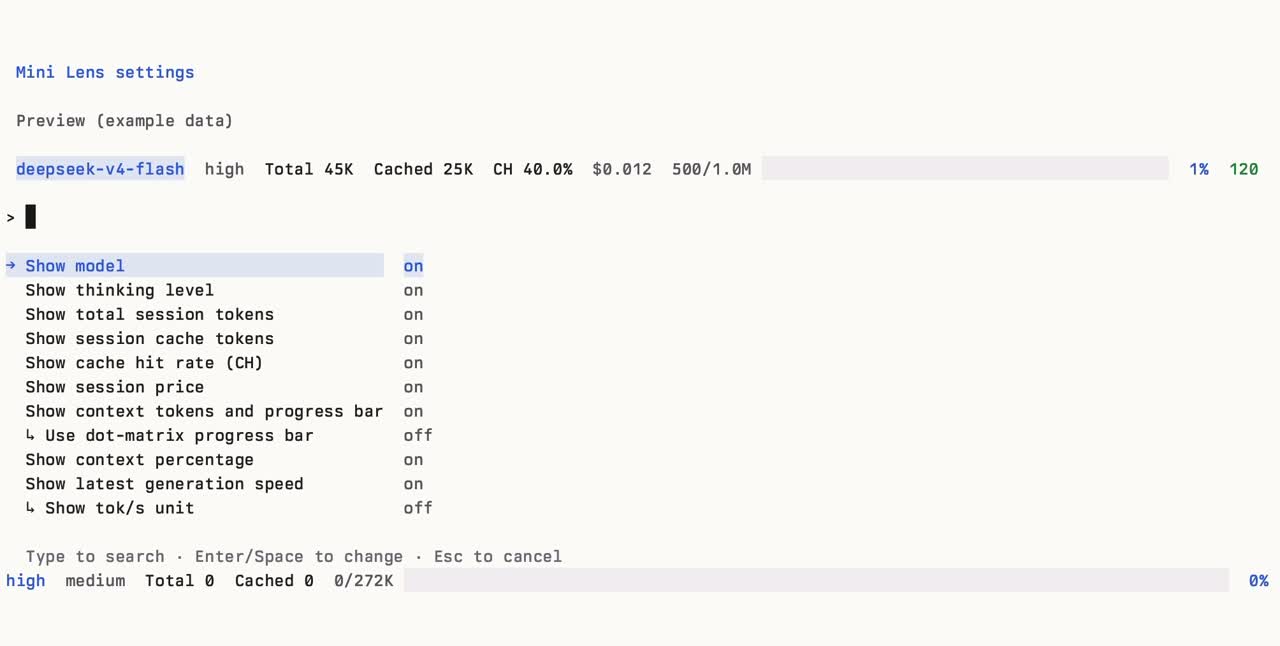
This earlier screenshot shows footer configuration, not the newer image, folding or subagent features. Settings previews use sample data.
Compatibility
- Images: previews require a terminal image protocol; unsupported terminals show a hint. Large images are resized for the terminal preview only (up to 1200 × 800 pixels and 1 MB encoded); the original file and submitted path are unchanged. Image reads are limited to 20 MB, and deleted files cannot be reopened. Link gestures depend on the terminal: usually
Cmd+clickon macOS orCtrl+clickon Windows/Linux; Ghostty fullscreen may requireShift+Cmd/Shift+Ctrl. Pi fullscreen also supports a direct left-click. Right-clicking a file link reveals and selects that file on macOS and Windows, and opens its folder elsewhere. Right-clicking empty space keeps selection or paste behavior. See Pi terminal setup. - Minimal output: uses a private Pi 0.85.x layout adapter without patching Pi’s installation. Unknown layouts refuse activation and keep native output. Recheck after Pi upgrades; other transcript-replacing extensions can conflict.
- Subagents: the pi-subagents widget adapter runs only in minimal mode, restores on disable, and passes unknown formats through. Available details depend on the integration’s status/output data; this is not a complete subagent transcript viewer.
- History:
/reloadremounts the transcript, including history created in native mode. Empty progress events do not erase existing content; tools without output show elapsed waiting time. Legacy per-item minimal controls no longer filter content. - Metrics: costs are estimates, not provider invoices. See the calculation details below.
Reference
On the first interactive TUI session, Pi Mini Mode shows a preview. Branch-only, Cached tokens, and MCP count are off by default; branch-only is mutually exclusive with project & branch. Change anything later with /pi-mini-mode-settings.
Example with optional Cached and MCP fields enabled:
deepseek-v4-flash high Total 45K Cached 25K CH 40.0% $0.012 ◇ MCP 3 500/1.0M ⣿⣀⣀⣀⣀⣀⣀⣀⣀⣀ 1% 120 tok/sThe first-run picker offers Keep defaults (保留默认), Open browser settings (打开浏览器设置), and Apply recommended setup (应用推荐配置). Keeping defaults saves the default field selection, leaves minimal output on, and prevents the prompt from appearing again; configuring opens the HTML settings page in your browser immediately. Applying the recommendation asks you to choose the bundled cc-dark or cc-light theme, saves that theme and global tuiMode=fullscreen through Pi's settings API, applies the theme immediately, and asks you to restart Pi because the fullscreen renderer is chosen at startup. Project settings and CLI flags may override these global values. Escape/cancel leaves onboarding incomplete; it runs again on the next interactive session. Print, JSON, and other non-interactive modes never prompt.
Open settings any time in your browser with:
/pi-mini-mode-settingsThe command requires an interactive Pi session and opens settings in your browser. Changes save automatically and apply immediately where the current renderer supports them. Focus a preview item and use the left/right arrow keys, or drag it, to change the footer order. The preview uses fixed sample data. Resetting defaults restores feature switches, image preview mode, and footer visibility and order.
Settings are stored globally at Pi's agent directory (normally ~/.pi/agent/pi-mini-mode.json; installations with a different Pi config directory use that directory). A malformed or missing file safely falls back to the defaults.
{
  "pi-mini-mode-project-branch-show": true,
  "pi-mini-mode-branch-show": false,
  "pi-mini-mode-model-show": true,
  "pi-mini-mode-thinking-show": true,
  "pi-mini-mode-ch-show": true,
  "pi-mini-mode-session-tokens-show": true,
  "pi-mini-mode-cache-tokens-show": false,
  "pi-mini-mode-cache-miss-show": true,
  "pi-mini-mode-cost-show": true,
  "pi-mini-mode-mcp-show": false,
  "pi-mini-mode-context-show": true,
  "pi-mini-mode-context-dots-show": true,
  "pi-mini-mode-context-percent-show": true,
  "pi-mini-mode-speed-show": true,
  "pi-mini-mode-speed-unit-show": true,
  "pi-mini-mode-minimal-show": true,
  "pi-mini-mode-input-enhancements": true,
  "onboardingCompleted": true
}| Key | Default | Controls |
|---|---|---|
pi-mini-mode-project-branch-show |
true |
Project name and branch |
pi-mini-mode-branch-show |
false |
Branch only, instead of project and branch |
pi-mini-mode-model-show |
true |
Model ID without provider prefix |
pi-mini-mode-thinking-show |
true |
Thinking level |
pi-mini-mode-ch-show |
true |
Session cache-hit rate (CH) |
pi-mini-mode-session-tokens-show |
true |
Accumulated session tokens (Total) |
pi-mini-mode-cache-tokens-show |
false |
Accumulated cache read + cache write tokens |
pi-mini-mode-cache-miss-show |
true |
Estimated cache misses when detected |
pi-mini-mode-cost-show |
true |
Estimated session list price |
pi-mini-mode-mcp-show |
false |
Enabled MCP server count |
pi-mini-mode-context-show |
true |
Used/total context tokens and progress bar |
pi-mini-mode-context-dots-show |
true |
Use a single-line dot-matrix bar instead of the solid bar |
pi-mini-mode-context-percent-show |
true |
Context-use percentage |
pi-mini-mode-speed-show |
true |
Generation speed at the far right |
pi-mini-mode-speed-unit-show |
true |
Generation-speed sub-setting: append tok/s to the numeric value |
pi-mini-mode-minimal-show |
true |
Minimal output; off restores Pi's default conversation history |
pi-mini-mode-input-enhancements |
true |
Image previews, inline skills, and message file links |
onboardingCompleted |
false initially |
Internal marker that prevents another first-run prompt |
- Generation speed
- Show tok/s unit (
pi-mini-mode-speed-unit-show) is the indented sub-setting shown beneath Show latest generation speed in/pi-mini-mode-settings. Turning it off keeps the speed number (for example40.0) and removes onlytok/s. - The sub-setting is retained when generation speed itself is hidden.
- Show tok/s unit (
Session totals are aggregated from each finalized assistant and toolResult entry on the active session branch. This includes nested LLM work reported by tools (such as a child agent) exactly once. Total uses the provider's totalTokens when supplied; older/custom results without it fall back to the sum of input, output, cache-read, and cache-write tokens. Cached is cache-read + cache-write (included in Total); CH is cache-read / (input + cache-read). Only persisted finalized usage is counted, so stream updates cannot double count totals.
During an assistant stream, the footer shows the recent decode rate: tokens over the last second, redrawn every 500ms. Provider usage.output is the count when it advances. If that sample stays put while text is still streaming, the rate follows the streamed text instead of the stale total. When the assistant message finishes, the indicator switches to that turn's average (output tokens divided by time after the first output token, excluding TTFT). Hovering the indicator opens a floating panel beside it, above the status bar, with the average, the live rate while streaming, time to first token, and any usage fields the provider actually reported. The completed average remains visible while a later assistant message only calls tools or waits for output; it is replaced when the new reply produces a live sample. Nested tool LLM usage does not overwrite a measured main-turn rate; it can set the footer only when no speed has been measured yet. Short or single-token bursts are hidden rather than shown as inflated tok/s. Regressing output samples and non-increasing timestamps are ignored.
Before a measurable response exists, the speed field is absent entirely—Pi Mini Mode never displays a -- tok/s placeholder. When present, speed is the rightmost footer field (the context percentage, if enabled, is immediately to its left). Its color uses Pi theme semantics: success at >=30 tok/s, warning at 10–29.9 tok/s, and error below 10 tok/s. No colors are hard-coded, so it follows the selected Pi theme.
The price is the same finalized active-branch usage and configured per-million-token rates. It is an estimate, not a provider invoice. In narrow terminals, the footer drops/truncates lower-priority content to remain one line without overflow.
Install only the local copy while developing; installing npm and local copies together double-registers the extension:
pi remove npm:@each1024/pi-mini-mode && pi install /path/to/pi-mini-mode
npm run check
npm run check:syntax
After source changes, run /reload in an already-open Pi session. npm run check checks all extension and library TypeScript, including unused declarations and parameters. npm run check:syntax parses the JavaScript checks, maintenance scripts, and settings page without executing them.
For a specific regression, list the existing checks with npm run check:focused -- --list, then select one, for example npm run check:focused -- settings-web. npm test uses the same selector and requires a name; it never defaults to the full suite. Terminal fixtures in test/minimal-pty.py remain available for explicitly requested terminal investigations.
The direct development dependency on @earendil-works/pi-server is required by experimental modules imported by Pi 0.85.0; that Pi release omits it from its package dependencies. Keep it until a Pi upgrade fixes the upstream dependency declaration.
Every push to main (including merged PRs) that changes extensions/, lib/, themes/, package.json or the lockfile publishes automatically via .github/workflows/publish.yml: a package.json version above the highest published npm version is used as is; otherwise the patch number of the highest published version is incremented, the package is published to npm, the version is committed back to main with [skip ci], and a matching tag and GitHub Release are created. Docs-only or CI-only changes do not publish, and a version is never published twice. The Pi package gallery discovers the package from npm.
npm authentication prefers a Trusted Publisher (OIDC) bound to this repository and publish.yml; a repository secret NPM_TOKEN also works.
MIT License · Built for Pi