@elompenta/tau-mirror
Web UI that mirrors your Pi terminal session in the browser
Package details
Install @elompenta/tau-mirror from npm and Pi will load the resources declared by the package manifest.
$ pi install npm:@elompenta/tau-mirror- Package
@elompenta/tau-mirror- Version
1.2.0- Published
- Oct 9, 2026
- Downloads
- 336/mo · 336/wk
- Author
- elompenta
- License
- MIT
- Types
- extension
- Size
- 537.4 KB
- Dependencies
- 2 dependencies · 0 peers
Pi manifest JSON
{
  "image": "https://raw.githubusercontent.com/Elompenta/tau-mirror/main/docs/images/dark.png",
  "extensions": [
    "./extensions/mirror-server.ts"
  ]
}
Security note
Pi packages can execute code and influence agent behavior. Review the source before installing third-party packages.
README
Tau
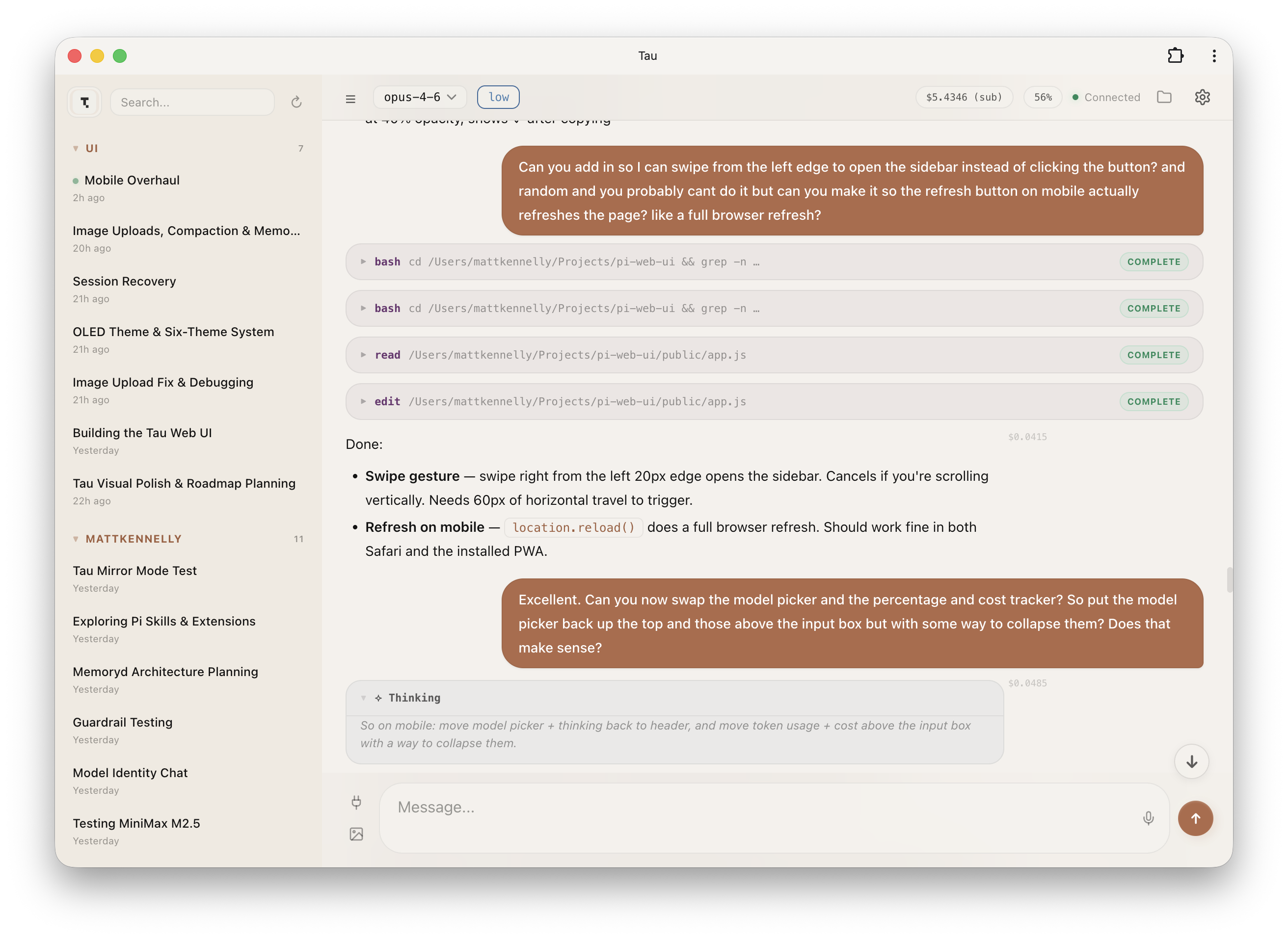
A web UI that mirrors your Pi terminal session in the browser. No separate server — it runs as a Pi extension inside your existing process.


What it does
Tau connects to your running Pi TUI and gives you a second view in the browser. Same session, same messages, same tools — just a different screen. Type in the terminal or the browser, both stay in sync.
- Live mirroring — streams messages, tool calls, and thinking blocks in real-time
- Works on any device — open it on your phone, tablet, or another monitor
- Session browser — view history from any past session
- No extra process — the Pi extension is the server
Project status: maintained fork
This is the actively maintained continuation of deflating/tau, which its original author deflating retired in September 2026. Bug reports, feature requests and pull requests are welcome in this repository.
Tau can access and control your Pi session; do not expose it to the public internet. By default it listens on 127.0.0.1, so only this machine can open it. To use it from your phone or another device, see Access from other devices.
Install
pi install npm:@elompenta/tau-mirrorOr from git:
pi install git:github.com/Elompenta/tau-mirrorMigrating from tau-mirror
The original npm package tau-mirror receives no further updates. Replace it with this fork:
pi remove npm:tau-mirror
pi install npm:@elompenta/tau-mirror
Restart Pi afterwards. Your settings in ~/.pi/agent/settings.json (the tau block) carry over unchanged.
Usage
- Start Pi normally in your terminal
- Open the URL shown in the status bar (default:
http://localhost:3001) - That's it
Type /qr in the terminal to show a QR code and scan it to access via your phone; this needs access from other devices enabled.
Features
Chat
- Full markdown rendering with syntax-highlighted code blocks
- Streaming responses with typing indicator
- Image attachments (paste, drag & drop, or button)
- Copy any message with one click
- Inline diff viewer for edit tool calls (red/green lines)
- Scroll-to-bottom button with new message indicator
- Message queuing — type while the agent is working, messages queue and auto-send
Session Management
- Browse all past sessions grouped by project
- Full-text search across all session history with highlighted snippets
- Sorted by last modified (most recent first)
- Live session marked with a green dot
- Click a session to resume it in Pi; the new-session button starts a fresh Pi session
- Inline session rename, in the sidebar or via the session title in the header
- Unsent drafts are kept per session across reloads
- Favourite sessions, tags, and filtering
Model & Thinking
- Model picker with search/filter and keyboard support
- Thinking level toggle (off/low/medium/high)
- Token usage percentage with context window visualiser
- Cost tracking per session
Voice Input
- Mic button in the input area using Web Speech API (on-device dictation)
- Live transcription into the textarea
- Pulses red while recording
File Browser
- Right sidebar with lazy-loaded file tree
- Navigate directories, open files natively
- Sort by name, date or size; instant search within the current directory
- Editable path field: type or paste a path (including Explorer's "Copy as path") to jump there
- Drag files onto the input to insert their path
Extension Dialogs
ctx.ui.select/confirm/inputdialogs from any Pi extension show in the terminal and in every connected browser at once- The first answer wins and closes the dialog everywhere else
Diagnostics
- Mirror server diagnostics go to
~/.pi/agent/tau-mirror.loginstead of the terminal
Compaction
- Manual context compaction with status display
- Auto-compaction support
PWA
- Installable as a standalone app on iOS, Android, and macOS
- Custom app icons
- Service worker with network-first caching
Configuration
Environment variables (set before starting Pi):
| Variable | Default | Description |
|---|---|---|
TAU_MIRROR_PORT |
3001 |
Server port |
TAU_HOST |
127.0.0.1 |
Bind address. Set to 0.0.0.0 to accept connections from other devices |
TAU_STATIC_DIR |
(bundled) | Override static files path |
TAU_DISABLED |
0 |
Set to 1 to disable Tau (it stays installed but won't start the server) |
TAU_USER |
(none) | HTTP Basic Auth username (both TAU_USER and TAU_PASS required to enable) |
TAU_PASS |
(none) | HTTP Basic Auth password |
Access from other devices
Tau listens on 127.0.0.1 by default. To reach it from your phone, tablet or another computer, bind it to all interfaces and set a login, because anyone who can reach the port can control your Pi session:
{
  "tau": {
    "host": "0.0.0.0",
    "user": "pi",
    "pass": "your-password"
  }
}
Without a login, Tau warns at startup whenever it is reachable from the network.
Allowed hosts
Tau answers only requests addressed to localhost or an IP address, and only from its own pages; other websites cannot reach it through your browser. To open Tau under a host name, for example a Tailscale MagicDNS name, list it in ~/.pi/agent/settings.json:
{
  "tau": {
    "allowedHosts": ["my-pc.tailnet.ts.net"]
  }
}
Authentication
Tau supports optional HTTP Basic Auth (browser-native login popup).
1. Set credentials — add to ~/.pi/agent/settings.json:
{
  "tau": {
    "user": "pi",
    "pass": "your-password"
  }
}
Or via environment variables: TAU_USER=pi TAU_PASS=secret pi
2. Toggle on/off — once credentials are configured, a "Require login" toggle appears in Settings within the Tau web UI. Flip it on to start requiring authentication, off to open it back up. The setting persists across restarts.
Both HTTP and WebSocket connections are gated when enabled. The /api/health endpoint remains open for monitoring.
Start / Stop
Control Tau at runtime without uninstalling:
/tau-stop     Stop the mirror server
/tau-start    Start it again
To prevent Tau from auto-starting (e.g. in multi-session or dev container workflows):
TAU_DISABLED=1 piYou can still start it manually with /tau-start in that session.
How it works
Tau is a Pi extension that starts an HTTP + WebSocket server inside the Pi process. The extension subscribes to all Pi events and forwards them to connected browser clients. Commands from the browser are executed via the extension API against the same agent session.
┌─────────────┐     ┌──────────────────────────────┐     ┌─────────────┐
│  Pi TUI     │     │  Pi Process                  │     │  Browser    │
│  (terminal) │◄───►│                              │◄───►│  (Tau)      │
│             │     │  tau extension               │     │             │
└─────────────┘     │    ↳ HTTP + WS on :3001      │     └─────────────┘
                    └──────────────────────────────┘
There's no separate server to run. The extension auto-loads when Pi starts and shuts down when Pi exits.
Development
Clone and point the extension at the local static files:
git clone https://github.com/Elompenta/tau-mirror.git
cd tau-mirror
TAU_STATIC_DIR=$(pwd)/public pi
Edit the files in public/ — refresh the browser to see changes.
License
MIT — originally created by deflating, maintained by Elompenta. See LICENSE.