@esoware/pi-cc-ui
Claude Code style UI for pi
Package details
Install @esoware/pi-cc-ui from npm and Pi will load the resources declared by the package manifest.
$ pi install npm:@esoware/pi-cc-ui- Package
@esoware/pi-cc-ui- Version
0.5.0- Published
- Sep 17, 2026
- Downloads
- 437/mo · 366/wk
- Author
- esoware
- License
- MIT
- Types
- extension, theme
- Size
- 254.9 KB
- Dependencies
- 1 dependency · 2 peers
Pi manifest JSON
{
  "image": "https://raw.githubusercontent.com/esoware/pi-cc/main/packages/pi-cc-ui/media/cover.png",
  "themes": [
    "./theme"
  ],
  "extensions": [
    "./extension/index.ts"
  ]
}Security note
Pi packages can execute code and influence agent behavior. Review the source before installing third-party packages.
README
pi-cc-ui
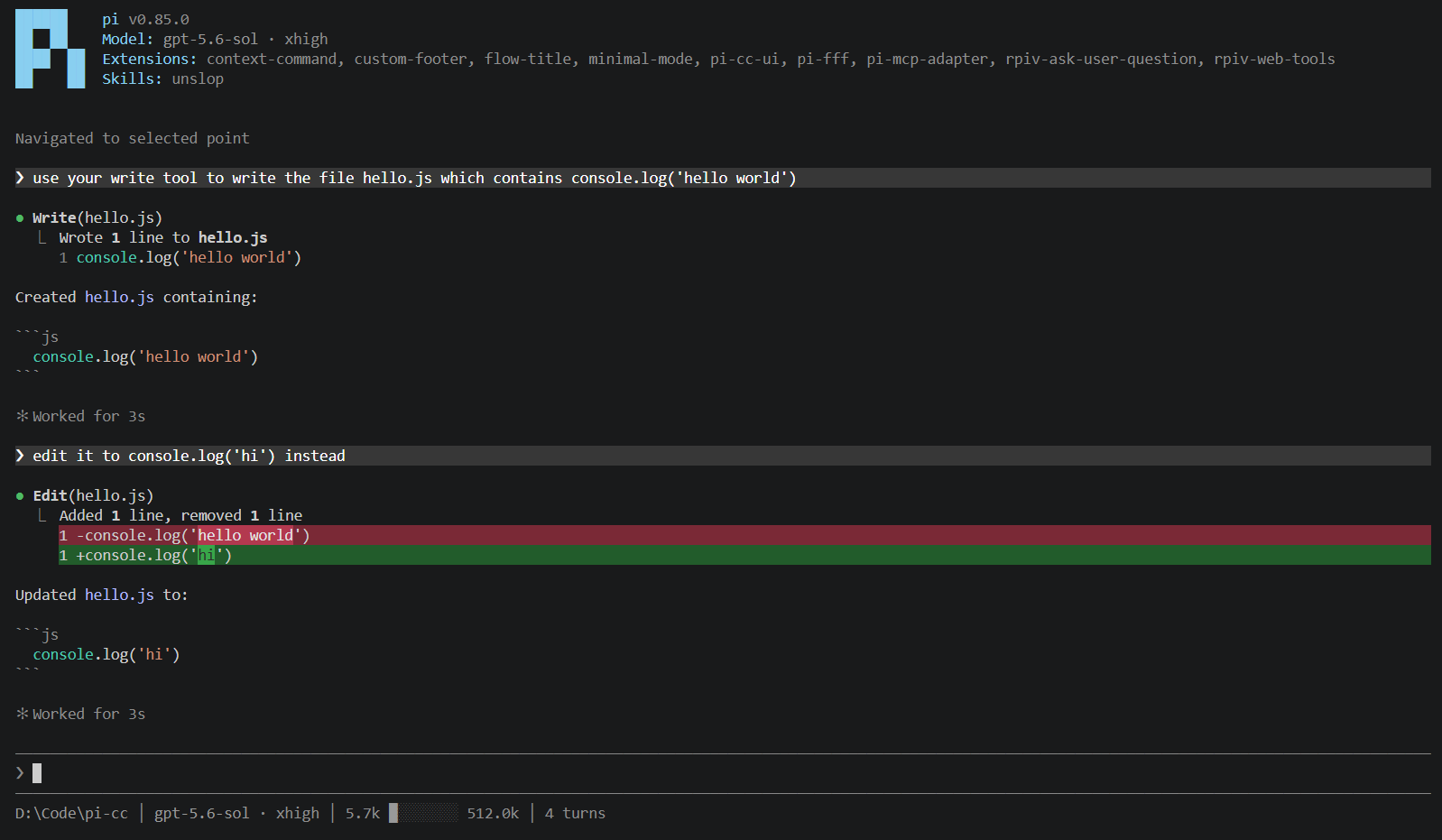
Makes pi look like Claude Code, in light blue instead of orange. Fork of better-claude-code-ui.
Install
pi install npm:@esoware/pi-cc-ui
Or from a checkout of this repo:
pnpm install
pi install /absolute/path/to/pi-cc/packages/pi-cc-ui
If npm:better-claude-code-ui is in your packages, remove it first. Both change the same parts of pi's UI.
Settings that go with it, in /settings or ~/.pi/agent/settings.json:
{ "quietStartup": true, "theme": "pi-cc-ui-dark", "outputPad": 0 }
Configuration
/ccopens pi-cc-ui's settings: tool grouping, completion duration, terminal title and symbol, wheel scroll lines, and colors. Changes apply immediately and are saved to~/.pi/agent/pi-cc-ui.json.- The theme and thinking display are pi's own settings, in
/settingsas Theme and Hide thinking. - Keys are pi's own keybindings, in
~/.pi/agent/keybindings.json.
What it changes
Themes
pi-cc-ui-darkandpi-cc-ui-light, each with an-ansivariant for 16-color terminals and a-daltonizedvariant for color-blind users. Pick one under Theme in/settings, or choose Automatic there to switch between a light and a dark one with the terminal.- Colors in
/ccoverrides individual colors as JSON:userHover(expanded tool rows),bashMessage,diffAddedLine,diffRemovedLine,diffAddedWord,diffRemovedWord,diffLineNumber,diffAddedDecorationanddiffRemovedDecoration. Values are"#RRGGBB"or a 0–255 color index."diffDimmed": truesoftens the changed-line backgrounds, and the four diff backgrounds also accept aDim-suffixed key for that mode. - Other themes work too. Diff backgrounds are derived from their
toolDiffAddedandtoolDiffRemovedcolors.
Header, status line and spinner
- Startup header with the pi logo, version,
Model: <id> · <effort>, and your installed extensions and skills. Extensions with a package update waiting are highlighted there instead of pi showing its update notice. Resumed and forked sessions addresumed <id> · <title>. - Status line:
pi-cc ⎇ main │ claude-opus-5 · high │ 56.4k █░░░░░░░ 1.0m │ 12 turns. The eight tiles fill as the context window does and switch to the warning color past 90%. - Spinner: a standalone, flush-left row below the chat and above the input bar, with a blank line above and below. A pulsing diamond and a shimmering
Working…are followed by(12s · ↓ 1.2k tokens · thinking with high effort). Long thinking readsthinking more,thinking some more, thenalmost done thinking(at 30s, 1m and 2m), andthought for 8sshows briefly once it ends. Parts drop off as the terminal narrows.
Prompt
❯in front of the prompt,!in bash mode.?on an empty prompt lists the newline, follow-up, thinking-level and thinking-display keys below it.Short hints below the prompt when you browse history, when messages are queued (with the key that restores them), and after a clipboard paste. Clipboard text goes in like a terminal paste, so undo gets the draft back; if nothing could be read, the hint says so.
For Claude Code's prompt keys, add these to
~/.pi/agent/keybindings.json.ctrl+pthen walks prompt history instead of cycling models while you type.{ "app.message.followUp": "ctrl+q", "tui.input.newLine": ["shift+enter", "alt+enter", "ctrl+j"], "tui.editor.historyPrevious": "ctrl+p", "tui.editor.historyNext": "ctrl+n" }None of this applies if another extension has replaced the editor.
Transcript
- User messages start with a dim
❯and lose pi's inner padding. - Assistant text starts with
●(⏺on macOS), with continuation lines indented under it. - A run that finishes normally and takes at least a second ends with
✻ Worked for 1m 12s · done 3:41 PM. Time spent waiting on dialogs isn't counted. Turning off Completion duration in/cchides these lines, including earlier ones. !commands you run yourself show as! commandwith the last 3 lines of output (5 while running) andRunning…,CancelledorExit N, on a tinted background in the dark, light and ANSI themes.- Extension messages without their own renderer get a muted
[type]label over their text and images instead of pi's box. Extensions can also postcc-info,cc-noticeandcc-warningmessages or entries, which render as muted or warning-colored text. Ones withverbosity: "verbose"only show when expanded.
Tool calls
- pi-cc-ui registers no tools of its own. It patches pi's tool component, so every tool call, including extension and MCP tools, gets a
●header and a⎿result instead of pi's padded box. The dot is green when done, red on error, blinks while running, and turns yellow withResult unavailable (interrupted)if the run ended before a result came back. - pi's built-in
read,bash,powershell,grep,find,ls,writeandeditget the renderers below only while pi itself owns those names. An extension that replaces one keeps its own renderer inside the frame, whatever the package order. Tools without a renderer show their name and a result preview with JSON pretty-printed and URLs clickable. - Headers are
Read(path),Bash(command),PowerShell(command),Search(pattern: "…", path: …)for both grep and find,Ls(path),Write(path)andEdit(path). Paths are plain text, relative to the cwd or~, with no file-opening links. Shell headers add the lines so far, the elapsed time after 2 seconds, and the timeout if one was set. Calls with bad arguments say so, e.g.edit (Invalid arguments: expected path). - Collapsed results stay short: a stat line for read, grep, find and ls (
Read 120 lines,Found 12 matching lines across 3 files), the first 3 lines plus… +N linesfor bash and powershell (the last 5 while running), the diff for edits and overwrites, and the first 10 lines, numbered and syntax-highlighted, for new files. - Edits and overwrites render as Claude Code style diffs: line number, sign, content, full-width backgrounds on changed lines, and highlighted words where a line only partly changed. Edits use pi's patch for real line numbers and fall back to per-edit snippets without them. Overwrites are diffed against the file as it was before the write, up to 1 MB. Previews stop at 60 lines.
ctrl+oexpands every row to the full command and result (up to 2000 lines), painted with the tool background. In fullscreen mode, clicking a row's result or a group expands or collapses just that one, hovering highlights it, and the(ctrl+o to expand)hints are left out.- Runs of pi's read, grep, find, ls, bash and powershell calls collapse into one line. While running it reads
● Reading 2 files, running 1 shell command…with the latest path, pattern or command under⎿, plus timers once something has run for 2 seconds. When done it readsRead 2 files, ran 1 shell command, with(1 failed)if something failed. The group dot is red only when the latest call failed. Assistant text, visible thinking and any other tool call start a new group. Expanding a group shows every call as a normal row, all inside one background block. - Terminal control sequences in tool output, commands and paths are stripped before display. Embedded hyperlinks keep their URL as text.
Thinking
- Thinking is expanded only while it streams, under a muted
∴ Thinking…with dimmed, indented text. When it finishes it collapses to∴ Thought for 4s, or just∴ Thoughtif no duration was recorded. Redacted thinking shows✻ Thinking…with no text. - Turning off Hide thinking in
/settings, or pressingctrl+t, keeps thinking expanded. Both save pi'shideThinkingBlock, which pi-cc-ui treats as on until it is set; an olderthinkingModeinpi-cc-ui.jsonstill counts until then.ctrl+oexpands thinking along with tools, and in fullscreen mode clicking a thinking row toggles just that one. - Durations are saved as separate session entries, so they survive reload and resume without changing messages or model context.
Fullscreen
- The mouse wheel scrolls 3 lines per tick instead of pi's 1. Change it with Wheel scroll lines in
/cc. - Selections keep their text colors on the theme's selection background instead of inverting.
- Double-click selects a whole URL or path. Triple-click selects the full width of the line.
- Copying says
copied 42 chars to clipboard, and whitespace-only selections aren't copied. The selection keys are under Commands and keys.
Terminal
- Title:
✳ <session name or cwd>, alternating◐/◑while the agent works or compacts. It stops animating while the terminal is unfocused or inside tmux or screen. Turning off Title symbol in/ccdrops the symbol; turning off Terminal title, or settingPI_CC_DISABLE_TITLE=1, leaves the title alone. - With pi's terminal progress indicator turned on (
terminal.showTerminalProgress), it stays up for the whole run instead of flickering off between steps.
Commands and keys
/ccopens pi-cc-ui's settings.?on an empty prompt shows the main keys below it. Press it again, or type anything, to hide them.ctrl+t, pi's thinking display key, switches between full and live-only thinking and saves the choice.ctrl+oexpands/collapses tool output and thinking together. Collapsing returns thinking to its saved display.- With a fullscreen selection,
ctrl+ccopies it instead of clearing the prompt. If the selection was already copied automatically,ctrl+cdismisses it.ctrl+shift+corcmd+calways copies.shift+arrowsandshift+home/endextend the selection. Typing clears it; scrolling, paging,escapeandalt/cmdnavigation keep it.
License
MIT. The copyright notice for the original better-claude-code-ui is in LICENSE.