@esso0428/pi-sidebar
Floating right sidebar for pi with git diff/status and session metadata (unofficial fork).
Package details
Install @esso0428/pi-sidebar from npm and Pi will load the resources declared by the package manifest.
$ pi install npm:@esso0428/pi-sidebar- Package
@esso0428/pi-sidebar- Version
0.1.35- Published
- Jul 14, 2026
- Downloads
- 5,621/mo · 591/wk
- Author
- esso0428
- License
- BSD-3-Clause
- Types
- extension, skill
- Size
- 139.3 KB
- Dependencies
- 0 dependencies · 2 peers
Pi manifest JSON
{
  "extensions": [
    "./extensions/sidebar.ts"
  ],
  "skills": [
    "./skills"
  ],
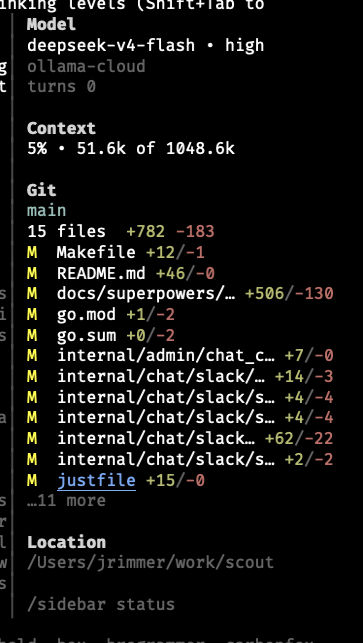
  "image": "https://raw.githubusercontent.com/jrimmer/pi-sidebar/main/assets/sidebar-screenshot.png"
}
Security note
Pi packages can execute code and influence agent behavior. Review the source before installing third-party packages.
README
@esso0428/pi-sidebar
Floating right sidebar for the pi coding harness with model, context, git, and session metadata.
This is an unofficial fork of jrimmer/pi-sidebar published under the @esso0428 npm scope. It includes the following additions over the original:
- Cursor restoration on session shutdown — ensures the terminal hardware cursor is shown (
\x1b[?25h) when Pi exits, preventing the disappearing-cursor issue when the sidebar overlay is active.
@esso0428/pi-sidebar renders a non-capturing right sidebar overlay, defaults to a vertically centered floating mode on the right side, and auto-hides while the LLM is working so it does not obscure review of in-progress model output. An optional full-height mode is available for a more fixed-window look.
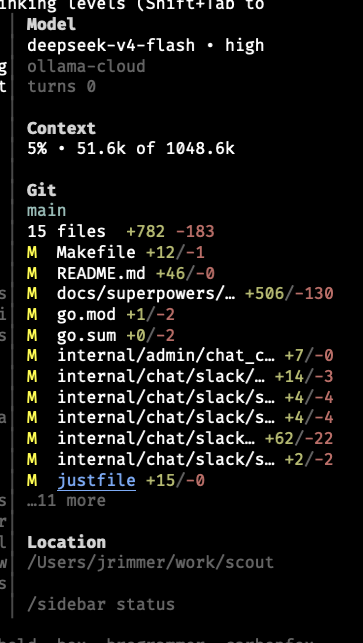
This fork replaces Pi's overlay API with a terminal-column shim that reserves space on the right side. Pi renders content in the reduced width and the sidebar is painted separately via ANSI escape codes, so there is no text overlap.
Features
- Floating sidebar by default — right-anchored, non-capturing overlay positioned near the visual middle of the screen.
- Optional full-height mode —
/sidebar fullorPI_SIDEBAR_FULL_HEIGHT=1renders a fixed right window with a small gutter. - Cursor restoration on Pi exit — hardware cursor is always restored; no more invisible cursor after leaving Pi.
- Auto-hide while the LLM is working — hides on turn start and reappears when the turn ends. Disable with
PI_SIDEBAR_AUTOHIDE_WORKING=0. - Compact model section — shows model + reasoning level on one line, provider underneath.
- Compact context usage — shows percentage first, then used/available context, e.g.
13% • 1.5k of 200.0k. - Git branch and diff summary — shows current branch, changed file count, and total
+/-stats. - Per-file git deltas — changed-file rows preserve room for deltas and color additions/deletions separately.
- Truncated git list — changed-file rows are capped so the centered sidebar does not grow too tall; overflow renders as
…N more. - Configurable git detail — toggle longer/reduced changed-file lists with
/sidebar-git-detail. - No footer replacement — leaves pi's native footer alone.
- Responsive visibility — auto-hides below a configurable terminal width.
Example layout:
Model
gpt-5.5 • medium
openai-codex
turns 4
last tool use bash

Context
5% • 49.2k of 1048.6k

Git
main
3 files  +507 -134
M  docs/superpowers/… +506/-130
M  go.mod +1/-2
M  go.sum +0/-2

Location
/path/to/project

/sidebar status
Install
Install globally from npm
pi install npm:@esso0428/pi-sidebar
Install from source
git clone https://github.com/esso0428/pi-sidebar
cd pi-sidebar
pi install ./
Test for one run without installing
pi -e npm:@esso0428/pi-sidebar
Reload an already-running pi after installation:
/reload
Verify installation inside pi:
/sidebar status
Manage the installed package:
pi list
pi update --extensions
pi remove npm:@esso0428/pi-sidebar
Use project-local install only when you want .pi/settings.json in the current project to carry the dependency:
pi install -l npm:@esso0428/pi-sidebar
Commands
/sidebar— toggle sidebar visibility/sidebar on— show sidebar/sidebar off— hide sidebar/sidebar status— show enabled/layout/autohide/git-detail state/sidebar full— use full-height fixed-window sidebar mode/sidebar floating— use the default floating overlay window/sidebar-refresh— refresh git/status data/sidebar-git-detail— toggle longer changed-file list
Shortcut:
ctrl+shift+s— toggle sidebar
Custom Data Panels (sidebar-ui.json)
The sidebar can display custom data from any pi extension that writes session entries via ctx.sessionManager.appendEntry(). Configure via sidebar-ui.json:
- Global:
~/.pi/agent/sidebar-ui.json - Local:
.pi/sidebar-ui.json(overrides global)
Built-in Skill
This package bundles the pi-sidebar-ui-helper skill, which walks the LLM through discovering available data and generating the correct config. Ask your LLM to help configure sidebar panels, or invoke it manually:
/skill:pi-sidebar-ui-helper
Example — show goal status in the sidebar:
{
  "panels": {
    "goal": {
      "label": "Goal",
      "entryType": "goal-state",
      "variables": {
        "goal.text": "Goal",
        "goal.status": "Status",
        "goal.tokensUsed": "Tokens Used"
      }
    }
  }
}
Environment Configuration
Set environment variables before starting pi:
| Variable | Default | Description |
|---|---|---|
PI_SIDEBAR_ENABLED |
1 |
Start enabled. Use 0 to start hidden. |
PI_SIDEBAR_WIDTH |
34 |
Sidebar content columns. |
PI_SIDEBAR_FULL_HEIGHT |
0 |
Use full-height fixed-window mode instead of floating mode. |
PI_SIDEBAR_BUFFER |
1 |
Blank gutter columns before the sidebar border in full-height mode. |
PI_SIDEBAR_FILL_ROWS |
200 |
Rows emitted to visually fill tall terminals in full-height mode. |
PI_SIDEBAR_MIN_TERM_WIDTH |
110 |
Auto-hide below this terminal width. |
PI_SIDEBAR_OFFSET_Y |
-6 |
Floating-mode vertical offset. Negative moves up; 0 uses the TUI's exact right-center anchor. |
PI_SIDEBAR_AUTOHIDE_WORKING |
1 |
Hide while the LLM is working. |
PI_SIDEBAR_REFRESH_MS |
5000 |
Git polling interval. |
PI_SIDEBAR_GIT_LINES |
12 |
Max changed-file rows rendered in detailed mode; overflow shows …N more. |
PI_SIDEBAR_MAX_FILES |
12 |
Legacy alias used only when PI_SIDEBAR_GIT_LINES is unset. |
PI_SIDEBAR_GIT_DETAIL |
1 |
Start with detailed changed-file list. Reduced mode shows up to 5 rows. |
Example:
PI_SIDEBAR_WIDTH=40 PI_SIDEBAR_AUTOHIDE_WORKING=0 pi
Git data
The sidebar uses pi's pi.exec helper to run static git commands in the current working directory:
git rev-parse --is-inside-work-treegit branch --show-currentgit diff --shortstatgit status --porcelain=v1git diff --numstat HEAD --
No shell strings are assembled from user input. The sidebar displays file paths and diff counts, not file contents.
Differences from upstream
Cursor restoration on session shutdown
When Pi exits the terminal hardware cursor was left hidden (Pi TUI hides it by default). This fork adds \x1b[?25h (show cursor) in both dispose() and session_shutdown.
No overlay overlap
The original pi-sidebar used Pi's overlay API, which draws on top of terminal content and covers text. @esso0428/pi-sidebar uses a different approach inspired by pi-sidebar-tui:
- Shrinks
terminal.columns— makes Pi think the terminal is ~35 columns narrower, so all content (transcript, input, footer) reflows to the left. - Hooks
tui.doRender— after every Pi render cycle, paints the sidebar in the reserved right-side columns via direct ANSI escape codes. - Synchronized output — uses DECSM/DECRC + synchronized update (
\x1b[?2026h/l) for tear-free rendering.
Because Pi never draws in the reserved columns, there is no overlap.
Notes
The terminal-column shim approach (Object.defineProperty(terminal, "columns", ...)) is a workaround that directly modifies Pi's internal terminal object. While functionally effective, it hooks into Pi's internal doRender method. A proper fix would be native Pi TUI window-region support, as described in Future native Pi TUI window regions.
Docs
Development
npm install --ignore-scripts
npm run verify
npm run verify runs TypeScript checks, unit tests, and npm pack --dry-run to confirm package contents.
Adding a sidebar section
Sections are intentionally lightweight and local to this package. There is no nested Pi-package plugin system.
To add a section:
- Add a self-contained renderer in
extensions/sidebar/sections/<name>.ts. - Accept a
SidebarSectionContextfromextensions/sidebar/types.ts. - Register the section in the compositor's
buildSidebarContentmethod. - Add or update tests in
tests/sidebar.test.ts.
Existing examples: model.ts, context.ts, git.ts, location.ts, and hint.ts.
License
BSD-3-Clause — same as the upstream.