@firstpick/pi-extension-bang-command-autocomplete
Autocomplete for !<command> in Pi, with optional shell-history indexing.
Package details
Install @firstpick/pi-extension-bang-command-autocomplete from npm and Pi will load the resources declared by the package manifest.
$ pi install npm:@firstpick/pi-extension-bang-command-autocomplete- Package
@firstpick/pi-extension-bang-command-autocomplete- Version
0.2.3- Published
- Aug 7, 2026
- Downloads
- 197/mo · 41/wk
- Author
- firstpick
- License
- MIT
- Types
- extension
- Size
- 90.5 KB
- Dependencies
- 1 dependency · 1 peer
Pi manifest JSON
{
  "image": "https://unpkg.com/@firstpick/pi-extension-bang-command-autocomplete/images/Common_commands_v0.1.4.png",
  "extensions": [
    "./index.ts"
  ]
}Security note
Pi packages can execute code and influence agent behavior. Review the source before installing third-party packages.
README
Bang Command Autocomplete for Pi
Suggests shell commands when you type ! or !! in Pi.
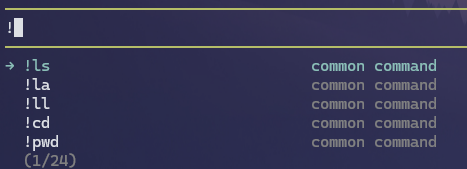
What you can do
- Suggests commands while you type
!or!!. - Includes a useful built-in command list.
- Can optionally learn command names from your shell history.
- Keeps normal Pi prompts unchanged.
Install
Install it through Pi:
pi install npm:@firstpick/pi-extension-bang-command-autocomplete
Restart Pi if the package does not appear in your current session.
How to use it
Type ! followed by part of a shell command. Choose a suggestion, finish the command, and submit it as usual. Use !! when the output should stay out of the next model prompt.
/bang-refresh— rebuild autocomplete index./bang-status— show indexed command count, history-index status, runtime-learned command/line counts, and learned flag count.
Before you start
No setup is needed for the built-in command suggestions. Suggestions from your shell history are optional; see the technical reference if you want to enable them.
Technical details
See TECHNICAL.md for complete commands, configuration, compatibility, security, and troubleshooting information.