@firstpick/pi-extension-setup-skills
Interactive Pi command to enable or disable local skills from a multi-selection list.
Package details
Install @firstpick/pi-extension-setup-skills from npm and Pi will load the resources declared by the package manifest.
$ pi install npm:@firstpick/pi-extension-setup-skills- Package
@firstpick/pi-extension-setup-skills- Version
0.2.1- Published
- Aug 20, 2026
- Downloads
- 1,256/mo · 242/wk
- Author
- firstpick
- License
- MIT
- Types
- extension
- Size
- 322.8 KB
- Dependencies
- 1 dependency · 1 peer
Pi manifest JSON
{
  "image": "https://unpkg.com/@firstpick/pi-extension-setup-skills/images/setup_skills_v0.1.3.png",
  "extensions": [
    "./index.ts"
  ]
}Security note
Pi packages can execute code and influence agent behavior. Review the source before installing third-party packages.
README
Setup Skills for Pi
Choose which local Pi skills are enabled from one interactive list.
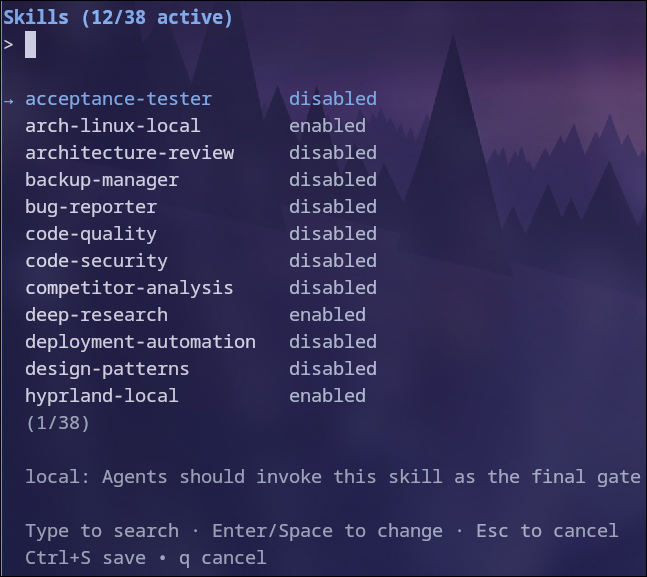
What you can do
- Lists locally available skills in one selector.
- Shows which skills are currently enabled.
- Lets you enable or disable several skills together.
- Saves the resulting skill selection for Pi.
- Keeps skills you install later working, without a second trip through the list.
Install
Install it through Pi:
pi install npm:@firstpick/pi-extension-setup-skills
Restart Pi if the package does not appear in your current session.
How to use it
Run /skills, select the skills you want available, and save the selection. Reopen it whenever you want to change the enabled set.
/skills↑/↓: navigateEnter/Space: toggle selected skill- Type: search/filter
Escorq: cancelCtrl+S: save The command updates Pi settings and prompts for/reloadafter changes.
Before you start
Skills are available unless you switch them off. Install a skill package and it works straight away, and the same is true for a skill you drop into ~/.pi/agent/skills. Only the skills you deselect here are recorded, so nothing you install later goes missing.
If you used an older version of this extension, your first save cleans up the settings it wrote back then. Your enabled and disabled skills stay exactly as they are.
Technical details
See TECHNICAL.md for complete commands, configuration, compatibility, security, and troubleshooting information.