@firstpick/pi-extension-stats
Token and cost usage analytics command for Pi session history.
Package details
Install @firstpick/pi-extension-stats from npm and Pi will load the resources declared by the package manifest.
$ pi install npm:@firstpick/pi-extension-stats- Package
@firstpick/pi-extension-stats- Version
0.3.3- Published
- Sep 4, 2026
- Downloads
- 827/mo · 101/wk
- Author
- firstpick
- License
- MIT
- Types
- extension
- Size
- 478.5 KB
- Dependencies
- 1 dependency · 1 peer
Pi manifest JSON
{
  "image": "https://unpkg.com/@firstpick/pi-extension-stats/images/stats_v0.1.2.png",
  "extensions": [
    "./index.ts"
  ]
}Security note
Pi packages can execute code and influence agent behavior. Review the source before installing third-party packages.
README
Stats for Pi
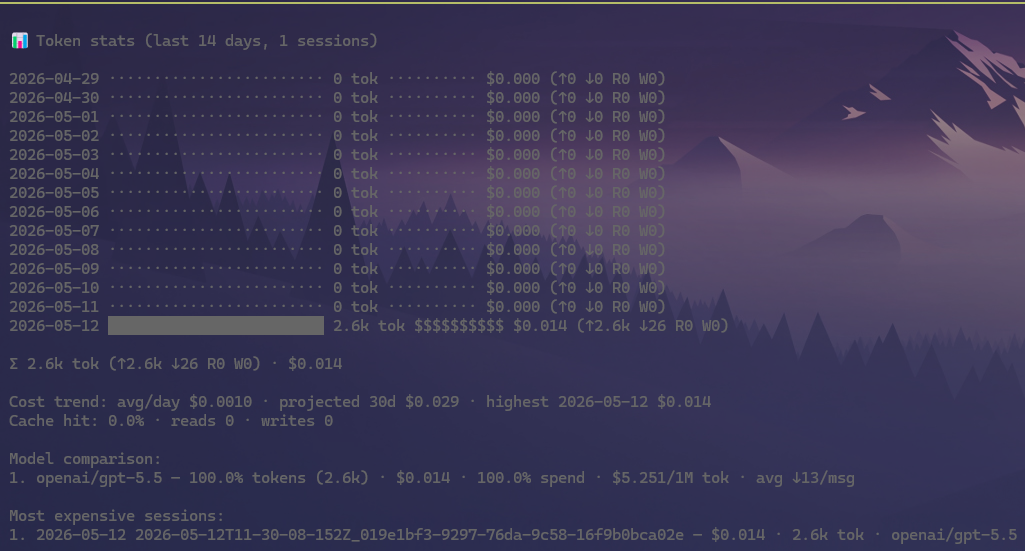
See where your Pi tokens and model costs are going over time.
What you can do
- Shows daily token and cost history.
- Compares model usage and expensive sessions.
- Explains how much of the initial prompt comes from Pi, tools, and context.
- Shows cache use, trends, and projected cost.
- Marks incomplete Ollama Cloud cost data instead of presenting missing prices as free usage.
Install
Install it through Pi:
pi install npm:@firstpick/pi-extension-stats
Restart Pi if the package does not appear in your current session.
How to use it
Start with:
/stats
This shows the most recent 14 days. Use /stats 30 for a longer period or /stats all for everything available.
Focused views:
/stats tokens— show what is using the current conversation space./stats-pi— estimate how much space Pi’s starting instructions and tools use./stats-model-compare— compare model usage and cost./stats-most-expense— find the most expensive sessions./stats-cost-trend— view recent spending direction and projections./stats-cache— show Cached-input share (cache-read tokens as a share of prompt-side input and cache tokens), cache reads and writes, and the token mix.
Estimation and calibration details are kept in the technical reference.
Cost estimates
The extension displays the cost saved in each Pi session. For Ollama Cloud, that value is an estimate based on the rates supplied by the provider package when the request ran. Historical totals may not match current Ollama pricing or your billed amount.
When an Ollama Cloud message has token usage but no recorded cost, /stats reports its cost as unavailable and marks the total as partial.
Technical details
See TECHNICAL.md for complete commands, configuration, compatibility, security, and troubleshooting information.