@firstpick/pi-extension-todo-progress
Aggressive automatic todo progress widget for multi-goal prompts in Pi.
Package details
Install @firstpick/pi-extension-todo-progress from npm and Pi will load the resources declared by the package manifest.
$ pi install npm:@firstpick/pi-extension-todo-progress- Package
@firstpick/pi-extension-todo-progress- Version
0.3.4- Published
- Oct 13, 2026
- Downloads
- 703/mo · 81/wk
- Author
- firstpick
- License
- MIT
- Types
- extension
- Size
- 178.7 KB
- Dependencies
- 1 dependency · 2 peers
Pi manifest JSON
{
  "image": "https://unpkg.com/@firstpick/pi-extension-todo-progress/images/todo_progress_v0.1.8.png",
  "extensions": [
    "./index.ts"
  ]
}Security note
Pi packages can execute code and influence agent behavior. Review the source before installing third-party packages.
README
Todo Progress for Pi
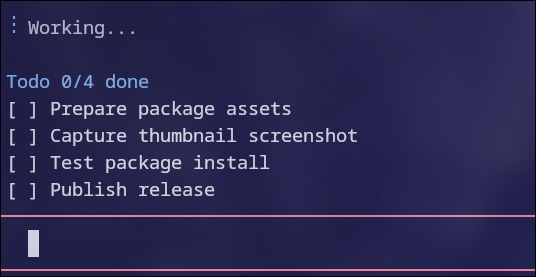
Follow live checklist progress while Pi sets a work goal and continues unfinished work across turns.
What you can do
- Follow checklist updates in Pi's compact terminal widget, or T3 Code's native Tasks panel with an updated Pi adapter.
- Let Pi set a durable goal from your multi-step request, or start one yourself with
/goal. - Inspect or pause a goal with dedicated commands, then ask Pi to resume it.
- Get a normal final reply after Pi records completion, a blocker, or a waiting job, with the details that matter to you.
- Ask for checklist-only work without automatic continuation when you prefer.
Install
Install it through Pi:
pi install npm:@firstpick/pi-extension-todo-progressRestart Pi if the package does not appear in your current session.
How to use it
Ask Pi as usual, for example:
Fix the failing parser tests and verify the change without modifying the public API.
For multi-step work, Pi is instructed to use the goal tool to set an outcome from your request and start durable execution. You do not need to type /goal. Pi then uses todo_update to keep the progress display current without repeating the checklist in chat, and records whether the goal is complete, blocked, waiting, or needs more work. After recording a final status, Pi should still reply in its own words with the result, checks, and anything you need to do next.
Try asking: "Track the parser fix and verification in the progress display, and keep the final reply focused on the result." If todo_update is disabled or unavailable, Pi can still update the terminal widget through Markdown checklists. T3's native Tasks panel requires both this extension and a T3 Pi adapter that supports these updates; changing extension source alone does not update a running installation.
Simple conversational replies do not need a goal. To keep a task checklist-only, ask: "Do this without automatic continuation."
To set the goal yourself:
- Run
/goal <one-sentence goal>or use/goaland enter the goal when prompted. - Let Pi work. The controller continues unfinished work only after Pi has fully settled.
- Use
/goal-statusto inspect progress and/goal-pauseto stop automatic work. To continue a paused, blocked, or waiting goal, say "Resume the goal" or run/goal-resume. Pi usesgoal_resumewhen you ask in ordinary language.
Example:
/goal Implement the complete plan in plans/planned/example.md and verify all acceptance checks.Before you start
Both /goal and an agent's goal tool call enable automatic follow-up turns, which can use additional tokens and incur costs. Use /goal-pause or Pi's normal cancellation control whenever you want execution to stop. Restored running or waiting goals stay paused until you explicitly resume them, either by asking Pi or using /goal-resume. Resuming enables another bounded cycle of automatic follow-ups. Creating or resuming a goal does not expand your request or bypass normal approvals.
Goal completion, blockers, and external job references are reported by the agent; the extension validates their structure and identity but cannot independently prove that the work or external job is correct.
Technical details
See TECHNICAL.md for complete commands, behavior, safety controls, limits, and troubleshooting information.