@firstpick/pi-package-webui
Pi Web UI companion package with a local browser UI CLI plus /webui-start and /webui-status commands.
Package details
Install @firstpick/pi-package-webui from npm and Pi will load the resources declared by the package manifest.
$ pi install npm:@firstpick/pi-package-webui- Package
@firstpick/pi-package-webui- Version
0.5.3- Published
- Jun 20, 2026
- Downloads
- 7,168/mo · 1,663/wk
- Author
- firstpick
- License
- MIT
- Types
- extension, skill, theme, prompt
- Size
- 14.8 MB
- Dependencies
- 1 dependency · 0 peers
Pi manifest JSON
{
  "image": "https://raw.githubusercontent.com/Firstp1ck/npm-packages/main/pi-package-webui/images/Webui_MainWindow_v0.4.8.png",
  "extensions": [
    "./index.ts",
    "node_modules/@firstpick/pi-extension-btw/index.ts",
    "node_modules/@firstpick/pi-extension-git-footer-status/index.ts",
    "node_modules/@firstpick/pi-extension-release-aur/index.ts",
    "node_modules/@firstpick/pi-extension-release-npm/index.ts",
    "node_modules/@firstpick/pi-extension-workflows/index.ts",
    "node_modules/@firstpick/pi-extension-safety-guard/index.ts",
    "node_modules/@firstpick/pi-extension-setup-skills/index.ts",
    "node_modules/@firstpick/pi-extension-stats/index.ts",
    "node_modules/@firstpick/pi-extension-todo-progress/index.ts",
    "node_modules/@firstpick/pi-extension-tools/index.ts",
    "node_modules/@firstpick/pi-package-remote-webui/index.ts"
  ],
  "skills": [
    "node_modules/@firstpick/pi-extension-release-aur/skills"
  ],
  "prompts": [
    "node_modules/@firstpick/pi-prompts-git-pr/prompts"
  ],
  "themes": [
    "node_modules/@firstpick/pi-themes-bundle/themes"
  ]
}Security note
Pi packages can execute code and influence agent behavior. Review the source before installing third-party packages.
README
@firstpick/pi-package-webui
Local browser UI for Pi coding agent.
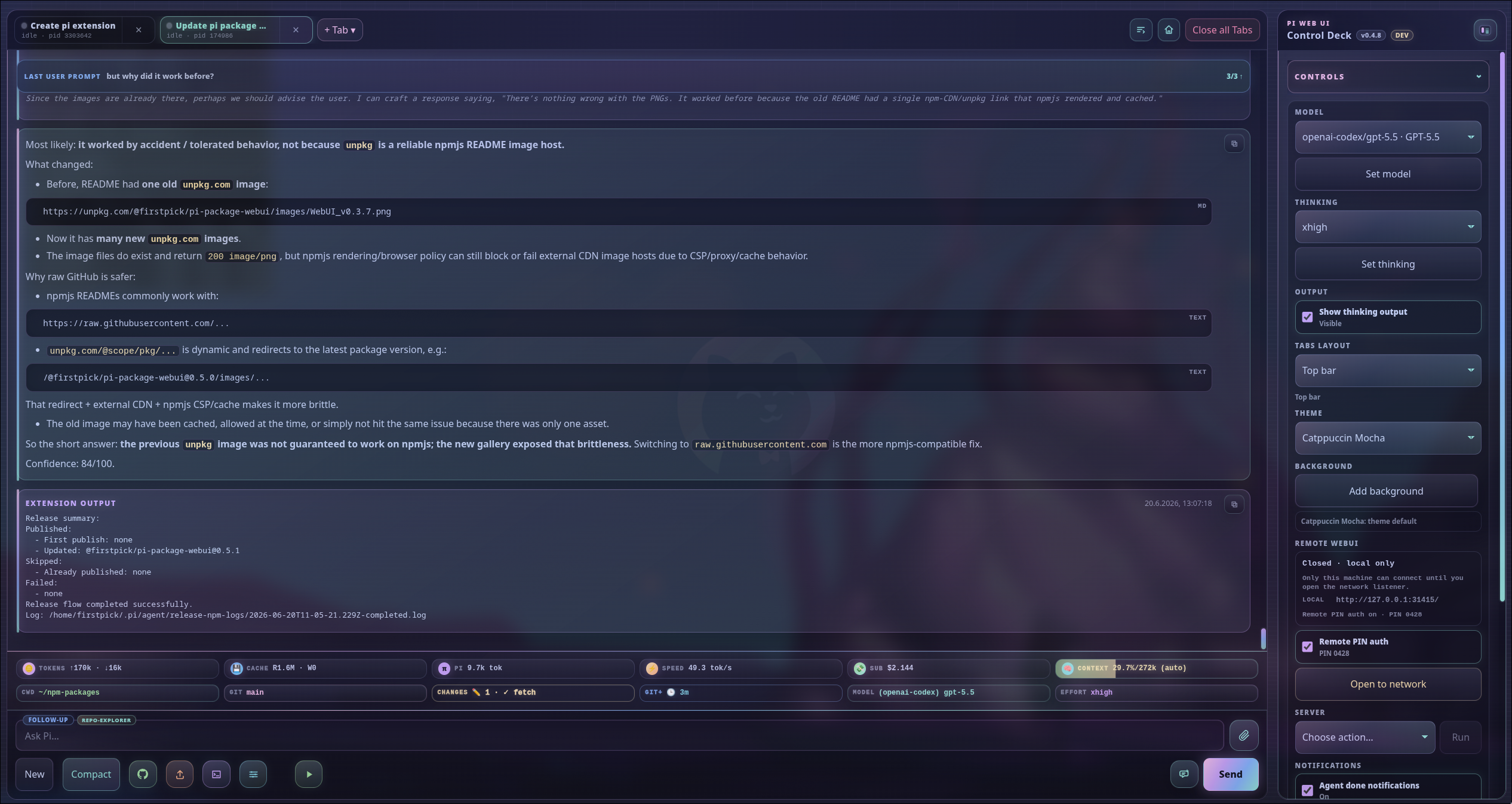
Pi Web UI gives you a local browser companion for Pi: multi-tab chat, streaming output, model controls, uploads, slash-command helpers, workspace navigation, and optional extension widgets.
Security: Pi Web UI can control the spawned Pi session and run anything that session is allowed to run. It binds to
127.0.0.1by default. Trusted-LAN opening/closing and Remote PIN auth controls are owned by the optional@firstpick/pi-package-remote-webuicompanion; when enabled, Remote PIN auth persists for later Web UI starts.
Requirements
- Node.js
>=22.19.0 - Pi installed and configured
- A modern browser with Server-Sent Events support
Install
Install the package into Pi:
pi install npm:@firstpick/pi-package-webui
Restart Pi after installation so the Web UI commands are loaded.
Start from Pi
Run this inside Pi:
/webui-start
Open the printed URL, usually http://127.0.0.1:31415/. The command opens your browser automatically unless you pass --no-open.
Check a running Web UI with:
/webui-status
/webui-status detailed
/webui-start options
/webui-start [port] [options] [-- <pi args...>]
  [port]             Port shortcut
  --host <host>      HTTP bind host (default: 127.0.0.1)
  --port <port>      HTTP port (default: 31415)
  --no-open          Do not open the browser automatically
  --no-session       Start Pi RPC with --no-session
  --name <name>      Initial Web UI tab name
  --remote-auth      Enable startup PIN authentication for non-local clients
  --no-remote-auth   Disable startup PIN authentication
  -- <pi args...>    Extra arguments forwarded to Pi RPC
Examples:
/webui-start
/webui-start 31500
/webui-start --port 31500 --no-open
/webui-start --remote-auth --host 0.0.0.0
/webui-start --name browser -- --model anthropic/claude-sonnet-4-5:high
Running /webui-start again on the same URL restarts the server and restores currently open Web UI tabs from their session files when possible.
/webui-status options
/webui-status [detailed] [port] [--port N] [--host HOST]
/webui-status reports the URL, online state, network exposure, and Remote PIN auth state. detailed adds tabs, sessions, models/providers, and recent backend events.
Standalone CLI
Use the CLI when you want to start the Web UI without first opening terminal Pi:
npm install -g @firstpick/pi-package-webui
pi-webui
pi-webui [options] [-- <pi args...>]
  --host <host>       HTTP bind host (default: 127.0.0.1)
  --port <port>       HTTP port (default: 31415)
  --cwd <path>        Start the first Pi terminal in this working directory
  --pi <command>      Pi executable to spawn (default: bundled dependency, then "pi")
  --no-session        Start Pi RPC with --no-session
  --name <name>       Initial Web UI tab name
  --remote-auth       Enable startup PIN authentication for non-local clients
  --no-remote-auth    Disable startup PIN authentication
  -h, --help          Show help
  -v, --version       Print version
If --cwd is omitted, the server starts first and the browser asks for the first terminal CWD.
Examples:
pi-webui
pi-webui --cwd ~/src/my-project
pi-webui --host 0.0.0.0 --remote-auth --cwd ~/src/my-project
pi-webui --port 3000 -- --model anthropic/claude-sonnet-4-5:high
PI_WEBUI_PI_BIN=/path/to/pi pi-webui --no-session
Environment variables:
PI_WEBUI_HOSTandPI_WEBUI_PORTset the default bind address.PI_WEBUI_PI_BIN=/path/to/piselects the Pi executable when--piis not passed.PI_WEBUI_REMOTE_AUTH=1starts with Remote PIN authentication enabled.PI_WEBUI_SETTINGS_FILE=/path/to/settings.jsonoverrides persisted Web UI settings such as the Remote PIN auth preference.PI_WEBUI_OPTIONAL_FEATURE_INSTALL_ROOT=/path/to/package-rootoverrides the npm prefix used for optional companion installs.PI_WEBUI_FAST_PICKS_FILE=/path/to/paths.jsonoverrides saved cwd fast-pick storage.PI_WEBUI_NPM_BIN=/path/to/npmselects the npm executable used by optional feature install/update actions.
Main features
- Pathless
pi-webuistartup: the server opens first, then the browser prompts for the first terminal CWD. - Multi-tab Pi sessions with isolated processes, working directories, prompt drafts, activity state, per-tab settings, and a workspace dashboard for common actions.
- Unified command palette (
Ctrl/Cmd+K) for commands, tabs, models, sessions, settings, app controls, and frequent Web UI actions. - Automatic tab naming from the first prompt, with
--name <name>still available for an explicit initial tab name. - Streaming chat transcript with Markdown, thinking output, tool/bash cards, queue and compaction events, edit-and-retry from user prompts, transcript search, copy buttons, and guarded abort controls that require holding Esc or the Abort button for 3 seconds.
- Prompt composer with uploads, drag/drop/paste, inline image support, generated text attachments for long input or clipboard text, editable text attachments, slash-command autocomplete, and
@file/path references with live suggestions. - Leading
!and!!user-bash commands from the composer, serialized per tab;!keeps output in the next model context and!!excludes it. - Browser-native Pi dialogs for
/model,/settings,/theme,/fork,/clone,/name,/resume,/tree,/login,/logout,/scoped-models,/tools, and/skills, plus native-command adapter output for/copy,/session,/new,/compact,/reload, and/export. - Runtime
/toolsand/skillsselectors backed by the hidden Web UI RPC helper; skill toggles persist on the session branch, disabled skills are removed from the system prompt, and trackedSKILL.mdfiles can be opened/edited from skill tags. - Session resume/switch, metadata rename, and localhost-only safe delete with active/open-tab/session-directory guards.
- Model, thinking, session, workspace, theme, optional-feature, Codex usage, optional Remote WebUI, update/restart/stop, event, notification, thinking-visibility, terminal-tab-layout, and custom-background controls in collapsible side-panel sections.
- Persistent context-window meter with manual compact and auto-compaction controls near the composer; side-panel thinking changes made while a tab is busy are queued for the next prompt.
- Side-panel theme picker backed by optional
@firstpick/pi-themes-bundlethemes when loaded. - Per-tab cwd changes, a clickable footer cwd picker, directory creation/search in the picker, saved path fast picks, server-persisted fast picks, and restart-safe restoration of open tabs.
- Detected app runner dropdown for the active tab cwd, including Cargo, Bun, npm/npx/pnpm, Python/uv, Go/Golang, Zig, C/C++, Docker Compose, root/dev/scripts shell scripts, and other common project runners with live output pinned at the top of the terminal. Running app runners expose line-oriented stdin in the widget for interactive scripts. Projects can add browseable custom runners in
.pi-webui-runners.jsonwith a command (default./) plus a relative path to the file to run. - Guided Git workflow for existing repos and new repos: initialize, create README/.gitignore, initial commit, rename to
main, add a GitHub remote, pull fetched incoming changes, stage, generate or type commit messages, push, and optionally create a PR. - Browser support for Pi extension UI prompts, widgets, status updates,
/btwside-question output widgets with optional context transfer/live steering, browser notifications when a tab needs an extension UI response, and an optional side-panel toggle for agent-done notifications. - Localhost-only Pi/Web UI update checks with a top-right update notification and confirmed restart actions: Update Pi & restart runs
pi updatefor Pi-only updates, while Update Pi + Packages & Restart runspi update --allfor Pi plus configured packages. - Feedback reactions (
👍,👎,?) on final assistant output plus tool/bash action cards, which can ask Pi to create or update a LEARNING. - Mobile-friendly layout, PWA install support where the browser allows it, backend-offline recovery, and a dedicated server-restart overlay while confirmed restart/update actions run.
Native Pi command coverage
Web UI keeps a packaged parity matrix at dev/docs/WEBUI_TUI_NATIVE_PARITY.json and exposes it at GET /api/native-parity.
| Status | Commands and behavior |
|---|---|
| Implemented | /model, /settings, /tools, /skills, /copy, /name, /session, /clone, /logout, /new, /compact, and /reload use browser-native dialogs or structured native-command cards. |
| Degraded / browser-specific | /theme changes the browser Web UI theme only; /scoped-models points to the footer scoped-model picker; /export supports no-path HTML downloads plus explicit new .html/.jsonl server paths; /hotkeys lists Web UI shortcuts; /fork, /tree, /login, and /resume have browser flows with documented gaps. |
| Unsupported in Web UI | /import, /share, /changelog, and /quit return structured unavailable output instead of raw HTTP errors. |
Sensitive native flows use shared trust-boundary guards: localhost-only APIs, trusted-context checks for LAN clients, confirmation-oriented dialogs, and session-directory confinement for session file operations.
Keyboard shortcuts
| Shortcut | Action |
|---|---|
Ctrl/Cmd+K |
Open the command palette. |
Ctrl/Cmd+L |
Open the model selector. |
Ctrl/Cmd+P / Shift+Ctrl/Cmd+P |
Cycle scoped or available models forward/backward. |
Shift+Tab |
Cycle thinking effort. |
Ctrl/Cmd+T |
Toggle thinking-output visibility. |
Ctrl/Cmd+O |
Toggle global expansion for tool and bash output cards. |
Alt+Enter |
Queue the composer as a follow-up. |
Alt+Up |
Restore the latest observed steering/follow-up queue snapshot into the composer. |
hold Esc |
Abort active user bash first, then active agent work. |
Ctrl/Cmd+C in an empty, focused composer |
Clear the prompt. |
Ctrl/Cmd+F |
Search the transcript. |
Feature gallery (screenshots from v0.4.8)
These screenshots show the v0.4.8 Web UI surfaces. Current implementations include the additional native-command, shortcut, attachment, Git, app-runner, server-control, and safety features documented above. Unless noted otherwise, actions apply to the active tab and its current working directory.
Main window
- What it is: The primary Web UI workspace for Pi, with terminal tabs, chat transcript, live assistant output, footer metrics, prompt composer, attachments, and side-panel controls in one browser view.
- What you can do: Run multiple Pi sessions, send prompts or follow-ups, monitor tokens/cache/cost/context/git/model state, attach files, launch quick actions, and control the active session without returning to the terminal.
Workspace dashboard

- What it is: The project home base for an active Web UI tab, combining cwd, model, context, git, queue, session, and activity status.
- What you can do: Start or resume work, verify the tab is pointed at the right project, jump into common session/workspace actions, and spot queued or active work before prompting.
Control panel
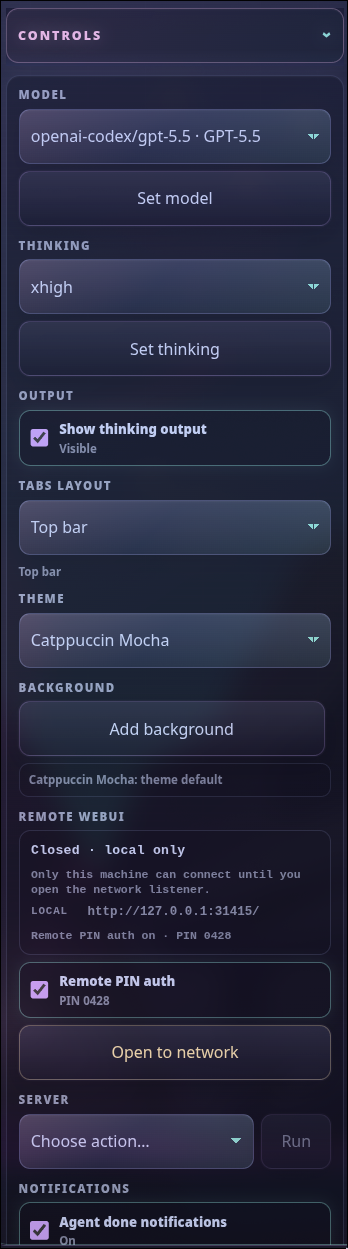
- What it is: The side rail for Web UI state and settings, including model, thinking effort, session/workspace controls, theme, optional companions, Remote WebUI, updates, notifications, and usage widgets.
- What you can do: Change model or effort, compact/manage sessions, toggle notifications, check or install optional packages, run confirmed updates/restarts, and manage remote/PIN controls when the remote companion is loaded.
Working-directory picker
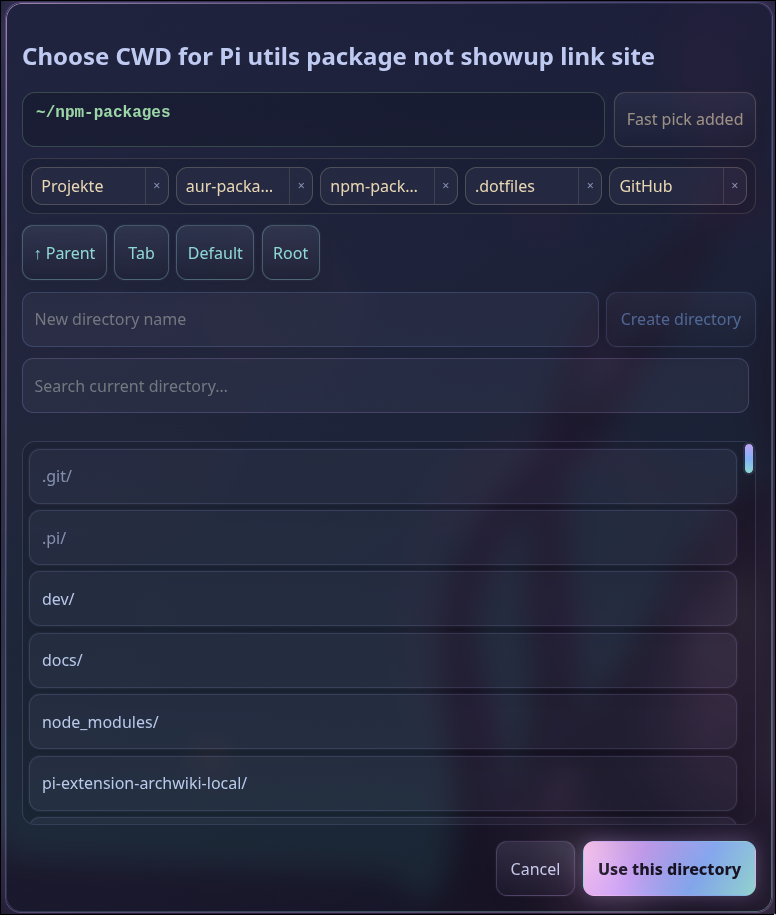
- What it is: A browser-native cwd chooser used at first launch and for per-tab working-directory changes.
- What you can do: Search and browse project paths, choose recent or saved directories, create a new directory, and start or move a Pi tab into the selected workspace.
App runners
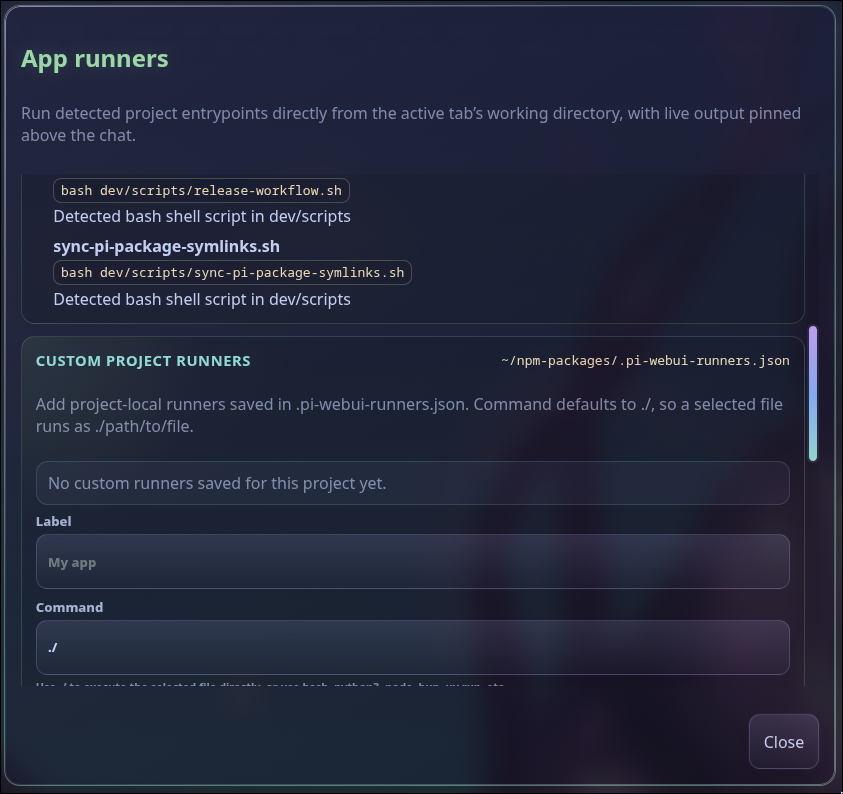
- What it is: A project runner detector for common stacks plus browseable custom runners from
.pi-webui-runners.json. - What you can do: Launch dev servers, tests, builds, scripts, and custom commands from the active cwd, pass arguments, watch pinned live output, and send line-oriented stdin to interactive runners.
Queue manager
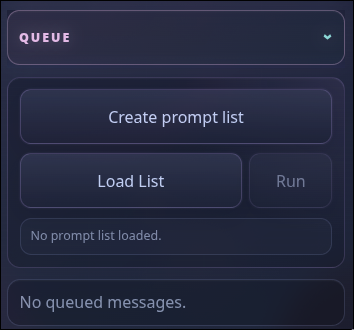
- What it is: The queue surface for follow-up prompts, steering messages, user bash work, and loaded prompt lists while a tab is busy or ready.
- What you can do: Create or load prompt lists, run batches when supported, see pending queued messages, and decide whether prompts sent during an active run should steer the current agent or wait as follow-ups.
Thinking effort picker
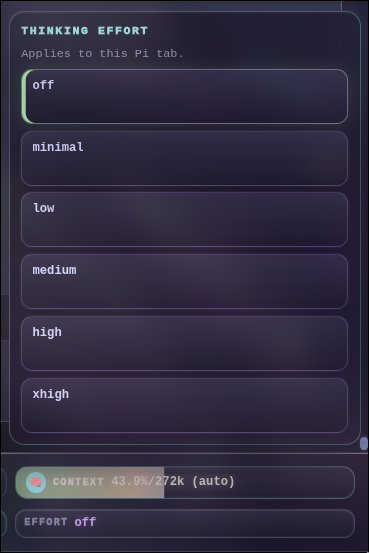
- What it is: A browser picker for Pi's model thinking/reasoning effort setting.
- What you can do: Switch between
off,minimal,low,medium,high, andxhigh, confirm the effective effort in the footer, and tune speed/cost/quality before sending a prompt.
Scoped models
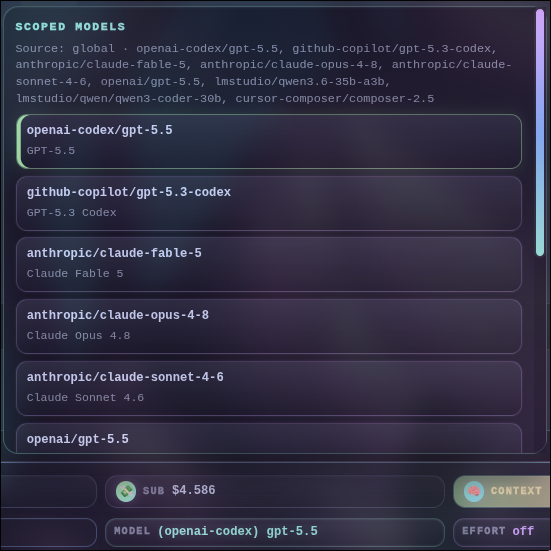
- What it is: A Web UI editor for
/scoped-models, project/global model scope rules, and model cycling order. - What you can do: Search available models, enable or disable scoped entries, inspect the effective model source, and save model choices so future prompts and tabs use the intended provider/model.
Tools setup
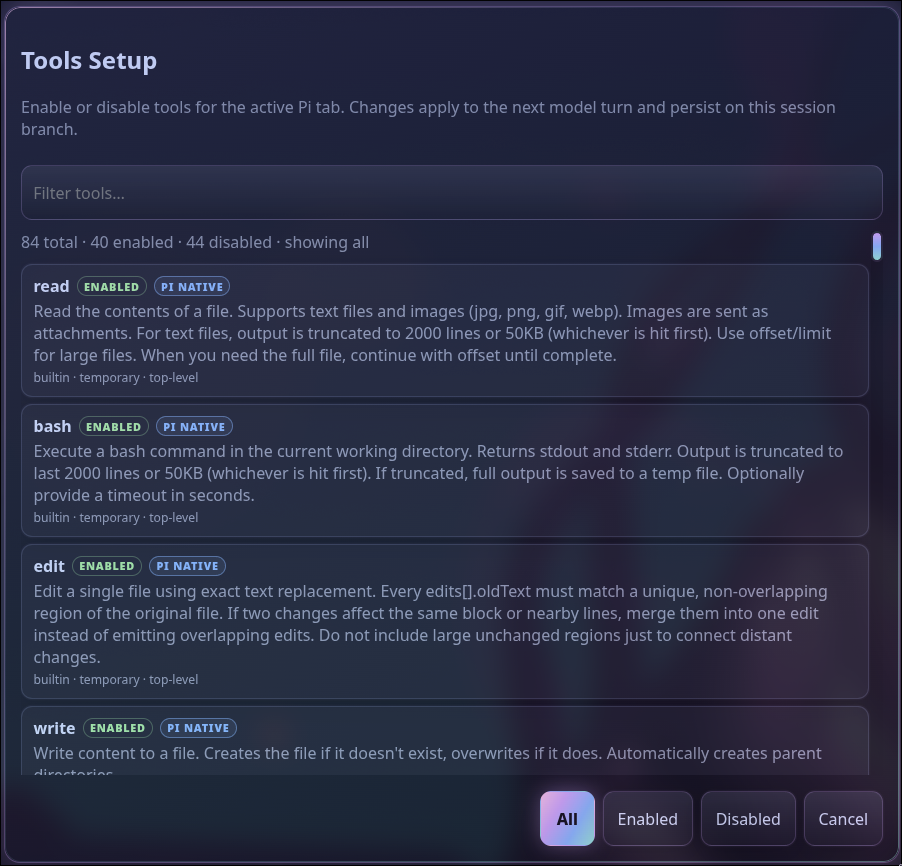
- What it is: A browser-native
/toolssetup dialog for active and available Pi tools. - What you can do: Search tools, inspect descriptions and availability, enable or disable tool access for the active session, and adjust capability exposure without leaving the browser.
Skills setup
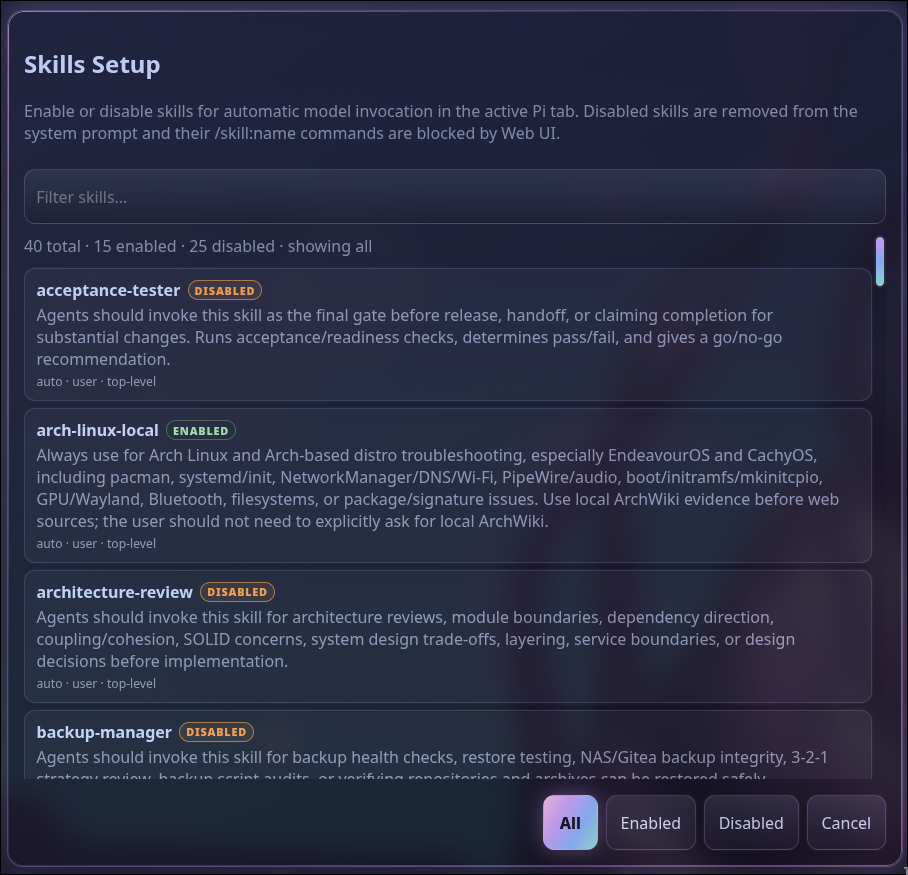
- What it is: A browser-native
/skillssetup dialog for installed Pi skills. - What you can do: Find skills by name or description, review what each skill is for, enable or disable skills for the active session, and make skill activation more transparent before asking Pi to work.
Optional features
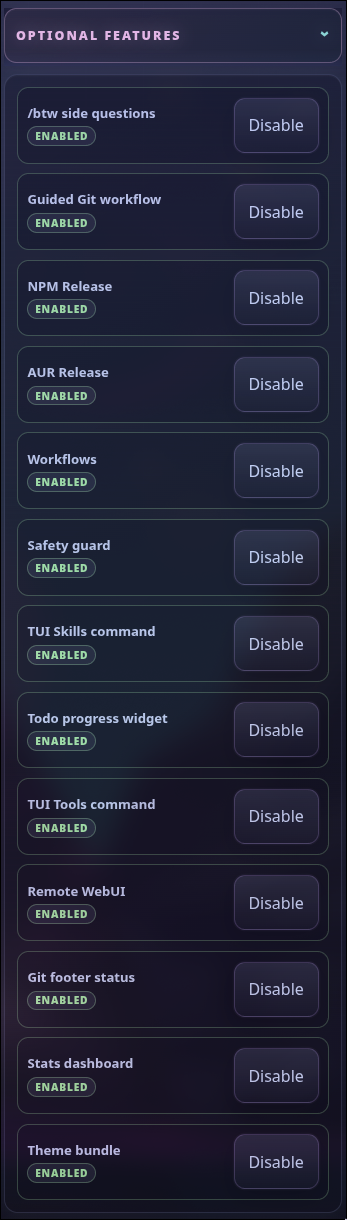
- What it is: A companion-package manager for Web UI-aware extensions, prompts, themes, and optional dashboards.
- What you can do: See whether each companion is enabled, disabled, installed-but-not-loaded, missing, or updateable; install/update known packages from localhost; and reload affected tabs when a feature becomes available.
/btw side questions

- What it is: A Web UI widget for the optional
/btwside-question extension, keeping quick questions separate from the main agent flow. - What you can do: Ask short side questions without derailing the main chat, inspect live output, steer or stop the side thread, and transfer useful context back into the main prompt when needed.
Guided Git workflow
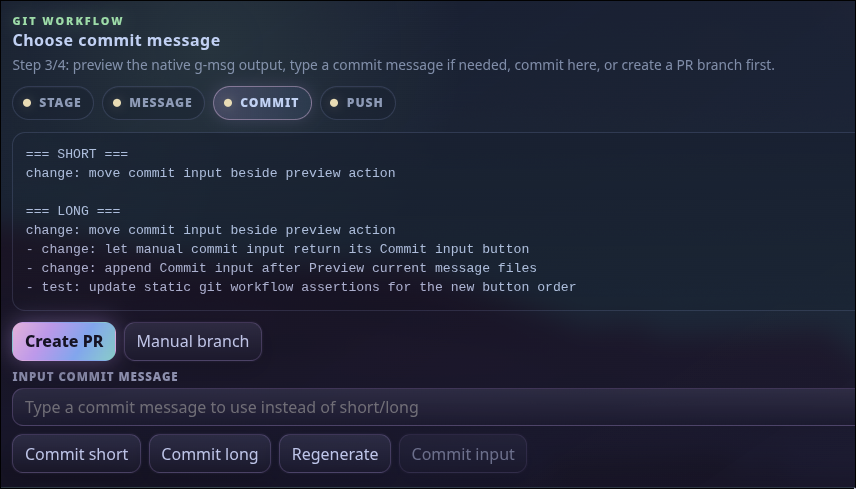
- What it is: A guided browser workflow for staging changes, generating commit messages, committing, pushing, and optionally creating a pull request.
- What you can do: Run the stage/message/commit/push steps, choose generated short or long commit messages, type a manual message, create or confirm PR branch names, review generated PR text, and push only after confirmation.
Git branch picker
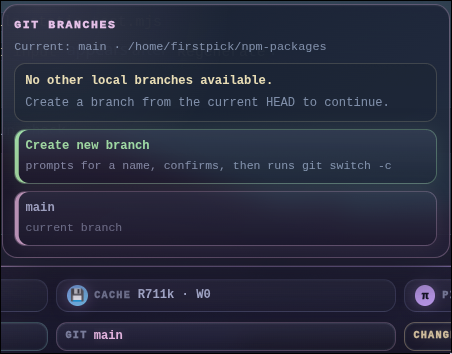
- What it is: A footer branch picker backed by the active tab's current Git repository.
- What you can do: View the current branch/repo, switch local branches, create and switch to a new branch, and get warnings when a branch change could affect active agent work.
Git diff viewer
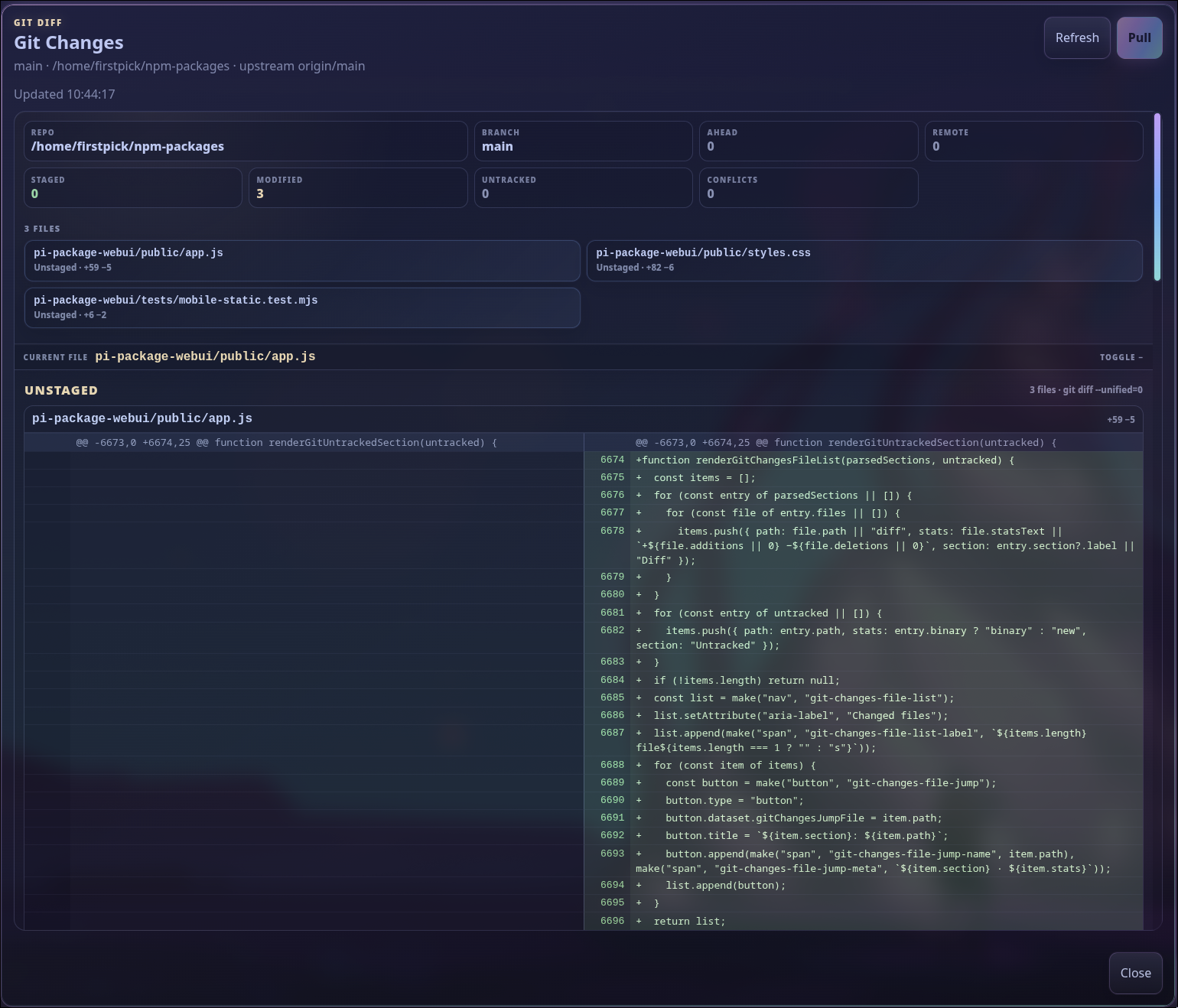
- What it is: A browser diff dialog for current Git changes in the active workspace.
- What you can do: Review staged, unstaged, untracked, and incoming changes; jump between files; see additions/deletions with line numbers; and inspect text previews before asking Pi to edit, commit, or create a PR.
Codex usage
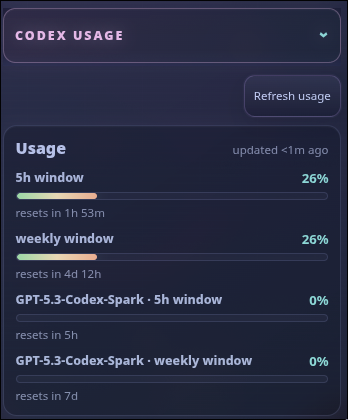
- What it is: A side-panel usage widget for Codex-family subscription-backed models.
- What you can do: Refresh usage, monitor short-window and weekly limits, see reset timing, and decide whether to switch models or delay large prompts.
Pi stats dashboard
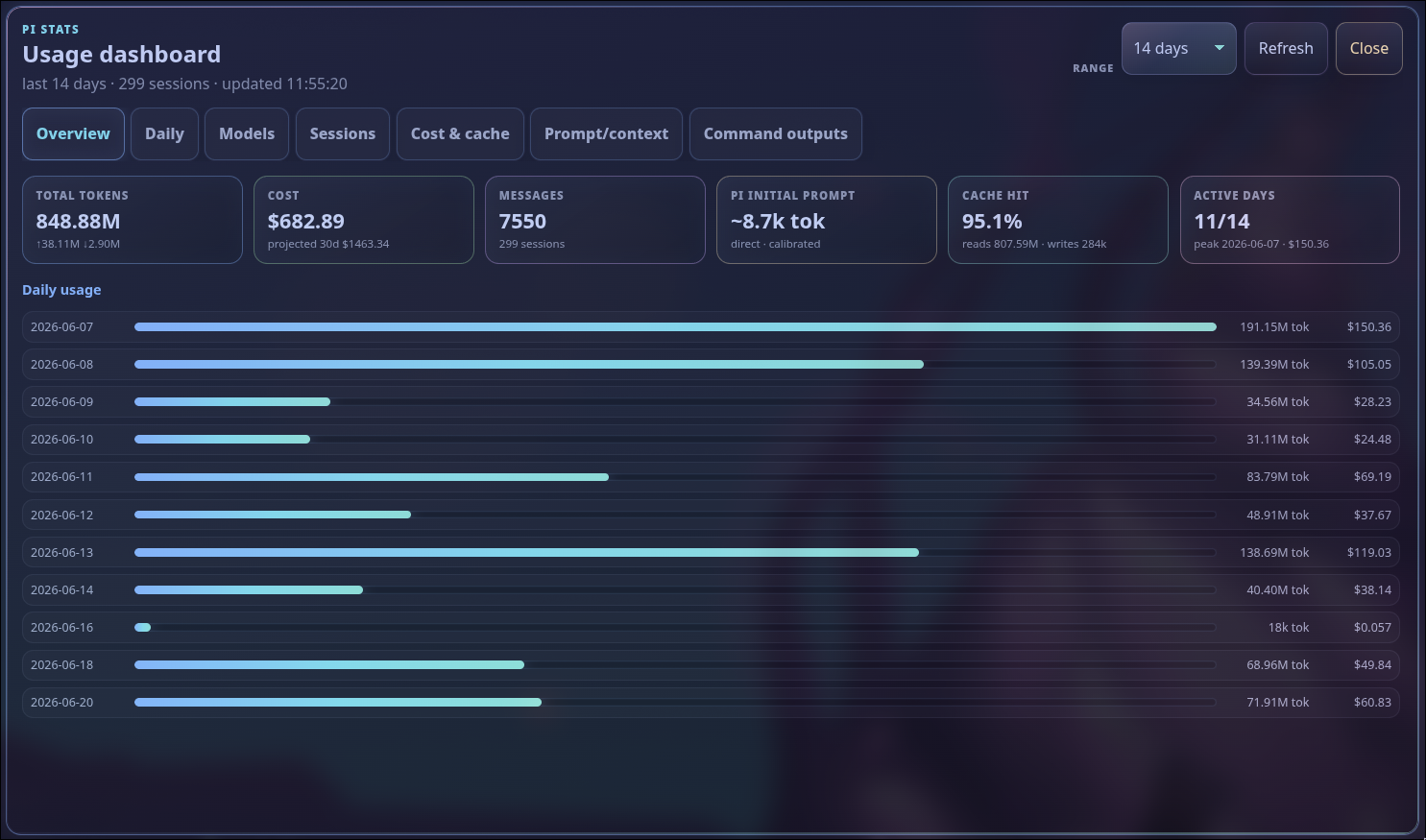
- What it is: The browser overlay from the optional stats companion, summarizing token, cost, cache, prompt/context, model, session, and command usage.
- What you can do: Filter by time range, refresh analytics, review daily/model/session breakdowns, inspect cost and cache behavior, and calibrate prompt estimates for more accurate local usage visibility.
Useful browser endpoints exposed by the local server include:
GET /api/healthandGET /api/webui-status?detailed=1for server health, network exposure, tabs, sessions, models/providers, update state, and recent events.GET /api/tabs,POST /api/tabs,PATCH /api/tabs/<tabId>, and tab close/delete routes for multi-tab lifecycle management.GET /api/messages?tab=<tabId>&since=<index>for transcript snapshots or delta refreshes.POST /api/prompt,POST /api/follow-up,POST /api/steer,POST /api/bash,POST /api/abort, andPOST /api/abort-bashfor tab-scoped Pi interaction.POST /api/attachmentsfor uploaded/generated prompt attachments and inline images.GET /api/path-suggestions?tab=<tabId>&query=<path>for@file/path references with live suggestions.GET /api/path-fast-picksandPOST /api/path-fast-picksfor server-persisted cwd fast picks.GET /api/native-parityfor the packaged native TUI/Web UI parity matrix.GET /api/settings,POST /api/settings,GET /api/tools,POST /api/tools,GET /api/skills, andPOST /api/skillsfor browser-native Pi settings/tool/skill selectors.GET /api/skill-fileand localhost-onlyPOST /api/skill-filefor guardedSKILL.mdediting from tracked skill tags.GET /api/sessions,GET /api/session-tree,POST /api/switch-session,POST /api/session-rename, and localhost-onlyPOST /api/session-deletefor resume/tree/session metadata flows.GET /api/auth-providersand localhost-onlyPOST /api/auth-logoutfor provider-auth status and stored-credential removal.GET /api/app-runners,POST /api/app-runner,POST /api/app-runner/input,POST /api/app-runner/stop,GET/POST/DELETE /api/app-runner-config, andGET /api/app-runner-filesfor detected and custom project runners.GET /api/git-changes,POST /api/git-changes/pull,GET /api/git-branches,POST /api/git-branch, and/api/git-workflow/*for browser Git status, diff, branch, init, commit, push, and PR helpers.POST /api/action-feedback?tab=<tabId>for feedback on final assistant output and action cards.GET /api/optional-featuresfor optional companion package install/update status.POST /api/optional-feature-installfor installing or updating known optional companion packages from the side panel.GET /api/update-status, localhost-onlyPOST /api/restart, and localhost-onlyPOST /api/updatefor checking Pi/Web UI updates and restarting the Web UI. UsePOST /api/update?all=1to runpi update --allfor Pi plus configured packages.GET /api/network, localhost-onlyPOST /api/network/open, localhost-onlyPOST /api/network/close,GET /api/remote-auth,POST /api/remote-auth, and localhost-onlyPOST /api/remote-auth/settingsfor trusted-LAN exposure and optional 4-digit PIN authentication when serving non-local browser clients.
For local development, run the checkout helper directly, for example:
./dev/scripts/start-webui.sh --dev --cwd /path/to/project
Run ../dev/scripts/sync-pi-package-symlinks.sh first when developing companion packages from this workspace. The Web UI manifest loads companions through node_modules/ paths, and the sync script links those paths to the top-level dev packages so only one copy is loaded.
Optional companion packages
A normal Pi/npm install includes the optional companion packages unless optional dependencies are disabled. Each Web UI tab curates Pi resources from the Web UI package that started the server, while preserving unrelated user/project resources. Companion packages installed as global/npm-prefix siblings of the started Web UI package are reused when the Web UI package does not have its own nested optional dependency copy, avoiding duplicate loads while keeping global pi-webui launches working. Startup checks loaded Pi capabilities directly through RPC-visible commands and live widget events, then the side panel shows each optional feature as enabled, disabled, installed-but-not-loaded, update-available, or install-needed. Installing or updating a feature is an explicit, warned action with running/failure feedback in the row and activity log; it is localhost-only, limited to known packages, and requires reloading the active Pi tab after installation.
When the standalone global pi-webui launcher is used, optional companion installs target the npm prefix containing the Web UI package when that prefix is safe, otherwise the Pi agent npm root if it contains Web UI. Override the target explicitly with PI_WEBUI_OPTIONAL_FEATURE_INSTALL_ROOT=/path/to/package-root when needed.
Optional companions:
@firstpick/pi-extension-btw— ephemeral/btwside-question command with a TUI overlay, Web UI live output widget, and Transfer Context action.@firstpick/pi-prompts-git-pr— guided Git commit/push workflow.@firstpick/pi-extension-release-npm— NPM publish menu and release widgets.@firstpick/pi-extension-release-aur— AUR publish menu and release widgets.@firstpick/pi-extension-workflows—/workflowruntime with non-blocking Web UI subprocess-output widgets.@firstpick/pi-extension-safety-guard— interactive guardrails for dangerous bash commands and protected file edits.@firstpick/pi-extension-setup-skills— TUI/skillssetup command alongside WebUI-native skill toggles.@firstpick/pi-extension-todo-progress— todo-progress rendering.@firstpick/pi-extension-tools— TUI/toolsactive-tool manager alongside WebUI-native tool toggles.@firstpick/pi-package-remote-webui—/remotetrusted-LAN QR helper plus the optional browser controls for opening/closing LAN access and Remote PIN auth.@firstpick/pi-extension-git-footer-status— richer extension-owned git/footer status, including the structured Web UI footer payload.@firstpick/pi-extension-stats— stats commands and status data.@firstpick/pi-themes-bundle— Web UI and Pi theme resources.
Guided Git workflow
The Git workflow button runs local git commands in the active Pi working directory. It now covers both empty/new projects and existing repositories.
For a new project, the browser flow can:
- Run
git initwhen the active cwd is not yet a repository. - Check for
README.mdand.gitignore. - Create and stage starter
README.md/.gitignorefiles without overwriting existing files. - Create an initial commit.
- Rename the branch to
main. - Add a GitHub remote from a confirmed
owner/repo. - Push the initialized branch when you confirm the remote target.
For an existing repository, the workflow can:
- Show staged, unstaged, untracked, and fetched incoming changes.
- Fast-forward pull fetched incoming commits when the repository is safely behind.
- Run
git add .. - Send
/git-staged-msgto Pi and read generated commit message files fromdev/COMMIT/. - Use a generated short/long message, a generated single-file default such as
updated file.txt, or a manual Commit input message. - Run
git push.
After the message is generated, Create PR asks Pi to generate dev/COMMIT/staged-branch-name.txt, lets you confirm or edit the type/feature-name branch, then switches with git switch -c before committing. In PR mode, choose Commit short, Commit long, or type a message and use Commit input, then Push and Create PR pushes the branch, sends /pr, shows the generated dev/PR/<branch>.md description for editing/confirmation, and creates the pull request with gh pr create. Use Manual branch to skip agent branch-name generation and type the branch directly.
Use the workflow process buttons to jump directly to Initialize, Stage, Message, Commit, Push, or PR steps when earlier work was already completed manually. Selecting Message lets you either run /git-staged-msg or type a commit message and use Commit input directly. Selecting Commit loads the current generated files from dev/COMMIT/ before enabling the commit choices. A yellow dot means that process was selected or is available but its action has not completed in this workflow; green means the process action completed.
This requires /git-staged-msg and /pr from @firstpick/pi-prompts-git-pr; branch-name generation uses /git-branch-name when available and otherwise sends an equivalent inline prompt. Creating the PR also requires an authenticated GitHub CLI (gh). Review the generated commit message, branch name, remote URL, and PR description before committing, pushing, or creating a PR.
Mobile and PWA notes
- The mobile composer starts as a compact
Ask Pi…input and grows as you type. - Installable PWA support, blocked-tab browser notifications, and optional agent-done notifications require browser service-worker/notification support and usually require
localhostor HTTPS. - Plain
http://<LAN-IP>can show the app, but some browsers disable PWA install and notifications there.
Network safety
- Default bind is localhost-only:
127.0.0.1:31415. - When
@firstpick/pi-package-remote-webuiis loaded and enabled, the side-panel Remote WebUI controls dispatch through/remote: opening rebinds the server to0.0.0.0, shows LAN URLs when available, and toggles to "Close for network". - The optional Remote PIN auth toggle is off by default on first use. When enabled through
/remote auth onor the Remote WebUI controls, the server saves that preference, generates a fresh random 4-digit PIN for each server start, shows it in the Remote WebUI controls and/webui-status, and requires it from non-local browser clients. - Localhost clients stay frictionless and can toggle Remote PIN auth through the remote companion; changing the toggle persists the preference and disconnects existing event streams so remote clients must re-authenticate after enablement.
--host 0.0.0.0also exposes the Web UI to the local network; pass--remote-authto start with PIN auth already enabled.- Any connected browser client with access (and the PIN, if enabled) can control Pi and run Web UI bash actions as the Web UI process user.
- Remote PIN auth is a simple trusted-LAN HTTP gate, not hardened multi-user authentication; do not expose it to untrusted networks.
- The Web UI update endpoint is restricted to localhost, because it runs package update commands and restarts the server.
- Treat Pi Web UI as a local companion, not a hardened multi-user web service.
Troubleshooting
/webui-startis missing: restart Pi after installing the package.- Wrong port or existing server: use
/webui-status detailed, or start on another port with/webui-start --port 31500. - Optional feature is disabled or missing: check the side panel, install the companion package if needed, then run
/reloadin the active Pi tab. - Remote browser asks for a PIN: read it from the optional Remote WebUI side-panel controls,
/webui-status,/remote status, or the local Web UI server log. Disable the toggle from localhost to remove the PIN gate. - PWA install or notifications are unavailable: use
localhostor HTTPS; browser support varies on LAN HTTP URLs.