@firstpick/pi-package-webui
Pi Web UI companion package with a local browser UI CLI plus /webui-start and /webui-status commands.
Package details
Install @firstpick/pi-package-webui from npm and Pi will load the resources declared by the package manifest.
$ pi install npm:@firstpick/pi-package-webui- Package
@firstpick/pi-package-webui- Version
0.3.7- Published
- Jun 9, 2026
- Downloads
- 584/mo · 584/wk
- Author
- firstpick
- License
- MIT
- Types
- extension, skill, theme, prompt
- Size
- 4.8 MB
- Dependencies
- 1 dependency · 0 peers
Pi manifest JSON
{
  "image": "https://unpkg.com/@firstpick/pi-package-webui/images/Main_Window_v0.1.7.png",
  "extensions": [
    "./index.ts",
    "../pi-extension-git-footer-status/index.ts",
    "../pi-extension-release-aur/index.ts",
    "../pi-extension-release-npm/index.ts",
    "../pi-extension-setup-skills/index.ts",
    "../pi-extension-stats/index.ts",
    "../pi-extension-todo-progress/index.ts",
    "../pi-extension-tools/index.ts",
    "node_modules/@firstpick/pi-extension-git-footer-status/index.ts",
    "node_modules/@firstpick/pi-extension-release-aur/index.ts",
    "node_modules/@firstpick/pi-extension-release-npm/index.ts",
    "node_modules/@firstpick/pi-extension-setup-skills/index.ts",
    "node_modules/@firstpick/pi-extension-stats/index.ts",
    "node_modules/@firstpick/pi-extension-todo-progress/index.ts",
    "node_modules/@firstpick/pi-extension-tools/index.ts"
  ],
  "skills": [
    "../pi-extension-release-aur/skills",
    "node_modules/@firstpick/pi-extension-release-aur/skills"
  ],
  "prompts": [
    "../pi-package-prompts-git-pr/prompts",
    "node_modules/@firstpick/pi-prompts-git-pr/prompts"
  ],
  "themes": [
    "../pi-package-themes-bundle/themes",
    "node_modules/@firstpick/pi-themes-bundle/themes"
  ]
}Security note
Pi packages can execute code and influence agent behavior. Review the source before installing third-party packages.
README
@firstpick/pi-package-webui
Local browser UI for Pi coding agent.
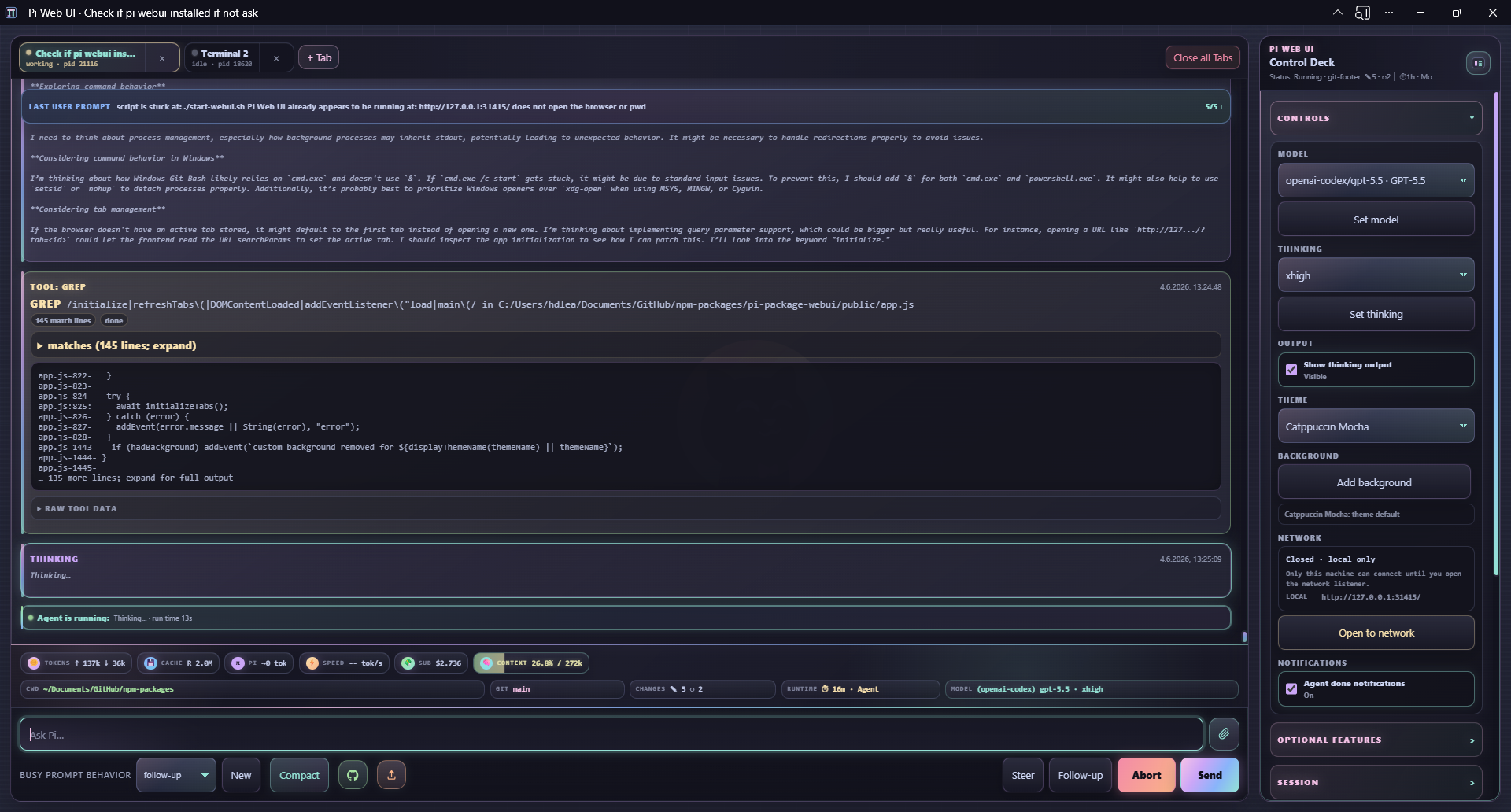
Pi Web UI gives you a local browser companion for Pi: multi-tab chat, streaming output, model controls, uploads, slash-command helpers, workspace navigation, and optional extension widgets.
Security: Pi Web UI has no authentication. It can control the spawned Pi session and run anything that session is allowed to run. It binds to
127.0.0.1by default; only expose it on trusted networks.
Requirements
- Node.js
>=22.19.0 - Pi installed and configured
- A modern browser with Server-Sent Events support
Install
Install the package into Pi:
pi install npm:@firstpick/pi-package-webui
Restart Pi after installation so the Web UI commands are loaded.
Start from Pi
Run this inside Pi:
/webui-start
Open the printed URL, usually http://127.0.0.1:31415/. The command opens your browser automatically unless you pass --no-open.
Check a running Web UI with:
/webui-status
/webui-status detailed
/webui-start options
/webui-start [port] [options] [-- <pi args...>]
  [port]             Port shortcut
  --host <host>      HTTP bind host (default: 127.0.0.1)
  --port <port>      HTTP port (default: 31415)
  --no-open          Do not open the browser automatically
  --no-session       Start Pi RPC with --no-session
  --name <name>      Initial Web UI tab name
  -- <pi args...>    Extra arguments forwarded to Pi RPC
Examples:
/webui-start
/webui-start 31500
/webui-start --port 31500 --no-open
/webui-start --name browser -- --model anthropic/claude-sonnet-4-5:high
Running /webui-start again on the same URL restarts the server and restores currently open Web UI tabs from their session files when possible.
/webui-status options
/webui-status [detailed] [port] [--port N] [--host HOST]
/webui-status reports the URL, online state, and network exposure. detailed adds tabs, sessions, models/providers, and recent backend events.
Standalone CLI
Use the CLI when you want to start the Web UI without first opening terminal Pi:
npm install -g @firstpick/pi-package-webui
pi-webui
pi-webui [options] [-- <pi args...>]
  --host <host>       HTTP bind host (default: 127.0.0.1)
  --port <port>       HTTP port (default: 31415)
  --cwd <path>        Start the first Pi terminal in this working directory
  --pi <command>      Pi executable to spawn (default: bundled dependency, then "pi")
  --no-session        Start Pi RPC with --no-session
  --name <name>       Initial Web UI tab name
  -h, --help          Show help
  -v, --version       Print version
If --cwd is omitted, the server starts first and the browser asks for the first terminal CWD.
Examples:
pi-webui
pi-webui --cwd ~/src/my-project
pi-webui --port 3000 -- --model anthropic/claude-sonnet-4-5:high
PI_WEBUI_PI_BIN=/path/to/pi pi-webui --no-session
Environment variables:
PI_WEBUI_HOSTPI_WEBUI_PORTPI_WEBUI_PI_BIN
Main features
- Pathless
pi-webuistartup: the server opens first, then the browser prompts for the first terminal CWD. - Multi-tab Pi sessions with isolated processes, working directories, prompt drafts, and activity state.
- Automatic tab naming from the first prompt, with
--name <name>still available for an explicit initial tab name. - Streaming chat transcript with Markdown, thinking output, tool/bash cards, queue and compaction events, and abort controls.
- Prompt composer with uploads, drag/drop/paste, inline image support, slash-command autocomplete, and
@file/path references with live suggestions. - Browser dialogs for common Pi selectors such as
/model,/settings,/theme,/fork,/clone,/resume,/tree,/scoped-models,/tools, and/skills. - Model, thinking, session, workspace, theme, optional-feature, Codex usage, network, update/restart, event, and notification controls in the side panel.
- Side-panel theme picker backed by optional
@firstpick/pi-themes-bundlethemes when loaded. - Per-tab cwd changes, a clickable footer cwd picker, saved path fast picks, server-persisted fast picks, and restart-safe restoration of open tabs.
- Detected app runner dropdown for the active tab cwd, including Cargo, Bun, npm/npx/pnpm, Python/uv, Go/Golang, Zig, C/C++, Docker Compose, root/dev/scripts shell scripts, and other common project runners with live output pinned at the top of the terminal. Projects can add browseable custom runners in
.pi-webui-runners.jsonwith a command (default./) plus a relative path to the file to run. - Browser support for Pi extension UI prompts, widgets, status updates, browser notifications when a tab needs an extension UI response and an optional side-panel toggle for agent-done notifications.
- Localhost-only Pi update checks with a top-right update notification and a confirmed Update & restart action that runs
pi update, then restarts the Web UI server. - Feedback reactions (
👍,👎,?) on final assistant output plus tool/bash action cards, which can ask Pi to create or update a LEARNING. - Mobile-friendly layout and PWA install support where the browser allows it.
Useful browser endpoints exposed by the local server include:
GET /api/path-suggestions?tab=<tabId>&query=<path>for@file/path references with live suggestions.POST /api/action-feedback?tab=<tabId>for feedback on final assistant output and action cards.POST /api/optional-feature-installfor installing known optional companion packages from the side panel.GET /api/update-statusand localhost-onlyPOST /api/updatefor checking Pi/Web UI updates and runningpi updatefollowed by a Web UI server restart.
For local development, run the checkout helper directly, for example:
./start-webui.sh --dev --cwd /path/to/project
Optional companion packages
A normal Pi/npm install includes the optional companion packages unless optional dependencies are disabled. Startup checks loaded Pi capabilities directly through RPC-visible commands and live widget events, then the side panel shows each optional feature as enabled, disabled, or install-needed. Installing a missing feature is an explicit, warned action; it is localhost-only, limited to known packages, and requires reloading the active Pi tab after installation.
When the standalone global pi-webui launcher is used, optional companion installs should target the Pi agent npm root instead of the global npm prefix. Override the target explicitly with PI_WEBUI_OPTIONAL_FEATURE_INSTALL_ROOT=/path/to/package-root when needed.
Optional companions:
@firstpick/pi-prompts-git-pr— guided Git commit/push workflow.@firstpick/pi-extension-release-npm— NPM publish menu and release widgets.@firstpick/pi-extension-release-aur— AUR publish menu and release widgets.@firstpick/pi-extension-setup-skills— TUI/skillssetup command alongside WebUI-native skill toggles.@firstpick/pi-extension-todo-progress— todo-progress rendering.@firstpick/pi-extension-tools— TUI/toolsactive-tool manager alongside WebUI-native tool toggles.@firstpick/pi-extension-git-footer-status— richer extension-owned git/footer status, including the structured Web UI footer payload.@firstpick/pi-extension-stats— stats commands and status data.@firstpick/pi-themes-bundle— Web UI and Pi theme resources.
Guided Git workflow
The Git workflow button runs local git commands in the active Pi working directory:
git add .- Send
/git-staged-msgto Pi - Read the generated commit message files from
dev/COMMIT/ - Commit with the selected message
- Run
git push
After the message is generated, Create PR asks Pi to generate dev/COMMIT/staged-branch-name.txt, lets you confirm or edit the type/feature-name branch, then switches with git switch -c before committing. In PR mode, choose Commit short or Commit long, then Push and Create PR pushes the branch, sends /pr, shows the generated dev/PR/<branch>.md description for editing/confirmation, and creates the pull request with gh pr create. Use Manual branch to skip agent branch-name generation and type the branch directly.
Use the workflow process buttons to jump directly to Stage, Message, Commit, or Push when earlier work was already completed manually. Selecting Commit loads the current generated files from dev/COMMIT/ before enabling the commit choices. A yellow dot means that process was selected or is available but its action has not completed in this workflow; green means the process action completed.
This requires /git-staged-msg and /pr from @firstpick/pi-prompts-git-pr; branch-name generation uses /git-branch-name when available and otherwise sends an equivalent inline prompt. Creating the PR also requires an authenticated GitHub CLI (gh). Review the generated commit message, branch name, and PR description before committing, pushing, or creating a PR.
Mobile and PWA notes
- The mobile composer starts as a compact
Ask Pi…input and grows as you type. - Installable PWA support, blocked-tab browser notifications, and optional agent-done notifications require browser service-worker/notification support and usually require
localhostor HTTPS. - Plain
http://<LAN-IP>can show the app, but some browsers disable PWA install and notifications there.
Network safety
- Default bind is localhost-only:
127.0.0.1:31415. - The side-panel Open to network button rebinds the server to
0.0.0.0, shows LAN URLs when available, and toggles to "Close for network". --host 0.0.0.0also exposes the Web UI to the local network.- Any connected browser client can control Pi and run Web UI bash actions as the Web UI process user.
- The Web UI update endpoint is restricted to localhost, because it runs
pi updateand restarts the server. - Treat Pi Web UI as a local companion, not a hardened multi-user web service.
Troubleshooting
/webui-startis missing: restart Pi after installing the package.- Wrong port or existing server: use
/webui-status detailed, or start on another port with/webui-start --port 31500. - Optional feature is disabled or missing: check the side panel, install the companion package if needed, then run
/reloadin the active Pi tab. - PWA install or notifications are unavailable: use
localhostor HTTPS; browser support varies on LAN HTTP URLs.