@firstpick/pi-package-webui
Pi Web UI companion package with a local browser UI CLI plus /webui-start and /webui-status commands.
Package details
Install @firstpick/pi-package-webui from npm and Pi will load the resources declared by the package manifest.
$ pi install npm:@firstpick/pi-package-webui- Package
@firstpick/pi-package-webui- Version
0.2.5- Published
- Jun 7, 2026
- Downloads
- 584/mo · 584/wk
- Author
- firstpick
- License
- MIT
- Types
- extension, skill, theme, prompt
- Size
- 4.4 MB
- Dependencies
- 1 dependency · 0 peers
Pi manifest JSON
{
  "image": "https://unpkg.com/@firstpick/pi-package-webui/images/Main_Window_v0.1.7.png",
  "extensions": [
    "./index.ts",
    "../pi-extension-git-footer-status/index.ts",
    "../pi-extension-release-aur/index.ts",
    "../pi-extension-release-npm/index.ts",
    "../pi-extension-setup-skills/index.ts",
    "../pi-extension-stats/index.ts",
    "../pi-extension-todo-progress/index.ts",
    "../pi-extension-tools/index.ts",
    "node_modules/@firstpick/pi-extension-git-footer-status/index.ts",
    "node_modules/@firstpick/pi-extension-release-aur/index.ts",
    "node_modules/@firstpick/pi-extension-release-npm/index.ts",
    "node_modules/@firstpick/pi-extension-setup-skills/index.ts",
    "node_modules/@firstpick/pi-extension-stats/index.ts",
    "node_modules/@firstpick/pi-extension-todo-progress/index.ts",
    "node_modules/@firstpick/pi-extension-tools/index.ts"
  ],
  "skills": [
    "../pi-extension-release-aur/skills",
    "node_modules/@firstpick/pi-extension-release-aur/skills"
  ],
  "prompts": [
    "../pi-package-prompts-git-pr/prompts",
    "node_modules/@firstpick/pi-prompts-git-pr/prompts"
  ],
  "themes": [
    "../pi-package-themes-bundle/themes",
    "node_modules/@firstpick/pi-themes-bundle/themes"
  ]
}Security note
Pi packages can execute code and influence agent behavior. Review the source before installing third-party packages.
README
@firstpick/pi-package-webui
Local browser UI for Pi coding agent.
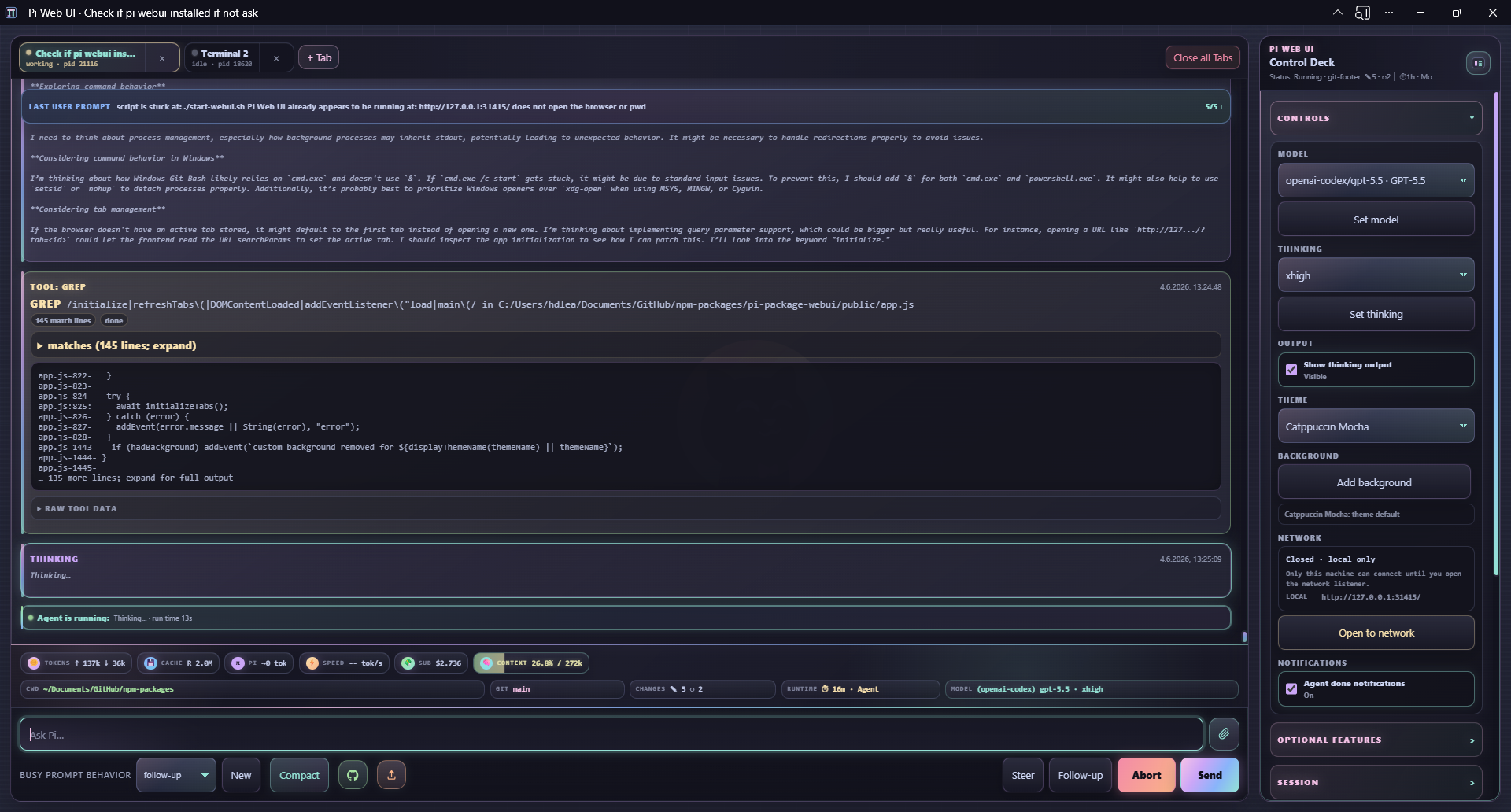
Pi Web UI gives you a local browser companion for Pi: multi-tab chat, streaming output, model controls, uploads, slash-command helpers, workspace navigation, and optional extension widgets.
Security: Pi Web UI has no authentication. It can control the spawned Pi session and run anything that session is allowed to run. It binds to
127.0.0.1by default; only expose it on trusted networks.
Requirements
- Node.js
>=22.19.0 - Pi installed and configured
- A modern browser with Server-Sent Events support
Install
Install the package into Pi:
pi install npm:@firstpick/pi-package-webui
Restart Pi after installation so the Web UI commands are loaded.
Start from Pi
Run this inside Pi:
/webui-start
Open the printed URL, usually http://127.0.0.1:31415/. The command opens your browser automatically unless you pass --no-open.
Check a running Web UI with:
/webui-status
/webui-status detailed
/webui-start options
/webui-start [port] [options] [-- <pi args...>]
  [port]             Port shortcut
  --host <host>      HTTP bind host (default: 127.0.0.1)
  --port <port>      HTTP port (default: 31415)
  --no-open          Do not open the browser automatically
  --no-session       Start Pi RPC with --no-session
  --name <name>      Initial Web UI tab name
  -- <pi args...>    Extra arguments forwarded to Pi RPC
Examples:
/webui-start
/webui-start 31500
/webui-start --port 31500 --no-open
/webui-start --name browser -- --model anthropic/claude-sonnet-4-5:high
Running /webui-start again on the same URL restarts the server and restores currently open Web UI tabs from their session files when possible.
/webui-status options
/webui-status [detailed] [port] [--port N] [--host HOST]
/webui-status reports the URL, online state, and network exposure. detailed adds tabs, sessions, models/providers, and recent backend events.
Standalone CLI
Use the CLI when you want to start the Web UI without first opening terminal Pi:
npm install -g @firstpick/pi-package-webui
pi-webui --cwd ~/src/my-project
pi-webui [options] [-- <pi args...>]
  --host <host>       HTTP bind host (default: 127.0.0.1)
  --port <port>       HTTP port (default: 31415)
  --cwd <path>        Default working directory for Pi tabs (default: current dir)
  --pi <command>      Pi executable to spawn (default: bundled dependency, then "pi")
  --no-session        Start Pi RPC with --no-session
  --name <name>       Initial Web UI tab name
  -h, --help          Show help
  -v, --version       Print version
Examples:
pi-webui --cwd ~/src/my-project
pi-webui --port 3000 -- --model anthropic/claude-sonnet-4-5:high
PI_WEBUI_PI_BIN=/path/to/pi pi-webui --no-session
Environment variables:
PI_WEBUI_HOSTPI_WEBUI_PORTPI_WEBUI_PI_BIN
Main features
- Multi-tab Pi sessions with isolated processes, working directories, prompt drafts, and activity state.
- Automatic tab naming from the first prompt, with
--name <name>still available for an explicit initial tab name. - Streaming chat transcript with Markdown, thinking output, tool/bash cards, queue and compaction events, and abort controls.
- Prompt composer with uploads, drag/drop/paste, inline image support, slash-command autocomplete, and
@file/path references with live suggestions. - Browser dialogs for common Pi selectors such as
/model,/settings,/theme,/fork,/clone,/resume,/tree,/scoped-models,/tools, and/skills. - Model, thinking, session, workspace, theme, optional-feature, Codex usage, network, event, and notification controls in the side panel.
- Side-panel theme picker backed by optional
@firstpick/pi-themes-bundlethemes when loaded. - Per-tab cwd changes, a clickable footer cwd picker, saved path fast picks, server-persisted fast picks, and restart-safe restoration of open tabs.
- Browser support for Pi extension UI prompts, widgets, status updates, browser notifications when a tab needs an extension UI response and an optional side-panel toggle for agent-done notifications.
- Feedback reactions (
👍,👎,?) on final assistant output plus tool/bash action cards, which can ask Pi to create or update a LEARNING. - Mobile-friendly layout and PWA install support where the browser allows it.
Useful browser endpoints exposed by the local server include:
GET /api/path-suggestions?tab=<tabId>&query=<path>for@file/path references with live suggestions.POST /api/action-feedback?tab=<tabId>for feedback on final assistant output and action cards.POST /api/optional-feature-installfor installing known optional companion packages from the side panel.
For local development, run the checkout helper directly, for example:
./start-webui.sh --dev --cwd /path/to/project
Optional companion packages
A normal Pi/npm install includes the optional companion packages unless optional dependencies are disabled. Startup checks loaded Pi capabilities directly through RPC-visible commands and live widget events, then the side panel shows each optional feature as enabled, disabled, or install-needed. Installing a missing feature is an explicit, warned action; it is localhost-only, limited to known packages, and requires reloading the active Pi tab after installation.
When the standalone global pi-webui launcher is used, optional companion installs should target the Pi agent npm root instead of the global npm prefix. Override the target explicitly with PI_WEBUI_OPTIONAL_FEATURE_INSTALL_ROOT=/path/to/package-root when needed.
Optional companions:
@firstpick/pi-prompts-git-pr— guided Git commit/push workflow.@firstpick/pi-extension-release-npm— NPM publish menu and release widgets.@firstpick/pi-extension-release-aur— AUR publish menu and release widgets.@firstpick/pi-extension-setup-skills— TUI/skillssetup command alongside WebUI-native skill toggles.@firstpick/pi-extension-todo-progress— todo-progress rendering.@firstpick/pi-extension-tools— TUI/toolsactive-tool manager alongside WebUI-native tool toggles.@firstpick/pi-extension-git-footer-status— richer git/footer status.@firstpick/pi-extension-stats— stats commands and status data.@firstpick/pi-themes-bundle— Web UI and Pi theme resources.
Guided Git workflow
The Git workflow button runs local git commands in the active Pi working directory:
git add .- Send
/git-staged-msgto Pi - Read the generated commit message files from
dev/COMMIT/ - Commit with the selected message
- Run
git push
This requires /git-staged-msg from @firstpick/pi-prompts-git-pr. Review the generated commit message before committing or pushing.
Mobile and PWA notes
- The mobile composer starts as a compact
Ask Pi…input and grows as you type. - Installable PWA support, blocked-tab browser notifications, and optional agent-done notifications require browser service-worker/notification support and usually require
localhostor HTTPS. - Plain
http://<LAN-IP>can show the app, but some browsers disable PWA install and notifications there.
Network safety
- Default bind is localhost-only:
127.0.0.1:31415. - The side-panel Open to network button rebinds the server to
0.0.0.0, shows LAN URLs when available, and toggles to "Close for network". --host 0.0.0.0also exposes the Web UI to the local network.- Any connected browser client can control Pi and run Web UI bash actions as the Web UI process user.
- Treat Pi Web UI as a local companion, not a hardened multi-user web service.
Troubleshooting
/webui-startis missing: restart Pi after installing the package.- Wrong port or existing server: use
/webui-status detailed, or start on another port with/webui-start --port 31500. - Optional feature is disabled or missing: check the side panel, install the companion package if needed, then run
/reloadin the active Pi tab. - PWA install or notifications are unavailable: use
localhostor HTTPS; browser support varies on LAN HTTP URLs.