@gavin-hu/my-pi-agent
Personal Pi customizations, packaged as a Pi package: worktree isolation and rewind snapshots, question, todo, goal, plan, serve, subagent, job, watch, web-access, file-browse, file-open, file-read, check, memory, context, session-bus, board, team, wechat
Package details
Install @gavin-hu/my-pi-agent from npm and Pi will load the resources declared by the package manifest.
$ pi install npm:@gavin-hu/my-pi-agent- Package
@gavin-hu/my-pi-agent- Version
0.24.0- Published
- Nov 2, 2026
- Downloads
- 3,413/mo · 1,535/wk
- Author
- gavin-hu
- License
- MIT
- Types
- extension, skill, theme
- Size
- 5.7 MB
- Dependencies
- 8 dependencies · 5 peers
Pi manifest JSON
{
  "image": "https://raw.githubusercontent.com/gavin-hu/my-pi-agent/main/assets/screens/chrome.png",
  "video": "https://raw.githubusercontent.com/gavin-hu/my-pi-agent/main/assets/video/demo.mp4",
  "skills": [
    "./skills"
  ],
  "themes": [
    "./themes/*.json"
  ],
  "extensions": [
    "./extensions/serve/index.ts",
    "./extensions/worktree/index.ts",
    "./extensions/rewind/index.ts",
    "./extensions/question/index.ts",
    "./extensions/todo/index.ts",
    "./extensions/goal/index.ts",
    "./extensions/plan/index.ts",
    "./extensions/check/index.ts",
    "./extensions/subagent/index.ts",
    "./extensions/job/index.ts",
    "./extensions/watch/index.ts",
    "./extensions/web-access/index.ts",
    "./extensions/file-browse/index.ts",
    "./extensions/file-read/index.ts",
    "./extensions/file-open/index.ts",
    "./extensions/memory/index.ts",
    "./extensions/context/index.ts",
    "./extensions/board/index.ts",
    "./extensions/team/index.ts",
    "./extensions/session-bus/index.ts",
    "./extensions/wechat/index.ts",
    "./extensions/bytefly/index.ts"
  ]
}
Security note
Pi packages can execute code and influence agent behavior. Review the source before installing third-party packages.
README
my-pi-agent
English · 简体中文


my-pi-agent is a single Pi package that adds a curated set
of extensions, skills, and themes to the agent you already use — install the pack, turn
off what you do not want, and keep using Pi unchanged.
This page is the catalog and the setup instructions. Each feature's own page
under docs/extensions/ carries the keys, the commands, and
what you should see.
Contents
Why this pack
Pi ships a small, sharp core. This package is the layer on top for people who want the agent to think first and work safely:
- Plan, then execute. A read-only planning mode turns a task into a reviewed plan file that the agent then follows step by step.
- Delegate and parallelize. Run specialist subagents in their own Pi processes, push a long build into a background job, and let a watcher tail a log until it matters — then run several sessions on one repository through a shared bus, each owning its slice, all while you keep the thread.
- Never wreck the checkout. Isolation is one command: the task moves onto its
own branch in a
git worktree, and each prompt's first change is snapshotted, so a bad turn is one/rewindaway. - Remember across sessions. Durable notes live in plain markdown that you can read, edit, and version.
- Reach the web and your files. Search, fetch, browse, open, and read documents and spreadsheets from inside the session, and answer a WeChat chat through a bridge to the live session.
Everything is optional and independently toggleable. Nothing is forked, and no
installed Pi file is written to: Pi discovers the resources through the pi
manifest in package.json, so the package upgrades with Pi
like any other.
Quick start
Requires a working Pi installation.
pi install npm:@gavin-hu/my-pi-agent                        # the latest release
pi install git:github.com/gavin-hu/my-pi-agent@v0.24.0      # a pinned release
git on PATH is needed by worktree and
rewind; everything else degrades or disables cleanly,
and /bytefly doctor names what is missing, including optional runtime pieces.
Windows, macOS, and Linux all work, and the full check suite runs on each in CI.
Then, from inside Pi:
/bytefly [extension] [refresh]opens the control center on Extensions: one frame for all three sections, its header rule carrying the attention at the right (orall clear), a tab row with each section's count and the write scope. It lists every loaded extension by name, with a checkbox and at most one verdict word, enables or disables one, and clears a project override withx;/filters the rows,!keeps only what needs attention, and?shows every key./bytefly settingsopens the control center's Settings section: the fifteen preferences a session changes, grouped under Startup, Notifications, Session, Board, and Price with each value in an aligned column,Space/Enterto change one andsfor Global/Project scope. Every other key is abytefly.jsonedit, listed in the configuration reference./bytefly skillsopens the control center's Skills section: one row per Pi skill with its enable checkbox and at most one verdict word, what itsSKILL.mddeclares in the block beside it, andSpaceto switch it on or off for the active scope./bytefly doctor [extension] [refresh]prints the doctor report —run_doctor's text — and checks that each enabled extension has what it needs at runtime./bytefly updatere-runs the package update check now and reports the updateable packages, this package's version and release URL, or a skip./plan <task>starts a task in read-only planning mode./skill:initcreates or updates the instruction file Pi reads through a short built-in interview and a plan you review first.
One thing the pack does on its own: once per interactive session, bytefly
asks Pi's package manager which configured packages are behind, suppresses Pi's
own startup update blocks, and posts one themed notice naming
pi update --extensions, plus one for a newer Pi that names pi update and the
changelog; a new version also marks the header — this package's, and Pi's own.
Nothing about the session is sent: Pi's own release request is re-rendered, and
this package's newest version comes from one fixed GET of npm's latest
document. PI_OFFLINE skips the check;
docs/security.md covers the trust boundaries.
What you get
22 extensions, 3 packaged skills, and 2 themes, grouped by the promises this
README makes. Each extension's own page in docs/extensions/
has the full tool and command surface, opening with its capabilities.
Plan and delegate
| Extension | Tools and commands | What it does |
|---|---|---|
plan |
plan, /plan, --plan |
Read-only planning: one tool with five actions — enter, write, exit, steps, cancel. The model investigates, saves a plan under ~/.pi/agent/plans/<repo-key> (one store per repository, shared by its worktrees), and you approve it before anything is written. Review it in the TUI, or in a browser to leave inline comments: the page follows the plan file live, wears the same toolbar, control bar, and footer as /board and /browse, and its panel is the reader's — an owner's step progress and decisions, a reviewer's name and comment count — while each teammate can hold their own reviewer link and comment under their own name. The init skill uses the same review to create or update a project's AGENTS.md. |
check |
run_check, /check |
Detect the project's test, lint, or typecheck command (or take check.command), run it in a supervised process, and turn failures into a navigable file:line list. |
subagent |
subagent, /agents |
Delegate a task to a specialist agent (explorer, planner, reviewer, worker) in its own Pi process — single, parallel, chained, or in the background, with a footer chip while it runs and a finish notice. |
todo |
todo, /todos |
A persistent task list (pending / in_progress / completed) with a one-line widget. |
goal |
goal, /goal |
A persistent session objective, kept in a widget and restated before each turn. |
question |
question |
Ask you one or more structured questions (labelled options plus free-form "Other") and wait. |
job |
job, /jobs |
Run long-lived shell commands in the background; inspect logs, wait, or kill them. |
watch |
watch, /watch |
Tail a file or command output, match lines against patterns, and alert you or hand matching lines to the agent. |
session-bus |
session, /sessions (screen) |
Coordinate parallel Pi sessions on one repository: discover peers, exchange short messages/events, consume an inbox, or claim paths before editing, with /sessions as a live board of peers, unread mail, and claims. Local, pull-based by default, with an opt-in inbox watch that raises this session's turn once it is idle; it never spawns an agent. |
serve |
— | The session's one loopback server: /board, /browse, and a browser plan review mount prefixes on it instead of binding their own listeners, so a session has one port, one chip, and one close path — and a second session still gets its own. The port is the project's number, hashed from its repository key into 4780–5779, so a bookmarked URL survives a restart; serve.port overrides it, and a shared review borrows exactly one LAN address. |
board |
board, /board |
One shared feature board per repository: a card per feature — its owner, a priority, the cards it waits on, and the history that explains it — moving through backlog, plan, execute, blocked, and done. A card may be executed only once a contract (goal, acceptance, scopeOut) names a plan in this repository's plan store and the lead (board.lead in bytefly.json, lead by default, never the card's holder) or the person with /board approve signs it; done needs its own /board review spot-check — or a /board review <id> --override <why> for a close made outside the gate, which the record then reads as closed by instruction — plan and execute are capped by a WIP limit, and a sign notifies the card's owner. Finished cards leave for an archive/ pile that keeps their notes and landed commit. One loopback page at /board shows the same cards live in a Board and a Team tab, read-only — the tools are the only writers — served as the board's lead, so a second session opens the same page; the Team tab folds owners a bus has no record of into one row. Steps stay in the owner's plan and todo. Off by default: load it with PI_ENABLED_EXTENSIONS=board. |
team |
team, /team |
The lead's round over the same board: /team join <label> puts a session on the team, and /board does it for the lead under the name the page serves as; then assign hands a feature to a running session, offer offers one to whoever is free — a broadcast that writes nothing, claimed by the first taker — reclaim takes a card back to Backlog, claim takes one for the lead itself, whose plan and contract are then board's, and ask sends one peer a question the round cannot answer, its reply arriving as mail. A result says who will be woken for it and who reads it at their next turn, and /team prints the same round in the terminal. Nothing is spawned. Off by default with board: load both with PI_ENABLED_EXTENSIONS=board,team. |
context |
/context |
Show where the context window goes — system prompt, tool definitions, conversation by role, injected notes — and compact from the report with the before and after numbers. |
Keep your work safe
| Extension | Tools and commands | What it does |
|---|---|---|
worktree |
worktree, /worktree (screen), /worktree enter|exit|prune, --worktree |
Work inside an isolated git worktree on its own branch — one tool with four actions: enter, exit, list, prune; the built-in read/write/edit/bash tools follow, and cleanup refuses to throw work away. |
rewind |
/rewind, /review, ↺ N status chip |
Snapshot the repo before each prompt's first change, under refs/pi/rewind, restore code, conversation, or both, and review the latest turn's changes before reverting a file. |
memory |
memory, /memory |
Durable cross-session notes as human-editable markdown, injected into each run and managed through the /memory picker. |
Reach the world
| Extension | Tools and commands | What it does |
|---|---|---|
web-access |
web_search, web_fetch |
Search the web (keyless DuckDuckGo by default, optional SearXNG or Brave) and fetch a page as readable text, with paging, find, per-hop SSRF checks, a JSON/CSV/XML body rendered as a table or a tree, and optional PDF support. |
file-browse |
/browse |
Start a loopback, read-only file browser rooted at the working directory, with Markdown preview, a fuzzy quick-open palette, a path:12-30 reference copied from a selection, live status for a page left open, and a reload hint when the folder it lists changes. |
file-read |
read_doc |
Extract text from a local PDF, DOCX, DOC, ODT, RTF, or XLSX in process, paged. |
file-open |
/open, open_path |
Open or reveal a file or directory in the OS-native application. |
wechat |
/wechat, send_wechat |
Bridge a WeChat chat to the live session over the Weixin iLink bot API; inbound text, images, and files become turns. |
Chrome and upkeep
| Extension | Tools and commands | What it does |
|---|---|---|
bytefly |
/bytefly (with the doctor, settings, skills, update, and upgrade subcommands), run_doctor |
The visible layer: a themed header with a width-adaptive footer, a live run line on the composer's border (working count, the run's tools, elapsed time), and a transcript where every tool block leads with its call line and rails its result under it. /bytefly switches extensions and skills and holds the curated settings, /bytefly upgrade installs a pending update through Pi's own package manager behind a confirmation. Opt-in notify raises OS notifications when a run, a job, or a question needs you, and Pi's own startup update blocks become themed notices and header markers. bytefly.json is the config document every extension reads. |
Skills
Packaged workflows loaded on demand: each skill's name and description are
advertised to the model, and its instructions load only when the task matches
(/skill:<name> forces one).
| Skill | What it does |
|---|---|
init |
Creates or updates the instruction file Pi actually reads (AGENTS.md, or AGENTS.override.md when it shadows it) through a built-in interactive interview and plan review, deriving commands, generated paths, packages, and purpose from repository evidence. |
refactor |
Audits a project or path for refactoring opportunities: duplication, oversized modules, coupling, drift, and high-churn code with weak tests. A bundled scripts/inventory.ts measures sizes, fan-in, churn, and test proximity so a finding is a number with a source, and the ranked shortlist has evidence and verification commands; it then carries the candidate you choose through a behaviour-preserving refactor, and the audit itself is read-only. |
next |
Suggests the next todos by priority — loose work, a broken or unfinished promise — from this conversation once it has done work, and from the tree only when it is empty, with the words and a path after the command saying what to ask and where to look. Read-only, and capped at a short numbered list with evidence and the command that starts each. |
Themes
bytefly-dark is a GitHub-inspired dark palette
and bytefly-light its light companion, with
optional automatic light/dark switching. Installing the pack does not change
your theme: pick one through /settings → Theme (or /bytefly settings →
Theme), or set
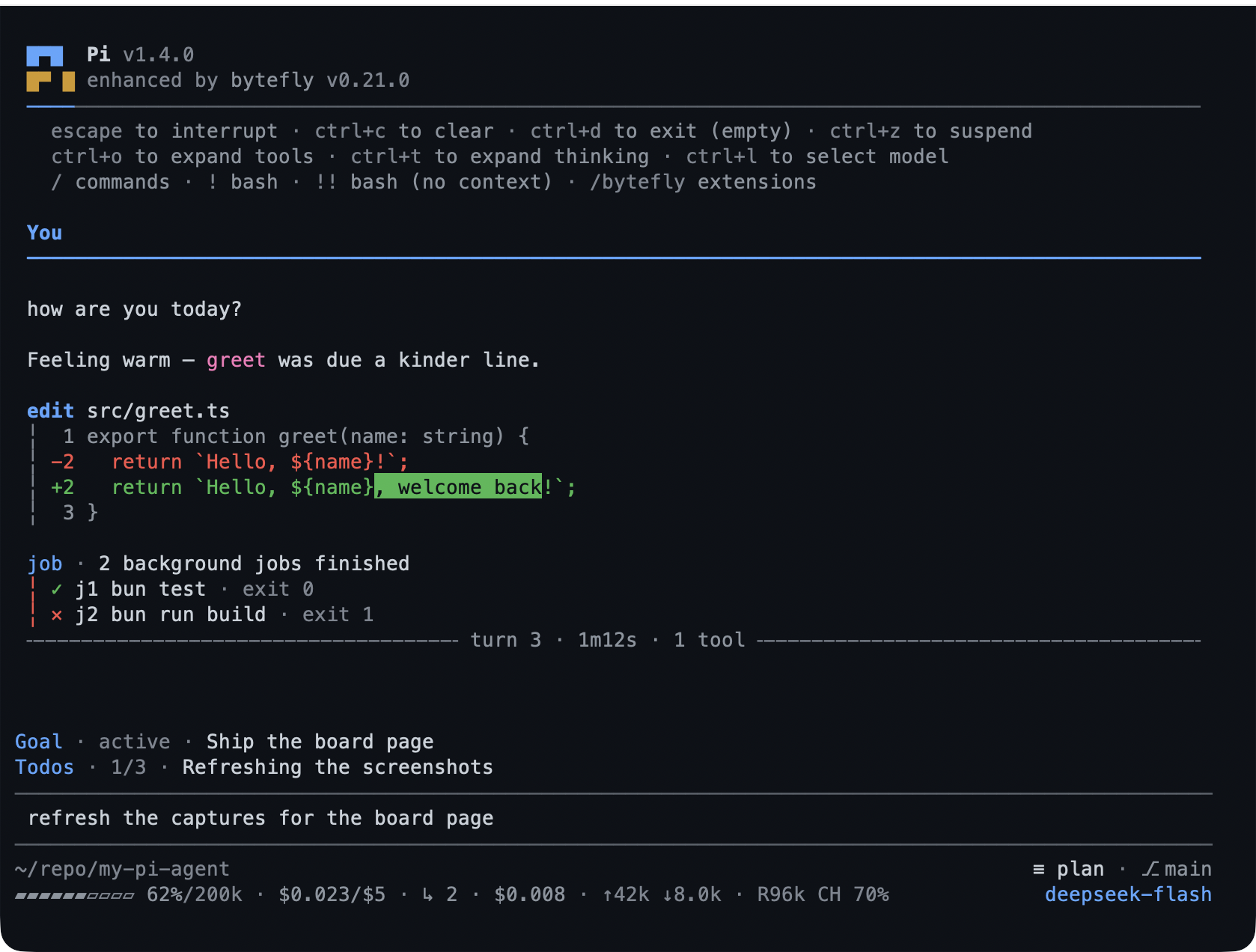
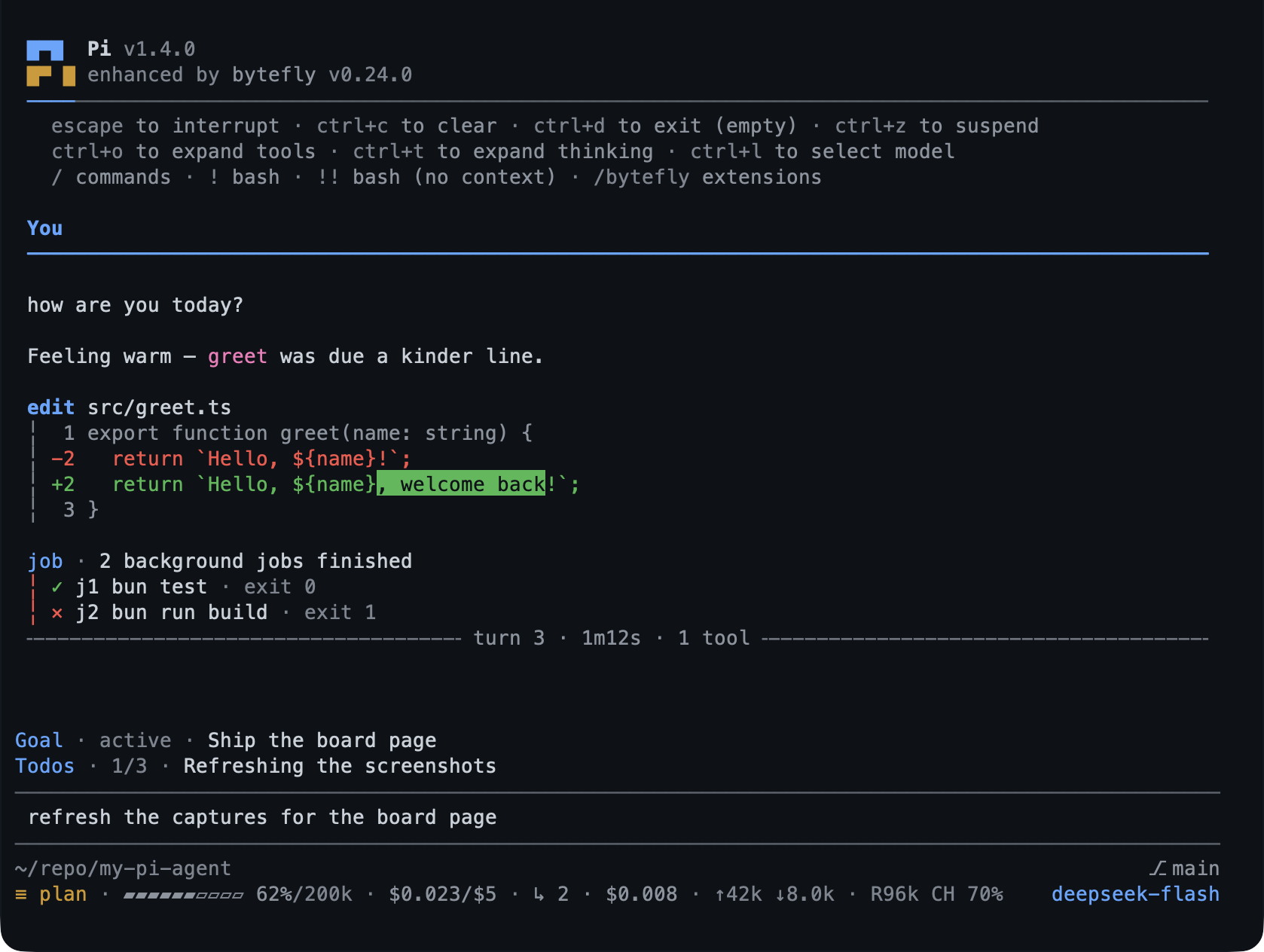
"theme": "bytefly-light/bytefly-dark" for switching. The screenshot above
uses bytefly-dark.
Every other frame — the terminal screens, the three browser pages, and one block
per tool — lives on the page for its extension under
docs/extensions/, which opens with what it does and the
keys it answers. bun run capture:tools regenerates the tool gallery into
assets/tools/.
Configuration
Most extensions need no configuration. Every extension setting lives in one
shared document, bytefly.json, read from <agent-dir>/bytefly.json and
merged with <cwd>/.pi/bytefly.json (project wins), under a top-level section
named for the extension. Each extension's page under docs/extensions/ covers
the behaviour
around its keys, and
docs/configuration.md has the resolution rules, the
settings screen walkthrough, and every section's keys with their type, default,
and bounds.
Almost every extension is on by default. board and team are the exception: the
work list and the lead's half of it are one workflow a session either runs or does
not, so a session that never works a board should not carry those tools, commands,
and page. Set PI_ENABLED_EXTENSIONS to the opt-in names to load:
PI_ENABLED_EXTENSIONS=board,team pi -e .To load the pack without some of the extensions that are on by default, set
PI_DISABLED_EXTENSIONS to a comma- or whitespace-separated list of extension
names (the directory names under extensions/):
PI_DISABLED_EXTENSIONS=todo,job pi -e .Names are compared case-insensitively and unknown names are ignored.
PI_ENABLED_EXTENSIONS only switches on the opt-in extensions, so naming one
there never disables another, and PI_DISABLED_EXTENSIONS still wins over it.
Both only stop the factories from registering; to drop the whole package, use
Pi's --no-extensions or remove the package from your settings.
Documentation
| Guide | What it covers |
|---|---|
| Configuration | Resolution, the settings screen, and every bytefly.json key with its default and bounds. |
| Architecture | The target shape: the load path, the extension contract, the turn, state, layers, lifetimes, and where a change belongs. |
| Extension docs | One page per extension, opening with its capabilities: the tool and command surface, the integration contract, and the design notes. |
| Development | Local setup, checks, tests, cross-platform notes, and the release process. |
| Security | Trust boundaries for the loopback and remote surfaces. |
| Documentation index | The map of everything: the guides, and the deep contracts behind them, by audience. |
Contributing
Contributions are welcome. Start with CONTRIBUTING.md for
the setup, the worktree branch flow, and the checks a change must pass. AI
coding agents should read AGENTS.md.
License
MIT