@guneriu/pi-keybindings-help
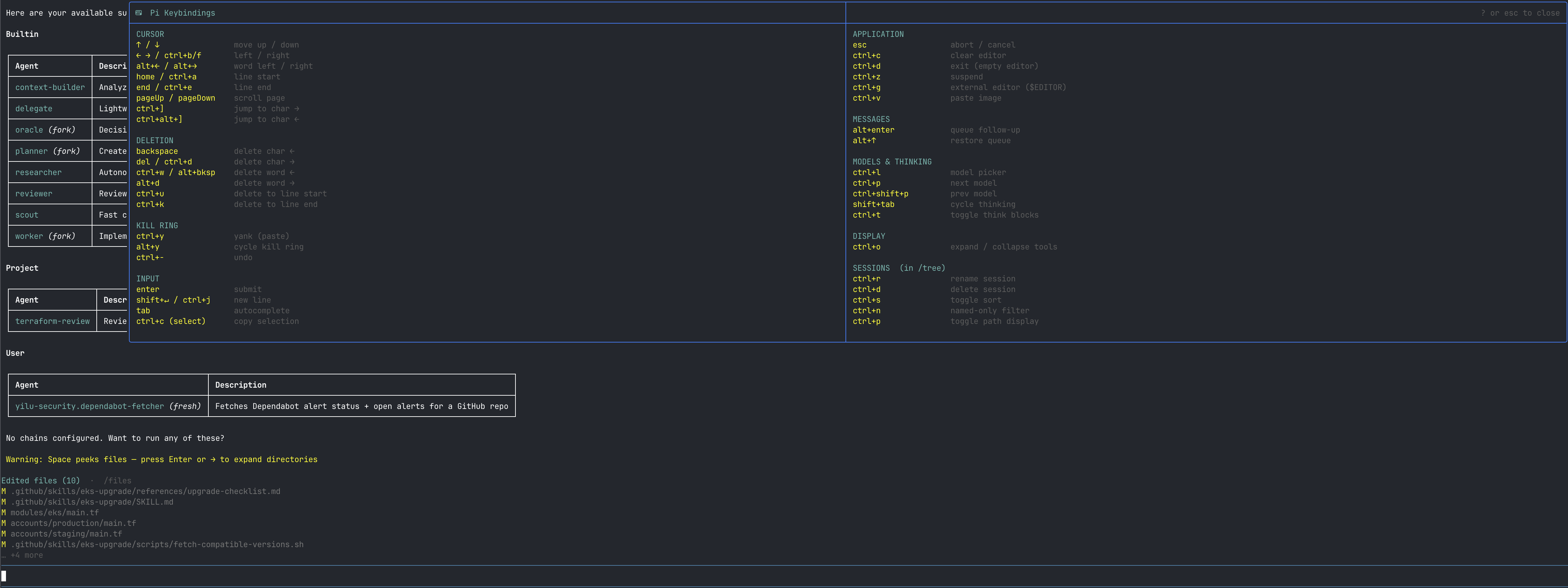
Press ? on an empty editor to open a native floating keybindings reference popup
Package details
Install @guneriu/pi-keybindings-help from npm and Pi will load the resources declared by the package manifest.
$ pi install npm:@guneriu/pi-keybindings-help- Package
@guneriu/pi-keybindings-help- Version
0.2.0- Published
- Jun 29, 2026
- Downloads
- 99/mo · 8/wk
- Author
- guneriu
- License
- MIT
- Types
- extension
- Size
- 14.5 KB
- Dependencies
- 0 dependencies · 1 peer
Pi manifest JSON
{
  "extensions": [
    "./extensions"
  ],
  "image": "https://raw.githubusercontent.com/guneriu/pi-extension-mono/main/assets/keybindings-help-preview.png"
}
Security note
Pi packages can execute code and influence agent behavior. Review the source before installing third-party packages.
README
@guneriu/pi-keybindings-help
Press ? on an empty editor → native floating overlay with all pi keybindings.
⌨  Pi Keybindings                             ? or esc to close
─────────────────────────────────────────────────────────────────

CURSOR                            APPLICATION
↑ / ↓           move up / down   esc            abort / cancel
← → / ctrl+b/f  left / right     ctrl+c         clear editor
alt+← / alt+→   word left/right  ctrl+d         exit (empty editor)
home / ctrl+a   line start        ctrl+z         suspend
end / ctrl+e    line end          ctrl+g         external editor
pageUp / Down   scroll page       ctrl+v         paste image

DELETION                          MESSAGES
backspace        delete char ←   alt+enter      queue follow-up
del / ctrl+d     delete char →   alt+↑          restore queue
ctrl+w           delete word ←
alt+d            delete word →   MODELS & THINKING
ctrl+u           del to line←    ctrl+l         model picker
ctrl+k           del to line→    ctrl+p         next model
                                  ctrl+shift+p   prev model
KILL RING                         shift+tab      cycle thinking
ctrl+y           yank (paste)     ctrl+t         toggle think blocks
alt+y            cycle kill ring
ctrl+-           undo             DISPLAY
                                  ctrl+o         expand/collapse tools
INPUT
enter            submit
shift+↵/ctrl+j   new line
tab              autocomplete
ctrl+c           copy selection
Install
Part of the mono-repo:
pi install ~/Developer/projects/ai-upskill/pi-extension-mono
Usage
?(empty editor) → open keybindings popup?orEscinside popup → close
? typed in a non-empty editor behaves normally (inserts the character).
How it works
Wraps pi's CustomEditor class — all built-in keybindings, model switching, and escape handling stay intact. The ? interception only fires when the editor buffer is empty.