@henryqw/pi-deps
Prepare Node and uv dependencies when opted-in Git worktrees are created.
Package details
Install @henryqw/pi-deps from npm and Pi will load the resources declared by the package manifest.
$ pi install npm:@henryqw/pi-deps- Package
@henryqw/pi-deps- Version
1.0.4- Published
- Sep 10, 2026
- Downloads
- 2,475/mo · 537/wk
- Author
- henrywang
- License
- MIT
- Types
- extension
- Size
- 36.2 KB
- Dependencies
- 0 dependencies · 2 peers
Pi manifest JSON
{
  "extensions": [
    "./extensions/deps.ts"
  ]
}
Security note
Pi packages can execute code and influence agent behavior. Review the source before installing third-party packages.
README
@henryqw/pi-deps
Start locked Node and uv dependency installs whenever Git creates a worktree for an opted-in repository. Developers using several worktree tools get one shared hook without adding work to every Pi startup.
Install
pi install npm:@henryqw/pi-deps
Node 22.19 or newer, Git, and each selected package manager must be available on the PATH used by Git.
Use
Run /deps in a trusted repository to enable preparation. Create a worktree, then open Pi there.
Pi shows install progress and reports the result. Run /deps again when you want to disable future preparation.
- Run
/depsonce from any worktree to enable preparation through the repository's sharedpost-checkouthook. - Run
/depsagain to disable it. - Hooks without this package's marker are never overwritten or removed.
- After updating the package, run
/depstwice in each opted-in repository. This replaces the copied hook with the current version.
Flow
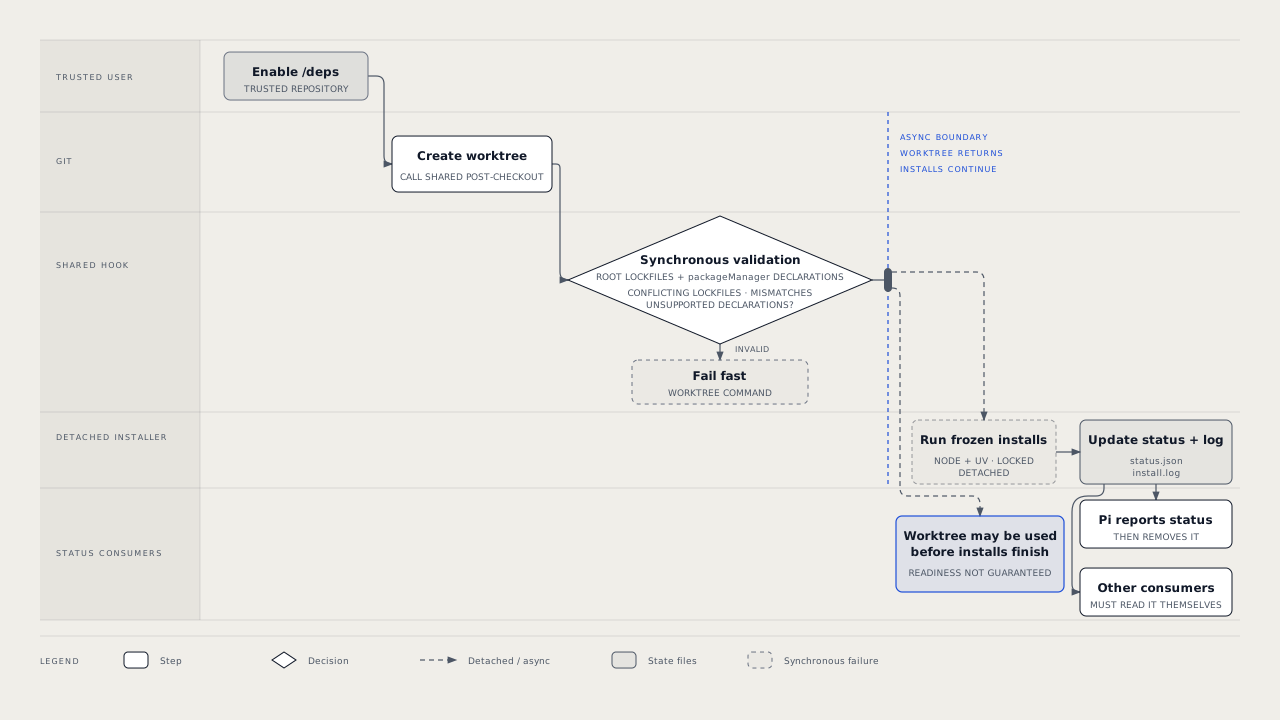
- Worktree creation returns immediately.
- The hook validates lockfiles synchronously. Conflicting Node lockfiles,
packageManagermismatches, and unsupported declarations still fail the worktree command fast. - A detached installer runs frozen installs in the background.
- A Pi session in the worktree shows an editor widget while installing. It auto-dismisses success after five seconds and keeps failures visible, including missing executables.
Node and uv both run when both lockfile types exist.
State and storage
The installer stores its result in <worktree gitdir>/pi-deps/status.json. Command output is in the adjacent install.log.
The status file is removed once a Pi session reports it. Other tools that create worktrees get the same background install. They must consume the status file themselves.
Limits and recovery
Dependency installation may execute repository-controlled build and install scripts. Enable only repositories you trust.
- A configured
core.hooksPathreplaces the shared hooks directory./depsrefuses instead of installing where Git would ignore or share the hook. - Only Git-root lockfiles are inspected.
- Root npm and uv workspaces remain package-manager concerns. Nested independent projects are not scanned.
- Already-present
node_modules,.pnp.cjs, or.venvare skipped. - Worktrees created with
git worktree add --no-checkoutnever runpost-checkout, so they are not prepared. - Installs finish after creation returns. A consumer may use a worktree before dependencies are ready.
Only current major versions are supported. Older majors are not handled and fall back to the lockfile default below.
| Manager | Command | Lockfile |
|---|---|---|
| npm | npm ci |
package-lock.json, npm-shrinkwrap.json |
| pnpm | pnpm install --frozen-lockfile |
pnpm-lock.yaml |
| Yarn | yarn install --immutable |
yarn.lock (Yarn Classic 1.x is not supported) |
| Bun | bun install --frozen-lockfile |
bun.lock, bun.lockb |
| uv | uv sync --locked |
uv.lock |