@henryqw/pi-footer
Show concise repository, branch, and usage details in the Pi footer.
Package details
Install @henryqw/pi-footer from npm and Pi will load the resources declared by the package manifest.
$ pi install npm:@henryqw/pi-footer- Package
@henryqw/pi-footer- Version
2.2.1- Published
- Oct 1, 2026
- Downloads
- 3,667/mo · 1,065/wk
- Author
- henrywang
- License
- MIT
- Types
- extension
- Size
- 25.5 KB
- Dependencies
- 1 dependency · 2 peers
Pi manifest JSON
{
  "image": "https://raw.githubusercontent.com/HenryQW/pi-harness/main/extensions/pi-footer/example.png",
  "extensions": [
    "./extensions/footer.ts"
  ]
}
Security note
Pi packages can execute code and influence agent behavior. Review the source before installing third-party packages.
README
@henryqw/pi-footer
Keep checkout identity, model usage, elapsed agent work, and extension status visible while you work in Pi. See repository, pull request, model, cost, and status details without separate commands.

Install
pi install npm:@henryqw/pi-footerWorks with
| Package | Relationship | Purpose |
|---|---|---|
@henryqw/pi-codegraph |
Improves | Shows CodeGraph index and direct tool activity when loaded. |
@henryqw/pi-multi-codex |
Improves | Adds active Codex subscription quota and reset status. |
@henryqw/pi-open-in |
Improves | Adds /open and /set-open-in commands for editor configuration. |
@henryqw/pi-pr |
Improves | Adds current-branch pull-request status. |
Use
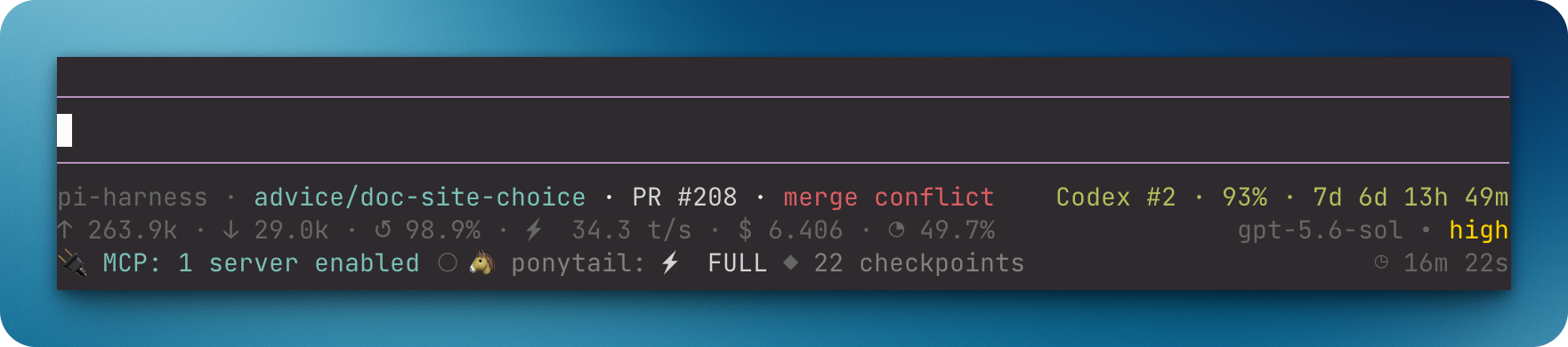
After installing, start a Pi TUI session to see checkout, usage, model, thinking, and extension statuses.
pi-harness · clear-field-f8d2 [+2 ~3 ?1 ↑2] · PR #123 · approved    Codex #1 · 50% · 7d 1d 1h 22m
↑ 12.4k · ↓ 2.1k · ↺ 84.3% · ⚡ 87.4 t/s · $ 0.127 · ◔ 36.8%    gpt-5.6-luna • high
✓ CG · ● 🐴 ponytail: ⚡ FULL ◷ 12m 34s- The first line shows the repository, branch, Git state, and
pi-prpull request status beside the checkout identity. Thepi-multi-codexquota status, when non-empty, occupies the right side. Linked-worktree branches drop the generatedworktree/prefix. - The second line shows cumulative input tokens, output tokens, latest cache-hit rate, and tokens per second for the most recent assistant response. The rate is timed from the response's first streamed content to its last, so request latency, time to first token, and provider work after the stream ends (such as Claude bridge shutting down Claude Code) are excluded. A response that arrives without streamed content, or all at once, shows
—. It also shows estimated cost and context usage. Totals include reported tool usage and finishedpi-subagentbackground workflows. The active model and thinking level are right-aligned. Under a virtual model, the physical model and thinking level of the latest successful response follow an arrow, for exampleauto • high → gpt-5.6-luna • medium, matching Pi's built-in footer. - The third line shows a compact CodeGraph badge first when loaded:
✓ CGindexed,● CGin use,◐ CGchecking or indexing,○ CGmissing,! CGsetup problem, or? CGunknown state. Its icon uses the active theme's state color;CGremains plain so the badge is readable without color. When pi-codegraph is not loaded, no badge appears. A middle dot separates the CodeGraph badge from other extension statuses; cumulative agent-work time stays on the right, beneath the active model.
Git badges appear only when action is needed:
| Badge | Meaning |
|---|---|
+2 |
Two staged paths |
~3 |
Three unstaged tracked paths |
?N |
N untracked porcelain status entries |
!1 |
One unresolved path |
↑2 |
Two commits ahead of the upstream branch |
↓1 |
One commit behind the upstream branch |
?N counts porcelain status entries. In --untracked-files=normal mode, Git may collapse a whole untracked directory to one entry.
Active operations appear first, such as REBASE 3/7, MERGING, or CHERRY-PICKING. Detached HEAD uses the short commit form @a1b2c3d.
The extension reads local Git data with git status --porcelain=v2 --branch --untracked-files=normal. It refreshes after each agent run and branch change. It does not make an LLM call or fetch a remote. Ahead and behind counts use the last fetched upstream state.
Unavailable values render as — without a misleading percent sign.
off uses the same dim grey as the model name. Active levels use an ANSI-256 gradient: green minimal, yellow-green low, lime medium, yellow high, orange xhigh, and red max.
ultra renders as a rainbow when the active Pi runtime supplies that thinking level. Unsupported levels never appear.
Only the non-empty pi-multi-codex quota status occupies the right side of the first line. The pi-pr pull-request status stays beside checkout identity, and CodeGraph appears separately on the third line.
Statuses from other extensions, including Ponytail and pi-rewind, share the left side of the third line. They are sorted by key; colors, links, glyphs, and interior spacing are preserved. Leading and trailing whitespace is trimmed, line breaks become spaces, and long statuses may be clipped to fit the footer. Only direct codegraph_explore tool calls trigger the ● CG badge; CodeGraph queries made from inside scripted tools are not shown.
Limits and recovery
When the configured executable is code and Pi reports hyperlink support, the accent-colored checkout name links to the current path. The link opens a new window for code -n or code --new-window. A missing config silently uses code. Other executables and terminals with hyperlinks disabled render plain text.
Use Pi fullscreen TUI so Pi handles the custom URI:
{
  "tuiMode": "fullscreen"
}
Set this through /settings, or launch with --tui-mode fullscreen. Then use normal primary click. Regular TUI delegates OSC 8 activation to the terminal.
Ghostty uses Cmd+click but may not open custom URI schemes.