@henryqw/pi-herdr-tools
Clone, hand off, name, and finish Pi conversations in Herdr, with mergeable side questions.
Package details
Install @henryqw/pi-herdr-tools from npm and Pi will load the resources declared by the package manifest.
$ pi install npm:@henryqw/pi-herdr-tools- Package
@henryqw/pi-herdr-tools- Version
4.0.1- Published
- Oct 27, 2026
- Downloads
- 2,556/mo · 817/wk
- Author
- henrywang
- License
- MIT
- Types
- extension, prompt
- Size
- 285 KB
- Dependencies
- 3 dependencies · 4 peers
Pi manifest JSON
{
  "prompts": [
    "./prompts"
  ],
  "extensions": [
    "./extensions/index.ts"
  ]
}
Security note
Pi packages can execute code and influence agent behavior. Review the source before installing third-party packages.
README
@henryqw/pi-herdr-tools
Run bounded background commands, clone conversations, hand off tasks, and ask side questions in Herdr. Name conversations, see where idle conversations stopped, and finish worktrees with explicit safety checks.
Install
pi install npm:@henryqw/pi-task-models
pi install npm:@henryqw/pi-herdr-tools
Use Herdr 0.9.3 or later in a Herdr-managed Pi pane. Outside Herdr, rename still sets the Pi session title.
Configure fast in /task-models.
Works with
| Package | Relationship | Purpose |
|---|---|---|
@henryqw/pi-herdr |
Required | Herdr CLI access. |
@henryqw/pi-memory |
Improves | Keeps Main-only memory and dream advice out of side threads. |
@henryqw/pi-task-models |
Required | Model profiles for titles, idle recaps, and side threads. |
Use
Run /clone-tab; the original session stays active. Commands and prompts are for humans; tools are for agents.
| Surface | Type | Purpose |
|---|---|---|
background_command |
tool | Launch, list, inspect, or cancel a managed command. |
/commands |
command | Inspect command status and output, or request cancellation. |
/clone-tab |
command | Clone into a new tab in the current workspace. |
/clone-worktree |
command | Clone into a new Git worktree workspace. |
/handoff-worktree <issue> |
prompt | Prepare a task for herdr_handoff. |
herdr_handoff |
tool | Start a separate task from local main, without changing focus. |
/done [-f] |
command | Remove the worktree and close its workspace tabs. --force aliases -f. |
/btw [<question...>] |
command | Open a side pane with an optional editable draft. |
/btw ask <question...> |
command | Ask a question starting with a subcommand name. |
/btw config [option value] |
command | Show values or reset defaults. Set auto-submit to on/off, tools to inherit/all/read-only/none, or split to right/down. |
/btw merge [<prompt...>] |
command | Queue a merge request. Without a prompt, open the editor. In Main, check pending deliveries. |
/btw help |
command | Show command grammar. |
| BTW capability widget | ui | Show tool-free, read-only, tool-enabled, or context-load errors with recovery steps. |
/rename |
command | Generate a title from up to five recent user messages. |
/main-tab |
command | Select this tab as main and copy its existing meaningful label to the workspace. |
| Rename progress and result widgets | ui | Show renaming..., then renamed to <title> for two seconds on success. |
| First real user prompt | ui | Start titles in new, untitled conversations. |
pi-herdr-tools/rename |
model task | Title model profile. |
| Idle recap widget | ui | Show the goal, current state, and next action after four idle minutes. |
pi-herdr-tools/recap |
model task | Idle recap model profile. |
pi-herdr-tools/btw |
model task | Side-thread model profile. |
| Dialog blocked status | ui | Show Input required in Herdr during interactive TUI dialogs. |
Background commands
Only Main, the parent Pi session, can launch managed commands. Delegated workers cannot launch commands in separate terminals outside their process lease. They can still list, inspect, and cancel commands.
Use background_command for an already authorized, noninteractive local command. No further approval is required. Declare access: "write" if it can change files, Git state, or external resources. read is a declaration, not an enforced restriction. There is no operating-system sandbox.
{"action":"launch","command":"pnpm test","access":"write"}Use {"action":"list"} to list jobs. Use {"action":"status","id":"<job-id>"} for status and the last 8192 output bytes. Use {"action":"cancel","id":"<job-id>"} to request cancellation. Lists show at most 20 jobs and the total count. Results include the full output path. Failed commands, limits, cancellation, and unknown ownership are error results.
Each command gets a dedicated, unfocused Herdr tab and pane. The extension sends a direct argument array through layout.apply; it does not type shell input. The packaged JavaScript runner uses Node to execute /bin/sh -c with closed standard input, in the current working directory. It inherits the Herdr terminal environment.
Launch needs a free checkout. A writer keeps checkout admission until its runner proves termination. Read jobs release admission after their specification is saved. Existing Main writes and direct subagent writers block launch. Main reads, command status, and cancellation remain available. This coordination covers the current Pi process and recovered command records, not arbitrary external writers or other Pi processes.
Do not use interactive commands, remote jobs, detached processes, or commands that escape their process group. The runner controls ordinary descendants in its own group. Cancellation first requests termination, then uses a forced kill if necessary. It never signals a process from a saved process number. A disappeared pane or screen text cannot prove completion.
Clones
Both commands require HERDR_ENV=1 and HERDR_PANE_ID. Pane, session-path, and leaf validation precedes target creation. Clones contain the root-to-current-leaf path, excluding sibling branches and still-streaming assistant output. Unsaved sessions use live state.
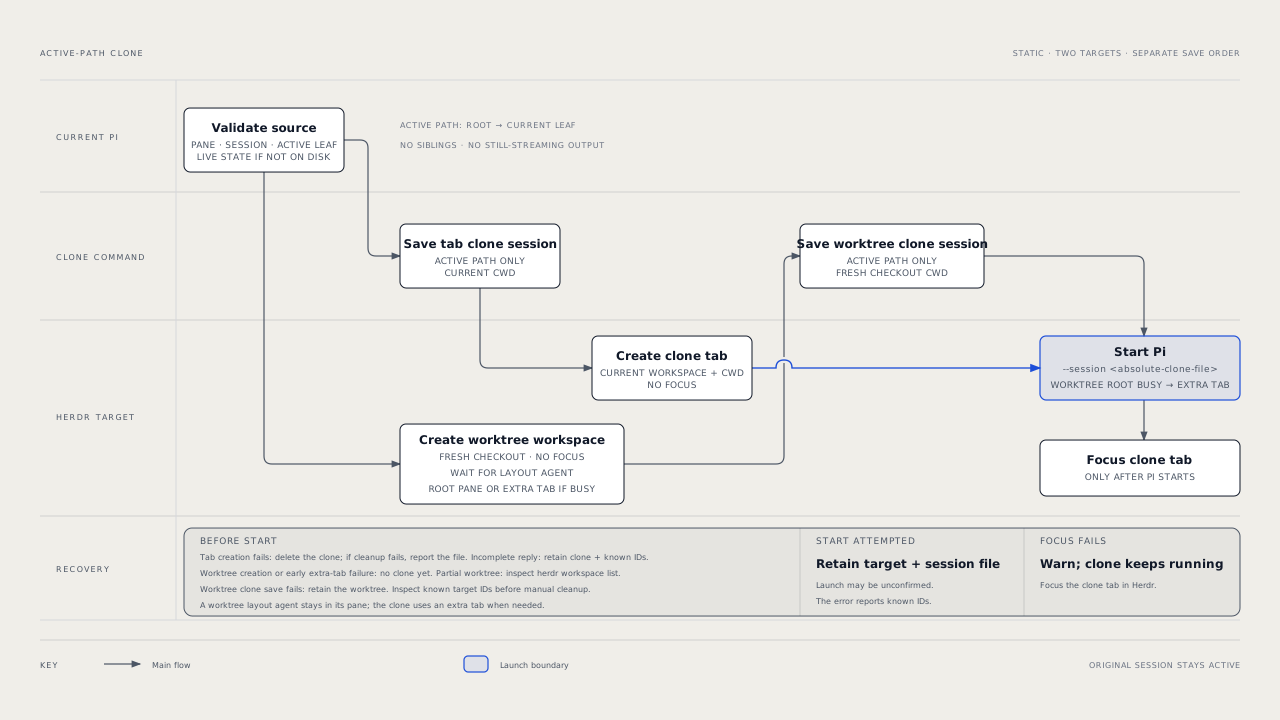
Clone tabs keep the current working directory. Worktree clones use the new checkout. Pi starts with --session <absolute-clone-file>; only successful launches change focus.
Worktree creation uses herdr worktree create --workspace <current-workspace> --no-focus, or the repository's parent workspace when already in a linked worktree. Herdr creates missing branches from HEAD, with checkouts under worktrees.directory in grouped workspaces. Clones and handoffs use an extra unfocused tab if a layout plugin such as herdr-plus occupies the root pane.
Worktree handoff
Run /handoff-worktree Fix the flaky login test. The agent collects missing facts, asking one question only for an unclear repository, outcome, or critical constraint. It sends a self-contained prompt, not the conversation, and reports without waiting for completion.
The tool registers only with HERDR_ENV=1. It also requires HERDR_PANE_ID, local main, and matching Git repositories for the current directory and pane workspace.
All parameters must be non-empty strings:
| Parameter | Requirement |
|---|---|
branch |
New branch; must not exist. |
label |
Workspace label. |
agentName |
Unique agent name matching ^[a-z][a-z0-9_-]{0,31}$. |
prompt |
Self-contained task prompt. |
After validation, the tool runs herdr worktree create --workspace <parent> --branch <branch> --base main --label <label> --no-focus. It starts Pi without session arguments. It submits herdr agent prompt <agentName> <prompt> --wait --until working --timeout 30000, with the prompt as one argument, not a shell command or file. The result includes workspace ID, tab, pane, branch, checkout path, and agent name.
Side questions
With a conversation open, run /btw Why is this test failing?, then submit the draft. Exact first words ask, config, merge, and help select subcommands; other input is a question.
The side-thread model receives Main's fixed, compaction-aware context snapshot. Enabled tools can change shared files. Select read-only or none to prevent changes. Shorten Main's context if it exceeds the side-thread context limit.
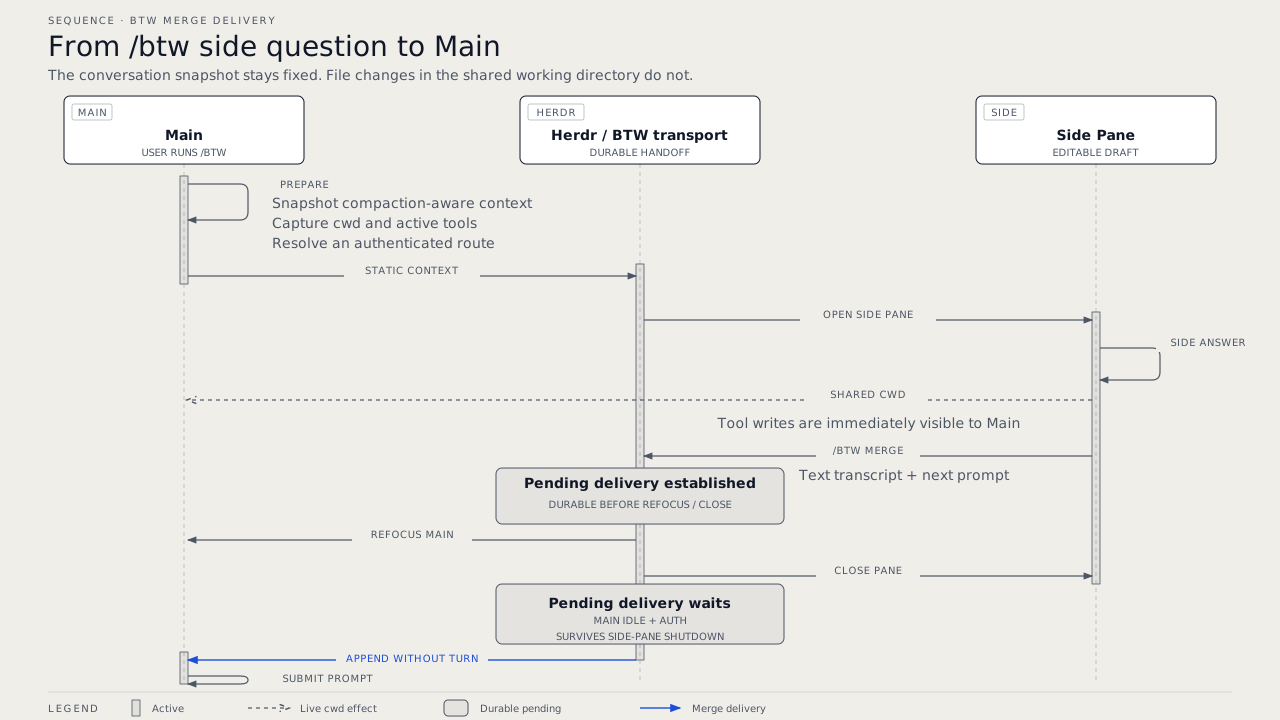
Run /btw merge Apply the smallest safe fix after the answer. The merge request contains user and assistant text, without tool payloads. Pending delivery survives shutdown until consumption or 24-hour stale cleanup. Once idle and authenticated, Main appends the transcript without starting a turn, then submits the prompt.
Titles
Automatic titles ignore extension-injected, empty, and image-only prompts. Expanded skill and prompt-template text starts background generation without delaying the reply. English, sentence-case display titles usually have two or three words; limits are four words and 20 characters.
Titles update the Pi session, Herdr pane, and sole-pane tab. A main tab is the selected tab that can change the workspace title and Git branch. The first-created tab is the default main tab. Other tabs keep these effects local, including with /rename. Closing a selected main tab does not promote another tab. Run /main-tab in the intended replacement.
Only a sole-pane main tab can copy a generated title to the workspace. Automatic titles replace generated linked-worktree labels or the previous saved display title. Custom workspace names stay unchanged unless you run /rename in that main tab. Multi-pane tabs keep their tab label, workspace title, and branch unchanged when one pane generates a title.
Linked worktrees get semantic branches only from the sole-pane main tab, and only for detached checkouts or generated worktree/... branches. Other branches remain unchanged. For example, Update task logic gives refactor/update-task-logic.
Run /main-tab to select the current tab and explicitly copy its existing meaningful label to the workspace, including for a multi-pane tab. This command makes no model request, changes no Pi session title, and derives no Git branch. Numeric labels and generic labels such as Tab 1, Tab, Shell, Terminal, or Untitled are not copied. Selection still succeeds; name the tab, then run /main-tab again.
Automatic and resumed titles preserve assigned subagent pane and tab names when PI_SUBAGENT_PROCESS_LEASE is set. The Pi session can still get an automatic title. Explicit /rename overrides these assigned names but does not bypass main-tab selection.
Idle recaps
When an agent run settles, a four-minute idle timer starts. Then the recap model reads the user and assistant text and the newest compaction or branch summary of the current branch, without tool payloads. The recap request has a limit of 48 KiB, so Pi keeps the start of the summary and the newest turns. It writes an idle recap of at most 40 words. The widget above the editor shows ↺ Recap: <text>. The recap does not go into the model context.
Idle recaps require an interactive UI. Pi does not start the timer when the editor has text. In the TUI, a key press stops the timer and cancels a recap request. Submitted input, ! shell commands, a new agent run, tree navigation, /reload, session switch, and exit also remove the widget. Without new entries on the branch since the last recap, Pi does not make a new recap.
Dialog status
Status requires Herdr's installed Pi integration, ~/.pi/agent/extensions/herdr-agent-state.ts. Select, confirm, input, editor, and custom dialogs from any package count; RPC, JSON, and print modes do not. No dialog title or content goes to Herdr.
Status clears on answer, cancellation, failure, /reload, session switch, or exit. Reload can hide dialogs; late events cannot restore status. Nested dialogs count as one block. Other status owners, including @henryqw/pi-ask-question, remain independent.
Flow
Managed command lifecycle
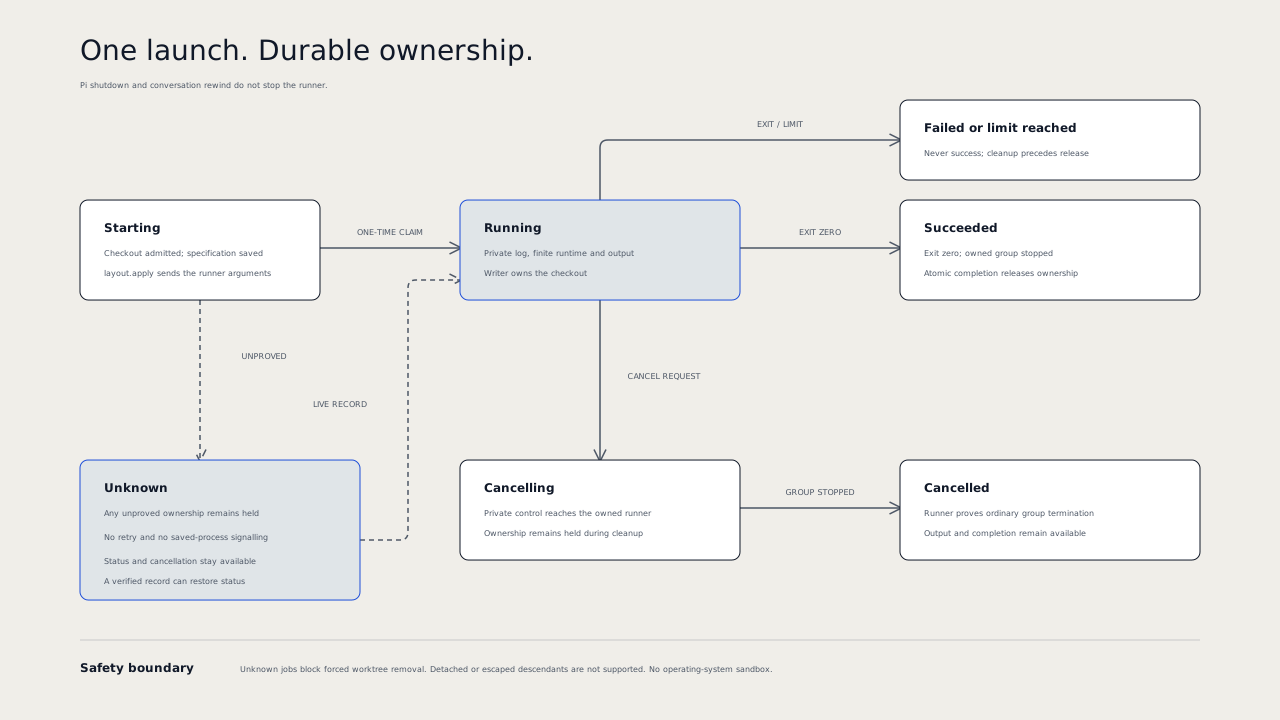
The specification is saved before dispatch. A one-time claim prevents duplicate execution. A lost response, runner crash, or stale heartbeat cannot cause another launch. Ownership stays held when termination is unknown. Only an exact runner record can restore status or prove completion.
The runner survives Pi shutdown, reload, and conversation rewind. Completion stays pending until the launching session is idle and its current branch contains the assistant tool-call entry that launched the command. On other branches, use /commands to inspect the result. Return to the launch branch to receive the pending notice.
After a success or failure, delivery requests one model turn. The agent can inspect the result and continue the request if needed. If Pi cannot start the turn, Pi reports an error. Reload the session to retry a notice that is not in the session history. The delivery record and session history prevent duplicate notices and turn requests after a rewind.
Pi sends the notice asynchronously. The delivery record is saved only after the notice appears in session history. If dispatch fails before that point, inspect /commands and the session history. Reload to retry only after the earlier dispatch cannot still complete; otherwise, a duplicate notice is possible. The extension cannot detect an asynchronous dispatch failure or retry it during the same load.
Worktree completion
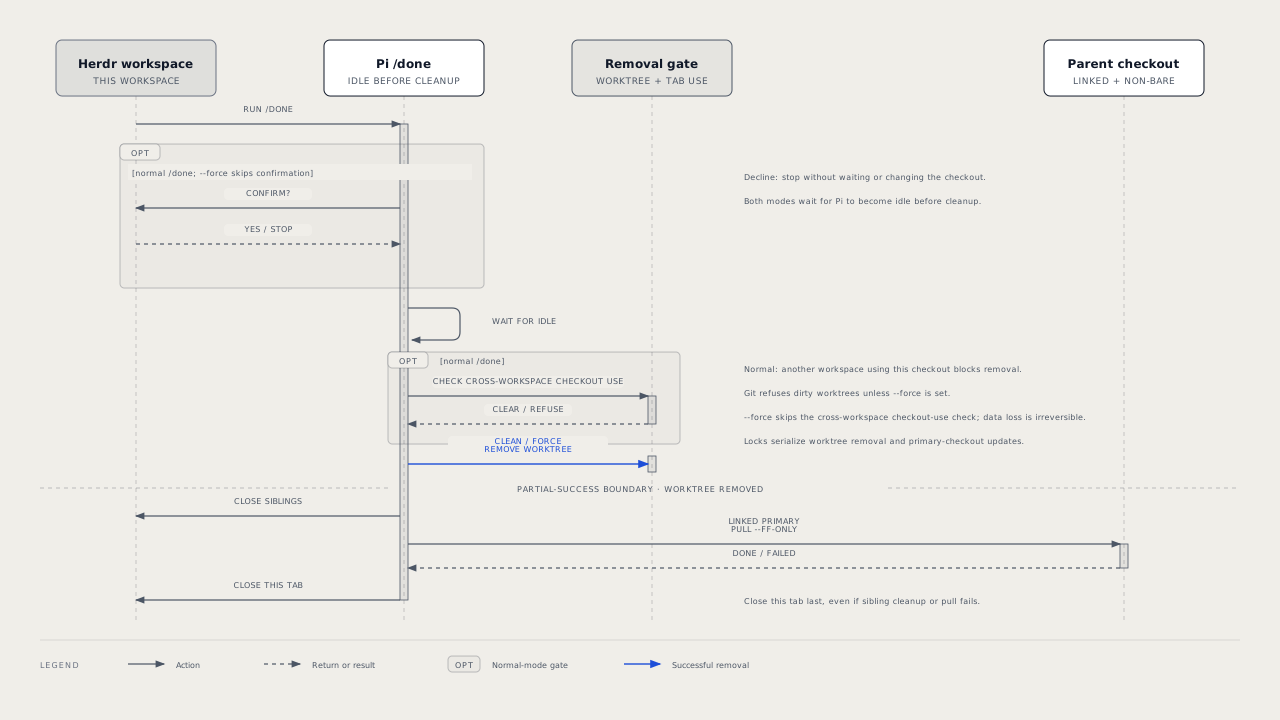
/done requires HERDR_ENV=1, HERDR_WORKSPACE_ID, and HERDR_TAB_ID. Commit or discard changes, then confirm removal; declining changes nothing. Normal and forced completion wait for idle Pi.
Active or unknown managed commands block both normal and forced removal, including read jobs. Cancel the job and wait for verified completion. Other admitted writers also block removal.
Normal removal rejects dirty worktrees and checkout use by other workspaces. Close listed tabs and retry; labels identify them, or IDs without labels. Primary-checkout tabs do not block removal or updates.
/done -f skips confirmation and cross-workspace checks. It passes --force to Git, can permanently delete uncommitted work, and can leave other workspaces' tabs pointing at a removed checkout.
Cleanup runs git worktree remove <checkout>, closes other tabs in the current workspace, then updates a non-bare primary checkout with git pull --ff-only. The current tab closes last, even if the update fails. Tabs in other workspaces do not close.
Config
Package-owned: ~/.pi/agent/config/pi-herdr-tools/config.json. The active Pi agent directory determines the config home. Side-thread settings are under btw; command limits are at the root.
{
  "runtimeMs": 600000,
  "outputBytes": 10485760,
  "concurrency": 4,
  "retainedJobs": 1000,
  "btw": {
    "autoSubmit": false,
    "tools": "inherit",
    "split": "right"
  }
}
Side-thread settings
| Name | Description | Values | Default |
|---|---|---|---|
btw.autoSubmit |
Submit the draft automatically; otherwise, keep it editable. | Boolean. | false |
btw.tools |
Tools available in the side pane. | inherit (Main's active tools), all, read-only (built-in read-only tools), or none. |
inherit |
btw.split |
Side-pane placement. | right or down. |
right |
File and fields are optional. Launch reports unknown keys and invalid values, using field defaults; malformed files use all defaults. /btw continues without changing the file. /btw config show prints effective side-thread values. Updates preserve command limits but fail while any config issue remains.
/btw config reset replaces only btw with defaults and preserves command limits. It can correct invalid settings under btw. Reset refuses malformed files and issues outside btw; correct those manually first. If the file changes during a repair, reset refuses the write. Read the file and retry.
Command policy
| Name | Description | Values | Default |
|---|---|---|---|
runtimeMs |
Maximum command runtime in milliseconds. | Integer, 100 to 86400000. | 600000 |
outputBytes |
Maximum combined standard output and error bytes per job. | Integer, 1024 to 104857600. | 10485760 |
concurrency |
Maximum active or unknown jobs in the command store. | Integer, 1 to 16. | 4 |
retainedJobs |
Maximum saved job records before launch is refused. | Integer, 1 to 10000. | 1000 |
Missing fields use defaults. Invalid fields and malformed files produce config warnings and use finite defaults. The extension preserves the file. Edit the file to change policy; each launch loads it again. Existing jobs keep their saved limits. No automatic job queue or retry is provided.
Model profiles
All three model tasks default to fast. Use /task-models to change their profiles.
Side threads select the first authenticated viable route before launch. Titles use the primary route, then fallback, with configured thinking; they never substitute the current session model. An invalid title gets one repair request before fallback. Without a viable route, titles remain unchanged. Idle recaps use the same route order and never substitute the current session model.
State and storage
Command records are private generated state under ~/.pi/agent/config/pi-herdr-tools/commands/, outside transcripts. Each job keeps its immutable specification, runner claim, terminal identities, log, cancellation control, completion, and delivery record. The command text and output can contain secrets; do not share this directory. Logs stay readable after completion and stop at the output limit. Records and tabs are not removed automatically. Archive only verified terminal records when the record limit is reached; never delete active, unknown, or malformed state to permit another launch.
Malformed state is preserved and blocks writes. Repair requires inspection of the original files and actual owned processes. There is no force-release action for unknown ownership. The runner waits for output streams to close after group termination. If group termination is unproved, or output streams stay open for more than four seconds after the termination check, it records unknown, not success. The runner cannot track descendants that detach or escape; those commands are not supported.
On Linux, use an init process that reaps exited child processes. A zombie is an exited process whose parent has not collected its status. Without child reaping, zombie process groups can remain unknown and keep writer admission held. A process-table snapshot is not proof of termination and cannot release ownership.
Main-tab selection is shared generated state at <checkout>/.context/pi-harness/pi-herdr-tools/state.json, not package configuration. Herdr supplies the checkout path. Outside Git, the extension uses a directory only when every pane in the workspace reports the same working directory. This check does not require Git to be installed. Missing Herdr checkout data for a Git directory disables shared workspace effects.
The versioned file separates socket paths and workspace identifiers. HERDR_SOCKET_PATH must identify the active Herdr socket. A private directory lock covers selection and workspace effects. Git branch changes also take the separate checkout lock.
Symlinks in any checkout-relative state-directory component are refused. Directories are created one component at a time. Every component is checked before state reads and writes. Each component must be owned by the current user. Parent components must not allow group or other writes; the extension directory must be private. Correct the permissions if the extension reports an unsafe directory.
Files are limited to 65,536 bytes, read strictly, and replaced atomically with private permissions. Malformed files remain unchanged. The state is not added to Git or automatically ignored; it can appear as untracked work. If .context/ is not ignored, pi-subagent and /pr clean-worktree checks can fail. Configure a Git exclusion if you use those workflows.
A workspace lifetime token is a random, non-secret metadata value that connects the saved selection to the live workspace. Herdr clears this metadata on server restart. A missing or changed token on an existing record disables automatic workspace effects until /main-tab confirms selection.
Herdr assigns number 1 to the first-created tab. The extension uses that number for the default selection and stores the tab identifier. If that tab is absent, select a main tab with /main-tab. An existing live token without a local selection does not authorize automatic selection.
The extension checks the lifetime token immediately before each workspace rename and Git branch mutation. An independent client can still clear metadata or change Herdr state after that check. Herdr cannot make the token check and mutation one atomic operation.
Clones are separate session files in the Pi-selected session directory. Each contains only the active path. Pi names the clone file for a saved source session; otherwise, the extension creates and names it. Saved titles restore display titles and semantic branches without another model request.
Limits and recovery
| Failure | Recovery |
|---|---|
| Unknown command ownership | Inspect /commands and the private state directory. Cancellation is a request, not proof of termination. Do not retry the command or delete its state. |
| Command runtime or output limit | Inspect the bounded log and error status. Any later launch is a new explicit decision. |
| Definite clone-tab creation failure | The clone file is removed. Cleanup errors name any remaining file. |
| Worktree creation or pre-launch extra-tab failure | No clone session exists yet. |
| Killed or incomplete worktree creation | Partial workspace state can remain. Inspect returned IDs with herdr workspace list. |
| Incomplete tab response | Inspect known IDs before cleanup. Clone tabs retain the session path; worktree clones retain the worktree without a clone session. |
| Agent start requested | An ambiguous launch retains targets and session files. Inspect reported IDs. |
| Clone focus failure | Pi already started. Focus its tab manually. |
| Handoff validation failure | No worktree exists. Correct the reported requirement. |
| Handoff cancellation | Before creation, nothing remains. After creation, reported resources remain; later launch or delivery steps stop. |
| Handoff start or prompt failure | Resources remain. Errors identify worktree, branch, workspace, tab, pane, and agent. No automatic cleanup occurs. |
agent_blocked or agent_prompt_stalled |
Prompt delivery failed. Inspect the agent before retrying. |
Timed-out prompts can still arrive. Check herdr agent get and herdr agent read; resend with herdr agent prompt only if absent. Alternatively, run /done in the new worktree.
After a failed primary update, the removed worktree stays removed. Correct primary-checkout changes or divergence, then run git -C <primary-checkout> pull --ff-only.
/rename warns without user text. Unavailable shared directories, malformed state, or failed token checks do not prevent Pi session, pane, and sole-pane-tab naming. They produce a warning and prevent shared workspace effects. Inspect and repair malformed state without deleting it to force automatic selection. Use /main-tab for a stale token or a closed main tab.
For other Herdr or Git synchronization warnings, correct the reported problem and retry the command. A later failure does not undo an earlier name change. Newer renames and /main-tab cancel older title requests in the same Pi process.
When an idle recap request fails, Pi shows a warning and does not retry. Pi shows each different warning only one time. The next settled run starts a new idle timer.