@henryqw/pi-notes
Persistent notes in a Pi widget, managed with /note commands.
Package details
Install @henryqw/pi-notes from npm and Pi will load the resources declared by the package manifest.
$ pi install npm:@henryqw/pi-notes- Package
@henryqw/pi-notes- Version
1.0.3- Published
- Sep 8, 2026
- Downloads
- 2,276/mo · 744/wk
- Author
- henrywang
- License
- MIT
- Types
- extension
- Size
- 13.9 KB
- Dependencies
- 1 dependency · 2 peers
Pi manifest JSON
{
  "extensions": [
    "./extensions/notes.ts"
  ],
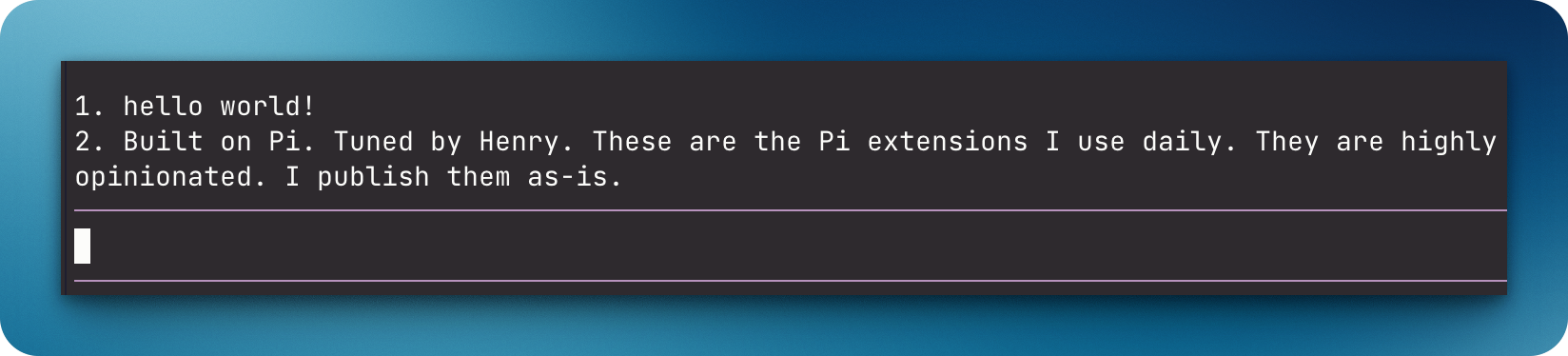
  "image": "https://raw.githubusercontent.com/HenryQW/pi-harness/main/extensions/pi-notes/example.png"
}
Security note
Pi packages can execute code and influence agent behavior. Review the source before installing third-party packages.
README
@henryqw/pi-notes
Keep up to four persistent reminders for each worktree visible above the Pi editor. Small fixed slots stay useful without becoming an unbounded history store.

Install
pi install npm:@henryqw/pi-notes
Use
Run /note Verify the migration rollback. The reminder appears above the editor and returns in later sessions for this worktree.
| Surface | Type | Purpose |
|---|---|---|
/note <text> |
command | Add a note for current Git worktree (max 4). |
/note-rm |
command | Pick a note from current worktree to remove. |
/note-clear |
command | Clear current worktree's notes. |
- Each Git worktree has separate notes.
- The widget numbers notes above the editor and shows at most two lines per note.
- Empty worktrees show no widget.
State and storage
The extension generates ~/.pi/agent/config/pi-notes/<worktree-sha256>.json for command-managed notes in one Git worktree.
Stale files for removed repositories and worktrees are deleted silently when a session starts or notes change.
Limits and recovery
Each worktree file is validated as untrusted data. Malformed files are preserved. They block mutation for the affected worktree until fixed or reset with /note-clear.