@henryqw/pi-prompt-creator
Turn current Pi conversation signals into user-approved prompt templates.
Package details
Install @henryqw/pi-prompt-creator from npm and Pi will load the resources declared by the package manifest.
$ pi install npm:@henryqw/pi-prompt-creator- Package
@henryqw/pi-prompt-creator- Version
3.1.5- Published
- Oct 15, 2026
- Downloads
- 3,530/mo · 1,281/wk
- Author
- henrywang
- License
- MIT
- Types
- extension
- Size
- 43.3 KB
- Dependencies
- 3 dependencies · 1 peer
Pi manifest JSON
{
  "extensions": [
    "./extensions/prompt-creator.ts"
  ]
}
Security note
Pi packages can execute code and influence agent behavior. Review the source before installing third-party packages.
README
@henryqw/pi-prompt-creator
Turn repeated requests or corrections in the current conversation into a reviewed global Pi prompt. A tool-free child drafts one Prompt Candidate. Main and the user control Prompt Review and the save.
Automatic analysis only prepares a candidate. The extension never saves it without your approval.
Install
This package requires Pi 1.1.0 or later in the 1.x series. Older Pi releases are no longer supported.
pi install npm:@henryqw/pi-task-models
pi install npm:@henryqw/pi-prompt-creator
Run /task-models before analysis. Assign a model to fast, or override pi-prompt-creator/draft. Open /task-models again and verify the saved route or task assignment.
Works with
| Package | Relationship | Purpose |
|---|---|---|
@henryqw/pi-task-models |
Required | Provides the isolated draft model route. |
Use
Run /promptor in the interactive TUI after a repeated request or correction appears:
- Run
/promptor. The completed candidate appears automatically. - Ask Main to refine it and return only the complete Final Prompt Draft.
- Run
/promptor saveto save under the suggested name, or/promptor save <name>to rename it.
The prompt is created at ~/.pi/agent/prompts/<name>.md. Then Pi reloads its resources. No selection menu or name prompt is required.
| Surface | Type | Purpose |
|---|---|---|
| `/promptor [analyze | dismiss | save [name] |
pi-prompt-creator/draft |
task | For users who configure /task-models: choose the child model and thinking level for the draft. |
| Analysis status widget and candidate message | ui | Show analysis progress, readiness, or failure. A displayed candidate is marked as untrusted. |
Flow
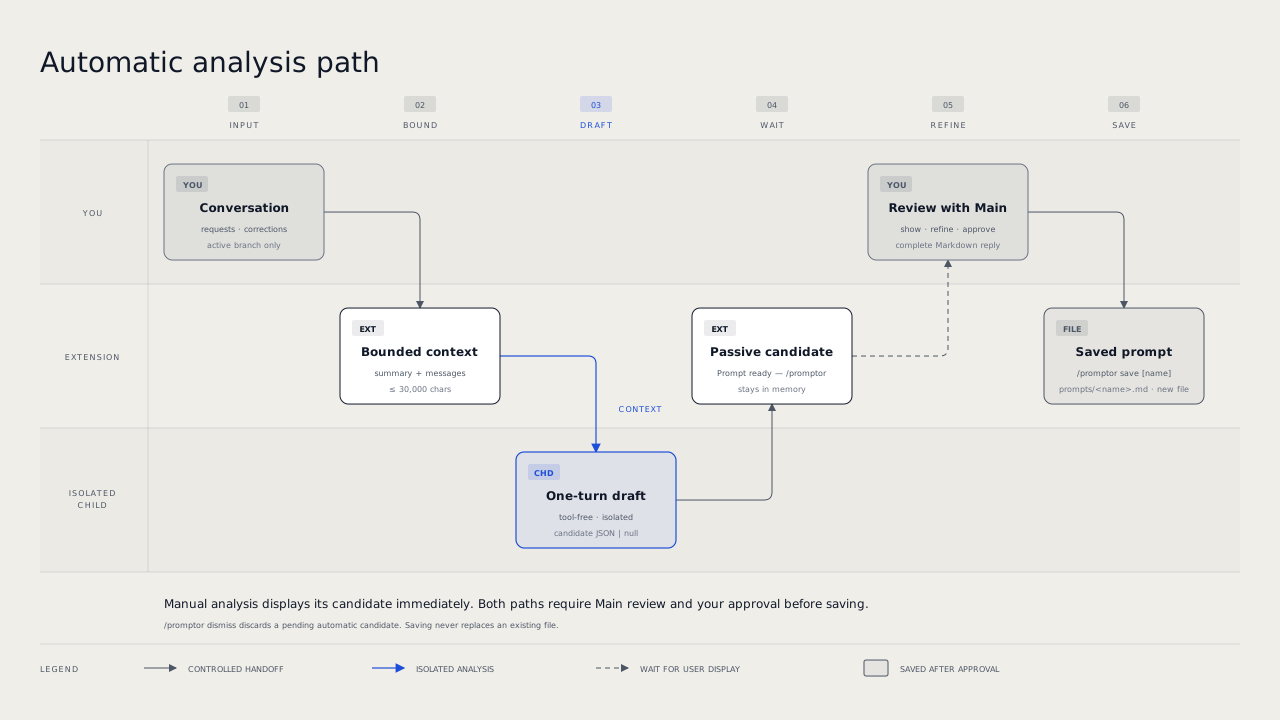
The diagram shows the automatic path. Manual analysis displays its candidate immediately, without the WAIT stage. Both paths require Main review and your approval before the save.
Automatic analysis
Automatic mode waits for the configured number of non-empty user inputs. The default is three.
It starts at the next idle agent_settled event that is not aborted. It starts at most one time per extension runtime.
An aborted run does not start automatic analysis. It keeps the input count and the automatic opportunity, so a later eligible normal settlement can start analysis. aborted: false does not prove that the provider completed successfully.
Explicit /promptor analyze remains available after cancellation. A manual analysis consumes the automatic opportunity.
Branch changes reset the input counter. Automatic analysis and candidate widgets require the interactive TUI.
Only one analysis can run at a time. A pending candidate blocks another analysis.
Manual and automatic analysis send Pi's current model-visible session context to the child model configured through /task-models. Session context edits that omit or replace messages are honored. Original text removed from model context is not sent to the child. Request-local context and context_with_system transformations are not included.
Its payload includes the active compaction or branch summary, user text, successfully completed assistant text, and effective prompt names and descriptions.
Project context files and prompt templates are disabled for the child. Tool traffic, thinking, images, custom messages, and inactive branches are excluded.
Analysis asks a tool-free child for one JSON response. It has no user extensions, Skills, or saved session. The extension does not retry failed analysis.
New user input does not stop a running child. Branch navigation discards its old result without stopping the child.
Review and save
A manually requested analysis displays its completed candidate immediately. Automatic analysis shows a running widget. Then it keeps a completed candidate behind the Prompt ready — /promptor widget until you run /promptor or /promptor dismiss. Thus, background work never interrupts the conversation.
Displayed candidates are visible messages marked as untrusted.
Refine the candidate with Main. Ask Main to return only the complete Final Prompt Draft. Then save it with /promptor save [name].
You can save only after you show a candidate and Main then completes a valid Markdown review reply. The save uses that latest retained Main reply as the entire file. Replies before the active compaction or branch summary cannot be saved.
An interrupted, failed, empty, or tool-use reply cannot be saved. The extension never falls back to an older reply.
A successful save ends that review. Show another candidate and complete another Main review reply before you save again.
/promptor save uses the suggested candidate name. Pass /promptor save <name> to choose another. Names must be lowercase kebab-case, start with a letter, and contain at most 64 ASCII characters. Existing command names and prompt files are rejected.
A successful save reloads Pi resources. If reload fails, the prompt remains saved and /reload can load it.
Model routing
The extension registers pi-prompt-creator/draft. Its default task profile is fast.
Use /task-models to select the model and thinking level. The extension owns no model configuration. At session start and before each analysis, it shows each problem in the shared task-model config one time in each session.
Config
Package-owned: ~/.pi/agent/config/pi-prompt-creator/config.json
| Name | Description | Values | Default |
|---|---|---|---|
automatic |
Runs automatic analysis after enough user inputs. | Boolean. | true |
inputThreshold |
Sets the number of non-empty user inputs before automatic analysis. | Positive safe integer (1–9007199254740991). |
3 |
Edit either field. Then run /reload to apply the change. Omitted fields use their defaults.
A missing file quietly uses both defaults. Startup never creates or rewrites the file.
At session start, Pi shows a warning with the file path and each problem for an unknown key or an invalid value. Pi ignores the unknown key. A misspelled key near a missing field, such as automatc, counts as an invalid value of that field. An invalid inputThreshold uses the default 3.
Automatic analysis stays off for the session when automatic is invalid or misspelled, or when the file has malformed JSON, invalid UTF-8, more than 64 KiB, a read error, or a non-object root. Startup leaves the file unchanged.
Only /promptor automatic on or /promptor automatic off writes the config. A toggle reads the file again and keeps its current inputThreshold, also when another session changed it. A toggle also replaces a file with problems: it first shows the problems, then keeps the usable values and removes unknown keys. If another session changes that file before the write, the toggle stops and writes nothing.
State and storage
A pending candidate stays in memory only. Automatic mode persists, but counters and candidates do not.
Saved prompts are at ~/.pi/agent/prompts/<name>.md. A save never replaces an existing file.
Limits and recovery
The child payload stays within 30,000 characters, including its JSON envelope and prompt metadata.
It gives priority to the active summary, then to the newest complete messages. It omits excess prompt metadata before conversation context.
Old messages can be omitted. Individual messages are never cut.
Generated candidate names use lowercase kebab-case and stay within 64 ASCII characters.
Candidate and Final Prompt Draft Markdown must be non-empty and at most 16 KiB.
Candidate and saved Markdown reject NUL and other terminal controls. Ordinary tabs and line feeds are allowed.
If analysis finds no candidate, the running widget clears without a notice. Invalid output or child failure shows Prompt analysis failed — /promptor. Failed analysis is not retried automatically. Run /promptor or /promptor analyze to start again.
The failure widget clears after the next non-empty user input. Analysis has a two-minute idle timeout and five-minute hard timeout.
This package does not search past sessions. It does not create Skills or project-local runtime state.