@hheei/codex-dollar-autcomplete
Dollar-triggered inline skill path references with cyan prompt highlighting for pi.
Package details
Install @hheei/codex-dollar-autcomplete from npm and Pi will load the resources declared by the package manifest.
$ pi install npm:@hheei/codex-dollar-autcomplete- Package
@hheei/codex-dollar-autcomplete- Version
0.1.1- Published
- Jul 5, 2026
- Downloads
- 162/mo · 11/wk
- Author
- hheei
- License
- MIT
- Types
- extension
- Size
- 327.1 KB
- Dependencies
- 0 dependencies · 0 peers
Pi manifest JSON
{
  "extensions": [
    "./extensions/dollar-skill-autocomplete.js"
  ]
}
Security note
Pi packages can execute code and influence agent behavior. Review the source before installing third-party packages.
README
@hheei/codex-dollar-autcomplete
@hheei/codex-dollar-autcomplete adds $skill-name autocomplete, cyan prompt highlighting, prompt-time skill path expansion, and pi-loadout-aware skill ordering to pi.
It is intentionally different from /skill:name: it does not expand SKILL.md into the prompt. When you send a prompt, each recognized $skill-name token is replaced with the loaded skill's sourceInfo.path.
Behavior
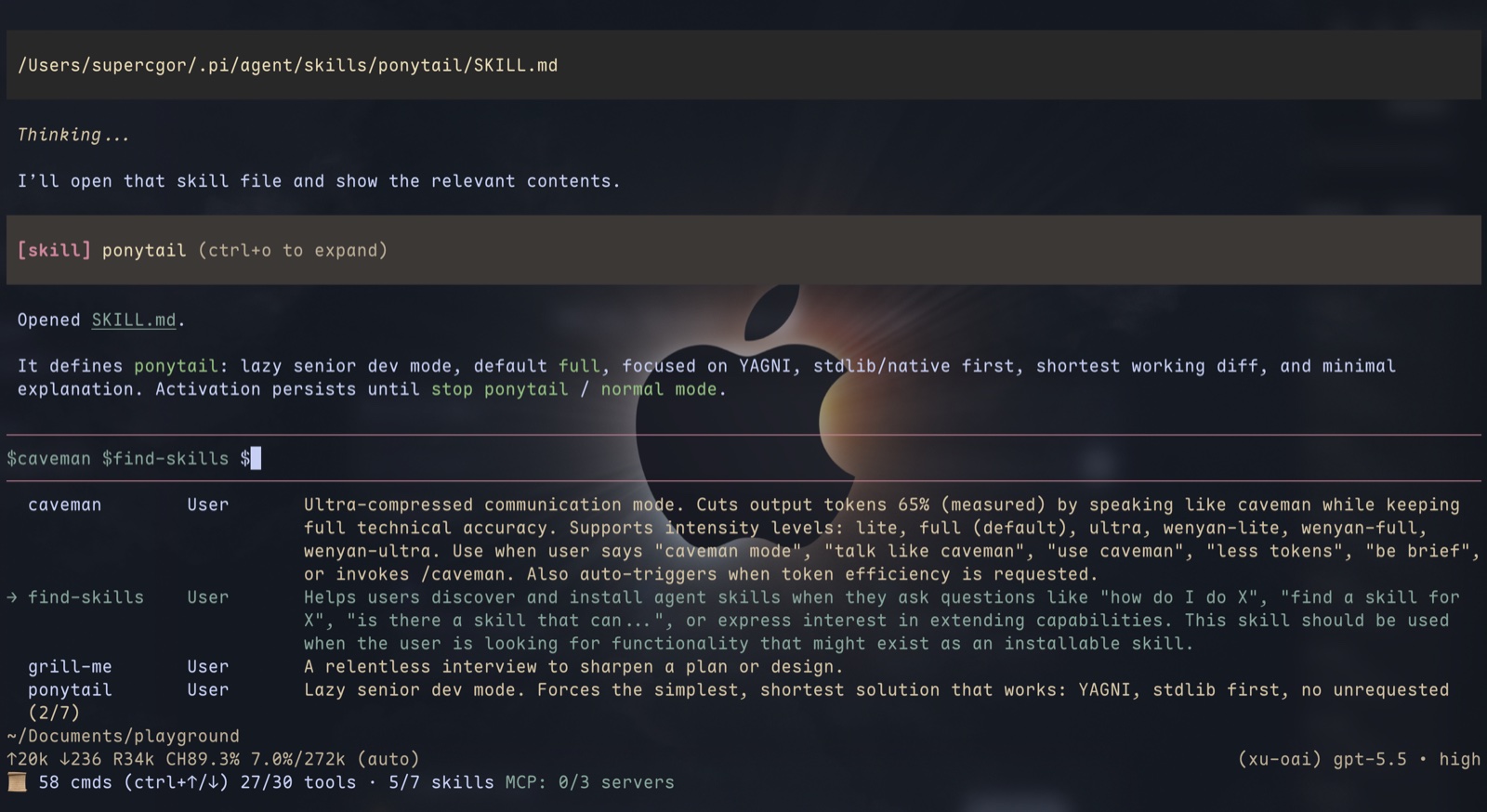
Type $ in the prompt editor to list all loaded skills, or continue typing to filter by skill-name prefix only:
Review this using $lib
The picker renders three columns: skill name, source (User, Project, or Extension), and a multi-line description:
  librarian       User       Research open-source libraries with evidence-backed
                         answers and GitHub permalinks.
→ pi-subagents    Extension  Delegate work to subagents
Selecting the suggestion inserts the token:
Review this using $librarian
If $librarian matches a loaded skill, the token is highlighted cyan while you are editing the prompt. Unknown tokens such as $UNKNOWN are not highlighted.
When the prompt is sent, pi transforms it to:
Review this using /Users/me/.pi/agent/skills/librarian/SKILL.md
Multiple references in one prompt are supported:
Compare $librarian with $pi-subagents and keep $UNKNOWN untouched.
Only loaded pi skills are expanded. Unknown $NAME tokens are left unchanged.
pi-loadout support
When pi-loadout is installed and has an active skill selection, active skills are listed first. Inactive skills remain available at the bottom of the picker and render with the autocomplete description/muted theme style.
This lets $ stay useful even when pi-loadout trims the skills exposed to the model: active skills are prominent, while inactive skills can still be inserted manually as path references.
Example
Theme colors
The picker reuses pi's built-in editor autocomplete theme hooks: selectList.selectedText for the selected row, selectList.description for unselected descriptions, and selectList.scrollInfo for the scroll indicator.
Prompt $skill-name highlights use the main theme keys codexDollarHighlight, codexDollarSelected, mdCode, syntaxType, toolTitle, then the editor selectList.selectedText hook.
Install
From npm:
pi install npm:@hheei/codex-dollar-autcomplete
For local development from this repository:
pi install /path/to/codex-dollar-autcomplete
Or test for one run:
pi -e /path/to/codex-dollar-autcomplete
After installing into a running pi session, use /reload.
Recommended configuration
This package is meant to replace most interactive uses of /skill:name with $skill-name path references. To reduce duplicate skill command suggestions, consider disabling Pi's built-in skill slash commands:
{
  "enableSkillCommands": false
}
pi-loadout users can still control which skills are active in the model prompt; this package will read that active skill list and order the $ picker accordingly.
Development
npm run verify