@howaboua/pi-pet
Animated companions for GipPity Remote.
Package details
Install @howaboua/pi-pet from npm and Pi will load the resources declared by the package manifest.
$ pi install npm:@howaboua/pi-pet- Package
@howaboua/pi-pet- Version
0.1.3- Published
- Sep 5, 2026
- Downloads
- 805/mo · 109/wk
- Author
- howaboua
- License
- MIT
- Types
- extension
- Size
- 6.2 MB
- Dependencies
- 0 dependencies · 4 peers
Pi manifest JSON
{
  "extensions": [
    "./extensions/index.ts"
  ]
}
Security note
Pi packages can execute code and influence agent behavior. Review the source before installing third-party packages.
README
Pi Pet
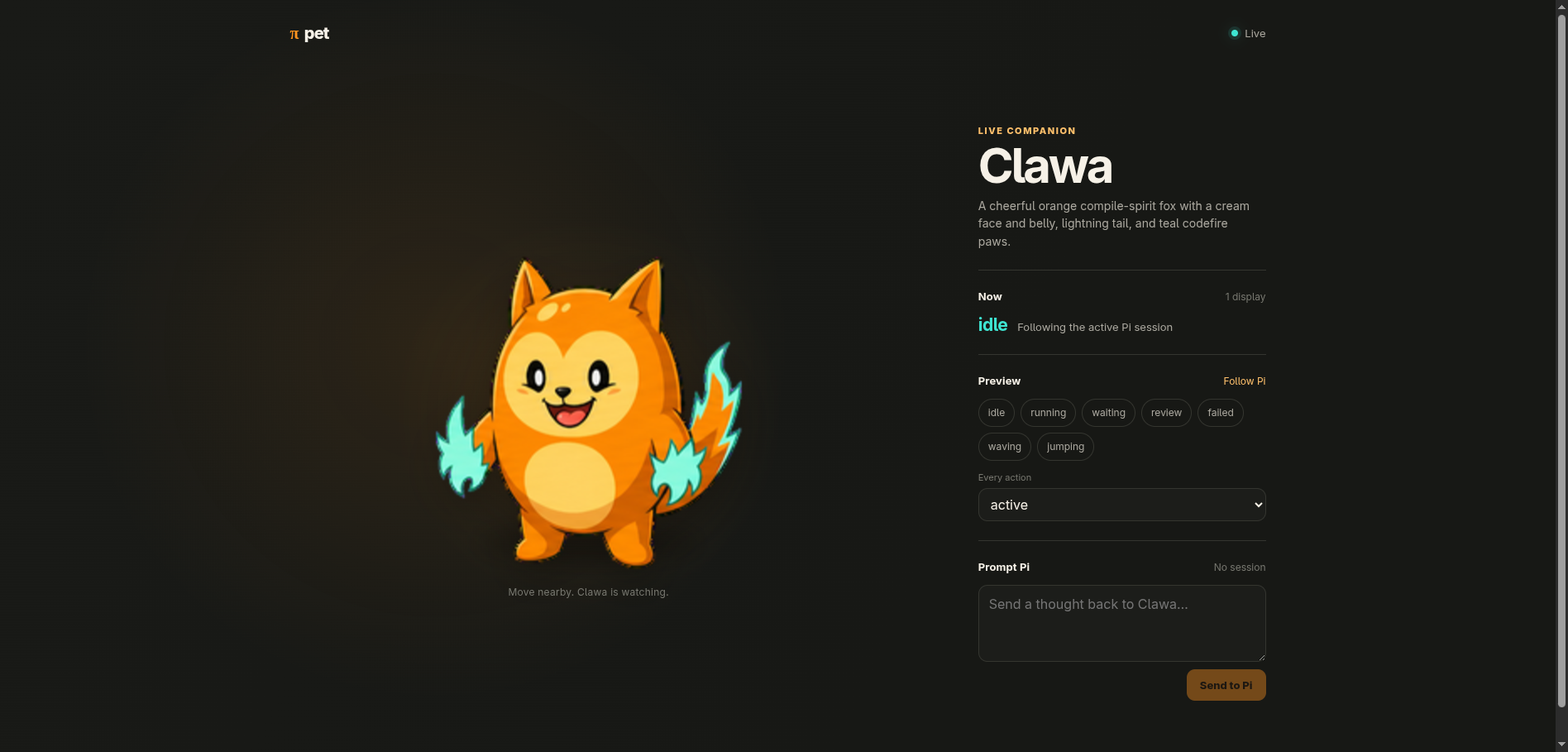
Pi Pet turns GipPity Control into an animated companion. Its bundled Clawa miniapp receives Pi activity, prompts, final replies, and realtime voice through GipPity Remote's existing browser SDK; Pi Pet contributes only pet rendering, reactions, assets, and an optional transparent Electron shell.
Install
pi install npm:@howaboua/pi-gippity-control
pi install npm:@howaboua/pi-pet
Run /gippity server or its configured shortcut. With Pi Pet loaded, GipPity serves Clawa at /_gippity/apps/pi-pet/ on every announced server URL. GipPity's bundled or explicitly configured main remote UI remains at /.
Open <gippity-url>/_gippity/apps/pi-pet/ and accept GipPity's local certificate. The same Clawa app provides:
- working, waiting, failure, and settled animation from Pi events;
- synchronized text prompts through
GippityRemote.send(); - realtime conversation through
GippityRemote.audio; - bounded final-reply bubbles;
- local action previews and sixteen pointer-look directions.
pet_show is the only model tool. It triggers an intentional named reaction; routine activity animates automatically and GipPity already owns speech and final text.
Electron is optional. With no attached device, Pi Pet still publishes its versioned { pet, revision, action, note? } state through GipPity alongside the session activity and tool events used by any browser renderer.
Transparent desktop pet
The Electron shell loads the same GipPity-hosted app in a transparent, frameless, always-on-top window. It adds local cursor tracking, size, quiet mode, and snooze without another agent runtime or remote protocol.
Attach the device running Pi directly:
/pet attach local
For another device, give it an SSH alias and confirm key-based access once outside Pi:
ssh desktop true
The remote device needs npm and Node 22 or newer; runtime extraction uses PowerShell on Windows and standard unzip on macOS/Linux. Attach it from Pi:
/pet attach desktop
Pi Pet starts GipPity for the active Pi session and uses its saved LAN settings unless /pet attach <device> <gippity-url> supplies an override. Local attachment runs the Pi-owned bootstrap directly and keeps its build under Pi's agent directory at pi-pet/. Remote attachment sends the bootstrap through SSH and uses ~/.pi/agent/pi-pet on that device. On connection Pi Pet compares the loaded package version and source digest with the recorded build, runs the copy, npm install, and npm run build steps only when they differ, then starts Electron. Pi exiting stops Electron and GipPity. Closing Clawa stops Electron while GipPity remains active for its Pi session. Neither path discards the build or creates an application installation, login item, or background service.
The global registry at <pi-agent-directory>/pi-pet.json, normally ~/.pi/agent/pi-pet.json, retains reusable local and SSH device definitions. PI_CODING_AGENT_DIR changes that local agent directory. The current folder's .pi/pi-pet.json selects which devices receive that folder's Pi sessions. Later sessions opened in the same folder start only those devices automatically. Inspect them with /pet status, relaunch them with /pet restart, or remove one from the folder with /pet detach desktop. SSH options, keys, proxies, and host routing stay in ~/.ssh/config.
{
  "schemaVersion": 1,
  "devices": {
    "local": { "kind": "local" },
    "desktop": { "kind": "ssh", "target": "desktop" }
  },
  "defaultDevices": []
}
If attachment or a build fails, Pi reports the failing phase and error. Ask Pi to diagnose and repair ~/.pi/agent/pi-pet on that device; no application reinstall or directory reset is normally needed.
Electron accepts GipPity's self-signed certificate only for the configured origin. The source-only desktop/ package is also directly runnable with npm install, npm run build, and npm start from a source checkout.
Pet authoring
Authoring guides are loaded only when requested rather than exposed as permanent skills. Pass a natural-language request to the same routed command:
/pet add a catching-mouse animation
/pet hatch a fluorescent office ferret
Pi Pet resolves authoring/PET-GUIDE.md from its own source or npm installation and asks Pi to follow it. That guide routes one-action work or full character hatching into the bundled references, deterministic atlas tooling, and visual review process.
Pi resolves its installed package from the guide path and uses its npm/Node authoring commands without requiring Bun or a monorepo checkout. Bundled pets are templates: the first edit copies one to <pi-agent-directory>/pi-pet/pets/, authoring evidence stays under <pi-agent-directory>/pi-pet/runs/, and generated miniapp assets stay under <pi-agent-directory>/pi-pet/web/. Package updates therefore do not overwrite user pets.
A repository can select any generated durable pet and its devices without duplicating assets in .pi/pi-pet.json:
{ "schemaVersion": 1, "pet": "office-ferret", "devices": ["local", "desktop"] }
Repository pet selection overrides the global default; otherwise Pi Pet uses the global selection and then bundled Clawa. Repository devices override the registry's defaults. /pet attach and /pet detach maintain the current folder's device list without changing its pet selection.
Run /reload after rebuilding to select the authored pet and refresh attached devices. Pet packages remain inert JSON and bounded PNG/WebP files; they cannot supply scripts, HTML, URLs, or commands.
See docs/architecture.md, SECURITY.md, and docs/research.md.