@hypercarrier/pi-team-bright
Task-first Pi teams, visible in terminal panes.
Package details
Install @hypercarrier/pi-team-bright from npm and Pi will load the resources declared by the package manifest.
$ pi install npm:@hypercarrier/pi-team-bright- Package
@hypercarrier/pi-team-bright- Version
0.25.1- Published
- Oct 25, 2026
- Downloads
- 2,053/mo · 379/wk
- Author
- silverbreenz
- License
- MIT
- Types
- extension, skill
- Size
- 1.5 MB
- Dependencies
- 3 dependencies · 4 peers
Pi manifest JSON
{
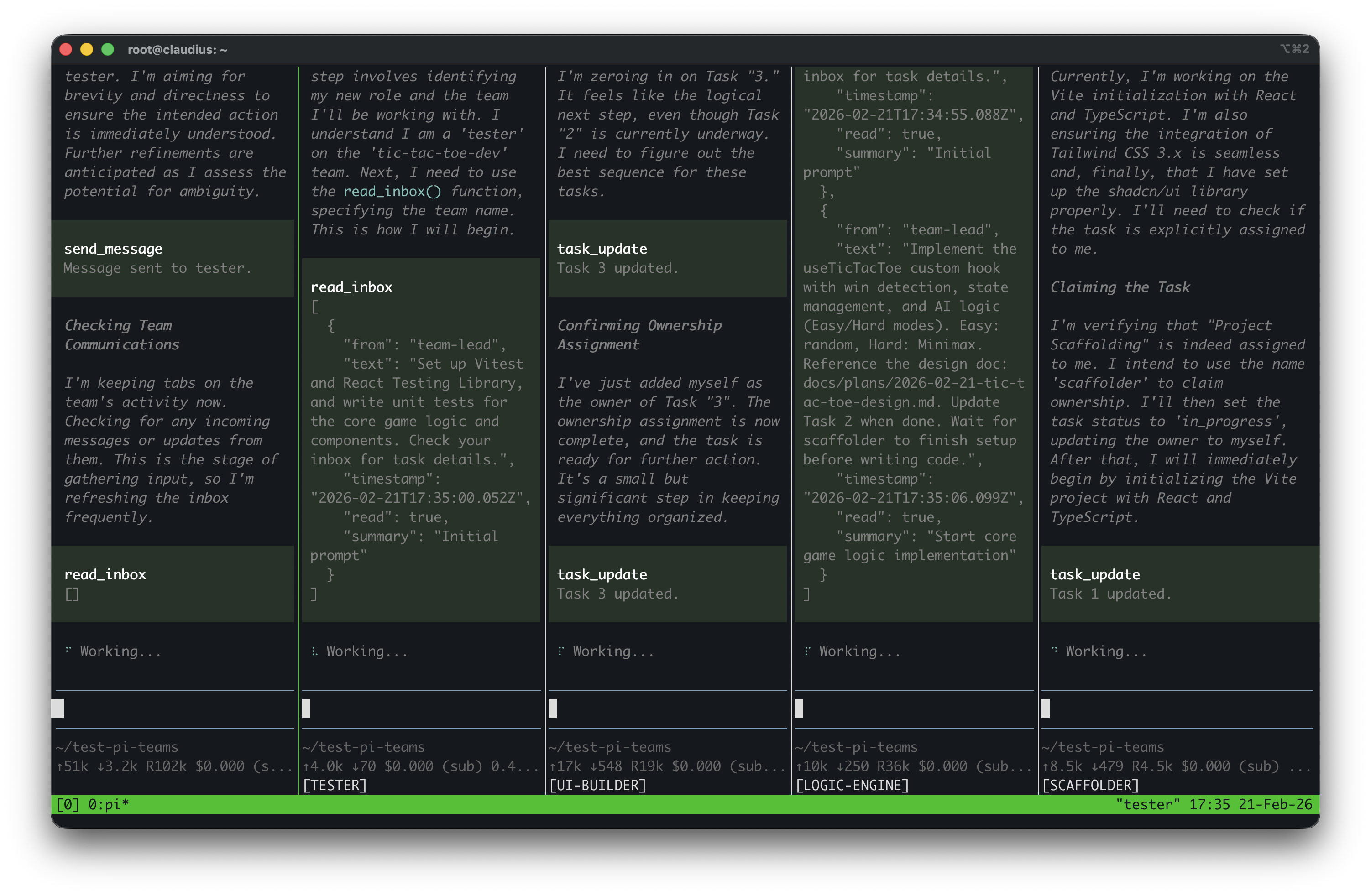
  "image": "https://raw.githubusercontent.com/deephbz/pi-team-bright/v0.17.0-rc.14/pi-team-in-action.png",
  "skills": [
    "skills"
  ],
  "extensions": [
    "extensions/index.ts"
  ]
}
Security note
Pi packages can execute code and influence agent behavior. Review the source before installing third-party packages.
README
Pi Team Bright
Delegate work to a visible Pi team without turning terminal activity into your source of truth.
Pi Team Bright lets one Pi lead assign durable Tasks to stable, named Workers. Workers remain visible through terminal adapters, but the work lives in the Task: who owns it, what done means, and the evidence that achieved, failed, or blocked its goal. The lead can wait for changes instead of watching panes.
Website: https://deephbz.github.io/pi-team-bright/
Watch the demo
Play the video inline in the release notes · Download the MP4
From terminal juggling to accountable delegation
Suppose a release needs two things at once: an API-contract audit and a rollback checklist update.
Before: the operator opens extra terminals, pastes two prompts, and watches scrolling output. One process exits and another looks busy, but there is no reliable answer to “Who owns which result?”, “What is still blocked?”, or “What proved completion?”
With Pi Team Bright: the lead ensures an auditor and a writer, then
creates one assigned Task for each outcome with explicit acceptance criteria.
The auditor reports goal_achieved with file-and-command evidence. The writer
blocks with the missing decision, blocker evidence, and a next action. The lead observes those
state changes through team_sync, resolves the blocker, and reviews the Task
evidence before stopping either Worker.
A pane, process, launch receipt, or startup observation may show that a carrier exists. None of them proves that a Worker is ready, making progress, or done. The Task plus its assignee is the only executable work contract.
The one lead is both project lead and coordinator. The project lead preserves user intent and constraints, chooses the approach, decomposes work, evaluates outcomes, and explains trade-offs. The coordinator assigns Tasks, supplies context, resolves blockers, supervises outcomes, and escalates decisions. Delegation does not transfer accountability or the user's authority.
The normal flow
The normal sequence is:
restore or create the Team → reuse or ensure Workers → task_graph_apply →
snapshot and updates through team_sync → inspect goal evidence → resolve
Tasks. Stop Workers or shut down the Team only when their lifecycle boundary
ends.
ensure_worker returns attention when carrier evidence requires a decision.
Follow its reason and next-action hint; unknown evidence never permits a new spawn.
A launch returns a receipt at once, and the lead does not wait for Pi to start. A
live pane or shell never proves a live Worker.
worker_ensured.recovered reports recovery of the exact Worker Session and current
Attempt. Inspect lastStop and ask the human before recovery when
suspectedHumanStop is true. /ptb status shows carrier, stop, and nonterminal Task
evidence in one transcript entry. It offers one confirmation for legacy generation
adoption and remembers a decline for the current Session runtime.
Configure a model role and its default using the canonical settings example. A minimal agent-led run looks like this:
team_create({ name: "review", purpose: "Audit the recovery contract." })

ensure_worker({
  name: "auditor",
  scope: "Contract reviewer who reports reproducible evidence."
})

task_graph_apply({
  operation_id: "audit-recovery-contract-1",
  tasks: [
    {
      key: "audit",
      title: "Audit the recovery contract",
      goal: "Compare implementation with the documented recovery path and report exact evidence.",
      assignee: "auditor"
    },
    {
      key: "repair",
      title: "Repair a failed contract",
      goal: "Apply the smallest coherent repair and report focused verification evidence.",
      assignee: "writer",
      needs: ["audit"]
    },
    {
      key: "verify",
      title: "Verify the repaired contract",
      goal: "Independently verify the repair and report the acceptance result.",
      assignee: "auditor",
      needs: ["repair"],
      on_goal_failed: { target: "repair", max_traversals: 2 }
    }
  ]
})

team_sync({ view: "snapshot" })
team_sync({ view: "updates" })
Use the initial team_sync snapshot to reconcile the Team, then use updates
for event-driven supervision. Inspect the authoritative Task and its evidence
after a change. A Worker reports goal_achieved or goal_failed with evidence,
or blocks with a next action. A blocked Task requires an explicit resolution, not an inference
from terminal output.
Team, Worker, and Task have different lifecycles. Align a long-lived Team with
one project or durable coordination boundary. A Worker owns a coherent semantic
role or an intentionally isolated perspective; a Task owns one bounded outcome.
Reuse current Workers unless another Worker unlocks independent parallel work,
establishes a distinct reusable scope, or provides deliberate context isolation.
Keep implementation, execution, diagnosis, and repair with one Worker when that
causal context matters; use a fresh Worker for independent review when a fresh
perspective matters. Before worker_stop, resolve every nonterminal assigned
Task and reconcile once more. Never infer Team shutdown from completed Tasks,
an empty ready front, or idle time.
Use team_sync({view:"updates"}) for one immediate Team observation. End the
turn to wait for Worker results. caught_up reports no new change. Unfinished
Tasks can still need action. unsettled lists Workers with activity, pending
actuation, or missing evidence. Concurrent observations return
observation_in_progress; use the active observation's result.
The framework batches unseen changes by a maximum delay or update-count
threshold. It publishes ptb.team-update only while the lead is idle. A new batch
resumes the settled leader once. Empty checks and unfinished Tasks alone do not
start turns. Use /ptb sync for an immediate check. An empty check displays
“No updates” without a model turn.
The selected native Session branch owns the cursor. Persisted ptb.team-update
messages and stamped team_sync results advance it. Provider success does not
control delivery. Each result names its event page and next action. A failed
send releases its reservation within 30 seconds. Automatic send failure pauses
retries until the branch changes. Run /ptb sync to retry manually.
Updates without a branch cursor return a snapshot at the current journal
watermark; they do not replay the journal from zero. Compaction preserves the
cursor. Request a snapshot after compaction to restore Tasks and recent received
Alerts. The snapshot reads the exact Membership's inbox without changing delivery
state. It shows the newest 10 Alerts with bounded previews and an omitted count.
Recent does not mean unresolved. Ask the sender if cut or omitted text matters.
The inbox read is independent of the journal watermark.
Update delivery uses bounded event pages. The first observation on a branch
sends a complete Team snapshot; a large Team can require substantial model context.
If no actor can progress, name the blocker and next actor. Task completion does not stop the Team or its future update monitoring.
Task assignment and goal or dependency changes belong in the Task graph, not in Alerts or context updates. Alerts are only for exceptional clarification, attention, or announcements. They never assign, advance, block, or complete work, and they are not a chat-based substitute for Tasks.
Diagnose a Team problem
Run /ptb doctor to send the repair guide and Team metadata observed at
invocation to the agent. The command starts a diagnostic turn. During an active turn, Pi queues
it as a follow-up. Use /ptb doctor <team-name> to inspect a named Team from
an unbound Session. Selection does not join the Team.
The command reads local metadata and changes no Team state. The agent checks
fresh evidence before a repair. Missing or damaged Team records remain visible
in the diagnostic context. /ptb opens the command palette. /ptb help shows usage without a model turn.
Other PTB slash commands keep their current names.
Mission graph semantics
task_graph_apply atomically applies the complete assigned Task graph. On the
first revision, omit expected_graph_version. Later revisions must supply the
exact current graph version. Success edges in needs remain acyclic. An
explicit on_goal_failed edge may return to earlier repair work, but its
traversal limit must be from 1 through 8.
Only goal_achieved satisfies a prerequisite. goal_failed, cancelled, and
blocked never release a success edge. dependency_waiting and ready are
derived states and cannot be authored. Every claim starts an immutable Attempt,
and joins bind the accepted Attempt lineage of all prerequisites.
Task authority presents at most one ready Task to each stable Worker. Different
Workers can execute the ready front in parallel. Several unordered ready Tasks
for one Worker remain queued; add needs edges when their order matters.
In Herdr, /ptb graph opens or closes a read-only Task pane in the exact
current tab. An optional limit is 25, 50, 100, 200, or all.
The pane opens in DAG view. Press v to switch between DAG and Timeline.
Both views use the same Task source and keep the selected Task, recent limit,
and state filter. Press Tab for pan or selection mode, f to change the
recent limit, s to change the state filter, and Enter for Task details.
The DAG supports TB and LR layouts and disconnected islands.
Timeline shows one row per Attempt, including retries. Its bars show elapsed
calendar time with separate running and blocked segments. Active Attempts have
an open end. These times come from recorded Task transitions; they do not
measure model effort or prove that a Worker process is alive. Older Attempts
without complete timing show timing unavailable. In Timeline, + and -
zoom time, arrows pan, and Home restores the full time span. Neither view schedules or
changes a Task.
External read-only consumers import readObservationSnapshot (Memberships)
and readTaskSnapshot (Task cards and the authoritative ready frontier) from
@hypercarrier/pi-team-bright/observation. The Task reader is independent
of panes and processes; unavailable authority is not an empty graph.
Types and implementation: src/public/tasks.ts.
Team identity labels and HUD
New Teams use a local YYYYMMDD- date prefix unless the name already has one.
Set global pi_team_bright.team.date_prefix to false to disable it. Existing
Team names and Worker names stay unchanged. The resolved Team name must fit
64 characters. Creation returns that canonical name; use it for later operations.
A bound Worker Session name is <team>/<worker>. PTB restores that name on
exact-binding sync when it differs. Equal names cause no rename event. Leader
and unbound Session names belong to the human or Rarebit; PTB does not choose
or change them. Names assigned by earlier PTB versions remain unchanged.
The leader pane and terminal title show leader-<team>; a Worker shows <worker>.
PTB publishes exact bound identity through the inline
HUD contract. A tui-footer composer owns the footer
while present. Without a composer, the PTB wrapper adds only [<role>] to
Pi's cwd line. Slot replay rechecks the binding; Session changes retract it.
Delivery holds
PTB holds model messages during native Pi compaction and during the
hc-auto-compact handoff and pickup window. The hc-auto-compact extension
signals that window through hc.delivery-hold on pi.events. PTB preserves
send order and resumes after every hold clears. Session changes discard held
sends; durable delivery owners can present them again for the new Session.
The external hold has a 30-minute lease. Repeated begin signals renew it. If renewal stops, expiry removes that external hold and displays a warning. Delivery protection is degraded after expiry. Native compaction can still block delivery independently. PTB cannot protect messages from senders that bypass its gate. The gate implementation and adapter tests own the signal contract and executable checks.
Candid limits
- This is Team-scoped coordination. It is not a general agent directory, cross-Team router, universal chat bus, or freeform work-by-message system.
- Terminal capabilities vary. Herdr and tmux enforce the Team pane-placement
invariant: the first Worker splits the exact leader pane right with a measured
ratio that keeps the leader at least at its configured share. Linear placement
preserves its exact current-Worker target and downward split. Herdr adaptive
placement reads live rectangles, considers only registered Workers in the
leader tab and Worker region, ranks candidates by
max(width / columns_per_row, height), and splits the longer visual dimension at 50/50. When either child would be below 20 columns or 5 rows, it tries the other dimension. A pane that fits its longer dimension ranks before a pane that fits only the other one. It reports insufficient geometry when no candidate remains. Ties use pane ID order. The legacygridvalue remains readable as an alias for adaptive placement; new layouts can useadaptiveand need no fixed grid shape. An optionalworker_limitcaps current registered Worker Memberships; omitted preserves the historical unlimited behavior. Every target is checked against the leader tab and Worker region. Adapters never use terminal focus, select a whole-window layout, or close another pane during Worker stop. iTerm2, Zellij, cmux, WezTerm, and Windows preserve their existing placement behavior but do not guarantee this exact target-and-ratio invariant. Herdr owns thepiexecutable used byagent start; a real Herdr Team must configure that executable to a supported Pi release (0.83.x or later). Pi 0.83 or later is required for exact Worker run-state evidence. Launching a supported local Pi only for the leader does not change Worker Pi. Workers load the exact Pi Team Bright extension and retain Pi's normal unrelated extension and Skill discovery. A distinct discovered Pi Team Bright copy violates the one-version-epoch rule and remains a documented installation risk. Herdr forwards the established Pi launch environment allowlist into Worker launches. Team creation names the recorded leader paneleader-<team name>. A naming failure warns without blocking Team creation. It names the exact pane returned by the split with the stable Worker name before agent startup. A presentation-label failure is warned and traced but does not block Worker coordination. Placement remains Team-wide policy, never a per-Worker override; an unsupported policy is refused. - Package version is not Team storage compatibility. Existing Team records
remain usable across compatible upgrades and rollbacks. Historical
implementationVersionvalues are accepted as provenance, not used as a capability gate. - Visibility is not progress. Launch, delivery, process, runtime, pane, and
window evidence is bounded evidence about those things only. Likewise,
/ptb statusand/ptb helpprovide bounded local diagnosis; they are not Worker health, readiness, or progress checks. - Task authority must be available. A missing or corrupt graph snapshot blocks Task reads and work-dependent stop or shutdown. An unavailable read never means an empty Task set.
- The packaged operating skill is named
pi-team-bright. Its discovery name now matches the product, command, and npm package.
Install and upgrade
Install the stable release by exact version:
pi install npm:@hypercarrier/pi-team-bright@0.25.1From 0.23.1, read the two upgrade sections below before you reload a live Team. See the v0.25.0 and v0.25.1 release notes.
Graph-only Task authority (0.25.0)
New Teams persist an explicit empty graph snapshot before creation succeeds.
The first task_graph_apply creates its first graph revision. All Task reads,
transitions, views, delivery recovery, and work-dependent lifecycle guards use
that snapshot. Old backend fields do not override a valid graph.
PTB 0.24 and later do not support graphless Teams that keep Tasks in Beads. They refuse
Task operations and work-dependent stop or shutdown. They leave .beads/ data
unchanged and supply no export, migration, or fallback reader. Finish those
Teams with their original version or preserve their stores and start new Teams.
Carrier-liveness upgrade (0.25.0)
On macOS, the package's postinstall hook builds the process-generation helper
from included Rust source. If rustc is missing, installation still succeeds.
Npm can hide successful postinstall output. PTB checks the helper at Pi startup
and emits one native warning per extension load when it is missing. Install
Rust (rustc) and Xcode Command Line Tools, then run
npm run build:process-generation from the installed
@hypercarrier/pi-team-bright directory. Use the same command if install scripts
were disabled. Linux uses procfs and needs no native build. Probes A7 and A9
pass on one Linux host. A full Linux Team with real Pi and Herdr has not run.
A missing helper returns generation_helper_missing attention with ask_human
and this build command. Plain /reload in the same bound Pi process remains
admitted as already_current. This does not verify the generation. A
replacement with a different PID still refuses until the helper is available.
For a live Team, reload the lead's Pi first, then reload each Worker's Pi. Keep
the Team store and native Session logs. A bound legacy Worker without a birth
token returns legacy_unverified with ask_human. team_sync and /ptb status
show the PID and probe evidence. If absent, the human restarts that Worker's Pi
in its pane to re-admit with a birth token, or stops the Worker. If present,
the human reloads that Pi or adopts it in /ptb status. If unknown, resolve the
probe failure first. Snapshot connected means Session binding only; check its
attention field for unresolved process evidence.
Neither attention result authorizes a replacement. Worker-first reload is
untested. As a fallback, shut down the Team under the old version, upgrade the
lead, and create a new Team epoch. This fallback allocates new Worker Sessions;
it does not preserve the old Worker Session bindings.
Earlier upgrades
Version 0.20.0 is backward compatible with 0.19.0 Team state. It adds the
/ptb command palette, validated editing of scoped settings, and one transcript
presentation for PTB messages. The old command names remain aliases. Restart Pi
to load it; do not recreate a Team for this update. See the
v0.20.0 release notes.
Version 0.19.0 replaces model profiles and raw model defaults with named
model roles. This is a breaking Worker-creation change. Finish or stop live
Teams under their original version. Preserve their Team stores and native Pi
Session logs. Update settings to model_roles and default_model_role, then
start new Team epochs under 0.19.0. Do not reload 0.19.0 into a live Team
from an older release. See the v0.19.0 release notes
and the upgrade steps.
Version 0.18.0 added Worker model profiles and removed per-Task model
selection. Its release notes preserve
that earlier upgrade boundary.
Version 0.17.0 replaces the leader tool task_create with
task_graph_apply. It also replaces authored Task status changes with explicit
transitions such as claim, block, resume, goal_achieved, and
goal_failed. Update saved prompts or scripts that call the old contract.
Versions 0.17.1 through 0.17.5 are backward compatible with 0.17.0 Team
state. Version 0.17.1 resolves the live Herdr graph-pane origin. Version
0.17.2 uses Herdr's official interactive-ready Worker command with a six-second
readiness timeout. Version 0.17.3 names the exact split Worker pane before
Agent startup. Version 0.17.4 starts the leader's recipient-delivery pair on
initial Team creation and makes full shutdown end the exact lead binding. Version
0.17.5 makes Team and Worker topology selection explicit in the packaged
operating skill. It also gives the one lead project-lead and coordinator
responsibilities, and directs interim replies, progress notes, and blocker
escalations to end with team_sync({view:"updates"}) while assigned nonterminal
Tasks remain. This is operating guidance, not runtime enforcement. These patches
do not change Team storage, Task graph, model-tool, or Worker protocol contracts.
Do not recreate a Team for these updates.
For an upgrade or rollback, restart each Pi process that must load the chosen
extension. Follow that release's Team boundary. Compatible patches do not
require Team recreation; 0.19.0 requires new Team epochs for the model-role
contract.
Team pane layout settings
Set the optional Team policy under pi_team_bright.team in global
settings.json or a trusted project's .pi/settings.json. Pane layout values
use trusted-project precedence. Sync timing values are global only. The
canonical settings example contains
Team, Worker, and model-role settings.
leader_share is the fraction kept by the leader after the first Worker split.
It must be greater than 0.1 and less than 1.0; the default is 0.6.
team_create.pane_layout takes precedence over trusted project settings, then
global settings, then { "leader_share": 0.6, "worker_tiling": "linear" }.
Herdr supports linear, adaptive, and the read-compatible grid value; other
pane backends support linear only. Adaptive placement uses
columns_per_row: 2 when omitted and the fixed minimum of 20 columns by 5 rows.
Set optional worker_limit in pane_layout to cap current registered Workers;
omitting it keeps the historical unlimited behavior. The resolved policy is
stored in TeamConfig, so later settings changes do not move a live Team.
wait_seconds is a retained sync timing value; it does not delay team_sync.
Worker liveness comes from the process-generation verifier, not from a sync wait.
Automatic synchronization defaults to enabled and flushes after 20 seconds or
three unseen projected changes. Several events
for one Task can count as one change. Configure
auto_sync_enabled, auto_sync_delay_seconds, and
auto_sync_update_threshold in the global Team settings. Invalid values use
validated defaults and produce a settings diagnostic. The old nudge_enabled
and nudge_delay_seconds names are deprecated fallbacks when their replacements
are absent. An existing explicit disable remains disabled.
Existing Teams keep their stored policy, including an older delay. Stop and
recreate the Team to apply a new policy.
Task goal length
Set pi_team_bright.task.goal_max_length in global Pi settings.json.
The canonical example shows the
setting. The default is 1600 TypeBox string-length units. Supply a positive
safe integer. Invalid values refuse extension loading; the settings editor
also refuses invalid saves. Project overrides are unsupported.
The extension resolves this limit once when it loads. Restart all Pi processes
in a Team after an edit so they use the same contract. The shared limit bounds
task_graph_apply, runtime writes, and returned Task cards. Lowering it can
make longer stored goals unreadable or incomplete. Preserve existing Task data
and keep the previous limit until those Tasks finish.
Worker model roles
A model role names one execution choice and its intended use. Worker scope and Task goals define the work. A model role does not grant authority or install prompts, tools, or skills. It never changes the leader's model.
Start with the canonical settings example.
It is shipped in the package and is the only maintained JSON example.
Merge the complete example's pi_team_bright entries into the active Pi agent
directory's settings.json (PI_CODING_AGENT_DIR, normally ~/.pi/agent).
Preserve unrelated Pi settings. A trusted project's .pi/settings.json can
override model roles, their default reference, Worker resources, and pane layout.
Keep sync wait and automatic-sync settings global; copying them into project settings
produces a scope warning. Run
pi --list-models and replace the example model references with exact available
provider/model-id values. Model IDs may contain additional slashes. Select
thinking levels supported by those models.
model_roles maps names to model, thinking, and use entries.
default_model_role references one existing name. Both explicit selection and
omission resolve through that map. If no default is configured, select a role
explicitly. An invalid or missing selection refuses before Worker creation;
there is no raw-model or Pi-native fallback.
ensure_worker({
  name: "second-opinion",
  scope: "Independent judgment of plans and deliverables from a reading bundle.",
  model_role: "second-opinion"
})
Team creation and snapshots show model role names, usage guidance, and the configured default. Routine updates omit the catalog. Invalid selections return valid choices. A trusted project's entry replaces the complete global entry of the same name. An invalid project override remains invalid; it does not reveal the global definition. The default resolves against this effective map.
The Worker retains its initial binding across Tasks. Editing, deleting, or renaming a model role affects future creation. Reuse keeps the stored binding; a conflicting explicit selection refuses. A human can change the runtime model or thinking level in the Pi pane. Same-Session recovery preserves Pi's recorded selection. Initial binding details are configuration evidence, not a claim about the current runtime model. Tasks have no model selector.
Upgrade from model profiles
Version 0.19.0 replaces the 0.18.0 model-profile contract.
Finish existing live Teams under their original version before switching.
Preserve their stores and native Session logs.
- Rename
model_profilestomodel_roles. - In each entry, join
providerand the oldmodelwith/, store that reference inmodel, and removeprovider. Keepthinkinganduse. - Set
default_model_roleto the intended entry name. Removeworker.default_model. A role name alone does not make that role the default. - Update saved Worker calls from
modeltomodel_role. - Install
0.19.0and restart Pi. Address any settings warning, then start new Team epochs before creating Workers.
A legacy Team with a raw model default cannot create new Workers through this contract. The refusal directs the operator to finish the old Team with its original version or create a new Team. Existing binding and Session evidence remain readable. Configuration changes never rewrite Team stores or user files.
Configuration warnings
Pi startup and reload use Pi's native warning notification and theme warning color. The warning includes the affected field, source, consequence, and canonical example path. Repair the settings and reload Pi to stop new warnings. The warning does not start a model turn or enter model-visible Session history. Pi remains usable; a dependent invalid Worker selection still refuses. An absent extension configuration produces no settings warning during standalone Pi use. On macOS, a missing process-generation helper produces a separate native startup warning with the Rust/Xcode remedy and build command. This warning also stays outside model-visible history.
Worker resource settings
Worker-only prompt and tool projection uses pi_team_bright.worker in the same
Pi settings files. Trusted-project values take precedence. The canonical example
leaves optional prompt paths and tool lists empty. Supply absolute agents
paths and registered tool names when needed. Model selection belongs to the
model-role map and its default reference.
Both agents paths are optional and must be absolute. The four cases are:
- Neither: native global plus ancestor/project context stays unchanged.
append_global: native global plus ancestor/project context, then the append file.replace_global: the replacement file, then native ancestor/project context.- Both: the replacement file, native ancestor/project context, then the append file.
An unreadable replace_global warns and restores the native global contribution.
An unreadable append_global warns and skips only the append file. Pi Team Bright
serializes an active aggregate in a private temporary file and launches Workers
with --no-context-files --append-system-prompt; Pi reports appended content and
getAgentsFiles is empty.
Tool-list precedence
Tool projection starts with the Worker's inherited active tool list. It then
adds registered tools named in enable and removes registered tools named in
disable. Thus, [A, B, C] with enable: [E] and disable: [C] becomes
[A, B, E], not [E]. If both lists name the same tool, disable wins.
Unknown names are ignored with a Worker diagnostic. Settings cannot restore
leader-only tools to a Worker.
Tool projection changes only the model-visible active set. It never grants authorization: core services, including Alert authorization, still reject forged or prohibited calls.
A saved Pi trust decision controls project settings. A trusted Worker gets
--approve. An untrusted or unknown Worker gets --no-approve; an unknown cwd
uses global settings only and warns. Save trust then restart.
The aggregate covers normal and Task-delivery trigger turns. On Worker reload,
Pi Team Bright atomically refreshes the fixed aggregate path. If both paths then
disappear, it restores serialized native global plus ancestor/project context.
Model selection removes its temporary aggregate before launch. Launch keeps its
separate aggregate after an uncertain outcome. Final Worker shutdown attempts
cleanup on a best-effort basis. Restart
without an aggregate restores Pi's native getAgentsFiles metadata. The lead is
unchanged.
Architecture and authority boundaries
Pi Team Bright keeps coordination concepts separate so that convenient observations do not become accidental authority:
| Concern | What it means |
|---|---|
| Team and Membership | The durable roster, lifecycle, current Membership generation, and Team-wide placement policy. |
| Pi Session identity | The exact conversational Session bound to a current Membership; a matching name, process, pane, or environment variable is not identity proof. |
| Task authority | Durable graph revisions, Task goals, assignments, Attempts, versions, outcomes, and evidence. A Team-scoped graph snapshot is the only Task authority. |
| Delivery | Presentation of a Task change or Alert to one exact Session. A delivery receipt never changes Task state. |
| Runtime observation | Bounded evidence that an exact Membership process generation was observed. It does not prove readiness or progress. |
| Terminal surface | An adapter-owned pane or window carrying a Worker process. It is replaceable and is neither Worker identity nor work state. |
Events and team_sync |
The projection and branch cursor boundary that wakes the lead. Events report changes; Team and Task authorities still own current state. |
Terminal surfaces may be replaced while the stable Worker and its assigned Task remain the coordination concepts the operator reasons about. Exact schemas, guards, and lifecycle behavior live in executable contracts rather than this README.
Security and local data
Pi packages run with full system access as the user running Pi. Pi Team Bright is not a sandbox: review the package and release before installing it, and only run Workers in directories they should be allowed to access.
Team/Membership configuration, event and delivery records, runtime observations, and the Team-owned Task graph snapshot are local machine state. Terminal adapters also control processes and surfaces in their host applications. Treat those files, processes, prompts, and Task evidence according to the sensitivity of the project.
Report suspected vulnerabilities privately as described in SECURITY.md; do not open a public vulnerability issue.
Command palette
Run /ptb in interactive Pi. Use Tab and Shift+Tab to switch Actions, Models,
Team, and Workers. Use arrow keys to select a row, Enter to choose, and Escape
to cancel. Actions include status, sync, graph, doctor, settings diagnostics,
and command help. Doctor starts or queues a model turn; sync can continue the
leader when changes exist.
Direct commands use the same handlers:
/ptb status
/ptb sync
/ptb graph [25|50|100|200|all]
/ptb doctor [team-name]
/ptb settings [global|project]
/ptb settings check
/ptb help
Settings show the edited scope and file. Global editing writes only
pi_team_bright in Pi's global settings.json. Project editing requires Pi
project trust and writes .pi/settings.json. Scope selection does not remove
other overrides. Unset fields show Not set here or No project override; the screen shows
values in the selected file, not a live Team's effective configuration.
Choose common values with the pickers, or use Edit PTB configuration JSON for the full namespace. Each edit requires Save confirmation. Cancel leaves the file unchanged. Invalid settings or a file changed since opening refuse the save. Other Pi settings remain intact. Sync policy is global-only and applies to new Teams. Pane layout applies to new Teams. Model-role changes affect new Workers; existing Worker model bindings stay unchanged. Worker resources apply when a Worker process starts. These edits do not change live Team records.
In RPC or headless mode, bare /ptb shows help. Use explicit commands for
non-interactive work; configuration editing requires the TUI. The old
/pi-team-bright, /teamsync, /pi-team-graph, and
/pi-team-bright-settings names remain compatibility aliases.
Review the terminal displays
From a source checkout, run npm run review:tui to inspect PTB message scenes
one by one. Run npm run review:graph for the production DAG pane with mock
Tasks, or npm run review:graph -- --view timeline for mock Attempt bars.
Both programs use production rendering with fixed local fixtures. They need no
model, Team store, or terminal multiplexer.
The TUI review guide explains the controls, text exports, reusable components, coverage, and required fixture updates when an interface changes.
Verification and exact contracts
From a source checkout, use the verification lane appropriate to the change:
npm run typecheck
npm test
npm run test:full
npm run verify:package
npm test is the fast deterministic lane; npm run test:full includes the
broader suite, and npm run verify:package probes the packed public artifact.
For current stage, constraints, and open work, read the maintained context. For one-hop links to tool schemas, authority implementations, types, event semantics, adapters, and focused tests, use the contract source map.
Credits
Pi Team Bright is maintained by the HyperCarrier project. It derives from
pi-teams by Mark Burggraf, a Pi port of
claude-code-teams-mcp
by Victor (cs50victor). The original MIT copyright notice is retained in
LICENSE.
TODO
- Isolate Task projection availability from valid Team and Worker carrier state when Task authority is unavailable.