@hyperdreamer/pi-webui
Web UI for persistent Pi Coding Agent sessions in real workspaces.
Package details
Install @hyperdreamer/pi-webui from npm and Pi will load the resources declared by the package manifest.
$ pi install npm:@hyperdreamer/pi-webui- Package
@hyperdreamer/pi-webui- Version
1.11.5- Published
- Aug 9, 2026
- Downloads
- 4,272/mo · 2,715/wk
- Author
- wenhepku
- License
- MIT
- Types
- extension
- Size
- 5.6 MB
- Dependencies
- 25 dependencies · 3 peers
Pi manifest JSON
{
  "extensions": [
    "./extensions"
  ],
  "image": "https://raw.githubusercontent.com/hyperdreamer/pi-webui/main/docs/assets/pi-webui-banner.png"
}
Security note
Pi packages can execute code and influence agent behavior. Review the source before installing third-party packages.
README
PI WEBUI




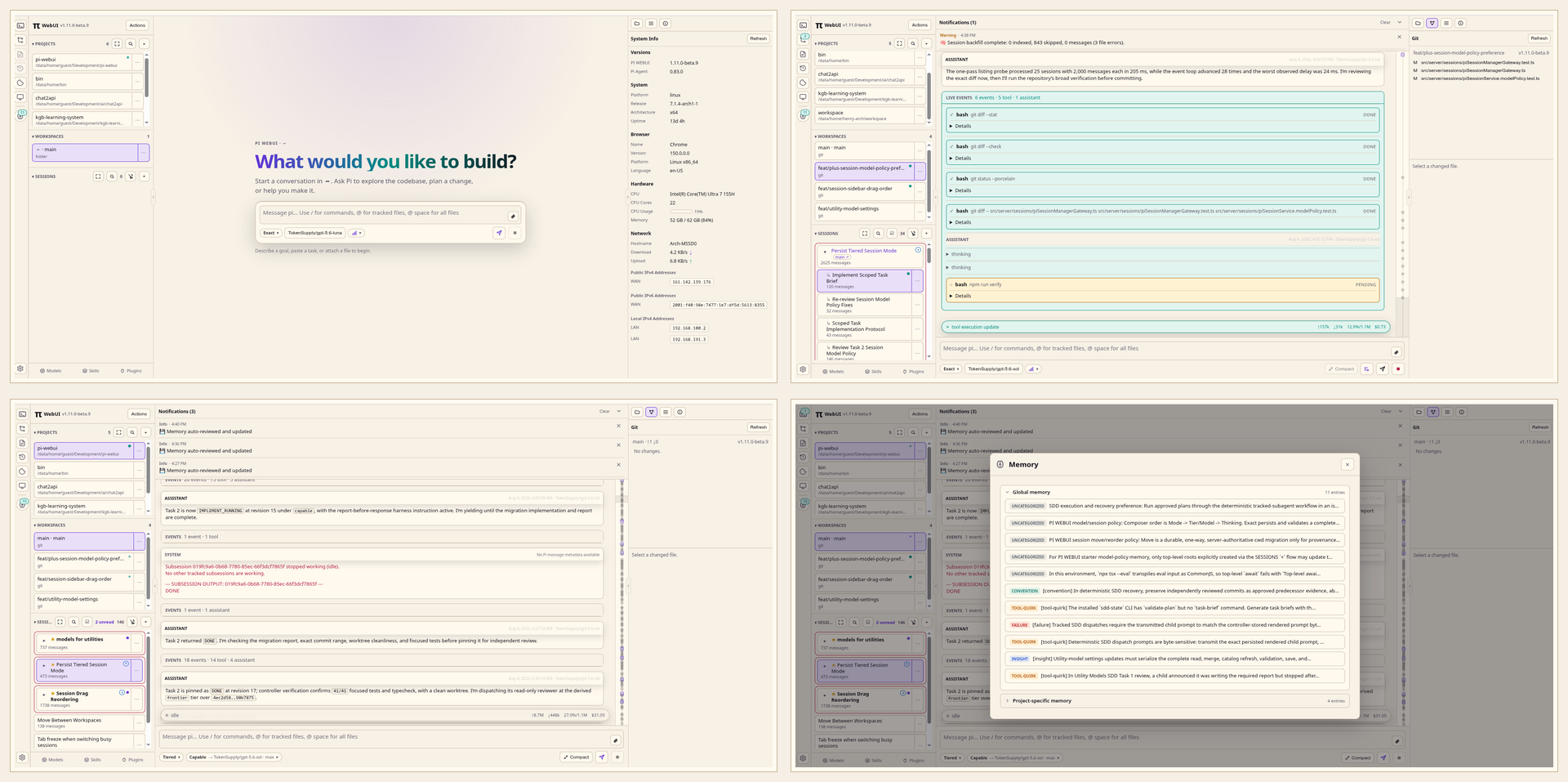
PI WEBUI is a web UI for Pi Coding Agent that keeps agent sessions running in real workspaces on your machine or server.
Run agents where your code, tools, credentials, and build caches live. Supervise them from any browser.
Why PI WEBUI?
Agentic development works better when the work environment is persistent.
PI WEBUI lets you:
- keep Pi Coding Agent sessions alive after browser disconnects;
- run agents inside real repositories and git worktrees;
- supervise multiple sessions in parallel;
- switch between laptop, phone, tablet, and desktop;
- use a server, workstation, or remote dev box as your agent runtime;
- navigate long conversations with the minimap and monitor live generation metrics;
- configure per-project models and skills to match each codebase;
- manage projects, workspaces, files, terminals, sessions, and remote machines from one web UI.
Your browser is the control surface. The work stays where it can keep running.
Quick start
Requirements:
- Node.js 22.19.0 or newer
- npm
- Pi Coding Agent
>=0.84.0 <0.85, configured for your user - git and the development tools your agents need
Install PI WEBUI from npm or clone from GitHub:
# npm (recommended)
npm install -g @hyperdreamer/pi-webui
pi-webui

# or clone from GitHub
git clone https://github.com/hyperdreamer/pi-webui.git
cd pi-webui
npm install
./start.sh
Then open:
http://localhost:8809
Important: configure your model settings first
Before starting serious work, open Settings → Model tiers and Settings → Utility models for the machine where your sessions run. Treat both as core setup, not optional fine-tuning:
- Model tiers control the model and thinking level used for session work. Configure the six-rung
economythroughfrontierladder so Tiered sessions can route to the models you intend to use. - Utility models are separate from session routing. They handle automatic titles, branch summaries, and context compaction, helping long-running work stay usable.
See the configuration reference for complete details and examples.
Core model
PI WEBUI organizes work like this:
Machine     a local or remote PI WEBUI runtime endpoint
Project     a folder on that machine
Workspace   a git worktree, or the project folder for non-git projects
Session     a Pi Coding Agent chat running inside a workspace
A typical flow:
- On first run, PI WEBUI creates and opens
~/workspace. - Choose a workspace or git worktree, or add a different project.
- In an empty workspace, send a prompt; PI WEBUI creates its first session automatically.
- Let the agent work.
- Come back later from any browser.
Remote-first development
PI WEBUI is designed for remote AI-driven development.
Instead of tying agent work to your laptop session, run PI WEBUI on a machine that stays available: a server, desktop, cloud VM, home lab machine, or remote dev box.
Use a private network, SSH tunnel, trusted reverse proxy, or federated PI WEBUI machine setup when accessing it remotely.
Machines and fleets
PI WEBUI can register other PI WEBUI runtimes as remote machines. One browser-facing PI WEBUI instance can proxy projects, files, git state, sessions, terminals, activity, Pi package management, and selected-machine settings from trusted remote machines.
When a remote machine is selected, Settings tabs label their target. Pi packages, PI WEBUI plugin enablement, session daemon toggles, external file access, and upload defaults target the selected machine. Gateway/server settings such as host, port, allowed hosts, registered machines/tokens, and keyboard shortcuts stay local to the gateway/browser.
Plugins
PI WEBUI supports trusted browser-side PI WEBUI plugins that can add actions, workspace panels, and workspace metadata. Plugins can also carry Pi package dependencies, and workspaces can configure per-workspace Pi packages.
Pi packages are managed through Pi's package manager or Settings → Pi packages. In a federated setup, the Pi packages panel targets the selected machine and labels where installs, updates, or removals will run. Use Settings → PI WEBUI plugins to enable or disable discovered browser plugins on the selected machine.
After installing, updating, or removing a Pi package, type /reload in each idle PI WEBUI session on that machine to refresh Pi runtime resources such as extensions, skills, prompt templates, themes, and context/system prompt files. Reload the browser page separately for newly discovered or changed PI WEBUI plugins.
Configuration
Global config lives at:
$PI_WEBUI_CONFIG
~/.config/pi-webui/config.json
Project-local PI WEBUI config lives at:
<project>/.pi-webui/config.json
Common configuration includes host/port, path access, uploads, PI WEBUI plugin enablement, shortcuts, and session daemon options. In Settings, machine-affecting config targets the selected machine; gateway host/port/allowed-hosts, remote machine registration, tokens, and keyboard shortcuts stay local.
Extra skills
PI WEBUI ships two opt-in agent skills for deterministic plan authoring and subagent-driven execution. Nothing installs or activates them by default:
pi-webui install-extra --dry-run   # show what would change
pi-webui install-extra             # install, after confirming
They install as writing-plans and subagent-driven-development, replacing
any existing skills with those names. The command explains the risk, asks for
confirmation, and backs up both skills and the skill lock file first. See
docs/optional-skills.md.
Development
start.sh (a thin wrapper around npm run dev) starts the complete development stack. To run its processes separately:
npm run dev:sessiond
npm run dev:web
npm run dev:client
npm test and npm run test:fast use four workers for local feedback. Run the routine local gate with:
npm run verify:fast
Before final merge or release, run the authoritative serial gate:
npm run verify
Security model
PI WEBUI assumes trusted users, trusted repositories, and trusted server paths.
It is not a sandbox, permission system, or multi-tenant platform. Do not expose it directly to the public internet without a trusted network, firewall, VPN, SSH tunnel, or authenticated reverse proxy.
Attribution
PI WEBUI is forked from jmfederico/pi-web, created by Federico Jaramillo Martinez, with additional code adapted from agegr/pi-web.
License
MIT © 2026 Federico Jaramillo Martinez, agegr, and HyperDreamer. See LICENSE.