@jals1212/pi-spaces
Named spaces for Pi: keep several agent homes (sign-ins, packages, settings) and pick one by name.
Package details
Install @jals1212/pi-spaces from npm and Pi will load the resources declared by the package manifest.
$ pi install npm:@jals1212/pi-spaces- Package
@jals1212/pi-spaces- Version
0.15.0- Published
- Nov 6, 2026
- Downloads
- 3,624/mo · 2,561/wk
- Author
- jals1212
- License
- MIT
- Types
- extension, skill
- Size
- 207.7 KB
- Dependencies
- 2 dependencies · 3 peers
Pi manifest JSON
{
  "image": "https://raw.githubusercontent.com/jals1212/pi-spaces/main/assets/preview.png",
  "skills": [
    "./skills"
  ],
  "extensions": [
    "./extensions/spaces.ts"
  ]
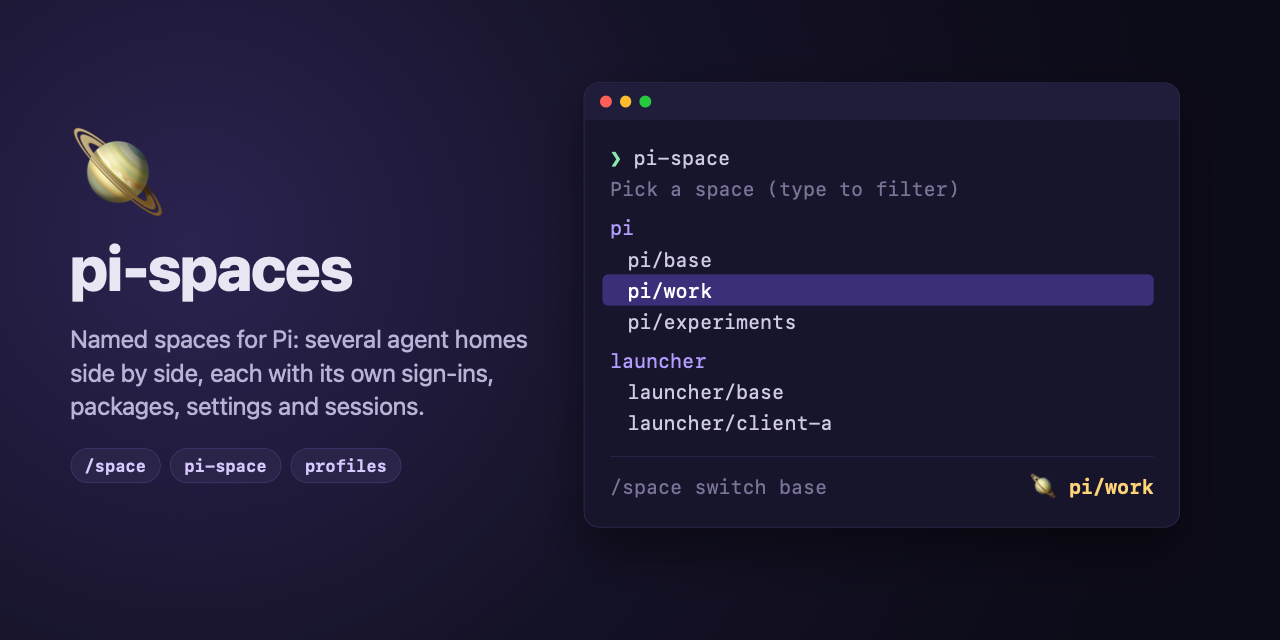
}
Security note
Pi packages can execute code and influence agent behavior. Review the source before installing third-party packages.
README
🪐 pi-spaces

Named spaces for Pi: keep several agent homes side by side and switch between them from inside Pi.
A space is a complete Pi agent home: its own sign-ins, packages, settings, skills and sessions. Use one per client, per experiment, or to try a package without touching your everyday setup. A space is a root folder with its agent home, agent, inside it, like Pi's own ~/.pi/agent, so a program that keeps more per space has room for it next to agent/.
/space new work          Created space "work" at ~/.pi/spaces/work (its agent home is ~/.pi/spaces/work/agent).
/space                   Switch to space
                         → base
                           work
                         Pi restarts in "work"; the status line shows space: work
It relies only on Pi's own PI_CODING_AGENT_DIR variable, so it works with plain Pi and with any program that runs Pi (a launcher such as gentle-shell).
Two packages: use either one, or both
pi-spaces ships as two independent npm packages. They read the same spaces and the same config file, but neither requires the other: install the one that fits how you start Pi, or both.
| The Pi extension | The pi-space shell command |
|
|---|---|---|
| Package | @jals1212/pi-spaces |
@jals1212/pi-spaces-cli |
| Install | pi install npm:@jals1212/pi-spaces |
npm install -g @jals1212/pi-spaces-cli |
| Where you use it | Inside Pi | In your shell, before Pi starts |
| What it gives you | /space (list, create, switch, rename, remove), pi --space <name>, the 🪐 status line, the <pi_space> prompt section, the Herdr sidebar and the pi-spaces skill |
A picker of the spaces of every profile, new, setup, rename, remove, migrate, package commands across spaces (update --every), shell completion |
| Works on its own | Always | With a profile whose commands.space has {home} (see below) |
Which one do I need?
- You start plain
piand want to switch from inside it: the extension alone. - You start Pi through a launcher that takes its home as an option (
gentle-shell --home <dir>,my-launcher --home <dir>): the command alone is enough. Give the launcher a profile whosecommands.spacehas{home};pi-spacethen starts the launcher directly in the space's home and sets the space's variables itself, so Pi needs nothing installed. See Example: gentle-shell. - You want both: pick a space from the shell, switch from inside Pi, and see the space in the status line. Install both; they share everything.
What each one cannot do alone
The command without the extension:
- With the built-in
piprofile (or anycommands.spacewithout{home}), starting a space runspi --space <name>, and the package commands runpi --space <name> update. Only the extension understands--space, so these need it in the base home. Commands that only touch folders (new,setup,rename,remove,migrate,listwithout a space,init) never need it. - Inside Pi there is no
/space, no status line, and the model gets no<pi_space>section. The variablesPI_SPACEandPI_SPACE_HOMEare still set for Pi's tools. pi-space newasks whether the new space'sagent/settings.jsondeclares the extension (Enter is yes), and Pi installs what that file declares the first time it runs there. Answer no, or pass--no-extension, to keep the space without it;--extensiondeclares it without asking, and without a terminal it is declared./space newalways declares it, since it runs inside the extension.
The extension without the command:
- No picker or completion from the shell; use
pi --space <name>and/spaceinstead. - No
setup,migrateor--everyacross spaces and profiles;/space newnames thepi-space setupcall to run, andpi --space <name> updateupdates one space at a time.
Requirements
- Pi 1.4 or later (the extension).
- Node 20 or later (the command).
Install
The extension, into the Pi home you start (a launcher with its own home installs it through its own install command):
pi install npm:@jals1212/pi-spacesThe command, globally from npm (pi install does not put commands on your PATH):
npm install -g @jals1212/pi-spaces-cliEach package is installed and updated on its own.
Quick start
With the extension, inside Pi:
/space new work          create a space
/space                   pick a space; Pi restarts in it
/space switch base       back to the home Pi started with
With the extension, from your shell:
pi --space work                         # start Pi in "work"
pi --space work "review this branch"    # with a prompt
pi --space work update                  # update the packages of "work"
With the command, from your shell:
pi-space                                # pick a space of any profile: arrows, Enter, type to filter
pi-space new pi/work                    # create a space of the profile "pi"
pi-space pi/work                        # start Pi in it
pi-space remove pi/work                 # delete it, after asking; keeps a backup unless told not to
pi-space update --every                 # update the packages of base and of every space of every profile
A new space is a folder with an agent/ folder inside it, empty except for agent/settings.json, which declares this package so /space works inside it. Sign in and install packages there as you would in a fresh Pi. Spaces made by an older version have no agent/ folder and keep working as they are; see Moving an old space.
Commands in Pi
| Command | What it does |
|---|---|
/space |
Opens a list of the other spaces and restarts Pi in the one you pick. Without the interactive terminal it lists them instead. |
/space list |
Lists base and every space, with * on the active one. |
/space new <name> |
Creates an empty space (its folder, with agent/ inside). When a setup command is set (the profile's commands.setup, or PI_SPACES_SETUP), it names pi-space setup <profile>/<name> to run from a shell, with this Pi's profile (pi when none matches). |
/space switch <name> |
Restarts Pi in that space. base is the home Pi started with. |
/space switch |
Same as /space. |
/space rename <old> <new> |
Renames a space. The active space cannot be renamed. |
/space remove <name> [--yes] [--no-backup] |
Deletes a space after asking, then asks whether to keep a backup in <spaces folder>/.backups (keeping one is first in the list; dismissing the question keeps the space). --yes skips the questions and keeps a backup; it is required without a dialog (print and JSON modes). --no-backup deletes without one. |
pi --space <name> |
Starts Pi directly in a space, keeping the prompt and every other option. |
pi --space <name> <command> [args...] |
Runs one of Pi's package commands (install, remove, uninstall, update, list) in a space, or in the base home with base: pi --space work update --extensions, pi --space work install npm:<package>. |
The status line shows 🪐 <profile>/<name> while a space is active: the name pi-space takes, with the profile of the running Pi (pi when no profile matches its base home), so 🪐 launcher/work and 🪐 pi/work are told apart. /space cannot change the profile: a switch starts the same program again. In the base home it shows 🪐 <profile>/base when pi-spaces opened it (pi --space base, pi-space pi/base, or /space switch base), and nothing when Pi was started plainly. 🪐 is pi-spaces' own emoji.
Herdr sidebar: the same text also shows in Herdr's Agents sidebar, next to the agent. Display only: the agent's state in Herdr does not change.
In a Herdr pane (
HERDR_ENV=1,HERDR_PANE_ID,HERDR_SOCKET_PATH) it is the pane'sspacemetadata token, reported again every 10 seconds with a 30-second TTL, so it goes away when Pi does, and cleared when the session ends. To show it, add$spaceto a row of the Agents sidebar in Herdr'sconfig.toml, then runherdr server reload-config:[ui.sidebar.agents] rows = [ ["state_icon", "machine", "workspace", "tab"], ["agent", "$space"], ]In a terminal of the Herdr app (herdr-core sets
HC_TERMINAL_ID) it is the terminal'sspacelabel, set withhc label <terminal> space=<text>. A label has no TTL: the session removes it when it ends, and a session that starts in another terminal first removes it from the one it leaves, so a Pi killed without ending can leave the label until the next session replaces it. Both sidebars are served when both environments are present. The Herdr app's shipped Agents panel does not show labels, so showing it takes a copy of that panel (mods and layouts shipped with Herdr are read-only; a clone is yours):Clone the layout you use and the
agentsmod:herdr-app do layout.clone '{"name":"main","as":"my-layout"}' herdr-app do mod.clone '{"name":"agents","as":"my-agents"}'In
~/.config/herdr-app/layouts/my-layout.json, point the Agents block to the clone:"content": { "mod": "my-agents" }.In
~/.config/herdr-app/mods/my-agents/main.js, importterminalsfrom"herdr", read each terminal's labels by address, and add the space to the agent's row when it has aspacelabel:// where the rows are built: the labels of every terminal, by address const labelsOf = new Map(terminals().map((x) => [x.address, x.labels ?? {}])) // in the row of agent `a` (`t` is the mod's theme()) const space = labelsOf.get(a.address)?.space ?? '' // ...the row... .when(Boolean(space), (el) => el.child(div().flex_none().text_size(12).text_color(t.dim).child(space)))Check the mod, which the app reloads on save:
herdr-app check ~/.config/herdr-app/mods/my-agents.
To try the mod without Pi, set a label by hand in a Herdr app terminal with
hc label "$HC_TERMINAL_ID" space="🪐 pi/test", and remove it withhc label "$HC_TERMINAL_ID" space=.
Choosing an argument such as switch from the /space suggestions only fills the line; press Enter again to run it. /space and Enter opens the picker in one step.
Names: lowercase letters, digits, - and _, starting with a letter or digit, at most 64 characters. base is reserved, and so are the command words list, new, remove, rename, switch, update, install, uninstall, setup and completion.
The pi-space command
The @jals1212/pi-spaces-cli package adds a pi-space command to your shell; it works with or without the extension (see Two packages). It names every space as <profile>/<name> (pi/work, my/base): the profile is an entry of the config file, and pi (plain Pi) is always there.
| Command | What it does |
|---|---|
pi-space |
Opens a picker of the spaces of every profile and starts Pi in the one you choose. |
pi-space <profile>/<name> [pi args...] |
Starts Pi in a named space; <profile>/base runs the profile's commands.base as it is. |
pi-space new <profile>/<name> [--extension|--no-extension] |
Creates a space, asking whether it declares the extension, then runs the profile's setup command. |
pi-space setup <profile>/<name|--every> |
Runs the setup command again. |
pi-space rename <profile>/<old> <new> |
Renames a space. |
pi-space remove <profile>/<name> |
Deletes a space, after asking. |
pi-space migrate <profile>/<name|--every> |
Gives an old space the agent/ layout. |
pi-space list |
Lists the spaces of every profile. |
pi-space list|update|install|uninstall <profile>/<name|--every> ... |
Runs Pi's package commands in a space, in a profile's spaces, or (--every alone) in every profile's. |
pi-space init |
Writes a starter config file. |
How it starts Pi depends on the profile's commands.space:
- With
{home}(my-launcher --home {home}): it runs that command directly in the space's home and sets the space's variables itself, so the extension is not needed.pi-space launcher/work --versionrunsmy-launcher --home <that home> --version. - Without
{home}, and for the built-inpiprofile: it runspi --space <name> [command](or the filled-in command), and the extension in the base home does the switch.
The profile says which program to run, where its spaces live and how to prepare a new space; --command, --dir and --setup override those for one call, for one named profile. The command does not read PI_SPACES_COMMAND, PI_SPACES_DIR or PI_SPACES_SETUP as settings: they are what it hands to the Pi it starts. See cli/README.md for every option, completion and the exit status.
Profiles
A profile describes one program that runs Pi (plain Pi is one too): where its agent home is, the commands that start it, where its spaces live, how to prepare a new space, and the variables it needs per space. Profiles live in an optional file, in TOML or JSON, so you do not need shell variables or functions to tell pi-spaces about a program. Without the file, nothing changes: this is exactly how pi-spaces behaves without any configuration.
The extension uses the profile whose home is the base home Pi started with (the one base goes back to); inside a space that is the home the space came from. The optional pi-space command (cli/README.md) reads the same file, and the profile is the first word of every space it takes: pi-space ml/work. It does not use default: the profile is always named.
The file
| Location | The first that exists of $XDG_CONFIG_HOME/pi-spaces/config.toml, $XDG_CONFIG_HOME/pi-spaces/config.json, ~/.pi-spaces/config.toml and ~/.pi-spaces/config.json (XDG_CONFIG_HOME unset, blank or relative means ~/.config, so ~/.config/pi-spaces/config.toml: easy to keep in your dotfiles); with none, ~/.pi-spaces/config.toml, where pi-space init writes. On Windows ~ is %USERPROFILE% (C:\Users\<you>\.config\pi-spaces\config.toml). The first file found wins. When config.toml and config.json are in the same folder, config.toml is read and a warning names the config.json that is ignored (remove one of them). Nothing moves or creates any file. |
| Format | TOML when the file name ends in .toml, else JSON (with comments). Both have the same keys and the same checks; a JSON object is a TOML table. |
| Change it | PI_SPACES_CONFIG=<path> (a leading ~ is your home folder; a relative path is taken from it). The pi-space command also takes --config <path> (see cli/README.md). |
| Missing | No profiles: Pi, spaces and pi-space behave as without this feature. |
| Invalid | See When the file is wrong. |
A complete example for a program called my-launcher, which keeps its own configuration outside its agent home:
schema = "pi-spaces.config/v2"

[profiles.ml]
home = "~/.my-launcher/agent"
spaceEnv = { MY_LAUNCHER_CONFIG_HOME = "{home}/config" }

[profiles.ml.commands]
base = "my-launcher --"
setup = "my-launcher --home {home} setup"
{
"schema": "pi-spaces.config/v2",
"profiles": {
"ml": {
"home": "~/.my-launcher/agent",
"commands": {
"base": "my-launcher --",
"setup": "my-launcher --home {home} setup"
},
"spaceEnv": { "MY_LAUNCHER_CONFIG_HOME": "{home}/config" }
}
}
}With that file, a space of my-launcher lives in ~/.my-launcher/spaces/<name> (its agent home is <name>/agent), /space new <name> points you at pi-space setup ml/<name>, and entering the space work starts Pi with MY_LAUNCHER_CONFIG_HOME=~/.my-launcher/spaces/work/agent/config, while the base home gets no such variable from pi-spaces. From a shell, pi-space ml/work runs my-launcher -- --space work, and an alias such as alias mlw='pi-space ml/work' is optional sugar on top.
Some programs behave differently when they are given their home explicitly (an option such as --home), even when it is their own default home. So commands.base runs the program exactly as you would run it yourself, and commands.space puts it in the space's home. A program that takes its home with an option gets a space command with {home} in it: pi-space runs it in the space's home with no --space, with the words after the space after the command, and its base is the program as it is, so its own commands work in base. For my-launcher:
schema = "pi-spaces.config/v2"

[profiles.launcher]
home = "~/.my-launcher/agent"
spaceEnv = { MY_LAUNCHER_CONFIG_HOME = "{home}/config" }

[profiles.launcher.commands]
base = "my-launcher"
space = "my-launcher --home {home}"
setup = "my-launcher --home {home} setup"
{
"schema": "pi-spaces.config/v2",
"profiles": {
"launcher": {
"home": "~/.my-launcher/agent",
"commands": {
"base": "my-launcher",
"space": "my-launcher --home {home}",
"setup": "my-launcher --home {home} setup"
},
"spaceEnv": { "MY_LAUNCHER_CONFIG_HOME": "{home}/config" }
}
}
}With it, pi-space launcher/base runs my-launcher, pi-space launcher/base upgrade runs my-launcher upgrade, and pi-space launcher/work runs my-launcher --home ~/.my-launcher/spaces/work/agent.
Keep the spaceEnv of the program's own config home: without it, a space's --home would leave the program's configuration shared with the base home. The details are in cli/README.md.
pi-space init writes a starter file (see Writing the file). A file in the older format keeps working: see Moving from v1 to v2.
Example: gentle-shell
For whoever uses gentle-shell, this is a profile for it. The base runs gentle-shell as it is, and each space gets its own config folder, gentle-ai, next to its agent/ folder through spaceEnv:
schema = "pi-spaces.config/v2"

[profiles.gentle]
home = "~/.gentle-shell/agent"
spaceEnv = { GENTLE_PI_CONFIG_HOME = "{space}/gentle-ai" }

[profiles.gentle.commands]
base = "gentle-shell"
space = "gentle-shell --home {home}"
setup = "gentle-shell --home {home} setup"
{
"schema": "pi-spaces.config/v2",
"profiles": {
"gentle": {
"home": "~/.gentle-shell/agent",
"commands": {
"base": "gentle-shell",
"space": "gentle-shell --home {home}",
"setup": "gentle-shell --home {home} setup"
},
"spaceEnv": { "GENTLE_PI_CONFIG_HOME": "{space}/gentle-ai" }
}
}
}Writing the file
pi-space init writes the config file for you, in the location above (or in --config <path>), and refuses a file that already exists. It has no profiles of its own: the built-in pi is always there. The file starts with comments that show how pi is set up and a profile for another program, then an empty v2 config:
# pi-spaces config: https://github.com/jals1212/pi-spaces#profiles
#
# The built-in profile "pi" is always there, set up like this; add a
# [profiles.pi] table to change it:
#
#   [profiles.pi]
#   home = "~/.pi/agent"
#   dir = "~/.pi/spaces"
#   commands = { base = "pi", space = "pi --space {name}" }
# ...

schema = "pi-spaces.config/v2"
(The paths are written absolute, for your machine; the header goes on with the profile for another program.) The file is TOML, unless --config names a path that does not end in .toml: that one gets the same header and an empty config in JSON:
// pi-spaces config: https://github.com/jals1212/pi-spaces#profiles
// ...
{
  "schema": "pi-spaces.config/v2",
  "profiles": {}
}
Both formats take comments, in both schemas: # in TOML; // to the end of the line and /* ... */ in JSON. A comment inside a string is part of the string. An unclosed /* makes a JSON file invalid.
Schema pi-spaces.config/v2
Top level (every other key is refused):
| Key | Type | Required | Meaning |
|---|---|---|---|
schema |
string | yes | "pi-spaces.config/v2", or "pi-spaces.config/v1" (see Schema versions). |
default |
string | no | Accepted and validated (it must name a profile of the file, or pi), but not used: neither the extension nor pi-space falls back to it. pi-space warns when it reads a file that has it; remove the key. |
profiles |
object | no | Profiles by name. Names: lowercase letters, digits, - and _, starting with a letter or digit, at most 64 characters. |
A profile (every other key is refused; every key is optional):
| Key | Type | Default | Meaning |
|---|---|---|---|
home |
string, not empty | PI_CODING_AGENT_DIR, else ~/.pi/agent |
The base agent home of the program: the home it starts Pi with, which base goes back to. ~ is your home folder; a relative path is taken from it. |
commands |
object | none (the profile starts pi) |
The command of each action, below. base is required when commands is there; any other key is refused. |
dir |
string, not empty | spaces next to home (~/.my-launcher/agent gives ~/.my-launcher/spaces) |
The folder that holds the profile's spaces. ~ and relative paths as in home. |
spaceEnv |
object of strings | none | Variables that exist only in spaces; see below. Names: letters, digits and _, not starting with a digit; not PI_CODING_AGENT_DIR, PI_SPACE, PI_SPACE_HOME or any PI_SPACES_*, which pi-spaces sets itself. |
commands (each a string, not empty):
| Key | Required | Meaning |
|---|---|---|
base |
yes | Starts the base home: pi-space <profile>/base runs it as it is, with the words after base after it, and no --space. {home}, {space} and {name} in it become the profile's home, the folder above it and base. pi-space launcher/base upgrade with "base": "my-launcher" runs my-launcher upgrade. |
space |
no | The template that starts a space; {home} becomes the space's agent home, {space} its root folder and {name} its name, and the words after the space go after it. With {home} (my-launcher --home {home}): run in the space's home, with the environment of the space (its spaceEnv and the variables of the home). Without {home} (pi --space {name}): filled in and run with the plain environment, because the program switches itself. Missing: <base> --space <name>. |
setup |
no | Prepares a new space; {home} becomes the space's agent home, {space} its root folder and {name} its name. With it, /space new names pi-space setup <profile>/<name>. |
PI_SPACES_COMMAND, the program told to the model and exported, is commands.space when it is there, else commands.base; PI_SPACES_SETUP is commands.setup. The package commands (update, install, uninstall, list) go through the same commands: pi-space update launcher/base runs my-launcher update, and pi-space update launcher/work runs my-launcher --home ~/.my-launcher/spaces/work/agent update.
All strings are trimmed. {home}, {space} and {name} are replaced everywhere they appear in a spaceEnv value and in the commands (in base, {space} is the folder that holds the profile's home), and $ in a value stays literal. The profile has no command, setup or homeless in v2: they are commands, and pi-space <profile>/base upgrade already runs <base> upgrade.
spaceEnv: what is separate and what is shared
Pi keeps everything in its agent home, so a space separates it completely with no configuration. A program that runs Pi may also keep something outside that home (a configuration folder, say) and hand its location to Pi in an environment variable. When you switch, pi-spaces moves only the variables that point inside the old home (see How switching works); a variable that points elsewhere is not recognised as part of the home and stays as it was. So without spaceEnv, whatever the program keeps outside the agent home is shared between the base home and every space. That is the default on purpose: nothing is separated that you did not ask to separate.
To separate it, name the variable in spaceEnv, with a value built from the space:
- Entering a space sets the variable, from the template, with
{home}the space's agent home (<space>/agent),{space}the space's root folder and{name}its name. Use{space}for what the program keeps besideagent/, so it stays out of Pi's own home. - Going back to
baseputs back the value the base home had when you left it, or removes the variable when it had none, so the base home runs exactly as it was started. The base's values travel inPI_SPACES_BASE_ENVwhile you are in spaces. - Going from one space to another sets it again for the target; a value that pointed into the old space is replaced, not moved.
pi --space <name>does the same at startup.
pi-spaces does not create what a variable points to; setup (or the program itself) does.
The built-in pi profile
Plain Pi is always a profile named pi: base pi, spaces pi --space {name}, no setup, no spaceEnv. Its home is PI_SPACES_BASE_HOME (set inside a space), else PI_CODING_AGENT_DIR, else ~/.pi/agent. It needs no file; pi-space init only shows it in comments.
Inside another program's Pi those variables hold that program's home. When a profile of the file names that folder as its home, pi does not take it and uses ~/.pi/agent, so pi/<name> is still plain Pi there.
Naming pi in profiles replaces it as a whole; what that entry leaves out still takes the defaults above for home and the command, never anything from the old built-in's other fields.
Schema versions
The file says which format it uses in schema, so the format can grow without breaking files. This pi-spaces reads pi-spaces.config/v2 (the format above) and pi-spaces.config/v1 (see the v1 format); a v1 file works exactly as before. A file with a newer pi-spaces.config/vN is refused with a message that it needs a newer pi-spaces (update the package), for example "schema" is "pi-spaces.config/v3", which needs a newer pi-spaces; this one reads "pi-spaces.config/v1" and "pi-spaces.config/v2".; anything else in schema, or no schema, is refused as invalid. A newer format is never half-read. A pi-spaces older than the one that added v2 refuses a v2 file the same way ("needs a newer pi-spaces").
The v1 format
The first format, "schema": "pi-spaces.config/v1", is still read. Its profile has home, dir and spaceEnv as above, and these keys instead of commands:
| Key | Type | Default | Meaning |
|---|---|---|---|
command |
string, not empty | pi for the profile pi; none for the others |
The command that starts the program (my-launcher --), in front of --space <name>. With {home} and {name} in it (my-launcher --home {home}), pi-space runs it directly in the space's home, without --space, filling them in with the space's agent home and name, and {space} with its root folder (in base, the profile's home, the folder above it and base), and the words after the space go after it. See A command with {home}. |
setup |
string, not empty | none | The command that prepares a new space; {home} becomes the space's agent home, {space} its root folder and {name} its name. |
homeless |
list of words, not empty | none | First words that run command without its home: "homeless": ["upgrade"] with my-launcher --home {home} makes pi-space launcher/base upgrade run my-launcher upgrade, with no --space and the plain environment of the profile. Only the first word counts; each word has no spaces. |
A v1 profile with commands is refused, and so is a v2 profile with command, setup or homeless.
Moving from v1 to v2
There is no command for it: edit the file once.
- Change
schemato"pi-spaces.config/v2"(the steps are the same in TOML and JSON). commandwith{home}becomescommands.space, andcommands.baseis that command without the{home}words (--home {home}removed).commandwithout{home}becomescommands.base, with nospace.setupbecomescommands.setup.- Drop
homeless: in v2pi-space <profile>/base upgradealready runs<base> upgrade.
Before (v1):
schema = "pi-spaces.config/v1"

[profiles.launcher]
home = "~/.my-launcher/agent"
command = "my-launcher --home {home}"
setup = "my-launcher --home {home} setup"
spaceEnv = { MY_LAUNCHER_CONFIG_HOME = "{home}/config" }
homeless = ["upgrade", "self-uninstall", "memory"]
{
"schema": "pi-spaces.config/v1",
"profiles": {
"launcher": {
"home": "~/.my-launcher/agent",
"command": "my-launcher --home {home}",
"setup": "my-launcher --home {home} setup",
"spaceEnv": { "MY_LAUNCHER_CONFIG_HOME": "{home}/config" },
"homeless": ["upgrade", "self-uninstall", "memory"]
}
}
}After (v2):
schema = "pi-spaces.config/v2"

[profiles.launcher]
home = "~/.my-launcher/agent"
spaceEnv = { MY_LAUNCHER_CONFIG_HOME = "{home}/config" }

[profiles.launcher.commands]
base = "my-launcher"
space = "my-launcher --home {home}"
setup = "my-launcher --home {home} setup"
{
"schema": "pi-spaces.config/v2",
"profiles": {
"launcher": {
"home": "~/.my-launcher/agent",
"commands": {
"base": "my-launcher",
"space": "my-launcher --home {home}",
"setup": "my-launcher --home {home} setup"
},
"spaceEnv": { "MY_LAUNCHER_CONFIG_HOME": "{home}/config" }
}
}
}A v1 file keeps working unchanged, so move when you want to. Update pi-spaces first, though: the extension in every home and the pi-space command. An older pi-spaces refuses a v2 file with "needs a newer pi-spaces", and then behaves as if there were no file.
When the file is wrong
Unknown keys, wrong types, bad names, a default that names no profile, an unreadable file and invalid TOML or JSON are all refused with a message that names the file and the problem, for example ~/.pi-spaces/config.toml: unknown key "hmoe" in profile "ml"; allowed keys are "home", "commands", "dir" and "spaceEnv". (in a v1 file the keys are "home", "command", "dir", "setup", "spaceEnv" and "homeless"). Pi never stops for it: the extension shows the message once as a warning when the session starts (on stderr without a terminal UI) and then behaves as if there were no file. A missing file is not an error.
Moving an old space
Spaces made before this layout have no agent/ folder: their folder is the agent home. They keep working as they are, with every command, and {space} is then the same folder as {home}. To give one the new layout, run, from a shell (it needs the optional pi-space command):
pi-space migrate pi/work          # one space
pi-space migrate pi/--every       # every space of a profile
pi-space migrate --every          # every space of every profile
It copies the whole space to <spaces folder>/.backups/<name>-<UTC time> first, then moves its content into <space>/agent/; the space keeps its name. It never touches base, the space you are in (run it from another space or a plain shell), or a space that already has agent/. If a step fails, the move is undone and the backup stays. A path written inside a space's files that points into the old folder (a local package, a spaceEnv value kept in a script) does not change: update it by hand.
Configuration reference
Where spaces live
In a spaces folder next to the home Pi starts with: ~/.pi/agent keeps its spaces in ~/.pi/spaces/<name>/, and each space keeps its agent home in ~/.pi/spaces/<name>/agent/, as ~/.pi keeps Pi's own in agent/. A program that runs Pi with its own home gets its own folder too, for example ~/.tool/agent → ~/.tool/spaces. The folder stays the same while you switch between spaces. A profile's dir replaces it for that profile's home, and PI_SPACES_DIR replaces both. The pi-space command does not read PI_SPACES_DIR (or PI_SPACES_COMMAND and PI_SPACES_SETUP) as a setting: it takes the folder from the profile or --dir, and sets the variable for the Pi it starts.
Environment variables
Read:
| Variable | Meaning |
|---|---|
PI_SPACES_DIR |
The spaces folder. A relative value is taken from your home folder. Default: the matching profile's dir, else spaces next to the base home. |
PI_SPACES_CONFIG |
The config file with the profiles. A leading ~ is your home folder and a relative value is taken from it. Default: the first that exists of config.toml and config.json in ~/.config/pi-spaces (or $XDG_CONFIG_HOME/pi-spaces), then in ~/.pi-spaces; else ~/.pi-spaces/config.toml. A path ending in .toml is read as TOML, any other as JSON. |
PI_SPACES_COMMAND |
The program that starts Pi (default pi; for a v2 profile its commands.space, else commands.base): told to the model and exported (see below). A switch starts Pi again with the command line it already has, so this is information, not a setting. |
PI_SPACES_SETUP |
The command that prepares a new space (a v2 profile's commands.setup). /space new names pi-space setup <profile>/<name> when it is set. The pi-space command sets it for the Pi it starts, from the profile or --setup; it does not read it from your shell. |
PI_CODING_AGENT_DIR |
Pi's agent home; its parent holds the default spaces folder. Default: ~/.pi/agent. |
Set for the Pi a switch starts:
| Variable | Meaning |
|---|---|
PI_CODING_AGENT_DIR |
The space's agent home (<space>/agent; the space's folder itself for an old space), or the base home for base. |
PI_SPACE |
The space's name. Unset in the base home. |
PI_SPACES_BASE_HOME |
The home Pi started with, so base and the spaces folder survive switches. |
PI_SPACES_BASE_ENV |
Only with a profile's spaceEnv, and only in a space: the base home's own values of those variables (JSON), put back when you return to base. |
Set in every Pi this extension runs in, even one started without a switch, for its tools and the programs they start:
| Variable | Meaning |
|---|---|
PI_SPACE |
The active space's name, unset in the base home: the same variable a switch sets. |
PI_SPACE_HOME |
The agent home this Pi runs with: the space's agent folder (its folder, for an old space), or the base home. |
PI_SPACES_COMMAND |
Kept when it has a value; set to pi when it is unset or blank. The pi-space command sets it for the Pi it starts (the profile's command, or --command), and the extension reads it to tell the model and the tools how Pi was started (see below); pi-space itself does not read it from your shell. |
What the model is told
Before each run the system prompt gets a <pi_space> section with the same three facts: the space (or the base home), the agent home, and the command, with <command> --space <name> and /space as the ways to change space (when the command has {home} or {name}, pi-space <profile>/<name> instead of <command> --space <name>). The model knows where it runs without reading the environment. A Pi without structured prompt sections gets no section; the variables are still set.
The pi-spaces skill
The package also ships a pi-spaces skill (skills/pi-spaces/SKILL.md). It tells agents what a space is, how to read the current space, home and command, and which /space or pi-space action to use or propose for listing, creating, switching and removing spaces. Pi loads it when a task is about spaces; /skill:pi-spaces loads it by hand.
Exit status
| Status | pi --space |
|---|---|
| 0 … | Pi's own exit status. |
| 1 | An unknown or invalid space, or no name after --space. |
The pi-space command has its own: see cli/README.md.
How switching works
Pi reads its agent home once, when it starts, so a running session cannot move to another home. /space switch closes Pi and starts the same command again with the space's agent home (<space>/agent):
PI_CODING_AGENT_DIR,PI_SPACEandPI_SPACES_BASE_HOMEare set as in Environment variables.- Any other variable whose value is the old home, or a path inside it, moves to the same path in the new home; in a list such as
PATH, each entry moves on its own. This keeps variables that a launcher derived from the home consistent.PWDandOLDPWDare left alone. - With a profile that has
spaceEnv, those variables are then set, with{home}(the space's agent home),{space}(its root folder) and{name}filled in, when the target is a space; when it isbase, they get back the values the base home had (PI_SPACES_BASE_ENV). - The same options are kept, such as
--model,-e,--toolsand other extensions' options. The initial prompt,@filearguments, everything after--, and the session options (-c,-r,--session,--session-id,--fork,--session-dir,--no-session,-n) are dropped, because they belong to the home being left. - A
--space <name>option is dropped too, so a Pi that was started with it does not return to that space. - Switching works only in the interactive terminal.
A profile with commands does not start the running Pi again: /space switch base runs its commands.base, and /space switch <name> runs its commands.space with {home}, {space} and {name} filled in (or <commands.base> --space <name> when it has no commands.space), so the program's own setup for the base home is kept. The environment is the one above; the options of the running Pi are not added. A command with an unclosed quote is reported and nothing restarts. Any other profile (a v1 file, or no profile) starts the running Pi again as described above.
pi --space <name> acts before Pi opens its interface or runs anything, so it keeps the prompt and the session options too, in every mode.
pi --space <name> <command> ..., where <command> is one of Pi's package commands right after the name, runs Pi again in that home with only <command> ...: Pi runs a package command only as its first argument. Options before --space, such as a launcher's own -e, are left out. The same Pi runs it, so a launcher's own Pi manages the space's packages; base and the current home work too.
What it leaves on your machine
Only the spaces you create, each a folder in the spaces folder with its agent/ folder inside, and agent/settings.json. Pi fills a space as it would any home. Removing a space moves its folder to .backups/<name>-<UTC time> in the spaces folder, or deletes it with --no-backup or when you choose so; nothing else is written outside it. A backup is a whole space (its root folder, with agent/ in it when it has one): move it back to restore it (mv ~/.pi/spaces/.backups/work-2026-10-28T14-30-05Z ~/.pi/spaces/work), or delete it when you no longer need it. Backups are never removed for you, and .backups is never listed as a space.
Safety
/space remove, /space rename, pi-space remove, pi-space rename and pi-space migrate refuse, before they ask:
baseand the active space;- symlinks, and anything that is not a real folder directly inside the spaces folder;
- a space that holds the current or base home;
- a spaces folder that is the filesystem root, your home folder, or the agent home (or inside it).
A backup also needs .backups to be a real folder, not a symlink or a file.
Development
Two packages live in this repository: the Pi extension and its shared core at the root (@jals1212/pi-spaces), and the pi-space command in cli/ (@jals1212/pi-spaces-cli).
npm test                         # links cli/ to this checkout, builds both, runs both test suites (Node 22.18 or later)
pi -e ./extensions/spaces.ts     # try the extension without installing it
src/ is TypeScript. Pi loads the extension's TypeScript itself. The command in cli/ imports the core as @jals1212/pi-spaces/spaces (and the profiles code as @jals1212/pi-spaces/config): the plain JavaScript in dist/ that npm run build makes (Node does not strip types from files under node_modules). npm pack and npm publish build it first. scripts/link-self.mjs makes cli/node_modules/@jals1212/pi-spaces a link to this checkout, so the command's tests use the core from the working tree instead of from npm.
Branches: work goes to develop through pull requests; main receives develop when a release closes.
Releasing
Each package has its own version, its own CHANGELOG.md and its own tag prefix:
| Package | Directory | Tag | Version and notes |
|---|---|---|---|
@jals1212/pi-spaces (the extension) |
. |
vX.Y.Z |
package.json, CHANGELOG.md |
@jals1212/pi-spaces-cli (pi-space) |
cli/ |
cli-vX.Y.Z |
cli/package.json, cli/CHANGELOG.md |
- On a
release/X.Y.Zbranch fromdevelop: setversionin the package'spackage.json, rename## Unreleasedin itsCHANGELOG.mdto## X.Y.Z, and commitrelease X.Y.Z: <summary>. Merge it intodevelop, thendevelopintomain. - Tag
mainand push the tag:vX.Y.Zfor the extension,cli-vX.Y.Zfor the command. - The release workflow checks the tag against that package's
package.jsonandCHANGELOG.md, runs the tests of both packages, and stages the version on npm through trusted publishing, with provenance. Approve it with 2FA:npm stage list, thennpm stage approve <id>, or on npmjs.com. - The workflow then creates the GitHub release, with the version's section of that package's
CHANGELOG.mdas notes.
The command takes its core from the extension package (the @jals1212/pi-spaces range in cli/package.json). A CLI release needs a version in that range already on npm, so release the extension first and approve it; the workflow refuses a cli-v* tag otherwise. When the command needs a newer core, raise the range in cli/package.json in the same release.
License
MIT