@janvitos/pi-plan-build
Plan safely, approve explicitly, then implement here or in a clean session.
Package details
Install @janvitos/pi-plan-build from npm and Pi will load the resources declared by the package manifest.
$ pi install npm:@janvitos/pi-plan-build- Package
@janvitos/pi-plan-build- Version
0.1.42- Published
- Aug 26, 2026
- Downloads
- 5,645/mo · 1,701/wk
- Author
- janvitos
- License
- MIT
- Types
- extension
- Size
- 415.1 KB
- Dependencies
- 0 dependencies · 3 peers
Pi manifest JSON
{
  "extensions": [
    "./index.ts"
  ],
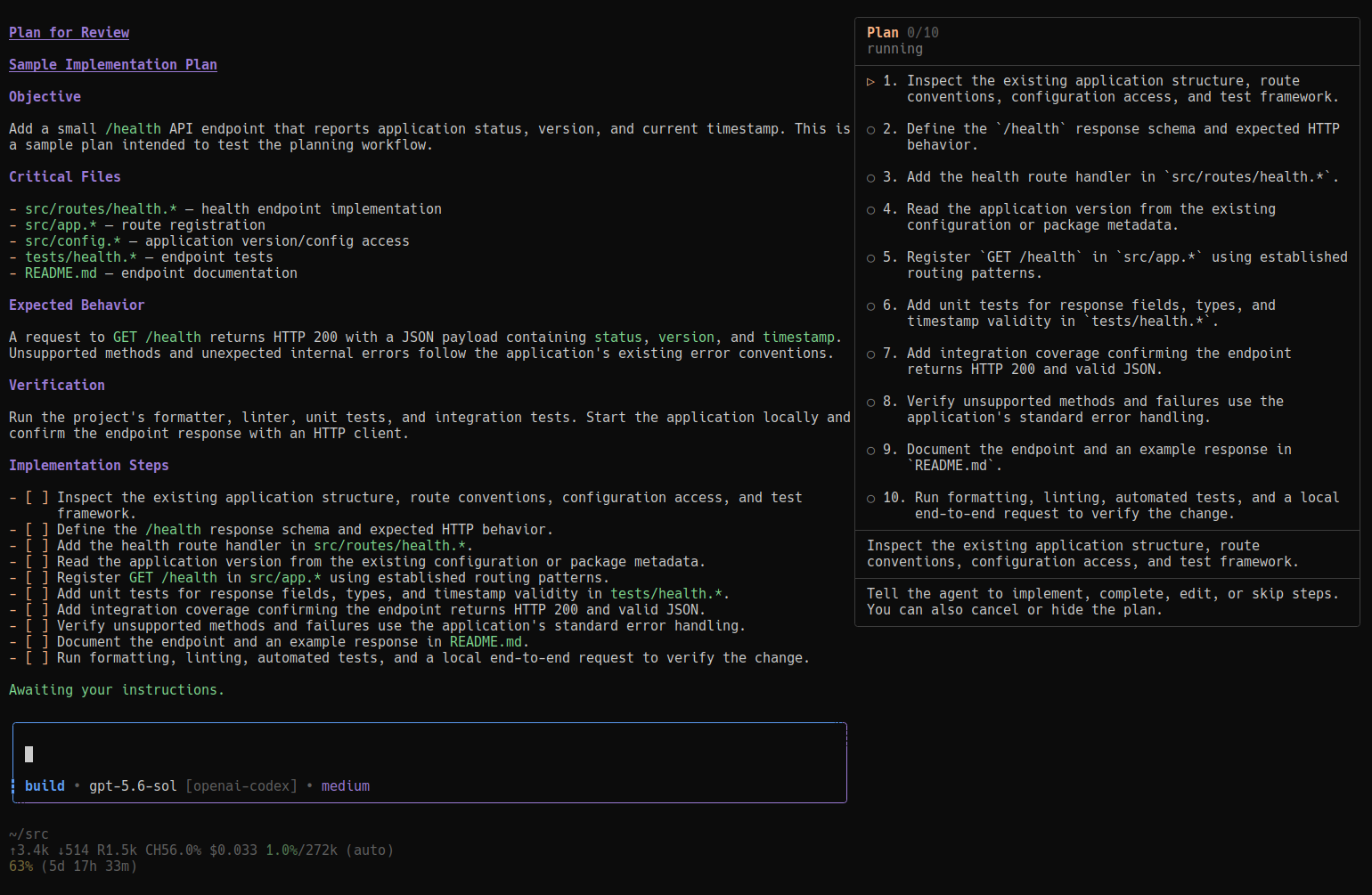
  "image": "https://raw.githubusercontent.com/janvitos/pi-plan-build/main/docs/images/step-by-step.png"
}
Security note
Pi packages can execute code and influence agent behavior. Review the source before installing third-party packages.
README
Pi Plan & Build
Plan safely, approve explicitly, then implement here or in a clean session.
A global Pi coding agent extension that adds persistent Plan and Build modes, guarded plan-file editing, interactive planning questions, full-plan review, explicit approval, and clean-session implementation handoffs.
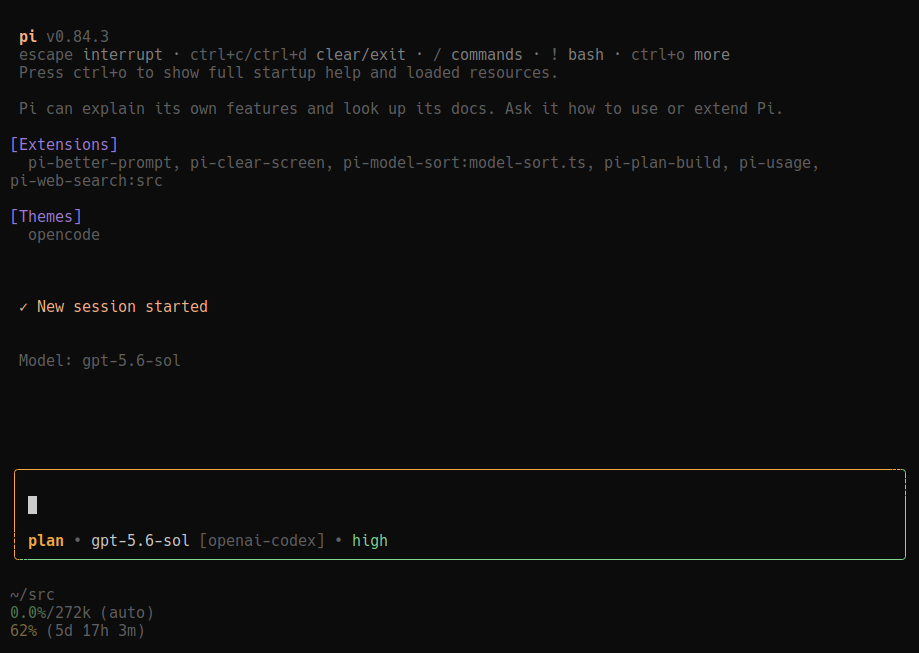
Plan mode
Explore a codebase, ask questions, and prepare an implementation plan without modifying project files.
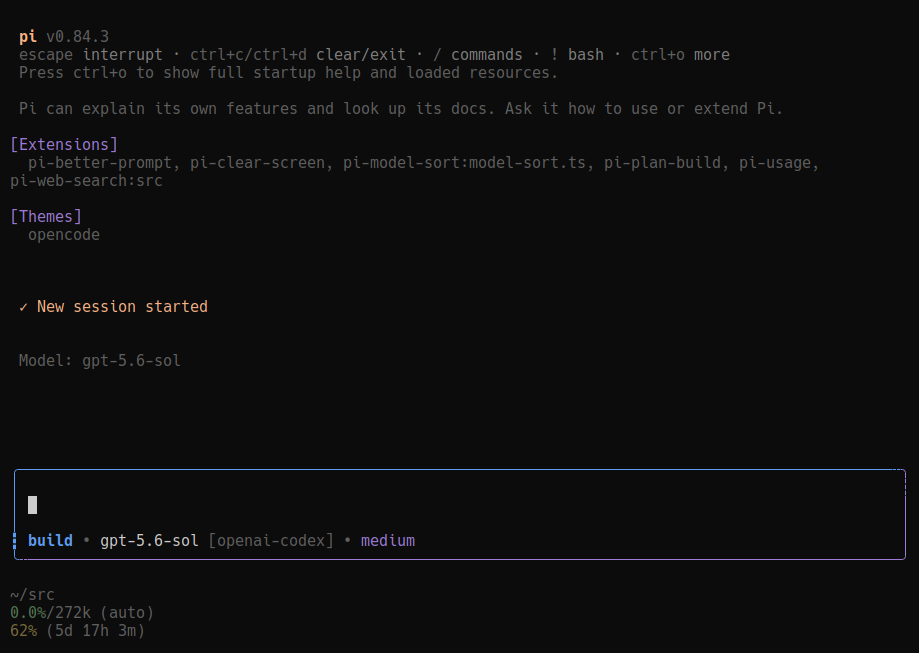
Build mode
Switch to Build mode to implement the approved plan directly in the current session or a clean session.
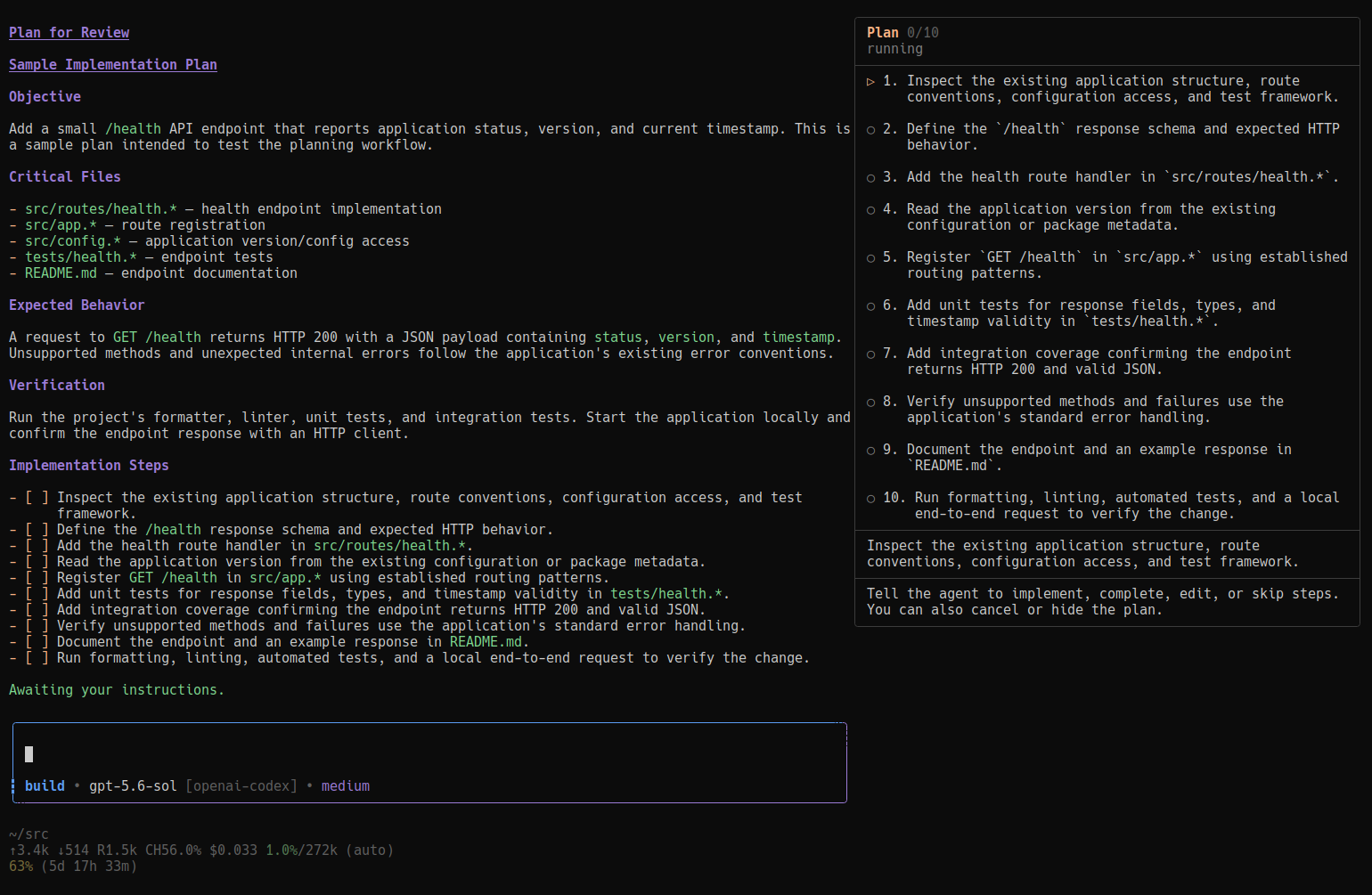
Step-by-step execution
Optionally keep the approved plan visible in a docked side panel while implementing and verifying one step at a time.
Features
- New sessions start in Build mode.
- Bare
Tabcycles Build → Plan → Build, while active autocomplete dropdowns retain Pi's normal Tab completion. - The composer uses OpenCode prompt-inspired blue/orange mode colors on the rounded top-left border and left rail, complemented by Pi's border color on the right rail and rounded bottom-right border; rounded corners inherit their vertical rail colors while horizontal
╌segments bridge the borders at both junctions, paired with a light vertical┆at the top right and a mode-specific bottom-left transition: thin┆in Plan and heavy┇in Build. It also includes a mode/model/thinking metadata row; cycling the thinking level updates this row without adding a duplicate status above the composer. The model is shown asmodel-id [provider](for example,gpt-5.6-luna [openai]), with the model ID inheriting the terminal foreground like unselected entries in/modeland the provider using the footer's dim text color. The footer keeps the remaining path and usage stats without duplicating model metadata. /plan,/build, and the--planstartup flag.- Per-session plans at
~/.pi/agent/plans/<session-id>.md. - In Plan mode, built-in
editandwriteare restricted to the exact plan file. - Interactive
question,plan_enter, andplan_exittools. - Plan mode supports read-only conversation and research across multiple turns, then persists the final plan when it is ready for approval.
- The complete saved plan is rendered in the transcript before approval—without the built-in write preview's truncation.
- Existing approval actions remain available:
- Switch to Build and implement here
- Start fresh and implement
- Stay in Plan mode
- Experimental: In fullscreen TUI, valid checklist plans also offer Implement step by step: a passive, non-overlapping docked right panel keeps the plan visible while natural-language prompts gate steps and report completed work. The panel is visual-only and never captures keyboard input. This feature is still under active development.
- Staying in Plan mode—or pressing Escape in the approval dialog—produces a durable acknowledgement and stops the run until the user responds.
- Mode state survives reloads, resumes, and forks.
- When Pi recreates the custom editor, the latest 100 user prompts from the active session branch are restored for Up/Down history navigation.
Requirements
- Pi
0.84.2or newer - Node.js
22.6or newer for the test command - TUI or RPC UI support for interactive questions and approval dialogs
- Pi fullscreen TUI mode for the optional docked step-by-step plan panel; regular mode and all existing workflows remain supported
Install
Install the npm package with Pi's package manager:
pi install npm:@janvitos/pi-plan-build
Pi stores npm packages under ~/.pi/agent/npm/; ~/.pi/agent/extensions/ is reserved for directly auto-discovered extension files and directories. Start a new Pi process after installation, or run /reload in an existing session.
Install from GitHub
pi install git:github.com/janvitos/pi-plan-build
Local development install
git clone https://github.com/janvitos/pi-plan-build.git ~/src/pi-plan-build
ln -s ~/src/pi-plan-build ~/.pi/agent/extensions/pi-plan-build
Do not install more than one npm, Git, or local copy at the same time; duplicate extension loads cause command and flag conflicts.
Usage
| Action | Result |
|---|---|
Tab |
Cycle Build and Plan, or accept an active autocomplete selection |
/plan |
Select Plan mode |
/build |
Select Build mode |
pi --plan |
Start a new session in Plan mode |
/build-fresh |
Start a pending clean-session implementation manually |
The agent may also enter Plan mode with plan_enter when planning or investigation is safer than immediate execution.
Plan approval
When planning is complete, plan_exit displays the entire persisted plan and asks whether to:
- implement in the current session;
- start a clean linked implementation session;
- stay in Plan mode; or
- experimentally implement step by step in fullscreen TUI when the plan contains a valid checklist.
Selecting Start fresh and implement stops the current run and automatically dispatches /build-fresh. Pi 0.84.2 or newer is required for extension command dispatch from an injected user message. The command creates a linked child session, copies the approved plan to its canonical plan file, preserves the model and thinking level selected for the action, switches it to Build, and starts implementation without transferring the planning conversation.
Selecting Stay in Plan mode, or pressing Escape while the approval dialog is open, displays:
Staying in Plan mode. Let me know when you’re ready to revise or implement the plan.
Both actions leave Plan mode active, stop the agent, and wait for the next user message.
Step-by-step execution details (Experimental)
Experimental feature: Step-by-step execution is still being developed. Expect UI and workflow changes, and please report issues or unexpected behavior.
When Pi uses "tuiMode": "fullscreen" and the saved plan contains top-level - [ ] items under ## Implementation Steps, plan_exit offers the additional Implement step by step approval action. This is opt-in per plan; it does not replace either one-shot implementation option or Stay in Plan mode.
The passive 64-column right panel reserves terminal columns, so the transcript and editor reflow instead of being covered. Long step instructions and panel guidance wrap instead of being clipped. It never accepts focus or keyboard input and collapses below 132 terminal columns. The panel is a visual status aid only; all control happens through ordinary prompts. Its guidance remains visible, and the main transcript says, “Awaiting your instructions.” The agent interprets intent contextually, so these are examples rather than required commands:
- “Implement the next step,” “Start step 2,” or simply “Approved” / “Go ahead.”
- “Step 1 is complete,” “I verified that one,” or “I already handled this.”
- “Change step 3 to …” or “Skip this step.”
- “Pause the plan,” “hide the plan,” or “show the plan.”
- “Cancel this plan” at any point to end step-by-step execution immediately.
The extension exposes these actions to the agent through plan_step_control; project mutations remain blocked until the user clearly approves a ready step or explicitly indicates that it is already complete. A ready step may be marked complete without implementation when the user says they already handled or verified it. An implemented step is marked completed immediately after verification, and the next step becomes ready without a review or acceptance phase. The agent interprets intent contextually rather than requiring exact phrases, while the extension validates every resulting state transition. Step tool results identify the affected step, for example Step 2: complete, rather than presenting a plan-wide completion label. When the final step is completed or skipped, the panel and execution guards are removed immediately and the main window receives a Markdown-formatted completion summary with plan-style headings, spacing, and colors. Cancelling removes the panel and execution guards immediately, restores the full-width layout, and preserves the saved plan file for reference. The agent implements only that step, calls plan_step_complete, and waits for the user's next prompt. Progress, revisions, summaries, and panel visibility survive reload/resume. If such a session is opened in regular mode, progress is retained but cannot advance until fullscreen mode is restored; no overlay fallback is used.
Enable fullscreen in ~/.pi/agent/settings.json and restart Pi:
{
  "tuiMode": "fullscreen"
}
The integration uses Pi 0.84.2's public fullscreen layout primitives plus a guarded read of its runtime layout root because the current extension API exposes setLayoutRoot() but not a corresponding getter.
Plan-mode permissions
Normal tools remain visible so the model can inspect the project. While a Plan run is active:
editandwriteare permitted only for the canonical session plan file;- the Plan prompt reserves those mutations for finalizing or explicitly revising the plan, not ordinary conversation or research;
- other
editandwritecalls are blocked by the extension; - bash is not restricted at the permission layer, but the Plan prompt explicitly permits read-only exploration only.
This mirrors the intended permission-oriented workflow rather than hiding normal tool schemas.
Conversational planning
Plan mode follows OpenCode’s standard conversational lifecycle while retaining this extension’s persisted approval flow. The agent can answer informational questions, discuss requirements and tradeoffs, inspect the project with read-only tools, and ask follow-up questions across multiple turns. Ordinary conversation and research do not create or update the plan file and do not invoke plan_exit.
Once the request is sufficiently understood and the agent is ready to present the final implementation plan—or the user explicitly asks it to finalize—the agent writes the complete canonical plan and calls plan_exit. An existing plan file does not trigger automatic edits during unrelated discussion.
Design and attribution
Pi Plan & Build is an independent extension with its own workflow and UI behavior. Its conversational read-only lifecycle follows OpenCode’s standard Plan agent, while persisted finalization and approval are adapted for Pi. Earlier prompt and transition semantics were informed by OpenCode 1.18.16, and clean-session implementation ideas were informed by the former pi-plan-mode extension. This project is not affiliated with either project.
The Plan workflow uses Pi's native exploration tools directly and does not bundle or require subagents.
Development
npm test
npm pack --dry-run
The tests cover state decoding, safe plan paths, mutation restrictions, deferred transitions, mode and provider rendering, conversational Plan guidance, session-based prompt history restoration, complete plan rendering, approval decisions, stop behavior, fresh-session settings and handoff content, question formatting and cancellation, structured checklist parsing, step state transitions, safe instruction revisions, and responsive panel rendering.
Publishing
Releases are published through .github/workflows/publish.yml. Bump the version in package.json, commit the release, and push a matching semantic-version tag:
git tag vX.Y.Z
git push origin main vX.Y.Z
The tag triggers GitHub Actions to publish the public package to npm with trusted publishing and provenance. The prepublishOnly hook runs the test suite before publication.