@jmcombs/pi-prompt-enhancer
Codebase-aware prompt enhancer for the Pi coding agent — rewrites rough prompts into precise ones, with project tree, git context, and referenced file contents, before they reach the model.
Package details
Install @jmcombs/pi-prompt-enhancer from npm and Pi will load the resources declared by the package manifest.
$ pi install npm:@jmcombs/pi-prompt-enhancer- Package
@jmcombs/pi-prompt-enhancer- Version
3.0.1- Published
- Aug 23, 2026
- Downloads
- 285/mo · 186/wk
- Author
- jmcombs
- License
- MIT
- Types
- extension
- Size
- 59.2 KB
- Dependencies
- 0 dependencies · 4 peers
Pi manifest JSON
{
  "extensions": [
    "./index.ts"
  ],
  "image": "https://raw.githubusercontent.com/jmcombs/pi-extensions/main/assets/prompt-enhancer/preview.png",
  "video": "https://raw.githubusercontent.com/jmcombs/pi-extensions/main/assets/prompt-enhancer/preview.mp4"
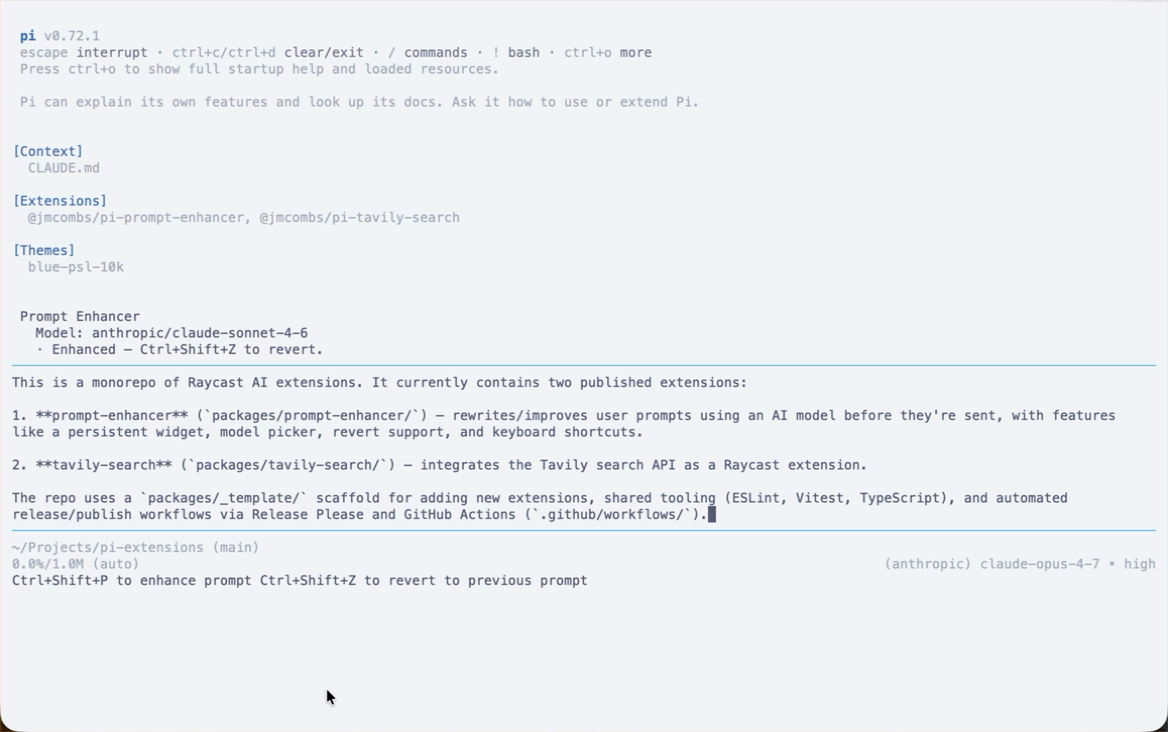
}
Security note
Pi packages can execute code and influence agent behavior. Review the source before installing third-party packages.
README
@jmcombs/pi-prompt-enhancer
Codebase-aware prompt rewriting for the Pi coding agent. It turns a rough request into a precise one, then puts that rewrite back in the editor for you to review. Nothing is submitted until you say so.
The enhancer looks at your project tree, git status, any files the draft names, and the last few turns of the conversation, then rewrites the request instead of answering it. The original stays one keystroke away.
That last part is what makes a follow-up work: "help me with this skill" can be rewritten because the enhancer can see what "this" was. Only a small, capped slice of the conversation is sent, and it is sent to the enhancer model — the one shown on the status bar, which may not be the model running your session.
Install
pi install npm:@jmcombs/pi-prompt-enhancer
See the Pi packages documentation for git, local path, project-scoped install, and filtering options.
No extra API keys. It uses the model already active in your session, or one
you pick with /prompt_enhance_model.
Quick start
- Type a rough request.
- Press
Ctrl+Shift+E. - Read the rewrite. Nothing has been sent.
- Press Enter to send, or
Ctrl+Shift+Zfor the original.
Commands
| Command | What it does |
|---|---|
/prompt_enhance [text] |
Rewrite the text you pass, or whatever is already in the editor. |
/prompt_enhance_model |
Pick the enhancer model for the current session. Resets when Pi restarts. |
/prompt_enhance_revert |
Put the pre-enhance text back. Once only; also clears when you send a prompt. |
/prompt_enhance_auto |
Turn auto-enhance on or off for the current session. Off until you do. |
Shortcuts (also listed in /hotkeys):
Ctrl+Shift+E: enhance what is in the editor. Always works, even when auto-enhance would skip.Ctrl+Shift+Z: revert the last enhance.
After an enhance, the footer reminds you how to revert. With auto-enhance on it
also says Enter to send. Press Esc to cancel an enhance that is still
running.
When an enhance does not work
A slow or unreachable model is retried a few times first, and the loader names the reason so you can decide to wait or press Esc:
Retrying (1/3) in 2s… · Connection error
Esc cancels and changes nothing else. If the retries run out, three things happen and nothing else:
- your prompt goes back in the editor, exactly as you typed it;
- auto-enhance turns itself off for the rest of the session, so the next Enter
sends — turn it back on with
/prompt_enhance_auto; - one message says so, and names the reason:
prompt enhancement failed (Connection error); your prompt is unchanged
The status bar
Prompt Enhancer displays in the Pi status bar with the enhancer model, when auto-enhance is enabled, and a short status after an action is taken. Here are the elements of the status bar:
- Ready: a model is resolved. Enhance with
Ctrl+Shift+E. - Auto on:
/prompt_enhance_autois armed. Enter rewrites; Enter again sends. - No model: pick one with
/modelor/prompt_enhance_model. - Review: a rewrite is in the editor and has not been sent.
Ctrl+Shift+Zrestores the original.
A Nerd Font is required for the mark and separators to render.
Auto-enhance on Enter
Off by default. Run /prompt_enhance_auto to turn it on for the current session. A
green auto block on the status bar means it is on.
flowchart TD
    A[Type a request] --> B[Enter]
    B --> C[Rewrite appears in the editor]
    C --> D{Keep it?}
    D -->|Enter| E[Send to the model]
    D -->|Ctrl+Shift+Z| F[Original comes back]
Short replies like ok, yes, approved, or a brief answer to a question
are skipped. To enhance those anyway, use Ctrl+Shift+E.
Requirements
| Node | ≥ 22.19.0 |
| Pi | any recent version |
| A Nerd Font | for the status bar mark and separators |
| A configured model | at least one Pi model with an API key |
Development
This package lives in the pi-extensions monorepo.
See CONTRIBUTING.md at the repo root for project conventions.
# From the repo root
npm ci
npm run check
npm run test -- packages/prompt-enhancer

# Try local changes (skip globally installed extensions so they do not collide)
pi --no-extensions -e ./packages/prompt-enhancer
License
MIT © Jeremy Combs