@jmcombs/pi-prompt-enhancer
Codebase-aware prompt enhancer for the Pi coding agent — rewrites rough prompts into precise ones, with project tree, git context, and referenced file contents, before they reach the model.
Package details
Install @jmcombs/pi-prompt-enhancer from npm and Pi will load the resources declared by the package manifest.
$ pi install npm:@jmcombs/pi-prompt-enhancer- Package
@jmcombs/pi-prompt-enhancer- Version
2.0.0- Published
- May 4, 2026
- Downloads
- not available
- Author
- jmcombs
- License
- MIT
- Types
- extension
- Size
- 32.3 KB
- Dependencies
- 0 dependencies · 4 peers
Pi manifest JSON
{
  "extensions": [
    "./index.ts"
  ],
  "image": "https://raw.githubusercontent.com/jmcombs/pi-extensions/main/assets/prompt-enhancer/preview.png",
  "video": "https://raw.githubusercontent.com/jmcombs/pi-extensions/main/assets/prompt-enhancer/preview.mp4"
}
Security note
Pi packages can execute code and influence agent behavior. Review the source before installing third-party packages.
README
@jmcombs/pi-prompt-enhancer
A Pi coding agent extension that rewrites rough user prompts into precise, codebase-aware ones — before they reach the model. The enhanced prompt is loaded back into the editor for your review, so you stay in control of what gets submitted.
Install
# Globally (recommended)
pi install npm:@jmcombs/pi-prompt-enhancer

# For a single session, without installing
pi -e npm:@jmcombs/pi-prompt-enhancer
No external API keys are required. The enhancer uses whichever Pi model is currently
active in your session (or one you pick interactively via /enhance-model).
What It Adds
- Command
/enhance [text]— enhance the provided text, or the editor's current contents if no argument is given. - Shortcut
Ctrl+Shift+P— enhance the editor's current contents in place. - Command
/enhance-revertand ShortcutCtrl+Shift+Z— restore the editor to the prompt that was there immediately before the most recent/enhance. Cleared after one revert (single-step undo) and also when you submit a non-command prompt. - Command
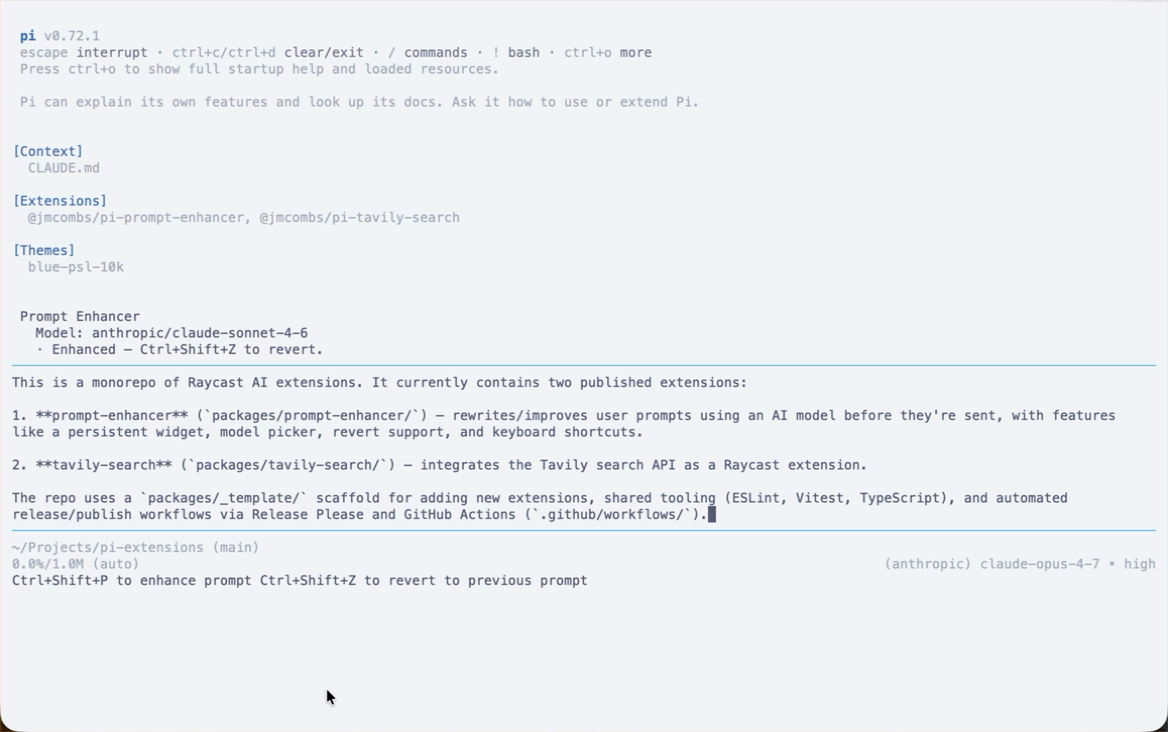
/enhance-model— interactively pick which model to use as the enhancer for the current session. Choice is held in memory and resets on restart. - Persistent widget above the editor — a two-line panel showing
Prompt Enhancerand the model the enhancer will use. Soft messages (cancelled, reverted, nothing-to-enhance, model-changed, etc.) appear as a third line for ~4 seconds and then auto-clear. Hard errors still surface as Pi notifications. - Footer hint chips — a
Ctrl+Shift+P to enhance promptchip is always visible from the start of every session. After a successful/enhance, a secondCtrl+Shift+Z to revert to previous promptchip appears next to it, and disappears once you revert or submit a new prompt.
How It Works
When you trigger an enhancement, the extension gathers (in parallel):
- Project directory tree — up to 3 levels deep, max 100 entries, skipping
node_modules,.git,dist,build,coverage, and similar artifact directories. - Git context — current branch,
git status --short, and the last 8 commits viagit log --oneline. 3-second timeout per call; failures are silently ignored (works fine outside a git repo). - Mentioned file contents — filenames or paths referenced in your prompt are
resolved relative to
cwd, verified to exist, and read up to 100 lines each (capped at 3 files; unreadable files are silently skipped).
That context plus your original prompt is sent to the configured enhancer model.
While the request is in flight, a BorderedLoader covers the editor; pressing
Esc cancels at any point and restores your original text.
On success the enhanced prompt is loaded into the editor and you receive a notification
to review it before submitting. Press Ctrl+Shift+Z (or run /enhance-revert) to
restore your original prompt; the revert affordance is single-step and clears
automatically once you submit a new prompt.
Note: Pi's terminal
Ctrl+Zis bound toapp.suspend(it sendsSIGTSTPto the OS and suspends Pi to the background — you can resume withfgin the shell). The extension usesCtrl+Shift+Zinstead for revert, which doesn't collide.
Model Selection
By default the enhancer uses the same model that's currently active in your Pi
session (ctx.model). Run /enhance-model to open an interactive picker showing
every model that has a configured API key. Your choice persists for the lifetime
of the session only — restarting Pi or starting a new session resets it back to
the default.
Behavior Notes
- Nothing is submitted to the LLM automatically. The flow always ends with the enhanced prompt sitting in your editor awaiting your review.
- An empty prompt, no model, or a model with no configured API key produces a notification and a no-op return — your editor is never modified.
- Cancellation (Esc) and errors both restore the original prompt and notify you.
- The extension makes no network calls of its own — it only invokes Pi's existing
model interface, which means anything that works in your
pisetup (local models, OpenRouter, Anthropic direct, etc.) works here.
Requirements
- Pi
>= 0.72.0 - Node
>= 20.6.0 - At least one Pi-configured model with an API key (any provider)
Development
This package lives in the pi-extensions monorepo.
# From the repo root
npm ci
npm run check       # full quality gate

# Try local changes against a real pi session
pi -e ./packages/prompt-enhancer
The smoke test in index.test.ts does not mock the LLM API; it only verifies
registration shape (commands, shortcuts). Real end-to-end behavior is exercised
manually via pi -e.
License
MIT © Jeremy Combs