@jmcombs/pi-tavily-search
Pi extension that performs real-time web search via the Tavily API.
Package details
Install @jmcombs/pi-tavily-search from npm and Pi will load the resources declared by the package manifest.
$ pi install npm:@jmcombs/pi-tavily-search- Package
@jmcombs/pi-tavily-search- Version
3.0.0- Published
- Jul 19, 2026
- Downloads
- 87/mo · 15/wk
- Author
- jmcombs
- License
- MIT
- Types
- extension
- Size
- 14.4 KB
- Dependencies
- 1 dependency · 2 peers
Pi manifest JSON
{
  "extensions": [
    "./index.ts"
  ],
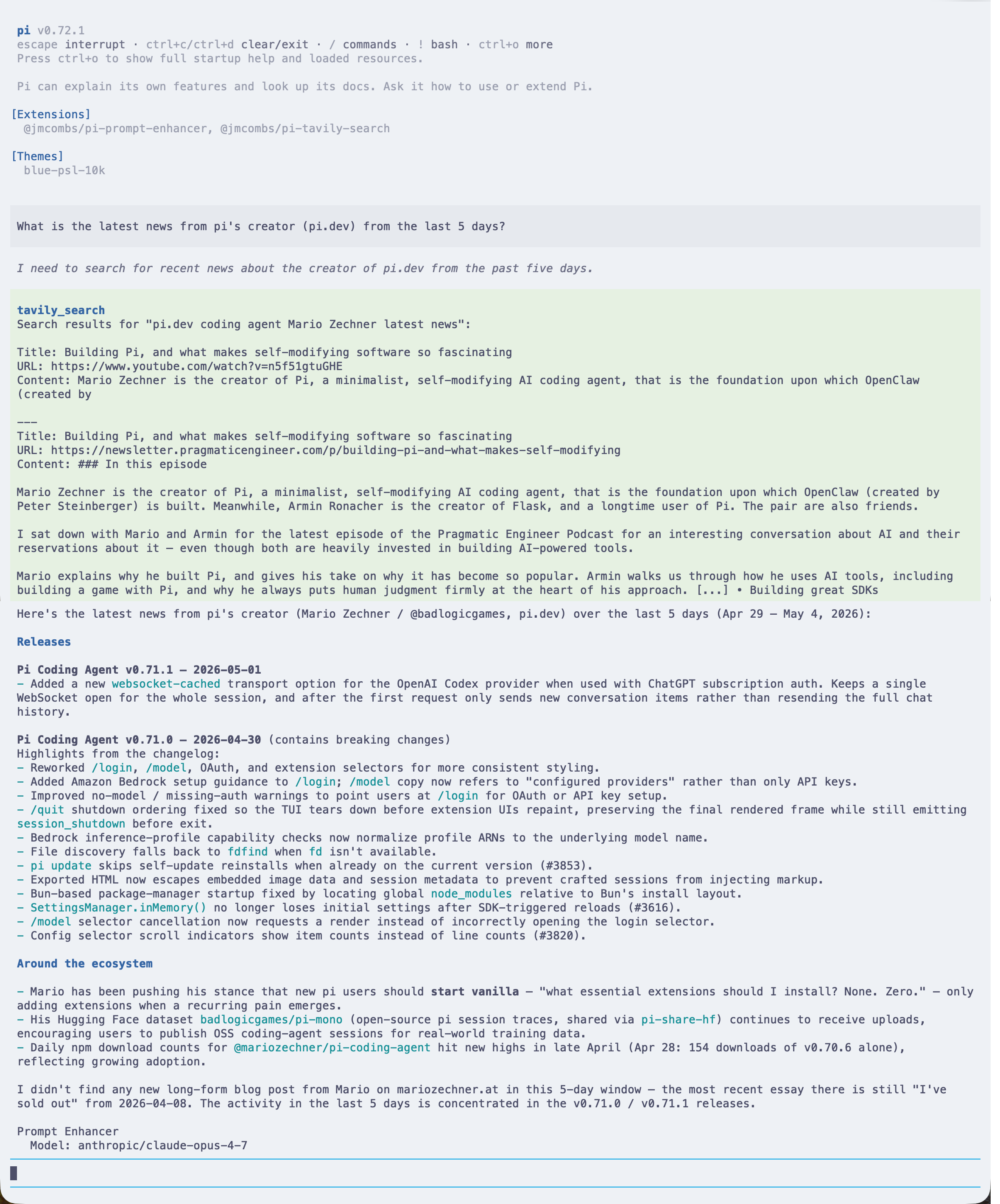
  "image": "https://raw.githubusercontent.com/jmcombs/pi-extensions/main/assets/tavily-search/preview.png"
}
Security note
Pi packages can execute code and influence agent behavior. Review the source before installing third-party packages.
README
@jmcombs/pi-tavily-search
A Pi coding agent extension that adds real-time web search via the Tavily API.
Breaking changes in v3.0.0
AuthStorageis gone. Pi 0.80.8 removed theAuthStorageAPI this extension used to store and read its API key. Credentials now resolve through the@jmcombs/pi-1passwordcredential API, which this package now depends on directly and installs automatically — no separate install step.- Availability-branched onboarding. When the
opCLI is installed and an account is configured, setup opens a 1Password vault → item → field picker; whenopis unavailable it falls back to masked manual key entry. - Existing keys keep working. Any Tavily key already in
~/.pi/agent/auth.json— a literal value or an!op readreference — resolves unchanged. No migration action is required.
What's New — 1Password credential integration
Tavily search now handles your API key through the
@jmcombs/pi-1password credential
API, which installs automatically as a dependency. What this means for you:
- Onboarding branches on 1Password availability. If the
opCLI is installed and an account is configured,/tavily_setupopens a live vault → item → field picker (or lets you type anop://…reference) and stores it as a!op read '…'entry that resolves fresh on every use. Ifopis not available, it falls back to manual API-key entry and nudges you to enable the 1Password extension for vault integration. - The
TAVILY_API_KEYenvironment variable still works. It remains a supported fallback, resolved after the storedtavilykey. - Existing keys keep working. Any Tavily key already in
~/.pi/agent/auth.json— a literal key or an!op readreference — continues to resolve unchanged. No migration action is required. - The key is never exposed to the model. Entry happens entirely in the TUI, and only the resolved value is used to call the Tavily API.
- Enable 1Password for vault integration and startup unlock. Install and enable the
@jmcombs/pi-1passwordextension: it makes the vault picker available during onboarding and runs a one-timeop readat session startup, so the biometric unlock prompt lands once.
flowchart TD
    A["/tavily_setup or first tool use"] --> B{"is1PasswordAvailable()<br/>(op installed AND configured)"}
    B -- "Yes" --> C["Live vault → item → field picker<br/>or manual op:// reference"]
    C --> D["Store !op read 'op://…' entry"]
    B -- "No" --> E["Manual API-key entry<br/>+ nudge to enable 1Password"]
    E --> F["Store literal api_key entry"]
    D --> G["resolveSecret('tavily') ?? TAVILY_API_KEY<br/>resolves fresh on each tool call"]
    F --> G
    G --> H["api_key → Tavily API<br/>(never shown to the LLM)"]
Install
# Globally (recommended)
pi install npm:@jmcombs/pi-tavily-search

# For a single session, without installing
pi -e npm:@jmcombs/pi-tavily-search
A Tavily API key is required. Sign up at tavily.com (free tier available) to get one, then configure it using one of the methods below.
What It Adds
- Tool:
tavily_search— performs an advanced Tavily web search and returns up to five formatted results (title, URL, content) plus the raw API response underdetails.raw. The tool is callable by the LLM whenever it needs current information from the public web. - Command:
/tavily_setup— runs the@jmcombs/pi-1passwordonboarding flow to save (or update) your Tavily key. The input is never visible to the LLM.
Configuration
The tavily_search tool resolves the key in this order:
resolveSecret("tavily")from@jmcombs/pi-1password— reads~/.pi/agent/auth.jsonfresh on each call (a literal key or an!op readreference). Recommended.- The
TAVILY_API_KEYenvironment variable — fallback.
If neither is set, the tool automatically runs onboarding (the availability branch above) on first use, then re-resolves — preserving the "prompt on first use" experience.
Option 1 — /tavily_setup (recommended)
Run the command and follow the flow:
/tavily_setup
- When the
opCLI is available, pick your key from the live vault picker (or paste anop://vault/item/fieldreference); it is stored as a!op read '…'entry that resolves fresh on every use. - When
opis not available, enter the key on a masked prompt; it is stored as a literalapi_keyentry.
Either way the value is written to ~/.pi/agent/auth.json (0600) and never shown to the
model.
Option 2 — edit ~/.pi/agent/auth.json directly
The stored entry is provider-shaped under the tavily key. Any of these resolve:
Plain key
{
  "tavily": {
    "type": "api_key",
    "key": "tvly-..."
  }
}
Shell-resolved key (1Password)
{
  "tavily": {
    "type": "api_key",
    "key": "!op read 'op://Personal/tavily/credential'"
  }
}
Shell-resolved key (macOS Keychain / pass)
{
  "tavily": {
    "type": "api_key",
    "key": "!security find-generic-password -ws tavily"
  }
}
The !-prefixed value is executed by your shell at lookup time, so no secret is
ever stored on disk in plaintext.
Option 3 — environment variable
export TAVILY_API_KEY="tvly-..."
Behavior Notes
- Search depth:
advanced - Max results returned: 5
- The tool honors Pi's abort signal — pressing Esc during a search cancels the HTTP request.
- If the API key is missing the tool returns an error result with a helpful configuration hint instead of throwing.
- Non-2xx responses from Tavily surface as tool errors (with status, status text, and response body) rather than throwing.
Requirements
- Pi
>= 0.80.8(credentials via the@jmcombs/pi-1passwordAPI andExtensionAPI) - Node
>= 22.0.0 - A Tavily API key
- Optional: the
op(1Password) CLI for vault-backed onboarding and startup unlock
Development
This package lives in the pi-extensions monorepo.
# From the repo root
npm ci
npm run check       # full quality gate

# Try local changes against a real pi session
pi -e ./packages/tavily-search
The smoke test in index.test.ts does not mock the Tavily API; it only
verifies registration shape. Real end-to-end behavior is exercised via pi -e.
License
MIT © Jeremy Combs