@jmfederico/pi-web
Remote web UI and browser control plane for persistent Pi Coding Agent sessions.
Package details
Install @jmfederico/pi-web from npm and Pi will load the resources declared by the package manifest.
$ pi install npm:@jmfederico/pi-web- Package
@jmfederico/pi-web- Version
1.202605.13- Published
- May 25, 2026
- Downloads
- 2,062/mo · 900/wk
- Author
- jmfederico
- License
- MIT
- Types
- extension
- Size
- 4 MB
- Dependencies
- 20 dependencies · 2 peers
Pi manifest JSON
{
  "extensions": [
    "./extensions"
  ],
  "image": "https://raw.githubusercontent.com/jmfederico/pi-web/main/docs/assets/pi-web-banner.png"
}
Security note
Pi packages can execute code and influence agent behavior. Review the source before installing third-party packages.
README
PI WEB





Website: https://pi-web.dev/

Run AI coding agents on your own machine or server, keep them alive in real workspaces, and control everything from a browser.
PI WEB is a web control plane for Pi Coding Agent. Add your repositories once, open project workspaces and git worktrees, start agent sessions inside them, and come back later without losing the work. Your browser becomes the cockpit; your server becomes the persistent development environment. Start on your laptop, check in from your phone, and continue from an iPad or another machine whenever that is the device you have at hand.
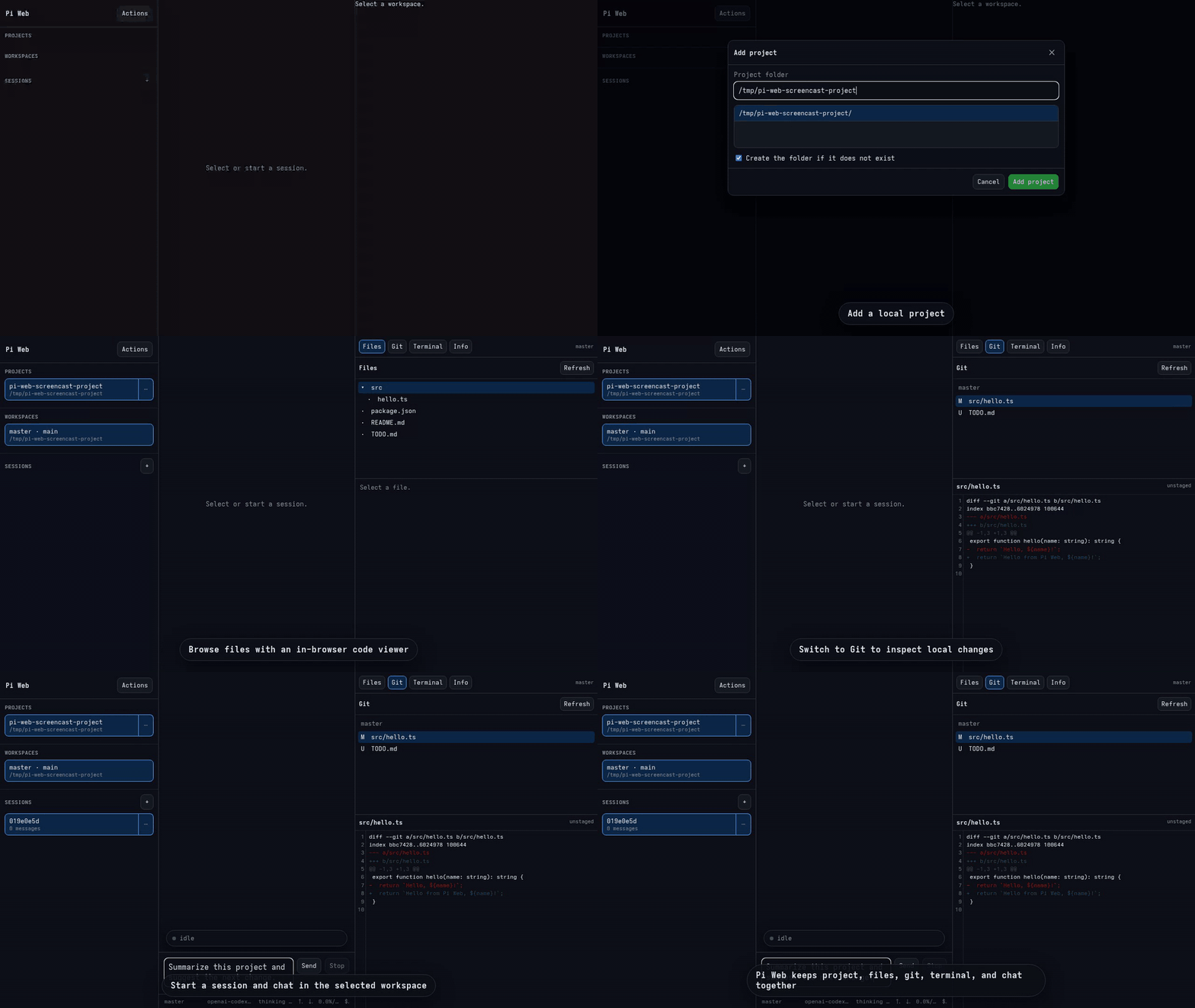
With PI WEB you can:
- launch and supervise multiple coding-agent sessions in parallel;
- keep sessions running when your browser disconnects or the UI restarts;
- organize agent work by project, workspace, branch, experiment, or review;
- use git worktrees to isolate concurrent features and fixes;
- chat with Pi Coding Agent through a realtime web UI;
- move fluidly between laptop, phone, tablet, and desktop without moving the development environment;
- turn any server, desktop, or remote dev box into an agent-first development hub.
Why use PI WEB?
Agentic development works best when agents are not trapped inside a single local terminal. They need stable environments, access to real repositories, and room to work across branches and tasks. Humans need the opposite: a clear place to supervise, redirect, review, and decide.
PI WEB connects those two worlds. The work stays in the server-side environment while you move between devices: laptop for deep focus, phone for a quick check-in, tablet for review, desktop when you are back at a desk. It is not trying to recreate the old desktop IDE in a browser; it is a control surface for persistent, parallel, human-in-the-loop agent work.
Core model
PI WEB organizes work into three levels:
Project     a folder on the server
Workspace   a git worktree, or the project folder for non-git projects
Session     a chat with Pi Coding Agent running inside a workspace
This maps naturally to real development work:
- add a project once;
- use worktrees to separate branches, features, experiments, and reviews;
- start one or more agent sessions inside each workspace;
- leave sessions running even when the browser disconnects or the UI restarts.
Features
- Add and list server-side projects.
- Discover git worktrees automatically with
git worktree list --porcelain. - Support non-git folders as single-workspace projects.
- Start, resume, archive, and restore Pi sessions per workspace.
- Chat with Pi Coding Agent through realtime WebSocket events.
- Keep active agent runtimes alive across browser disconnects and web/API restarts.
- Explicitly stop or abort active session work.
- View live session status: streaming, compaction, bash activity, token usage, cost, model, and context usage.
- Send prompts, shell input, and supported commands through the Pi SDK path.
- Reuse your existing Pi auth and model configuration from
~/.pi/agent. - Extend the UI with trusted plugins that add actions, workspace panels, and workspace-label metadata. See Plugin API for LLM-friendly plugin-building docs.
Architecture
PI WEB uses a split-process architecture so agent runtimes are not owned by the browser-facing dev server.
Browser UI
   │
   ▼
Fastify Web/API process
   │ HTTP + WebSocket proxy
   ▼
Session daemon
   │
   ▼
Pi Coding Agent SDK
Session daemon
The session daemon owns active Pi session runtimes. It is intended to be long-lived so sessions can survive browser disconnects and web/API restarts.
Web/API/UI server
The web process serves the API and browser UI. In development it can autoreload freely while active sessions continue running in the daemon.
State model
PI WEB keeps its own state intentionally small:
- Projects:
~/.pi-web/projects.json - Workspaces: discovered from git worktrees, not stored
- Sessions and chat history: Pi's default JSONL session storage
- Active session runtimes and WebSockets: memory in the session daemon
Plugins
PI WEB production installs can load trusted local UI plugins without rebuilding PI WEB. Plugins are browser-side ES modules that can add action-palette actions, workspace panels, and workspace-label metadata. They do not run in the session daemon and are not sandboxed.
The supported package shape is intentionally singular: piWeb.plugins entries with explicit id and module, plus a browser module that exports { apiVersion: 1, name, activate }. The bundled pi-web-plugins/info TypeScript source is the canonical minimal real example, and pi-web-plugins/pi-web demonstrates a dynamic status panel.
A useful prompt for AI agents:
Build a PI WEB plugin for this project. Goal: <describe the UI behavior>.
Before coding, read https://pi-web.dev/plugins.html and https://pi-web.dev/plugins.md.
Create it under ~/.pi-web/plugins/<plugin-id> using the documented PI WEB v1 plugin API.
Validate with /pi-web-plugins/manifest.json and explain reload/debug steps.
Do not modify PI WEB itself.
Reload the browser tab after adding or editing a plugin. If PI_WEB_DATA_DIR is set, use $PI_WEB_DATA_DIR/plugins instead of ~/.pi-web/plugins. Check discovery with:
curl http://127.0.0.1:8504/pi-web-plugins/manifest.json
See the full Plugin API for contribution types, package metadata, and troubleshooting.
Install
Recommended install uses npm plus native per-user services.
npm install -g @jmfederico/pi-web
pi-web install
On Linux servers, loginctl enable-linger is optional but recommended so the user systemd manager starts at boot and continues running after logout:
sudo loginctl enable-linger "$USER"
loginctl show-user "$USER" -p Linger
This writes and starts PI WEB's session daemon and web/API user services. The native user-service backend is selected automatically.
The generated services run through your detected login shell (bash, zsh, or fish with -lc) so they see a shell environment similar to running pi from your terminal.
Open http://127.0.0.1:8504.
Useful commands:
pi-web status
pi-web logs
pi-web restart
pi-web doctor
pi-web uninstall
One-line install is also available for users who prefer it:
curl -fsSL https://raw.githubusercontent.com/jmfederico/pi-web/main/install.sh | sh
PI WEB is also published as a Pi package. Installing it through Pi exposes a /pi-web command inside Pi:
pi install npm:@jmfederico/pi-web
Then in Pi:
/pi-web install
/pi-web status
/pi-web logs
/pi-web restart
/pi-web doctor
The Pi command is a convenience wrapper around the same service installer. When installed this way, the service installer can use PI WEB's package-local server entrypoints, so pi-web-server and pi-web-sessiond do not need to be on your shell PATH. /pi-web logs shows the last 100 service log lines; use pi-web logs in a shell when you want to follow logs continuously.
Advanced users may run the binaries however they prefer:
pi-web-sessiond
PI_WEB_PORT=8504 pi-web-server
Development quick start
npm install
npm run dev
Open the Vite URL, usually http://localhost:8505.
During development, the static marketing/docs site is also served by the Vite dev server at http://localhost:8505/site/.
For the recommended split development setup, run these in separate terminals:
npm run dev:sessiond
npm run dev:web
npm run dev:client
Or install the split development setup as native per-user services from the checkout:
pi-web install --dev
pi-web install --dev writes the session daemon plus a UI development service using the native user-service backend. pi-web uninstall removes both production and development service files; no uninstall flags are needed.
dev:web also watches bundled plugin TypeScript and rebuilds the browser-loaded plugin JavaScript under dist/pi-web-plugins/. You can restart dev:web or dev:client without stopping active Pi sessions.
Production-style run from a checkout
npm run build
npm run start:sessiond
PI_WEB_PORT=8504 npm start
Packaging and publishing
npm run verify
npm run pack:dry
npm publish --access public
prepack builds dist/ and bundled plugin JavaScript before npm creates the tarball, and prepublishOnly runs verification before publishing. Releases can also be published by the GitHub Actions npm workflow when a GitHub release is published.
PI WEB uses a single-line CalVer-inspired npm version: MAJOR.YYYYMM.SEQUENCE, for example 1.202605.1. The major number signals breaking-change eras; the middle number is the release month; the final number increments for additional releases in that month. Older major eras may be deprecated rather than maintained in parallel.
PI WEB declares @earendil-works/pi-coding-agent as a peer dependency (>=0.74.0 <1) and a development dependency for local builds. This keeps published installs flexible: npm 7+ installs the peer automatically, and users can upgrade the Pi package within the compatible range without PI WEB pinning a separate copy.
The web server defaults to 127.0.0.1:8504. Set PI_WEB_HOST=0.0.0.0 only when you intentionally want to bind directly on all interfaces.
The session daemon defaults to a private Unix socket at:
~/.pi-web/sessiond.sock
Environment variables:
PI_WEB_PORT/PORT— web server port. Defaults to8504.PI_WEB_HOST— web server bind host. Defaults to127.0.0.1.PI_WEB_DATA_DIR— PI WEB data directory. Defaults to~/.pi-web.PI_WEB_SESSIOND_SOCKET— Unix socket path used by both the daemon and web process whenPI_WEB_SESSIOND_URLis not set. Defaults to$PI_WEB_DATA_DIR/sessiond.sock.PI_WEB_SESSIOND_PORT— optional TCP port for the daemon. If unset, the daemon listens on the Unix socket instead.PI_WEB_SESSIOND_HOST— daemon TCP bind host whenPI_WEB_SESSIOND_PORTis set. Defaults to127.0.0.1.PI_WEB_SESSIOND_URL— daemon URL used by the web process when connecting over TCP, for examplehttp://127.0.0.1:3001. If you setPI_WEB_SESSIOND_PORT, set this for the web process too.PI_WEB_PROJECTS_FILE— optional override for the projects storage JSON file. Defaults to$PI_WEB_DATA_DIR/projects.json.
Development services
pi-web install --dev creates a practical local setup with two native per-user services:
pi-web-sessiondrunsnpm run start:sessiondfrom the checkout without autoreload.pi-web-ui-devrunsnpm run dev:webandnpm run dev:clientfor API reloads, bundled plugin rebuilds, and Vite HMR.
Under the hood, the native backends are systemd user services and LaunchAgents. For reference, an equivalent systemd setup looks like:
# ~/.config/systemd/user/pi-web-sessiond.service
[Unit]
Description=PI WEB session daemon

[Service]
Type=simple
WorkingDirectory=/srv/dev/pi-web
ExecStart=/bin/bash -lc 'exec npm run start:sessiond'
Restart=no

[Install]
WantedBy=default.target
# ~/.config/systemd/user/pi-web-ui-dev.service
[Unit]
Description=PI WEB UI dev server
After=pi-web-sessiond.service
Wants=pi-web-sessiond.service

[Service]
Type=simple
WorkingDirectory=/srv/dev/pi-web
ExecStart=/bin/bash -lc 'trap "kill 0" EXIT; npm run dev:web & npm run dev:client & wait'
Restart=no

[Install]
WantedBy=default.target
On Linux servers, enable persistent user services so the user systemd manager starts at boot and remains running after logout:
sudo loginctl enable-linger "$USER"
loginctl show-user "$USER" -p Linger
Install or refresh the development services with:
pi-web install --dev
Useful logs:
pi-web logs
If code affecting the session daemon changes, restart it manually:
pi-web restart
Current limitations
- Assumes trusted users and trusted server paths.
- Not a sandbox, permission model, or secure multi-tenant platform.
- Some Pi TUI slash-command behavior is not yet represented exactly in the web UI.
- Workspaces are discovered from existing git worktrees; UI-driven worktree management is a natural next step.
Vision
PI WEB is the beginning of an agent-first development environment:
- agents run persistently on servers;
- humans connect through the browser;
- work is organized by projects, workspaces, and sessions;
- the UI grows around the needs of agentic development rather than the habits of local IDEs.
The goal is simple: make it practical to run more development remotely, in parallel, with agents as first-class participants and humans focused on direction, judgment, and review.
License
MIT © 2026 Federico Jaramillo Martinez. See LICENSE.