@juicesharp/rpiv-voice
Pi extension. Voice dictation via /voice — local on-device STT with sherpa-onnx Whisper (base multilingual int8), microphone capture via decibri.
Package details
Install @juicesharp/rpiv-voice from npm and Pi will load the resources declared by the package manifest.
$ pi install npm:@juicesharp/rpiv-voice- Package
@juicesharp/rpiv-voice- Version
2.8.0- Published
- Aug 29, 2026
- Downloads
- 16.9K/mo · 1,236/wk
- Author
- juicesharp
- License
- MIT
- Types
- extension
- Size
- 162.1 KB
- Dependencies
- 3 dependencies · 3 peers
Pi manifest JSON
{
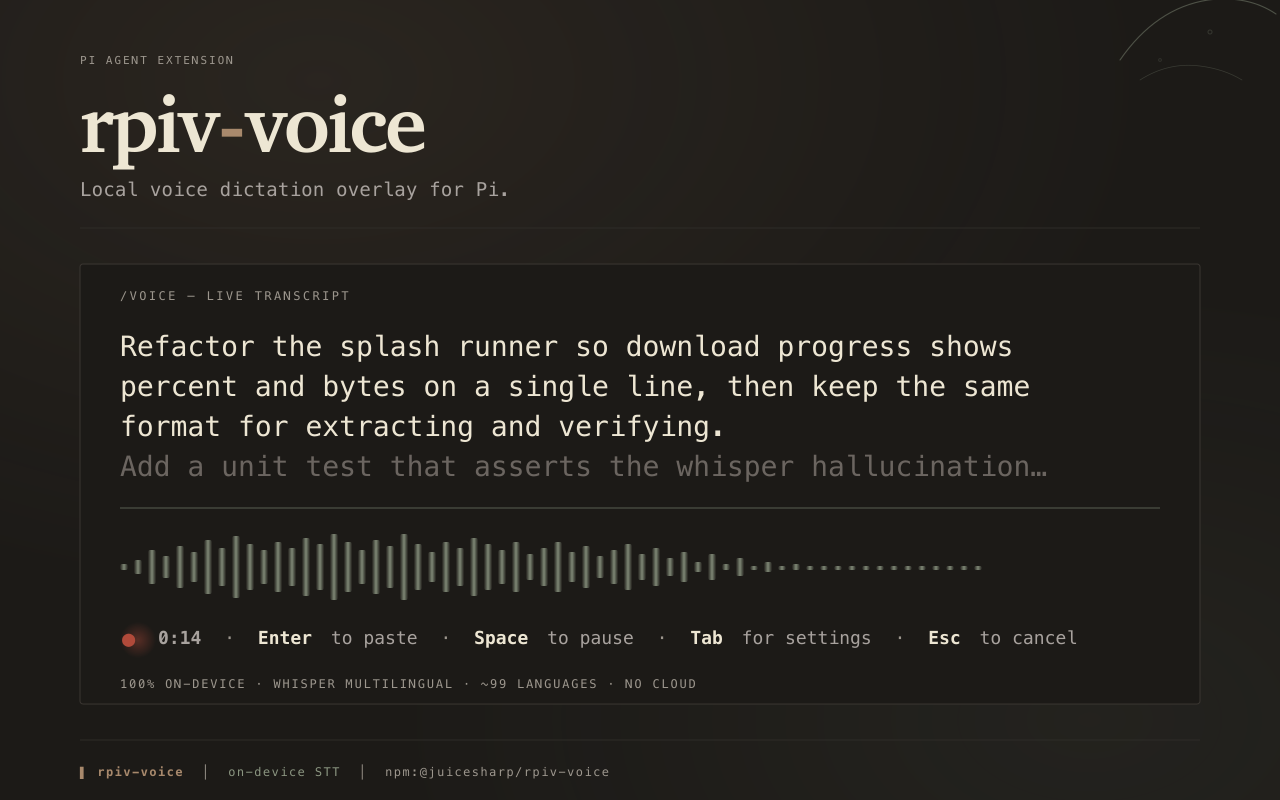
  "image": "https://raw.githubusercontent.com/juicesharp/rpiv-mono/main/packages/rpiv-voice/docs/cover.png",
  "extensions": [
    "./index.ts"
  ]
}
Security note
Pi packages can execute code and influence agent behavior. Review the source before installing third-party packages.
README
@juicesharp/rpiv-voice


Dictate long prompts to Pi Agent instead of typing
them. rpiv-voice adds a /voice command: an overlay opens, you speak, you press
Enter, and the transcript drops into Pi's editor. Speech-to-text runs on your own CPU
through sherpa-onnx Whisper (base multilingual int8) — no cloud, no API key, no account.
Install
pi install npm:@juicesharp/rpiv-voice
Restart your Pi session.
Quick start
Type /voice. The first run downloads the Whisper model (~198 MB, ~157 MB on disk) into
~/.pi/models/whisper-base/ with a progress splash; later runs open in about a second.
Then talk. Committed text appears as you finish phrases, with a dim trailing partial for the sentence you are still speaking.

| Key | Action |
|---|---|
Enter |
Close the overlay and paste the transcript — committed text plus the dim partial |
Esc |
Close the overlay and paste nothing |
Space |
Pause / resume |
Tab |
Open the settings screen |
If you have remapped Pi's confirm/cancel keys, the overlay follows your remap.
What you get
- Audio never leaves your machine — the only network call in the package is the one-time model download from GitHub Releases. Decoding runs locally on the CPU. No API key, no account, no telemetry.
- You see the words before you commit them — the still-open utterance is re-decoded
about once a second and rendered dim after the committed text, and
Enterpastes both. You never wait on a final decode. - Long monologues stay responsive — pauses flush a segment, and a cap keeps a non-stop stretch from stalling the transcript.
- Built-in microphones work, not just headsets — capture falls back to the device's native sample rate when 16 kHz is refused.
- Whisper's silence hallucinations get filtered — a curated phrase set ("thanks for watching", "music", "applause", and non-English equivalents), a repetition-loop detector, and an input-side energy floor. Toggle it off when you are dictating single words.
- Localized UI in nine languages —
de,en,es,fr,pt,pt-BR,ru,uk,zh. With@juicesharp/rpiv-i18ninstalled,/languagesflips the overlay strings without a restart; without it the extension still loads, English-only.
Configuration
/voice needs no config file. Both settings are editable on the settings screen (Tab
from dictation, Ctrl-S to save, Esc to save silently and go back) and persist to
~/.config/rpiv-voice/voice.json:
| Key | Default | Effect |
|---|---|---|
hallucinationFilterEnabled |
true |
Drops Whisper's silence artifacts and repetition loops |
equalizerEnabled |
false |
Renders the live audio waveform under the transcript |
The file is written with mode 0600.
The microphone is the OS default input and the model is fixed — neither is selectable.
Reference
- Configuration — every key, the XDG path rules, file permissions, the diagnostic log, and how the recognition language is chosen.
- Keys and screens — the full key table for both screens, the remappable bindings, and exactly what
Enterpastes andSpacepauses. - Model install and platform support — the first-run pipeline, the files on disk, failure recovery, and the prebuilt-binary matrix.
Requirements
- Apple Silicon macOS, glibc Linux (x64 / arm64), or Windows x64. Intel Macs are not
supported: the
decibricapture library publishes nodarwin-x64binary. Alpine/musl is out for the same reason. - A microphone Pi is allowed to use. On macOS, grant your terminal microphone access under System Settings → Privacy & Security → Microphone.
tarwith bzip2 support onPATH— model extraction shells out totar -xjf.- ~650 MB free during the first run — the archive and the unused fp32 weights are only deleted after extraction finishes. Settles at ~157 MB.
- Network access on the first run only. After that,
/voiceis fully offline.
Troubleshooting
Microphone unavailable…error notification — the OS refused the input device. Grant your terminal microphone permission, confirm an input device is connected, then re-run/voice./voice requires interactive mode— the command draws a TUI overlay and does nothing in a non-interactive session. Run/voicefrom an interactive Pi session.- The transcript says "Thanks for watching" — Whisper hallucinated on near-silence.
Speak closer to the microphone, and leave
hallucinationFilterEnabledon. - A phrase silently failed to transcribe — recognition errors are appended to
~/.config/rpiv-voice/errors.lograther than printed, because stderr would corrupt the live overlay. Check there for the underlying sherpa-onnx error. /voiceis not found — restart your Pi session after installing.STT model files were removed or corrupted…— the install directory was damaged after a good download. It is wiped automatically; run/voiceagain to redownload.
Related
@juicesharp/rpiv-i18n— optional. Install it withpi install npm:@juicesharp/rpiv-i18nto localize the overlay and enable/languages.@juicesharp/rpiv-pi— the umbrella package and/rpiv-setup. It does not installrpiv-voice; this package is opt-in and installed explicitly.
License
MIT — see LICENSE.