@juicesharp/rpiv-web-tools
Pi extension. Web search and fetch for the model with pluggable providers (Brave, Tavily, Serper, Exa, You.com, Jina, Firecrawl, Perplexity, SearXNG, Ollama).
Package details
Install @juicesharp/rpiv-web-tools from npm and Pi will load the resources declared by the package manifest.
$ pi install npm:@juicesharp/rpiv-web-tools- Package
@juicesharp/rpiv-web-tools- Version
1.20.0- Published
- Jun 15, 2026
- Downloads
- 5,439/mo · 1,193/wk
- Author
- juicesharp
- License
- MIT
- Types
- extension
- Size
- 169.2 KB
- Dependencies
- 1 dependency · 3 peers
Pi manifest JSON
{
  "extensions": [
    "./index.ts"
  ]
}
Security note
Pi packages can execute code and influence agent behavior. Review the source before installing third-party packages.
README
rpiv-web-tools
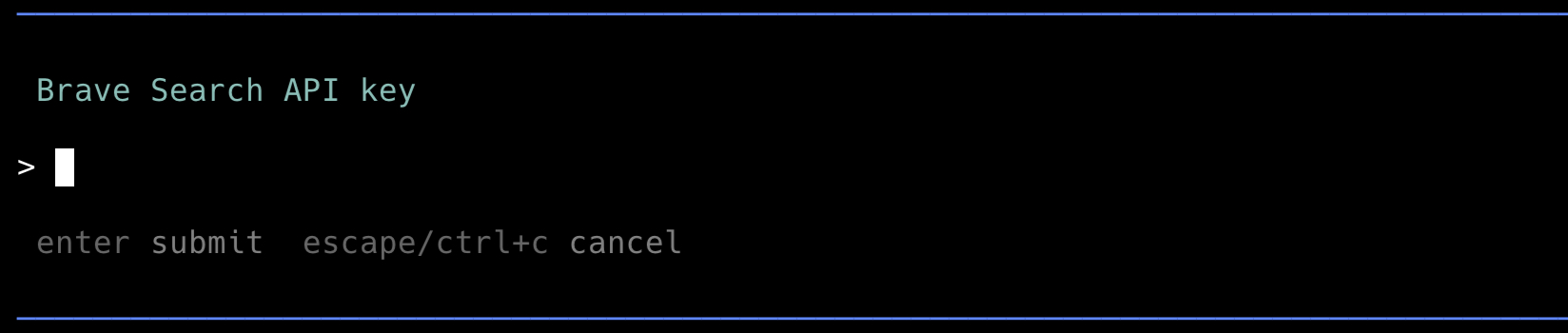
Let the model search the web and read pages. rpiv-web-tools adds web_search and web_fetch tools to Pi Agent with pluggable providers (Brave, Tavily, Serper, Exa, You.com, Jina, Firecrawl, Perplexity, SearXNG, Ollama), plus /web-tools for interactive provider selection and API-key setup.
Providers
Pick one as the active backend; switch any time without losing the others' keys.
| Provider | Env var | Signup | Fetch mode |
|---|---|---|---|
| Brave | BRAVE_SEARCH_API_KEY |
brave.com/search/api | raw HTTP → htmlToText, raw: true available |
| Tavily | TAVILY_API_KEY |
tavily.com | native extraction (plain text) |
| Serper | SERPER_API_KEY |
serper.dev | raw HTTP → htmlToText, raw: true available |
| Exa | EXA_API_KEY |
exa.ai | native extraction (plain text) |
| You.com | YOUCOM_API_KEY |
you.com | native extraction (markdown) |
| Jina | JINA_API_KEY |
jina.ai/reader | native extraction (markdown) |
| Firecrawl | FIRECRAWL_API_KEY |
firecrawl.dev | native extraction (markdown) |
| Perplexity | PERPLEXITY_API_KEY |
docs.perplexity.ai | raw HTTP → htmlToText, raw: true available |
| SearXNG | SEARXNG_URL (+ optional SEARXNG_API_KEY) |
self-hosted | raw HTTP → htmlToText, raw: true available |
| Ollama | OLLAMA_HOST / OLLAMA_API_KEY |
local or ollama.com | native extraction |
Features
- Read any URL - fetch http/https pages with HTML-to-text extraction, or get the raw response with
raw: true(honoured by Brave/Serper/Perplexity/SearXNG; extraction providers — Tavily/Exa/You.com/Jina/Firecrawl/Ollama — always return their parsed text). - GitHub URL interceptor (opt-in) - github.com URLs route through
gh/gitfor full repository content (file tree, README, individual file contents) instead of the rendered HTML page. Off by default; enable per-user via config or per-consumer at registration time. See §GitHub URL interceptor. - Large-page spillover - oversized responses truncate inline and spill the full body to a temp file the model can read on demand.
- SSRF guard - refuses loopback, RFC 1918, link-local, and cloud-metadata addresses (
localhost,127.0.0.0/8,10.0.0.0/8,169.254.0.0/16,172.16.0.0/12,192.168.0.0/16,::1,fc00::/7,fe80::/10). - Interactive setup -
/web-toolslists providers (active one first, configured ones marked) and writes to~/.config/rpiv-web-tools/config.json(chmod 0600); per-provider env vars also work and take precedence over persisted keys.
Install
pi install npm:@juicesharp/rpiv-web-tools
Then restart your Pi session.
Tools
web_search- query the active provider's search API and return titled snippets. 1–10 results per call.web_fetch- read an http/https URL. Lookup order: opt-in URL interceptors (see §GitHub URL interceptor), then the active provider's native fetch endpoint when it has one (Tavily/Exa/You.com/Jina/Firecrawl/Ollama → vendor extraction; Brave/Serper/Perplexity/SearXNG → shared raw HTTP + HTML-to-text fallback). Large responses truncate inline and spill the full body to a temp file the model can read on demand.
Schema - web_search
web_search({
  query: string,                    // natural-language query
  max_results?: number,             // 1-10, default 5
})
Returns:
{
  content: [{ type: "text", text: string }], // markdown list of "**title**\n url\n snippet"
  details: {
    query: string,
    backend: "brave" | "tavily" | "serper" | "exa" | "youcom" | "jina" | "firecrawl" | "perplexity" | "searxng" | "ollama",
    resultCount: number,
    results?: Array<{ title: string, url: string, snippet: string }>,
  }
}
Throws when the active provider's API key is unset (e.g. EXA_API_KEY is not set) or the provider's API returns a non-2xx response.
Schema - web_fetch
web_fetch({
  url: string,                      // http or https only
  raw?: boolean,                    // true → return raw HTML; default false → strip to text
})
Returns:
{
  content: [{ type: "text", text: string }], // header (URL/title/content-type) + body
  details: {
    url: string,
    title?: string,                 // <title> element, if present (HTML, non-raw)
    contentType?: string,
    contentLength?: number,         // from Content-Length header
    truncation?: TruncationResult,  // present when body exceeded inline limits
    fullOutputPath?: string,        // temp-file path containing the un-truncated body
  }
}
Throws on invalid URL, non-http(s) protocol, private/loopback hostnames (SSRF guard), non-2xx response, or image/ / video/ / audio/ content types. Extraction providers (Tavily/Exa/You.com/Jina/Firecrawl) additionally throw when the API returns an empty body or a vendor-level failure (e.g. Firecrawl success: false, Tavily failed_results).
Commands
/web-tools- pick the active provider and set its API key interactively. Providers already configured show(configured); the active one is listed first with a✓. Pressing Enter on an empty input keeps the existing key for the chosen provider while persisting the provider switch. Pass--showto see all per-provider keys (masked), env var status, and current URL interceptor states (see §GitHub URL interceptor).
API key resolution (per active provider)
First match wins:
- The active provider's environment variable:
BRAVE_SEARCH_API_KEY,TAVILY_API_KEY,SERPER_API_KEY,EXA_API_KEY,YOUCOM_API_KEY,JINA_API_KEY,FIRECRAWL_API_KEY,PERPLEXITY_API_KEY,SEARXNG_API_KEY, orOLLAMA_API_KEY apiKeys.<provider>field in~/.config/rpiv-web-tools/config.json- Legacy
apiKeyfield (Brave only — auto-migrated to the new shape on next save)
The active provider is config.provider (set by /web-tools); falls back to brave if absent.
SearXNG (self-hosted)
SearXNG is the only provider that talks to an instance you control, so it needs a base URL instead of (or in addition to) an API key.
export SEARXNG_URL=http://localhost:8080
# Optional: only if your instance sits behind a Bearer-auth reverse proxy
export SEARXNG_API_KEY=…
Resolution order for the URL: SEARXNG_URL env var → baseUrls.searxng in ~/.config/rpiv-web-tools/config.json → default http://localhost:8080. /web-tools prompts for the URL first and the (optional) API key second.
Your instance must have json enabled in settings.yml under search.formats — default SearXNG installs ship with JSON disabled and will return 403 Forbidden otherwise (per the SearXNG search API docs). The provider surfaces that case with an actionable hint. SearXNG's web_fetch reuses the same raw-HTTP + HTML-to-text pipeline as Brave/Serper, so URLs returned by web_search can be fetched without any extra setup.
The SSRF guard (which refuses loopback and RFC-1918 addresses) applies to URLs web_fetch retrieves on the model's behalf, not to the SearXNG search endpoint itself: a SEARXNG_URL pointing at http://localhost:8080 or another private host is intentionally reachable, since SearXNG is self-hosted by design.
Running SearXNG locally with Docker
The searxng/searxng entrypoint overwrites /etc/searxng/settings.yml on first start with the bundled default (ships with formats: [html] only). Pre-populating the mounted file doesn't stick — wait for the entrypoint, then patch:
mkdir -p ~/.searxng
docker run -d --name searxng --restart unless-stopped \
  -p 8080:8080 -v "$HOME/.searxng":/etc/searxng \
  -e BASE_URL=http://localhost:8080/ searxng/searxng:latest
sleep 5  # wait for entrypoint to write settings.yml
sed -i.bak '/^  formats:$/,/^[^ ]/ { /- html/a\
    - json
}' ~/.searxng/settings.yml
docker restart searxng

# Sanity check — a number > 0 means it's wired correctly
curl -sf 'http://localhost:8080/search?q=hello&format=json' | jq '.results | length'
403 means JSON is still disabled — re-check ~/.searxng/settings.yml. Works identically on Docker Desktop or OrbStack. For a throwaway test instance, swap ~/.searxng for /tmp/searxng and drop --restart unless-stopped.
Ollama (local or cloud)
Ollama provides web search and fetch as built-in capabilities — no third-party API key needed for local usage. For cloud access, an API key is required.
Local Ollama
Just run Ollama locally and it works out of the box:
ollama serve
No API key needed. The provider talks to http://localhost:11434 by default.
Ollama Cloud
For cloud access via Ollama Cloud, set the base URL and API key:
export OLLAMA_HOST=https://ollama.com
export OLLAMA_API_KEY=your_api_key   # generate at https://ollama.com/settings/keys
Or configure interactively via /web-tools — select "Ollama" and enter the URL and key.
Resolution order:
- Base URL:
OLLAMA_HOSTenv var →baseUrls.ollamain config → defaulthttp://localhost:11434 - API key:
OLLAMA_API_KEYenv var →apiKeys.ollamain config (optional for local, required for cloud)
The provider automatically uses the correct API paths:
- Local (
localhost,127.0.0.1,0.0.0.0):/api/experimental/web_searchand/api/experimental/web_fetch - Cloud (any other host):
/api/web_searchand/api/web_fetch
GitHub URL interceptor
Routes github.com URLs through gh / git to return repository content (file tree, README, file content) instead of the rendered HTML. Off by default. Opt in two ways:
// ~/.config/rpiv-web-tools/config.json — end-user opt-in
{ "interceptors": { "github": true } }
// or per-consumer at registration time (user config still wins)
registerWebTools(pi, { interceptors: { github: true } });
When enabled, github.com URLs are parsed into owner/repo/ref/path; non-code paths (/issues, /pulls, /discussions, /releases, …) fall through to the active provider. The interceptor probes for gh, falls back to plain git clone (with a stderr hint to install gh), and uses the gh api JSON view for SHA-pinned URLs and repos above maxRepoSizeMB. Shallow clones (--depth 1 --single-branch) land in clonePath; successful clones cache by owner/repo@ref for the session. Auth flows through gh's normal GH_TOKEN/GITHUB_TOKEN precedence — export GITHUB_TOKEN to reach private repos.
Replace the boolean shorthand with an object to tune the defaults; object form implies opt-in.
{
  "interceptors": {
    "github": {
      "maxRepoSizeMB": 1000,
      "cloneTimeoutSeconds": 90,
      "clonePath": "/Users/me/.cache/pi-github-repos"
    }
  }
}
| Field | Default | Purpose |
|---|---|---|
enabled |
false (top-level) / true (inside object form) |
Master switch |
maxRepoSizeMB |
350 |
Repos above this threshold skip the clone and use the API view |
cloneTimeoutSeconds |
30 |
Kill the clone process after this many seconds |
clonePath |
$TMPDIR/pi-github-repos |
Where shallow clones land; one subdir per owner/repo@ref |
/web-tools --show reports the current state at the bottom of its output (resolved token masked, clonePath, maxRepoSizeMB). The SSRF guard still runs first — a URL with a private/loopback host can't bypass it via a github.com path shape.
Executor guidance overrides
Override the promptSnippet / promptGuidelines the model sees for each tool by editing ~/.config/rpiv-web-tools/config.json. Note the per-tool nesting under guidance.web_search / guidance.web_fetch — this differs from the flat guidance shape used by single-tool siblings (rpiv-advisor, rpiv-todo, rpiv-ask-user-question):
{
  "provider": "exa",
  "apiKeys": {
    "exa": "sk-...",
    "brave": "sk-..."
  },
  "interceptors": {
    "github": true
  },
  "guidance": {
    "web_search": {
      "promptSnippet": "Search the web for current docs and library versions",
      "promptGuidelines": [
        "Only call web_search when training-data answers may be stale.",
        "Always include a Sources: section with markdown hyperlinks."
      ]
    },
    "web_fetch": {
      "promptSnippet": "Fetch a specific URL and read its content"
    }
  }
}
Each field is independent: omit one and the built-in default is kept. Invalid values (empty string, wrong type, empty array) silently fall back to defaults. Changes take effect on the next Pi session start.
The interceptors key is the GitHub URL interceptor opt-in — see §GitHub URL interceptor for the full schema (boolean shorthand or per-field overrides).
Security note: web_fetch host guard
web_fetch refuses URLs targeting loopback (localhost, 127.0.0.0/8, ::1), RFC 1918 private ranges (10.0.0.0/8, 172.16.0.0/12, 192.168.0.0/16), link-local (169.254.0.0/16, including cloud-metadata at 169.254.169.254), and IPv6 unique-local / link-local (fc00::/7, fe80::/10). Attempts surface as Refusing to fetch private/loopback address: <host>. This blocks the most common SSRF class — direct-literal targeting of internal services or cloud-metadata endpoints — without preventing legitimate public-web fetches.
The guard is host-literal only; it does NOT resolve DNS or validate redirects. A public hostname that resolves to a private IP, or a public URL that 302-redirects to one, will still reach the target. For untrusted automation environments, layer an egress proxy or firewall on top.
License


MIT