@juicesharp/rpiv-workflow
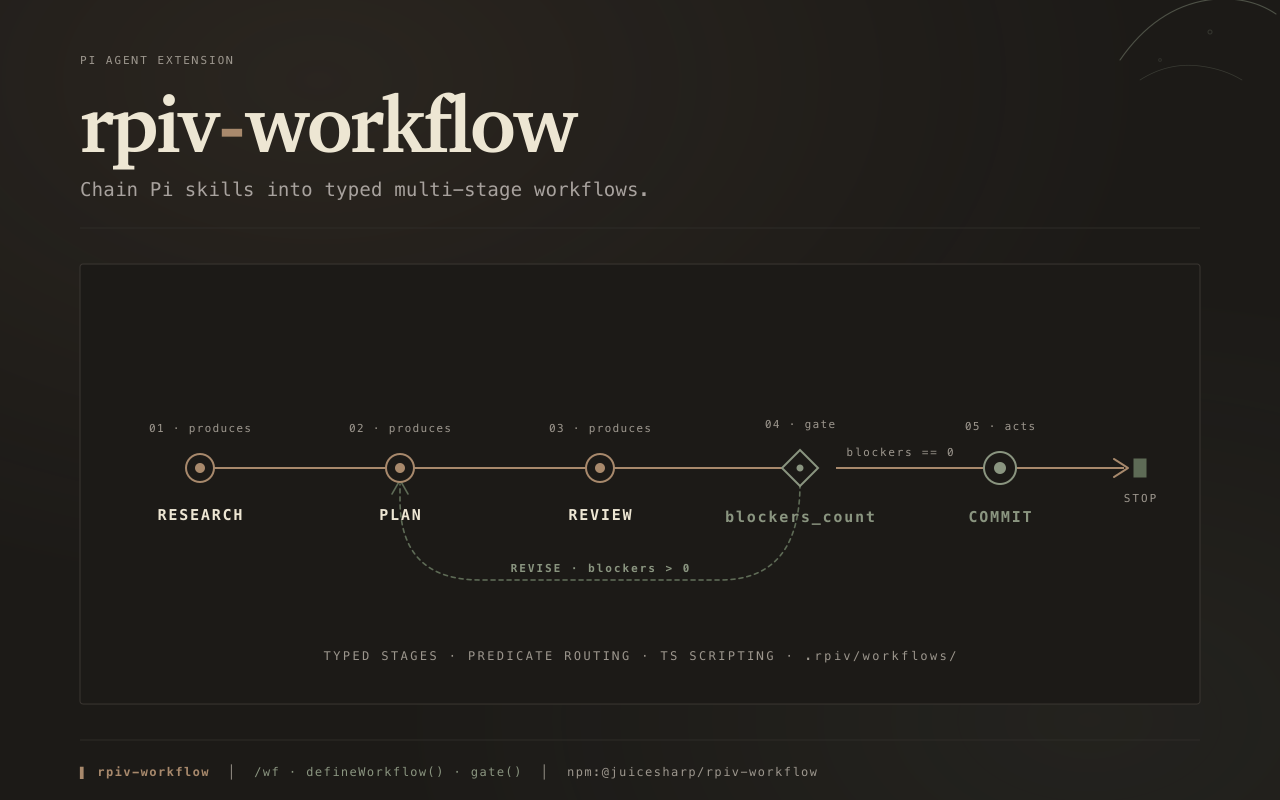
Pi extension. Chain skills into typed multi-stage workflows with audited JSONL state, predicate routing, and per-stage output validation. Skill-agnostic — bring your own skills.
Package details
Install @juicesharp/rpiv-workflow from npm and Pi will load the resources declared by the package manifest.
$ pi install npm:@juicesharp/rpiv-workflow- Package
@juicesharp/rpiv-workflow- Version
2.10.1- Published
- Sep 13, 2026
- Downloads
- 4,289/mo · 333/wk
- Author
- juicesharp
- License
- MIT
- Types
- extension
- Size
- 1,023.3 KB
- Dependencies
- 3 dependencies · 2 peers
Pi manifest JSON
{
  "image": "https://raw.githubusercontent.com/juicesharp/rpiv-mono/main/packages/rpiv-workflow/docs/cover.png",
  "extensions": [
    "./extension.ts"
  ]
}
Security note
Pi packages can execute code and influence agent behavior. Review the source before installing third-party packages.
README
@juicesharp/rpiv-workflow


Chain the Pi skills you already have into multi-stage pipelines. rpiv-workflow
adds a /wf command to Pi Agent that runs
each stage in its own detached session, validates its output against a schema,
routes between stages on predicates over the previous stage's data, and appends
each step to a resumable JSONL trail. It ships zero workflows — write your own
in .rpiv/workflows/config.ts, or install
@juicesharp/rpiv-pi for five.
Install
pi install npm:@juicesharp/rpiv-workflow
Restart your Pi session.
Quick start
/wf runs skills you already have installed — this package ships none of its
own. The fastest way to see a real run is the sibling that bundles both skills
and workflows:
pi install npm:@juicesharp/rpiv-pi
/wf ship "add a --json flag to the export command"
The run starts detached and your prompt comes straight back. Every step appends
to .rpiv/workflows/runs/<run-id>.jsonl, so you can walk away and resume later.
To write your own instead, put a workflow at .rpiv/workflows/config.ts naming
skills already on your machine (check ~/.pi/agent/skills/):
import { defineWorkflow, acts, terminal } from "@juicesharp/rpiv-workflow";

export default defineWorkflow({
  name: "review-and-ship",
  start: "code-review",
  stages: { "code-review": acts(), commit: terminal() },
  edges: { "code-review": "commit", commit: "stop" },
});
Each stage key is the skill name; acts() runs a skill for its side effects,
terminal() does the same for a stage that carries nothing forward. Schemas,
artifact outcomes, and predicate routing are in the
authoring reference.
| Command | What it does |
|---|---|
/wf |
Preview every loaded workflow |
/wf <name> |
Preview one workflow's stage graph |
/wf <name> "<input>" |
Run it detached — your prompt returns immediately |
/wf @<ref> |
Resume a past run by run-id, --name alias, or .jsonl path |
Add --name <slug> as the first or last token to give a run an alias you can
resume by. With no workflows registered anywhere, /wf says so and stops.
What you get
- Chain skills you already have — the runner dispatches
/skill:<name>through Pi's native loader, so anything in~/.pi/agent/skills/,<cwd>/.pi/skills/, or a settings-declaredskillPaths[]is fair game. - Every run resumes from disk — each step appends to
.rpiv/workflows/runs/<run-id>.jsonl, and/wf @<ref>re-enters at the pending step, replaying already-finished branches from the trail rather than re-running them. - Stages run detached and in parallel — each stage, and each parallel
branch, gets its own child session, up to the host's
maxConcurrency. - Bad stage output never reaches the next stage —
outputSchema/inputSchemaare Standard Schema v1 values (Zod, Valibot, ArkType, TypeBox), checked at both seams with bounded retries. - Routing is data-driven and auditable —
gate()on numeric fields,match()on enums,defineRoute()for arbitrary TypeScript, and every no-match writes a note on the audit row instead of falling through silently. - Loops without hand-rolled state machines — repeat a stage across many items at once, or re-run it until a TypeScript or model check says it is done.
- Team-wide skill swaps in one line —
skillAliases: { commit: "attributed-commit" }rewrites the skill across every loaded workflow, built-ins included.
Configuration
Workflows are TypeScript, loaded with jiti — no build step. Project config
lives at <cwd>/.rpiv/workflows/config.ts, user config at
~/.config/rpiv-workflow/config.ts; project config wins where both define the
same workflow name.
The stage knobs most people touch:
| Key | What it does | Default |
|---|---|---|
sessionPolicy |
"fresh" starts a clean session; "continue" forks the predecessor's |
"fresh" |
onInvalid |
What to do when outputSchema rejects: "retry" or "halt" |
"retry" |
maxRetries |
Validation retries per stage, clamped to 1–3 | 1 |
validateTimeoutMs |
Ceiling on one validate call, clamped to 1 s–30 min | 300000 |
outcome |
How the stage's artifacts are collected and parsed — required on produces() |
none |
Config and pack files are TypeScript modules whose top-level code is evaluated on load — the same trust boundary as an npm post-install script. Diff them before running
/wfin a repository you do not control.
Reference
- Workflow basics —
/wfinvocation forms,--nameand@resume, where every file resolves, layer merging, config vs pack files, skill aliases, run state, and the glossary. - Authoring reference — the full DSL: stage factories, loops,
verify/panel, script and prompt stages, edge targets, routing, outcomes with the collector and parser catalogs, multi-input stages, validators, and the load-time validation rules. - Embedding — host ports, the entry-point map,
registerBuiltIns/registerLifecycle, the programmatic runner and resume API, cancellation, triggers, and past-run inspection.
Requirements
Node ≥ 22. No native modules, no API key, and no model selection of its own — stages dispatch through your host's session.
Related
@juicesharp/rpiv-pi— supplies the detached SDK executor, the terminal-keystroke abort, and five bundled workflows (ship,arch,vet,polish,build).
License
MIT — see LICENSE.